
Sweetcrispy 3718-2
Contents
Sweetcrispy Home Office Drafting Chair User Manual
Brand: Sweetcrispy | Model: 3718-2
Introduction
This manual provides detailed instructions for the assembly, operation, and maintenance of your Sweetcrispy Home Office Drafting Chair. Please read this manual thoroughly before assembly and use to ensure proper function and safety. Keep this manual for future reference.

Image: Front view of the Sweetcrispy Home Office Drafting Chair in grey, highlighting its design with fixed armrests and an adjustable footrest.
Safety Information
WARNING: Failure to follow these safety instructions may result in injury or damage to the product.
- Assembly may require tools and careful handling. Ensure the chair is fully assembled and stable before use.
- Do not exceed the maximum weight recommendation of 113.4 kilograms (250 lbs).
- Be cautious when adjusting the height and footrest to prevent injury.
- Keep children and pets away during assembly.
- Use the chair only for its intended purpose as a drafting or office chair.
Package Contents
Please verify that all components are present before beginning assembly. If any parts are missing or damaged, contact customer support.
- Seat Cushion (1)
- Backrest (1)
- Armrests (2)
- Gas Lift Cylinder (1)
- Footrest Ring (1)
- Five-Star Base (1)
- Caster Wheels (5)
- Hardware Pack (Screws, Washers, Allen Wrench)
- Instruction Manual (1)
Assembly Instructions
Follow these steps carefully for proper assembly. It is recommended to assemble the chair on a soft, clean surface to prevent scratches.
- Attach Casters to Base: Insert the five caster wheels into the holes at the end of each leg of the five-star base. Push firmly until they click into place.
- Install Gas Lift and Footrest: Place the gas lift cylinder into the center hole of the assembled five-star base. Slide the footrest ring over the gas lift cylinder and secure it at your desired height using the adjustment knob.
- Attach Seat Plate to Seat Cushion: Secure the metal seat plate to the underside of the seat cushion using the provided screws. Ensure the front of the seat plate aligns with the front of the cushion.
- Connect Backrest to Seat: Attach the backrest to the seat cushion using the designated screws. Ensure a secure fit.
- Attach Armrests: Secure the armrests to the sides of the seat and backrest using the provided screws.
- Place Assembled Top onto Gas Lift: Carefully place the assembled seat and backrest onto the gas lift cylinder, ensuring it is centered and fully seated.
- Final Check: Ensure all screws are tightened and the chair is stable before use.

Image: Illustration showing how to insert the caster wheels into the five-star base.
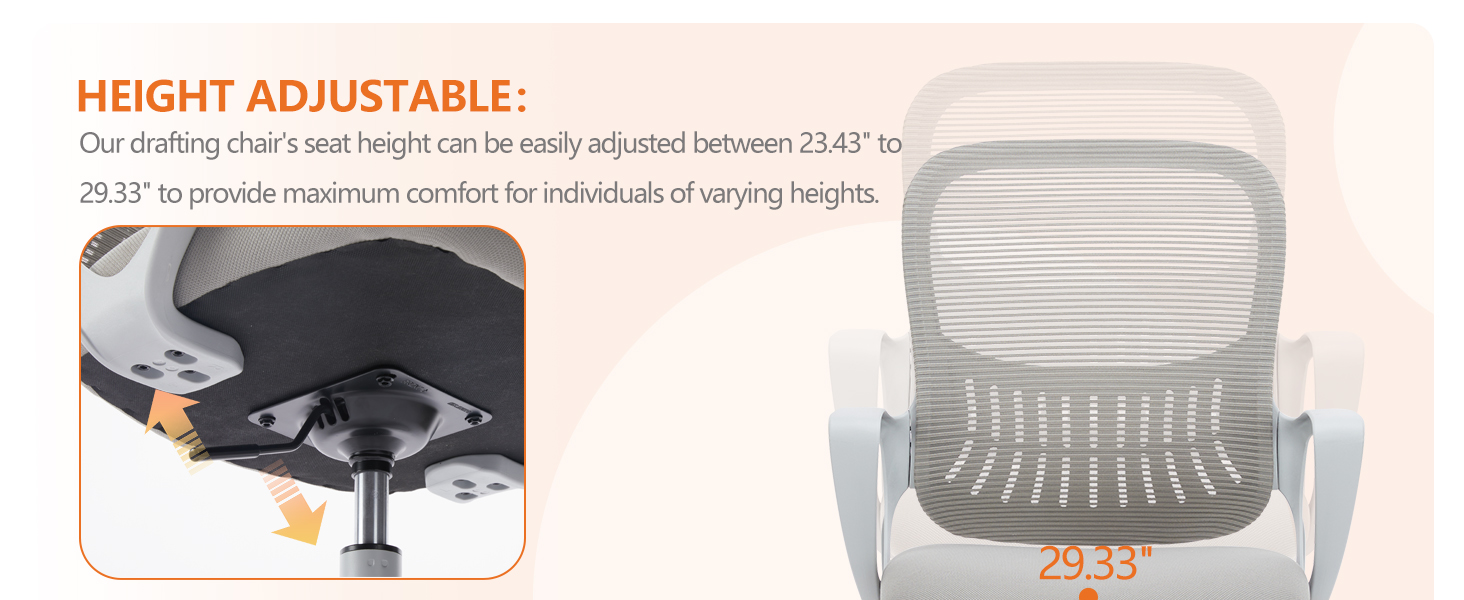
Image: Diagram illustrating the placement of the gas lift and footrest ring onto the chair base.
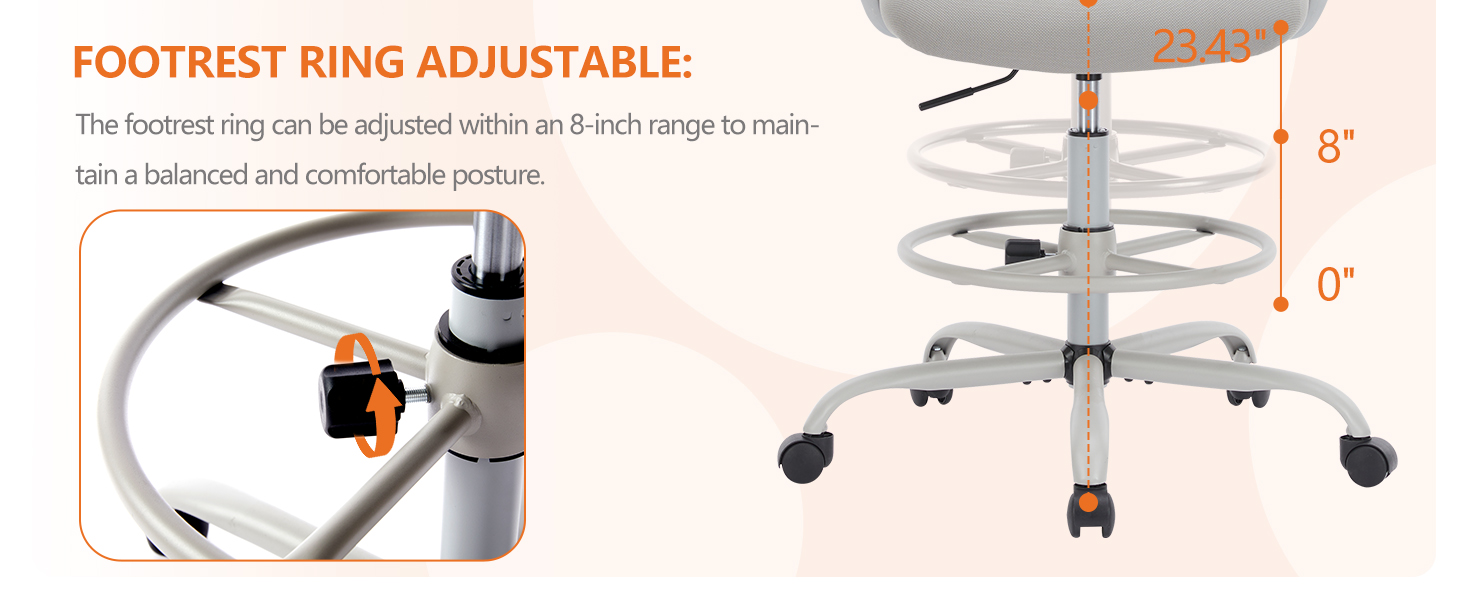
Image: Visual guide for attaching the seat plate to the underside of the seat cushion.

Image: Illustration demonstrating how to secure the backrest to the seat assembly.

Image: Diagram showing the attachment points for the fixed armrests.

Image: Final assembly step, showing the upper chair section being placed onto the gas lift and base.
Operating Instructions
Your Sweetcrispy Drafting Chair is designed with several adjustable features to enhance comfort and support.
1. Height Adjustment
To adjust the seat height, locate the lever under the right side of the seat. While seated, pull the lever up to lower the chair. To raise the chair, stand up and pull the lever up. Release the lever at the desired height to lock it in place.

Image: Close-up of the height adjustment lever located beneath the seat.

Image: Two drafting chairs demonstrating the adjustable height feature, suitable for various desk heights.
2. Footrest Adjustment
The footrest ring can be adjusted vertically to provide optimal leg support. Loosen the knob on the side of the footrest ring, slide the ring to your preferred height, and then tighten the knob securely to lock it.

Image: Detailed view of the chair's components, including the adjustable footrest ring with its locking mechanism.
3. Lumbar Support
The chair features an ergonomically designed backrest with integrated lumbar support to promote a healthy posture and reduce strain during extended sitting periods. The mesh back is breathable for comfort.

Image: Visual representation of the chair's ergonomic backrest and lumbar support, designed to conform to the spine's natural curve.
4. Fixed Armrests
This model is equipped with fixed armrests, providing stable support for your arms and shoulders.
5. Swivel Function
The chair features a 360-degree swivel function, allowing for easy movement and access to different areas of your workspace without needing to reposition the entire chair.
Maintenance
Regular maintenance will prolong the life and appearance of your chair.
- Cleaning: For the mesh back and fabric seat, use a soft cloth dampened with mild soap and water. Avoid harsh chemicals or abrasive cleaners.
- Casters: Periodically check the caster wheels for hair or debris that may hinder smooth movement. Clean as needed.
- Hardware: Every few months, check all screws and bolts to ensure they are tight. Retighten if necessary.
- Gas Lift: Do not attempt to disassemble the gas lift cylinder. If it malfunctions, contact customer support.
Troubleshooting
If you encounter any issues with your chair, refer to the following common problems and solutions:
| Problem | Possible Cause | Solution |
|---|---|---|
| Chair wobbles or feels unstable | Loose screws or uneven assembly. | Check and tighten all assembly screws. Ensure the chair is on a flat surface. |
| Height adjustment not working | Gas lift cylinder malfunction or lever mechanism issue. | Ensure the lever is fully engaged. If the issue persists, contact customer support for gas lift replacement. |
| Caster wheels not rolling smoothly | Debris (hair, dust) caught in wheels or damaged casters. | Remove any debris from the wheels. If damaged, replacement casters may be needed. |
| Squeaking noises | Loose connections or friction between parts. | Tighten all screws. Apply a small amount of silicone lubricant to moving parts if necessary (avoiding the gas lift). |
Specifications
| Feature | Detail |
|---|---|
| Brand | Sweetcrispy |
| Model Name | Sweetcrispy Home Office Drafting Chair |
| Item Model Number | 3718-2 |
| Color | Grey |
| Product Dimensions | 24.22"D x 23.63"W x 45"H |
| Seat Height Adjustment | 23.43" to 29.33" |
| Maximum Weight Recommendation | 113.4 Kilograms (250 lbs) |
| Back Style | Mesh Back with Lumbar Support |
| Arm Style | Fixed Arm |
| Furniture Base Movement | Swivel, Rolling Casters |
| Fill Material | High-density Foam |
| Assembly Required | Yes |
| Item Weight | 25.9 pounds |

Image: Diagram illustrating the key dimensions and maximum weight capacity of the chair.

Image: Detailed view of the seat cushion, emphasizing its construction with high-density, high-resilience foam and a waterfall edge for comfort.
Warranty and Support
For warranty information, product support, or to order replacement parts, please refer to the official Sweetcrispy website or contact their customer service directly. Keep your purchase receipt as proof of purchase.
You can also find additional information and a downloadable PDF user manual at the following link: Sweetcrispy Drafting Chair User Manual (PDF)
Documents and downloads
Ask a question about this manual
Ask about setup, troubleshooting, compatibility, parts, safety, or missing instructions. Manuals+ will review the question and use this page’s manual context to help answer it.