
1. Introduction
This manual provides essential information for the safe and efficient installation, operation, and maintenance of your WEFFORT Motorized Roller Shade. Please read all instructions carefully before use and retain this manual for future reference.

Figure 1: WEFFORT Motorized Roller Shade with smart home integration.
2. Product Overview
The WEFFORT Motorized Roller Shade offers 100% blackout capability, smart home integration, and quiet operation. It is designed for durability and ease of use, providing privacy and light control.
Key Features:
- 100% Blackout Fabric: Triple-layer fabric certified by CE and RoHS, blocking light, reducing UV exposure, and ensuring privacy.
- Smart Home Integration: Compatible with HomeKit, Alexa, Google Assistant, Zigbee, and Z-Wave systems via various motor options and a Smart Hub (sold separately for standard motors).
- Energy-Efficient & Quiet: Rechargeable battery lasts 4-6 months per charge, with USB/solar panel charging options. Motor noise level below 35 dB.
- Easy Installation: Supports inside, outside, or side mounting with included brackets.

Figure 2: Triple-layer blackout fabric for light blocking and privacy.
Components:
- Motorized Roller Shade Unit
- Remote Control (optional, but recommended for initial setup)
- Mounting Brackets (for inside, outside, or side mount)
- Screws
- Headrail
- Instruction Manual
- Smart Hub (optional, required for some smart home integrations)
- USB Charging Cable
- Solar Panel (optional)

Figure 3: Detailed view of shade components and package contents.
3. Setup & Installation
Measuring Your Window:
Accurate measurements are crucial for proper fit and function. Measure the width and height of your window at three points (top, middle, bottom for width; left, middle, right for height) and use the appropriate measurement as described below.

Figure 4: Measuring guide for inside and outside mount installations.
Inside Mount:
- Order Width: Submit the exact width. The manufacturer will make reasonable adjustments.
- Order Height: Submit the exact height. This is the whole item height, including the valance and bottom rod.
- Window Depth: Requires a minimum of 2.45 inches. If less, the valance may extend beyond the window frame.
Outside Mount:
- Order Width: Product Width = Window Width + 4"-5" (This suggestion helps cover the windows and improve shading).
- Order Height: Whole Item Height = Window Height + 4"-5" (This includes the height of the valance and bottom rod).
Mounting the Shade:
The shades are designed for hassle-free setup. Simply drill two holes and attach the brackets. For side mount, extended brackets may be provided upon request.
Video 1: Installation guide for inside mount shades (from KINCMO, similar process).

Figure 5: Optional light blockers and side rail tracks for enhanced light control.
Valance Options:
Various valance styles are available to complement your decor and minimize light leakage.

Figure 6: Available valance options for your roller shade.
4. Operating Instructions
Remote Control:
Standard motors are controlled via a remote. The first purchase requires at least one remote control. Remotes can be 5-channel or 15-channel, allowing individual or group control of shades.
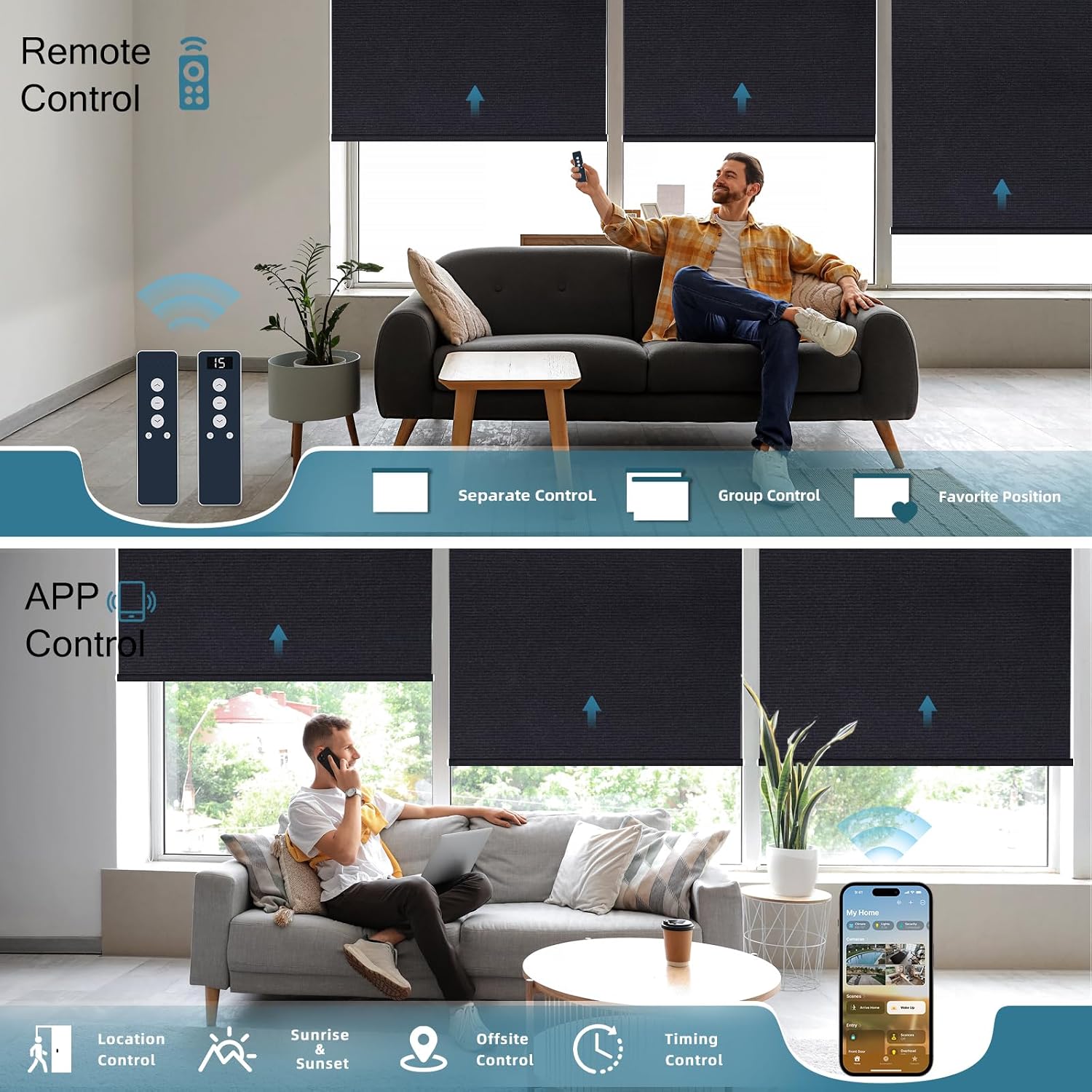
Figure 7: Remote and app control functionalities.
Smart Home Integration:
Enhance your experience by integrating your shades with various smart home ecosystems.
- Standard Motors + Smart Hub: Pair with a Smart Hub (not included) to manage shades with Alexa, Google Assistant, and SmartThings.
- Matter over Thread Motor: For native integration with HomeKit, Alexa, Google, and other major smart ecosystems. Requires a Matter Hub.
- HomeKit Motor over Thread: Highest adaptability with Thread Border Router-enabled HomePod (2nd gen), HomePod mini, or Apple TV 4K.
- Zigbee Smart Motor: Works directly with Echo 4th Gen, Echo Plus (2nd Gen), Echo Show (2nd Gen), Echo Studio, Echo Show 10 (3rd Gen). For other Alexa devices, a Zigbee Hub or SmartThings Bridge is needed.
- Z-Wave Smart Motor: Links directly to Z-Wave network via a Z-Wave Hub (not included) for seamless integration with Alexa, Google Home, and other smart devices.

Figure 8: Smart home integration options for various motor types.
Video 2: WEFFORT product overview demonstrating smart features.
5. Maintenance
Cleaning:
Spot clean only. Use a soft, damp cloth to gently wipe any soiled areas. Avoid harsh chemicals or abrasive cleaners.
Battery Charging:
The rechargeable battery lasts 4-6 months per charge. Charging can be done via USB, a power bank, or an optional solar panel.
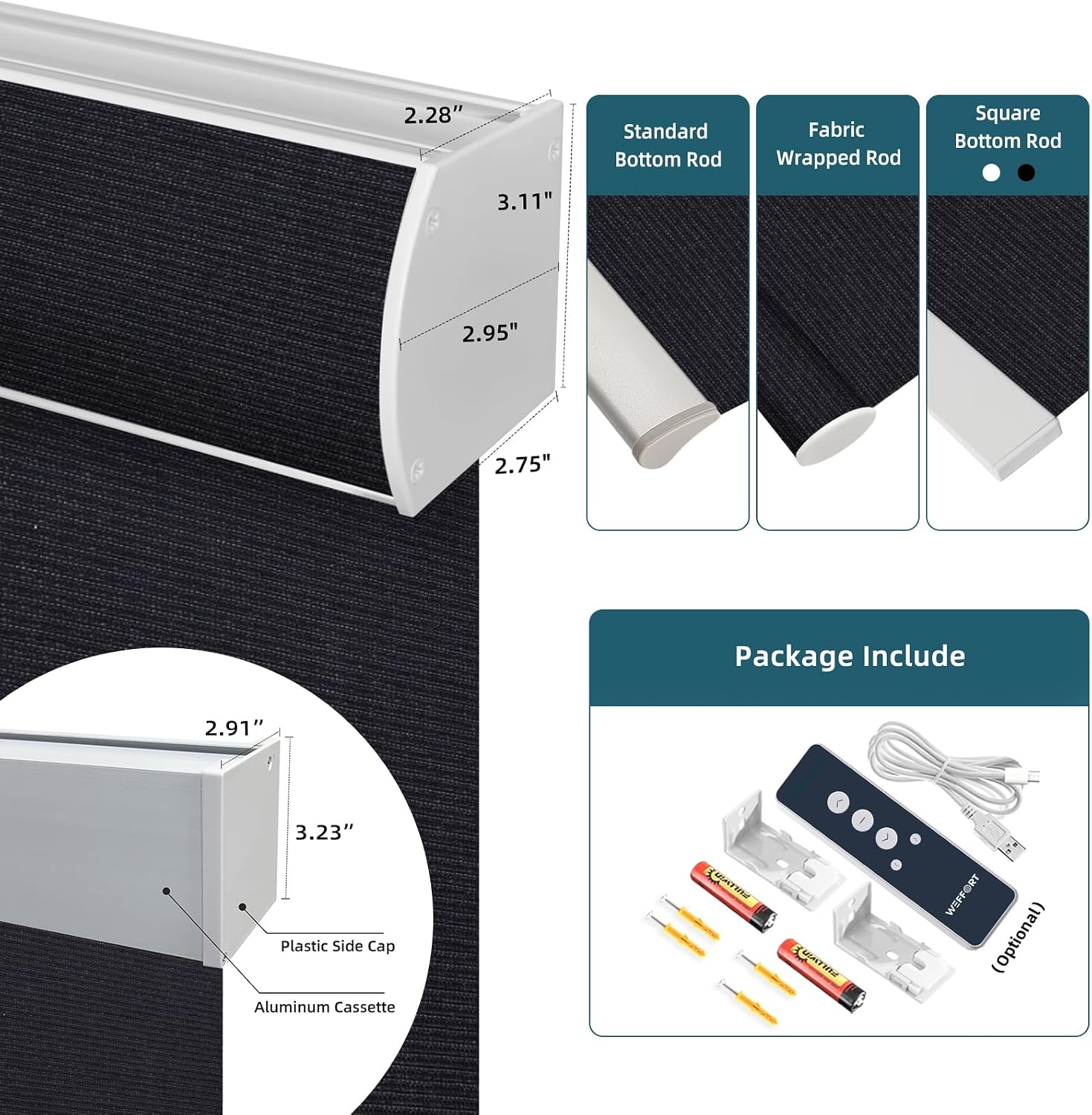
Figure 9: Solar charger for continuous battery maintenance.
Important: Solar panels are designed for use only on the inside of clean windows. If installed on single-hung, sliding, or casement windows, ensure the solar panel is positioned carefully to avoid obstruction.
6. Troubleshooting
If you encounter any issues with your WEFFORT Motorized Roller Shade, please refer to the following common solutions:
- Shade not responding to remote: Ensure the remote has fresh batteries and is paired correctly with the shade. Check if the motor is in shipping mode (refer to quick installation guide for deactivation).
- Shade not responding to smart home commands: Verify the Smart Hub (if applicable) is powered on and connected to your network. Check the smart home app for device status and connectivity. Ensure the motor type is compatible with your smart home system.
- Battery not charging: Confirm the USB cable or solar panel is properly connected. Ensure the solar panel is receiving adequate sunlight.
- Shade stops at incorrect position: The upper and lower limits may need to be reset. Refer to the detailed programming instructions in the full user manual (not provided in this excerpt) or contact customer support.
- Light leakage around edges: This can occur with inside mounts. Consider optional light blockers or side rail tracks for improved light control.
For further assistance, please contact WEFFORT customer support.
7. Specifications
| Attribute | Value |
|---|---|
| Brand | WEFFORT |
| Model Number | 38983545717011 |
| Material | Polyester |
| Product Dimensions | 8"L x 3"W (Note: Actual dimensions vary by custom order) |
| Color | Dark Eclipse Black (Specific to this variant) |
| Opacity | 100% Blackout |
| Operation Mode | Automatic |
| Special Feature | Thermal Insulation |
| Included Components | Remote Control, Smart Hub, Mounting Brackets, Screws, Headrail, Instruction Manual (Note: Smart Hub and Remote Control may be optional depending on motor type and purchase configuration) |
| Closure Type | Cordless, Motorized |
| Mounting Type | Inside Mount (Other options available) |
| Product Care Instructions | Spot Clean Only |
| UPC | 704334396692 |
8. Warranty & Support
For warranty information and customer support, please refer to the documentation included with your product or visit the official WEFFORT website. Contact details for support are typically provided in the Quick Installation Guide or on the product packaging.
