
OREiN OL3600140
OREiN 2 Pack Motion Sensor Outdoor Lights Instruction Manual
Model: OL3600140
Brand: OREiN
1. Introduction
Thank you for purchasing the OREiN 2 Pack Motion Sensor Outdoor Lights. These advanced flood lights are designed to provide efficient and customizable outdoor illumination with intelligent motion sensing and dimmable dusk-to-dawn functionality. Featuring 450° superwide adjustment and durable IP65 waterproof construction, these lights are ideal for enhancing security and visibility around your home, garden, garage, or backyard.
Please read this manual thoroughly before installation and operation to ensure proper use and to maximize the lifespan of your product.
2. Important Safety Information
- WARNING: Risk of electric shock. Disconnect power at the fuse or circuit breaker before installation or servicing.
- This product must be installed in accordance with the applicable installation code by a person familiar with the construction and operation of the product and the hazards involved.
- Use only UL/ETL listed wire connectors.
- Do not install this fixture on surfaces that are easily flammable.
- Ensure all connections are secure and properly insulated.
- Do not look directly into the LED light source when the light is on.
- Keep packaging materials away from children.
- This product is designed for outdoor use only and is hardwired. Do not attempt to modify it for battery or plug-in use.
3. Package Contents
Verify that all components are present before beginning installation:
- OREiN Motion Sensor Outdoor Lights (2 units)
- Mounting Hardware
- Wiring Components (wire nuts)
- LED Light Panels (integrated)
- Instruction Manual

Image: Two OREiN motion sensor outdoor lights, showing the dual heads and central motion sensor. These are the primary units included in the package.
4. Product Overview
The OREiN Motion Sensor Outdoor Light features a robust design with highly adjustable components to provide optimal lighting coverage.
- Adjustable Light Heads: Each light arm has 3 flexible joints, allowing for 450° width adjustment. This enables precise aiming of the light to cover specific areas or avoid light pollution.
- Motion Sensor: A 180° infrared PIR sensor detects motion up to 40 feet away, covering an area of approximately 1250 sq ft.
- LED Spotlights: Equipped with 5000K high-quality LED beads and professional filter lenses, providing bright and efficient illumination.
- Durable Construction: Made from PC material with IP65 waterproof certification, ensuring resistance to high temperatures, frost, UV, and shattering for long-lasting outdoor use.

Image: This diagram illustrates the six adjustable joints on the light arms, allowing for extensive rotation and aiming of the light heads and the central motion sensor.
Image: An exploded view highlighting the internal components and adjustable features of the OREiN dual-head light, including the sensor and LED elements.
5. Installation Guide
This outdoor motion light is AC hardwired and requires electrical connection to a standard junction box. A junction box is not included.
5.1 Pre-Installation Checklist
- Ensure power is disconnected at the circuit breaker before starting.
- Confirm you have a standard junction box (five 1/2 inch 16 cubic inches capacity recommended).
- Gather necessary tools: screwdriver, wire strippers, wire nuts (included), electrical tape.
5.2 Mounting Steps
- Fix the bracket: Attach the mounting bracket securely to your standard junction box using the provided screws. Ensure it is firmly in place.
- Connect wires: Carefully connect the wires from the light fixture to the corresponding wires in the junction box. Match colors: black to black (live), white to white (neutral), and green/bare copper to green/bare copper (ground). Use the included wire nuts to secure connections.
- Tighten connections: Ensure all wire connections are tight and properly insulated with wire nuts.
- Fix the light: Align the light fixture with the mounting bracket and secure it with the provided screws. Ensure the fixture is flush against the mounting surface.

Image: A visual step-by-step guide demonstrating the hardwired installation process, from mounting the bracket to securing the light fixture.

Image: The light fixture installed under a soffit, illustrating its flexibility for various mounting angles without restricting the sensor's functionality.
6. Operating Instructions
The OREiN motion sensor outdoor lights offer three distinct working modes, controlled by the settings on the motion sensor unit.
6.1 Working Modes
- Manual Mode: The light is controlled by a manual wall switch. Turn the switch on to activate the light at 100% brightness, and off to turn it off. This mode bypasses the motion sensor and dusk-to-dawn features.
- Safety Mode (Motion Activated at Night): In this mode, the light will only activate at night when motion is detected. It will turn on to 100% brightness and remain on for the set duration (TIME setting) after motion ceases.
- Dusk to Dawn Dimmable Mode: The light automatically turns on at 30% brightness when it gets dark. When motion is detected, it brightens to 100% for the set duration (TIME setting), then returns to 30% brightness.

Image: This graphic demonstrates the dimmable dusk-to-dawn functionality, showing the light at 30% brightness in standby and increasing to 100% upon motion detection.

Image: Visual representation of the three operating modes: motion-activated 100% brightness, motion-activated 30% brightness (dusk-to-dawn), and manual switch control.
6.2 Sensor Adjustments
The motion sensor has three adjustable dials to customize its behavior:
- TIME: Adjusts the duration the light stays on after motion is detected and ceases. Settings typically range from a few seconds to several minutes (e.g., 10s, 40s, 8min).
- SENS (Sensitivity): Controls the detection range of the motion sensor. Higher sensitivity means a wider detection area (e.g., up to 40ft).
- LUX (Daylight Sensor): Determines the ambient light level at which the motion sensor becomes active.
- Set to the "moon" end for minimal setting (light activates only in very dark conditions).
- Set to the "sun" end for maximum setting (light activates in brighter conditions, including daytime for testing).
For normal nighttime operation, ensure the LUX sensor is set towards the "moon" end to prevent the light from activating during the day.
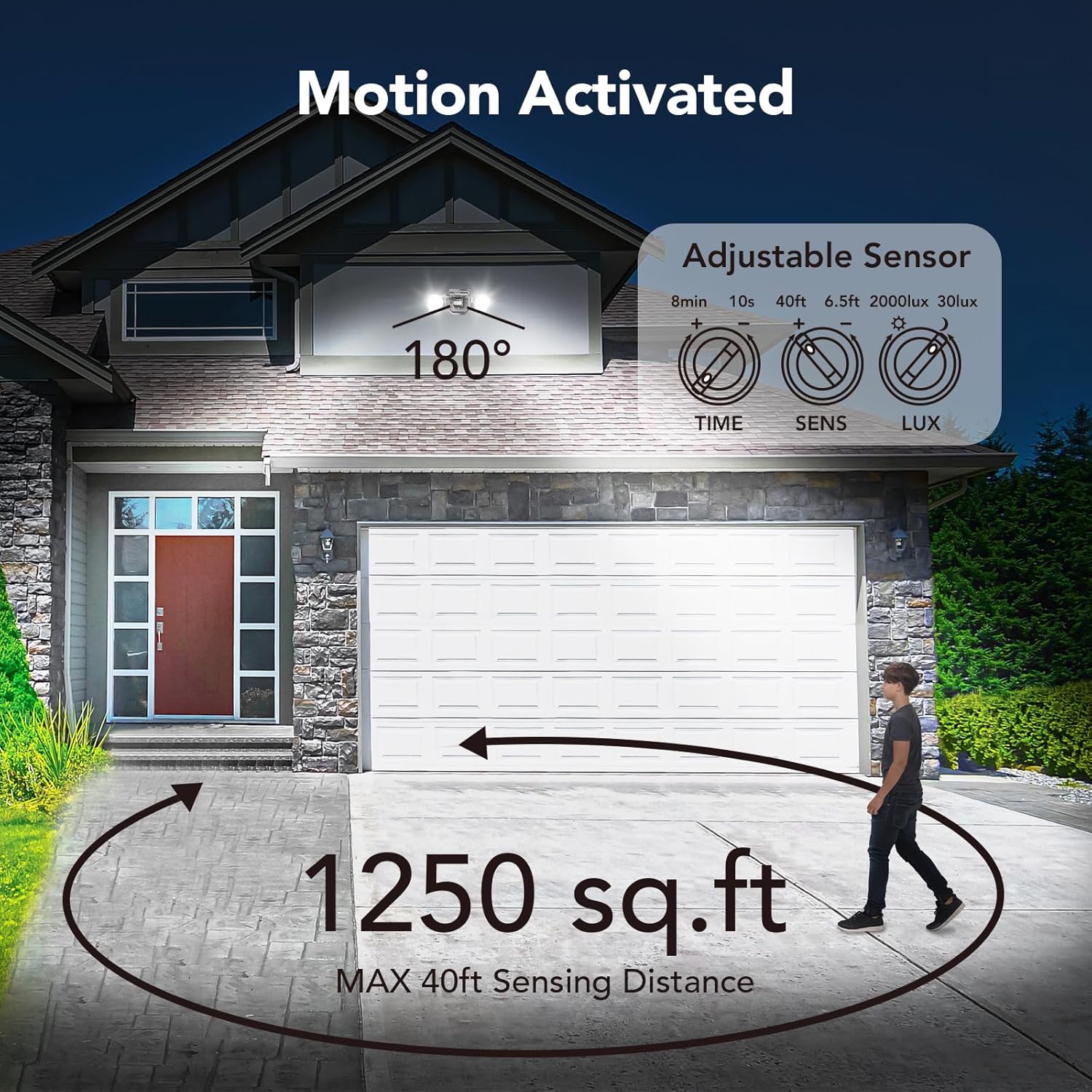
Image: This image displays the adjustable dials for TIME, SENS, and LUX settings on the motion sensor, along with an illustration of the 180° detection angle and 40ft sensing distance.
7. Maintenance
Regular maintenance ensures optimal performance and longevity of your OREiN outdoor lights.
- Cleaning: Periodically wipe the light fixture and sensor lens with a soft, damp cloth to remove dirt, dust, or debris. Do not use abrasive cleaners or solvents.
- Inspection: Annually inspect the wiring and mounting for any signs of wear, damage, or loose connections. Ensure the light heads and sensor are still securely positioned.
- LEDs: The LED light source is integrated and not user-replaceable.
8. Troubleshooting
| Problem | Possible Cause | Solution |
|---|---|---|
| Light does not turn on. | No power; loose wiring; LUX setting too high (daytime); faulty sensor. | Check circuit breaker/fuse. Ensure all wire connections are secure. Adjust LUX setting to "moon" for nighttime operation. Test sensor by waving hand in front. |
| Light stays on constantly. | Continuous motion detected; TIME setting too long; LUX setting too low (always dark). | Ensure no constant motion in detection area. Adjust TIME setting to a shorter duration. Adjust LUX setting to prevent activation in bright conditions. |
| Light flashes or flickers. | Unstable power supply; loose wiring; interference. | Check power source stability. Re-check all wire connections. Ensure no strong electromagnetic interference nearby. |
| Motion sensor not detecting. | Obstruction; SENS setting too low; sensor dirty; incorrect angle. | Clear any obstructions. Increase SENS setting. Clean sensor lens. Adjust sensor angle for optimal coverage. |
9. Product Specifications
| Feature | Detail |
|---|---|
| Brand | OREiN |
| Model Name | OL3600140 |
| Color | Black |
| Material | Acrylonitrile Butadiene Styrene (PC) |
| Light Fixture Form | Floodlight |
| Product Dimensions | 15.16"L x 5.83"W x 5.51"H |
| Indoor/Outdoor Usage | Outdoor |
| Power Source | Hardwired AC (220 Volts) |
| Installation Type | Surface Mount |
| Special Features | 133LM/W high efficiency, 180°/40FT Motion Sensor, 3 modes (dusk to dawn), 450° Adjustable Flood Lights, IP65 Waterproof |
| Light Source Type | LED |
| Light Color | Cool White (5000K) |
| Number of Light Sources | 2 (per unit) |
| Wattage | 12 watts (per unit) |
| Brightness | 1600 LM (equivalent to 150W) |
| Switch Type | Motion Sensor |
| Water Resistance Level | IP65 Waterproof |
| Item Weight | 3.31 pounds |
| Certifications | CE, FCC, RoHS |
10. Warranty and Support
10.1 Warranty Information
This OREiN product comes with a 2-year manufacturer's warranty from the date of purchase. This warranty covers defects in materials and workmanship under normal use.
The warranty does not cover damage caused by improper installation, misuse, accidents, unauthorized repairs, or natural disasters.
10.2 Customer Support
For any questions, technical assistance, or warranty claims, please contact OREiN customer support:
- Contact via Amazon: You can contact us directly through the Amazon platform where you purchased the product.
- Online: Search for "OREiN" online to find our official website and contact information.
- Phone Support: For 24-hour service, you may call 1(844)506-1530.
We recommend contacting support before initiating any returns, as many issues can be resolved quickly with assistance.

Image: OREiN customer service contact information, including a phone number for 24-hour support.
Related documentsOL3600140


Ask a question about this manual
Ask about setup, troubleshooting, compatibility, parts, safety, or missing instructions. Manuals+ will review the question and use this page’s manual context to help answer it.