
Homeika H016-Pro
Homeika- Pro Version- 28k PA Cordless Vacuum Instruction Manual
Brand: Homeika
Model: H016-Pro
Introduction
Thank you for choosing the Homeika- Pro Version- 28k PA Cordless Vacuum. This manual provides essential information for the safe and efficient operation, maintenance, and troubleshooting of your new appliance. Please read it thoroughly before first use and keep it for future reference.
Product Components
Your Homeika Cordless Vacuum comes with various components designed for versatile cleaning. Familiarize yourself with each part before assembly.
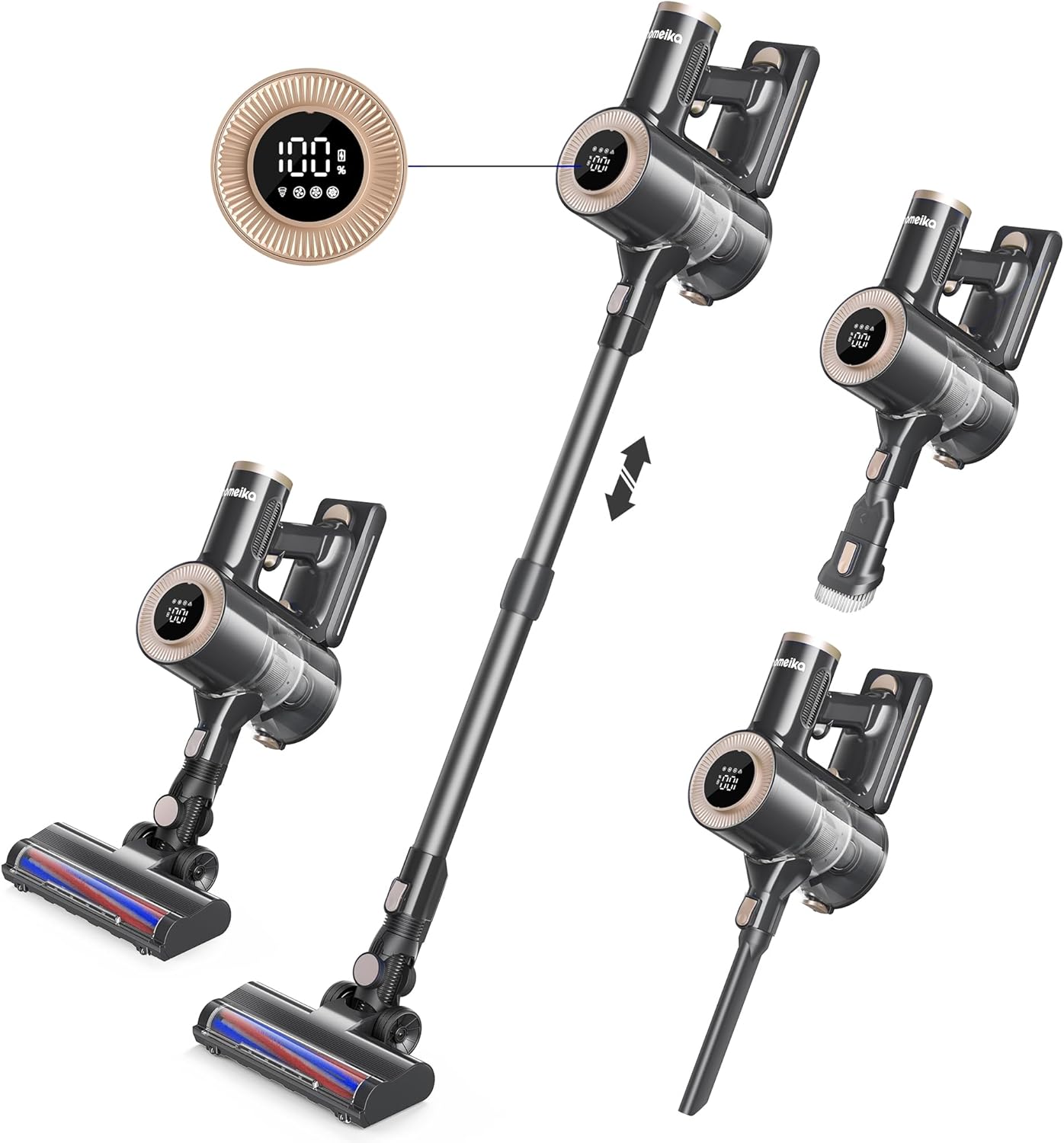
Figure 1: Main unit, telescopic wand, floor brush, and handheld configurations.
- Main Unit: Contains the 300W brushless motor, 28KPA suction system, digital IQ LED display, and dust cup.
- Telescopic Wand: Adjustable length for comfortable upright vacuuming and high-reach cleaning.
- Motorized Floor Brush: Features LED headlights and a 180-degree rotatable design for effective cleaning on various floor types.
- Detachable Lithium-Ion Battery: Provides up to 50 minutes of runtime.
- Crevice Tool: Ideal for narrow spaces and corners.
- Dusting Brush: Suitable for delicate surfaces and upholstery.
- Wall Mount: For convenient storage and charging.
Setup
1. Assembly
- Attach the Telescopic Wand: Align the connection point of the telescopic wand with the main unit and push until it clicks securely into place.
- Attach the Floor Brush: Connect the motorized floor brush to the other end of the telescopic wand, ensuring a firm connection.
- Install the Battery: Slide the detachable Lithium-Ion battery into its slot on the main unit until it locks.
- Optional Attachments: For handheld use, detach the telescopic wand and connect the crevice tool or dusting brush directly to the main unit.
2. Initial Charging
Before first use, fully charge the battery. The IQ LED display will show the battery percentage. A full charge takes approximately 5 hours.
- Connect the charger to the battery or the main unit while the battery is installed.
- Plug the charger into a power outlet.
- Monitor the IQ LED display for charging progress.

Figure 2: Detachable battery and run time indicators.
Operating Instructions
1. Power and Speed Modes
Press the power button to turn the vacuum on/off. Use the mode selection button to cycle through the 3 available speed modes:
- Eco Mode: Up to 50 minutes runtime, suitable for light cleaning.
- Mid Mode: Up to 30 minutes runtime, for everyday cleaning tasks.
- High Mode: Up to 18 minutes runtime, provides maximum 28KPA suction for stubborn dirt and debris.

Figure 3: IQ LED Display for real-time information.
2. Cleaning Different Surfaces
The motorized floor brush is designed for optimal performance on both carpets and hard floors. The LED headlights illuminate hidden dust and debris, ensuring thorough cleaning.

Figure 4: Powerful cleaning on carpets and hard floors.
3. Using Attachments (8-in-1 Functionality)
Utilize the various attachments for specialized cleaning tasks:
- Crevice Tool: Perfect for tight spaces, edges, and car interiors.
- Dusting Brush: Gently cleans delicate surfaces, curtains, and upholstery.
- Telescopic Wand: Extends reach for high ceilings, cobwebs, or under furniture.

Figure 5: Versatile cleaning with 8-in-1 functionality.

Figure 6: Powerful 28000Pa suction for quick clean-up.
Maintenance
Regular maintenance ensures optimal performance and extends the lifespan of your vacuum.
1. Emptying the Dust Cup
The 1.5L easy-empty dust cup should be emptied regularly, especially when the MAX line is reached, to maintain strong suction.

Figure 7: Easy-empty dust cup for mess-free disposal.
2. Filter Cleaning
The HEPA filter effectively traps allergens and dirt. Clean the filter regularly to prevent clogging and maintain suction power.

Figure 8: Internal filtration system for effective mite and allergen removal.
- Twist and remove the filter from the dust cup.
- Tap off loose dirt or use a soft brush to clean.
- Rinse the filter under cold running water if necessary. Ensure it is completely dry before reinserting.
3. Battery Care
To prolong battery life, avoid completely draining the battery before recharging. Store the vacuum in a cool, dry place.
Troubleshooting
| Problem | Possible Cause | Solution |
|---|---|---|
| Vacuum not turning on | Battery not charged or not properly installed. | Ensure battery is fully charged and securely clicked into place. |
| Loss of suction power | Full dust cup, clogged filter, or obstruction in the brush/wand. | Empty dust cup, clean filter, check for and remove any blockages. |
| Motorized brush not rotating | Brush roll tangled with hair/debris or brush head obstructed. | Turn off vacuum, remove any tangled hair or obstructions from the brush roll. |
| Short runtime | Battery not fully charged or operating in High Mode continuously. | Fully charge the battery. Use Eco or Mid Mode for longer cleaning sessions. |
Specifications
| Brand | Homeika |
| Model Number | H016-Pro |
| Motor Power | 300W |
| Suction Power | 28KPA |
| Battery Type | Lithium-Ion, Detachable |
| Max Runtime | Up to 50 minutes (Eco Mode) |
| Charging Time | 5 Hours |
| Dust Cup Capacity | 1.5 Liters |
| Filter Type | Cartridge (HEPA) |
| Noise Level | 75 dB |
| Weight | 8.05 pounds |
| Dimensions (L x W x H) | 46" x 36" x 36" |
Warranty and Support
For warranty information, technical support, or customer service inquiries, please refer to the contact details provided on the product packaging or the official Homeika website. Keep your purchase receipt as proof of purchase.
Ask a question about this manual
Ask about setup, troubleshooting, compatibility, parts, safety, or missing instructions. Manuals+ will review the question and use this page’s manual context to help answer it.