
Introduction
Thank you for choosing the oneisall Dog Clippers Grooming Kit. This 4-in-1 kit is designed to provide a comprehensive grooming solution for your pets, featuring multiple interchangeable heads for various grooming needs. Please read this manual carefully before use to ensure proper operation, maintenance, and safety.
Important Safety Instructions
- Keep the device away from water or damp environments. Do not use it in the bathroom or near a sink.
- Do not disassemble or attempt to repair the device yourself. Contact customer support for assistance.
- Keep out of reach of children and pets when not in use.
- Ensure the device is fully charged before first use for optimal performance.
- Always turn off the device before cleaning or changing cutter heads.
- Use only the provided charging cable and adapter.
- If the device shows signs of damage, discontinue use immediately.
Package Contents
Please check the package to ensure all items are present:
- Main Clipper Unit
- Standard Clipper Head
- Detail Trimmer Head
- Paw Trimmer Head
- Nose/Ear Trimmer Head
- USB Charging Cable
- Cleaning Brush
- Lubricating Oil
- User Manual

Image: Overview of the oneisall Dog Clippers Grooming Kit, displaying the main clipper unit and its four distinct interchangeable cutter heads designed for various grooming tasks.
Product Overview
The oneisall YP-7700 grooming kit features a powerful, low-noise motor and a durable body. It comes with four specialized cutter heads to address different grooming areas:
- Standard Clipper Head: For general body grooming and larger areas.
- Detail Trimmer Head: For precise trimming around sensitive areas or intricate patterns.
- Paw Trimmer Head: Specifically designed for delicate paw pads and between toes.
- Nose/Ear Trimmer Head: For safely trimming hair in the nose and ear canals.
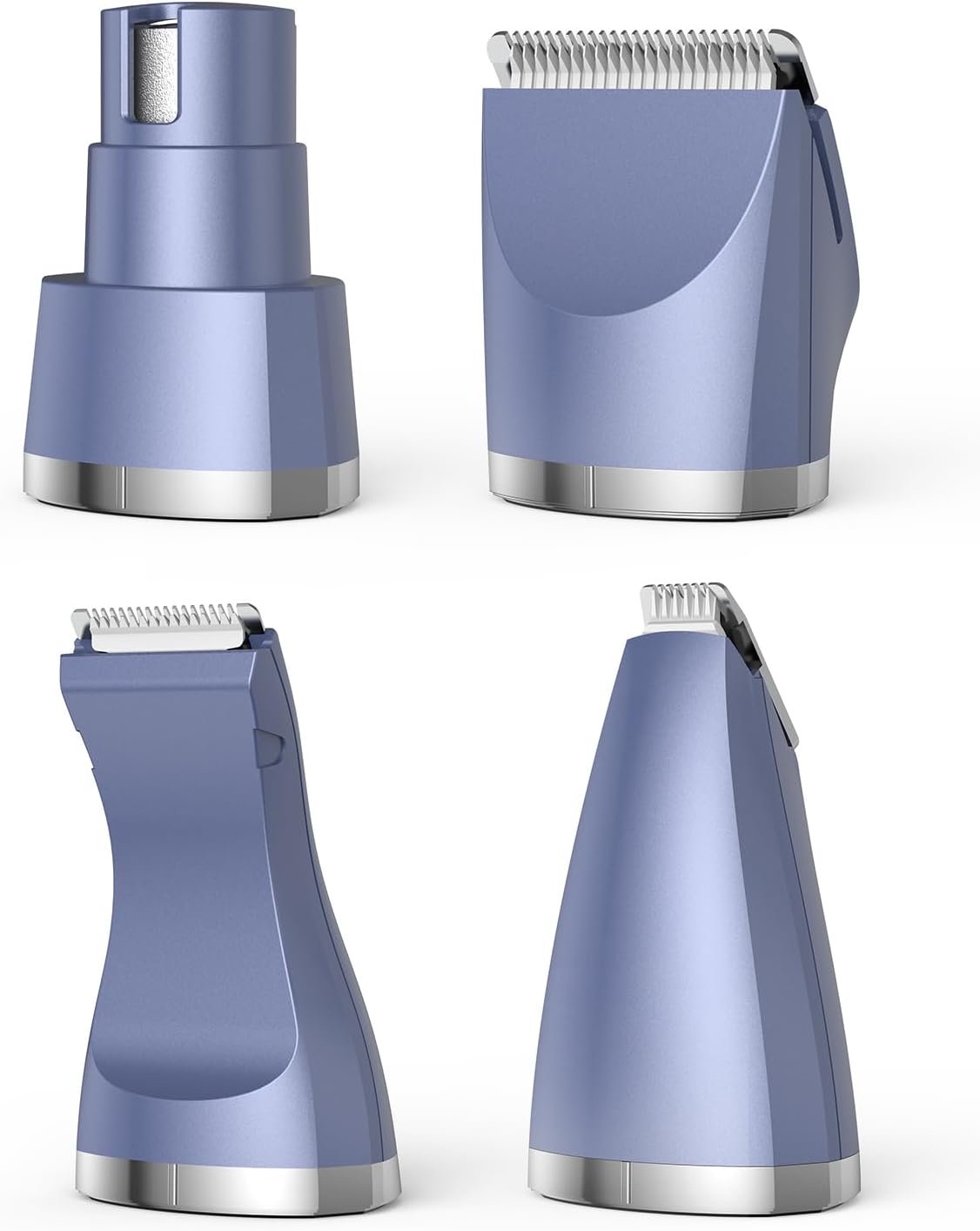
Image: Close-up view of the four distinct interchangeable cutter heads included with the oneisall grooming kit, each designed for specific grooming tasks.
Setup
Charging the Device
- Connect the USB charging cable to the charging port on the main clipper unit.
- Plug the other end of the USB cable into a compatible USB power adapter (not included) or a computer USB port.
- The indicator light will illuminate to show charging status. Charge the device for approximately 3-5 hours for a full charge before first use.
- Once fully charged, disconnect the charging cable.
Attaching and Detaching Cutter Heads
- Ensure the main clipper unit is turned OFF before changing heads.
- To detach a head: Hold the main unit firmly and gently pull the attached cutter head upwards and away from the unit.
- To attach a head: Align the desired cutter head with the slot on the main unit. Push the head down firmly until it clicks into place. Ensure it is securely fastened before use.

Image: Illustration demonstrating the simple process of attaching a cutter head to the main body of the oneisall grooming clipper.
Operating Instructions
General Grooming Tips
- Before grooming, ensure your pet's coat is clean, dry, and free of tangles. Brush thoroughly to remove loose hair and mats.
- Introduce the clippers to your pet gradually. Let them sniff and get used to the sound and vibration before turning it on.
- Always hold the skin taut while clipping to prevent nicks and ensure an even cut.
- Move the clippers in the direction of hair growth for a smoother finish, or against the direction for a closer cut.
- Take frequent breaks to check the blade temperature. If it becomes hot, turn off the clippers and allow them to cool.
Using the Main Clipper Unit
- Select and attach the appropriate cutter head for the area you wish to groom.
- Press the power button to turn on the clippers.
- Gently guide the clippers through your pet's fur. For body grooming, the standard clipper head is recommended.
- After use, press the power button to turn off the clippers.
Specific Head Usage
- Standard Clipper Head: Ideal for general body trimming. Use with caution around sensitive areas.
- Detail Trimmer Head: Perfect for intricate work, such as around the eyes, mouth, or for creating specific styles.
- Paw Trimmer Head: Designed with a narrow blade for safely trimming hair on paw pads and between toes. Be extra careful to avoid cutting paw pads.
- Nose/Ear Trimmer Head: Insert gently into the nose or ear canal. Move in a circular motion to trim unwanted hair. Do not insert too deeply.
Maintenance
Cleaning the Blades
- After each use, turn off the clippers and detach the cutter head.
- Use the provided cleaning brush to remove any trapped hair from the blades and the inside of the cutter head.
- The blades can be rinsed under running water, but ensure the main unit is kept dry. Dry the blades thoroughly before reattaching or storing.
Oiling the Blades
- After cleaning and drying, apply 1-2 drops of the provided lubricating oil to the blades.
- Turn on the clippers for a few seconds to allow the oil to distribute evenly across the blades.
- Regular oiling helps maintain blade sharpness, reduces friction, and extends the life of the clippers.
Storage
- Store the clippers and all accessories in a cool, dry place, away from direct sunlight and moisture.
- Ensure the device is fully charged before long-term storage to preserve battery health.
Troubleshooting
| Problem | Possible Cause | Solution |
|---|---|---|
| Clippers not turning on | Low battery; Power button not pressed correctly | Charge the device fully; Ensure power button is pressed firmly. |
| Poor cutting performance | Blades are dull or clogged with hair; Insufficient oiling | Clean and oil the blades; Replace blades if excessively dull. |
| Blades getting hot quickly | Lack of lubrication; Excessive continuous use | Apply lubricating oil; Take breaks during grooming to allow blades to cool. |
| Cutter head detaches during use | Head not securely attached | Ensure the cutter head clicks firmly into place during attachment. |
Specifications
- Model Number: YP-7700
- Power Source: Battery Powered (1 Lithium Ion battery included)
- Item Weight: 85 Grams
- Color: Purple
- Recommended Uses: Grooming (Dogs, Cats)
- Package Dimensions: 7.48 x 7.28 x 1.77 inches
- Manufacturer: oneisall
Warranty and Support
oneisall products are manufactured to high-quality standards. For any questions, concerns, or warranty claims, please contact oneisall customer support. Please retain your proof of purchase for warranty service.
For further assistance, visit the official oneisall store on Amazon: oneisall Store