
1. Product Overview
This EuroFone Microphone Headphone Soft Cable Headset Accessory is designed to provide audio and microphone functionality for EuroFone S2 and S2 Plus Series motorcycle helmet Bluetooth intercom systems. It integrates seamlessly into full-face helmets, offering clear communication and high-fidelity audio.
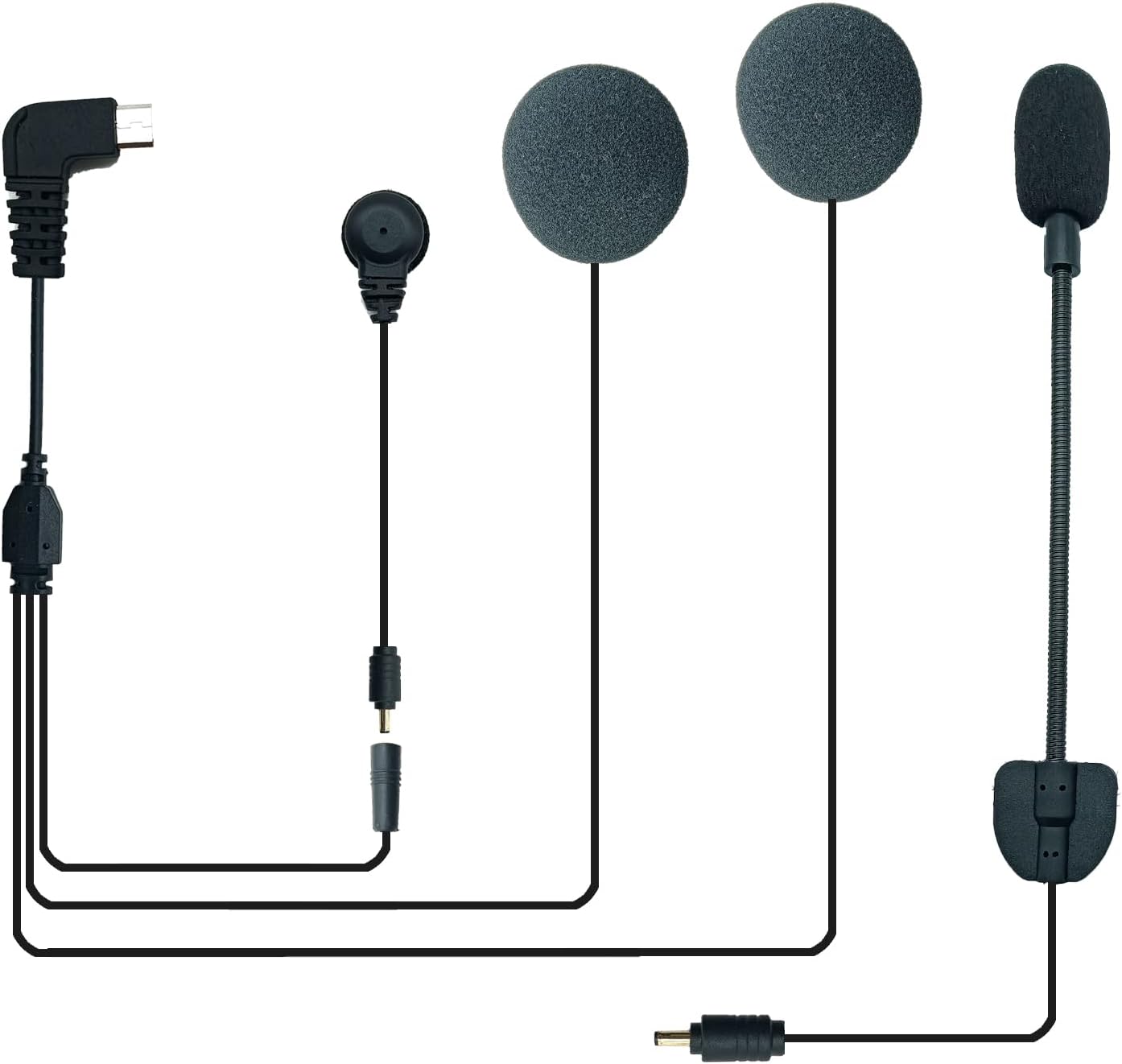
Image 1.1: Components of the EuroFone Microphone Headphone Soft Cable Headset Accessory. This image displays the complete headset assembly, including the main cable with a right-angle mini USB connector, two flat on-ear speakers with foam covers, a flexible boom microphone with a foam cover, and a smaller wired microphone with a clip, along with their respective connectors.
Package Contents:
- Soft Mic/Speaker cable assembly
2. Setup Instructions
Proper installation ensures optimal performance and comfort within your motorcycle helmet.
- Prepare Your Helmet: Ensure your full-face helmet has adequate space for speaker placement and cable routing. Many helmets have designated pockets for intercom speakers.
- Connect to Intercom Unit: Locate the mini USB port on your EuroFone S2 or S2 Plus Series Bluetooth intercom unit. Carefully insert the right-angle mini USB connector from the headset accessory into this port. Ensure a secure connection.
- Install Speakers: Peel off the adhesive backing (if present) from the back of the speakers. Position one speaker inside each ear pocket of your helmet, ensuring they are centered over your ears for the best audio experience. Press firmly to secure.
- Position Microphone: Choose between the flexible boom microphone or the smaller wired microphone.
- Boom Microphone: Attach the base of the boom microphone to the inside of the helmet near your mouth using its adhesive backing. Adjust the flexible boom so the microphone is positioned approximately 1-2 cm from your mouth, away from direct airflow.
- Wired Microphone: If using the wired microphone, route its cable and attach it to a suitable location inside the helmet, such as near the cheek pad, ensuring it is close to your mouth.
- Route Cables: Carefully route all cables under the helmet's padding and lining to keep them tidy and prevent interference with helmet removal or comfort. Ensure no cables are pinched or exposed in a way that could cause discomfort or damage.
- Test Connection: After installation, power on your EuroFone intercom unit and perform a quick audio test to ensure both speakers and the microphone are functioning correctly.
3. Operating Instructions
This accessory functions as the audio input and output interface for your EuroFone S2/S2 Plus intercom unit. All operational controls (power, volume, pairing, intercom functions) are managed directly through the main intercom unit.
- Audio Playback: Once connected to your intercom unit, the headset will deliver Hi-Fi music and audio from your paired Bluetooth device or intercom conversations.
- Microphone Function: The integrated microphone enables clear voice transmission for intercom communication and phone calls. The intercom unit's DSP noise echo cancellation feature helps to reduce background noise for improved clarity.
- Volume Control: Adjust volume directly on your EuroFone S2/S2 Plus intercom unit or the paired Bluetooth device.
4. Maintenance
To ensure the longevity and optimal performance of your headset accessory, follow these maintenance guidelines:
- Cleaning: Gently wipe the speakers and microphone foam covers with a soft, dry cloth. Avoid using harsh chemicals or abrasive materials. If necessary, a slightly damp cloth can be used, ensuring no moisture enters the electronic components.
- Cable Care: Avoid sharp bends or excessive pulling on the cables. When removing the headset from the intercom unit, grasp the connector, not the cable.
- Storage: When not in use, store the headset in a clean, dry place away from extreme temperatures and direct sunlight.
- Inspection: Periodically inspect the cables and connectors for any signs of wear or damage. If damage is observed, discontinue use and consider replacement.
5. Troubleshooting
If you encounter issues with your EuroFone Microphone Headphone Soft Cable Headset Accessory, refer to the following common solutions:
- No Sound from Speakers:
- Ensure the mini USB connector is fully and securely plugged into the intercom unit.
- Check the volume level on your intercom unit and paired device.
- Verify that the intercom unit is powered on and properly paired with your audio source.
- Microphone Not Working:
- Confirm the mini USB connector is securely attached to the intercom unit.
- Ensure the microphone is positioned correctly and not obstructed.
- Test the microphone function through your intercom unit's settings or by initiating a call/intercom conversation.
- Poor Sound Quality (Distortion, Low Volume):
- Check for proper speaker placement within the helmet, ensuring they are directly over your ears.
- Adjust the volume on both the intercom unit and the audio source.
- Ensure the cables are not pinched or damaged.
- If using Bluetooth, ensure the intercom unit is within range of the paired device and there is no interference.
- Intermittent Connection:
- Re-seat the mini USB connector firmly into the intercom unit.
- Inspect the mini USB connector and port for any debris or damage.
If these steps do not resolve the issue, please refer to the troubleshooting section of your EuroFone S2/S2 Plus intercom unit's manual or contact customer support.
6. Specifications
| Brand | EuroFone |
| Model Name | Microphone Headphone |
| Model Number | Microphone Headphone |
| Color | Black |
| Ear Placement | On Ear |
| Form Factor | Over Ear (referring to helmet integration) |
| Impedance | 8 Ohms |
| Built-In Media | Soft Mic/Speaker cable |
| Noise Control | Active Noise Cancellation (via intercom unit) |
| Connectivity Technology | Wired (Mini USB) |
| Wireless Technology | USB (for connection to wireless intercom unit) |
| Item Weight | 0.3 Pounds |
| Compatibility | EuroFone S2, S2 Plus Series Motorcycle Helmet Bluetooth Intercom |
7. Warranty Information
This EuroFone Microphone Headphone Soft Cable Headset Accessory comes with a 2-year warranty from the date of purchase. This warranty covers manufacturing defects and ensures the product meets its specified performance standards under normal use. Please retain your proof of purchase for warranty claims.
For detailed warranty terms and conditions, please refer to the documentation provided with your EuroFone S2 or S2 Plus intercom unit, or contact EuroFone customer support.
8. Customer Support
For further assistance, technical support, or warranty inquiries regarding your EuroFone Microphone Headphone Soft Cable Headset Accessory, please contact EuroFone customer service.
- Brand: EuroFone
- Online Store: Visit the EuroFone Store on Amazon
Please have your product model number and purchase details ready when contacting support.