1. Product Overview
The Generic Portable Power Station ZH-CN-1000A is a versatile and high-capacity power solution designed for various applications, including outdoor adventures, home backup, and emergency power needs. With a robust 1089Wh capacity and 1000W output, it provides reliable power for a wide range of electronic devices and small appliances.

Figure 1.1: Front view of the Portable Power Station ZH-CN-1000A.
Key Features:
- High Capacity: 1089Wh battery capacity for extended power supply.
- Multiple Charging Options: Recharge via AC wall outlet, solar panel, or car charger.
- Versatile Outputs: Equipped with 2x AC Outlets, 6x USB-A Ports, 2x Type-C PD Ports (27W & 100W), wireless charging (Max 15W), 2x DC 5521 Ports, and a Cigarette Lighter Plug.
- Durable and Reliable: Features high-performance lithium-ion batteries and pure sine wave AC output for stable power.
- Safety Protections: Includes overload protection, short circuit protection, and an intelligent Battery Management System (BMS).
- Informative LCD Screen: Displays input/output power, remaining battery percentage, usable time, and working function.
- Portable Design: Foldable handle for easy carrying and storage.
2. Package Contents
Please check the package carefully to ensure all items are present and undamaged. If any items are missing or damaged, please contact customer service.
- Portable Power Station 1000W
- AC input line
- Car charger cable
- MC4 charging line (for solar panel connection)
- User manual
3. Product Diagram and Controls
Familiarize yourself with the various ports and controls on your power station.

Figure 3.1: Front panel layout with labeled components.
- LED Light: Provides illumination.
- LCD Display: Shows battery status, input/output power, and remaining time.
- Foldable Handle: For easy transport.
- AC Outlets (x2): For powering standard household appliances (120V-60Hz, 1000W).
- USB-C PD Ports (x2): One 100W, one 27W for fast charging compatible devices.
- USB-A Ports (x4): 12W output each.
- USB 18W Ports (x2): For higher power USB devices.
- DC 5521 Ports (x2): DC 12V-10A Max.
- Cigarette Lighter Plug: DC 12V-10A Max.
- Solar Charger Input / Car Charger Input: For recharging the power station.
4. Operating Instructions
4.1 Charging the Power Station
The power station can be recharged using three methods:
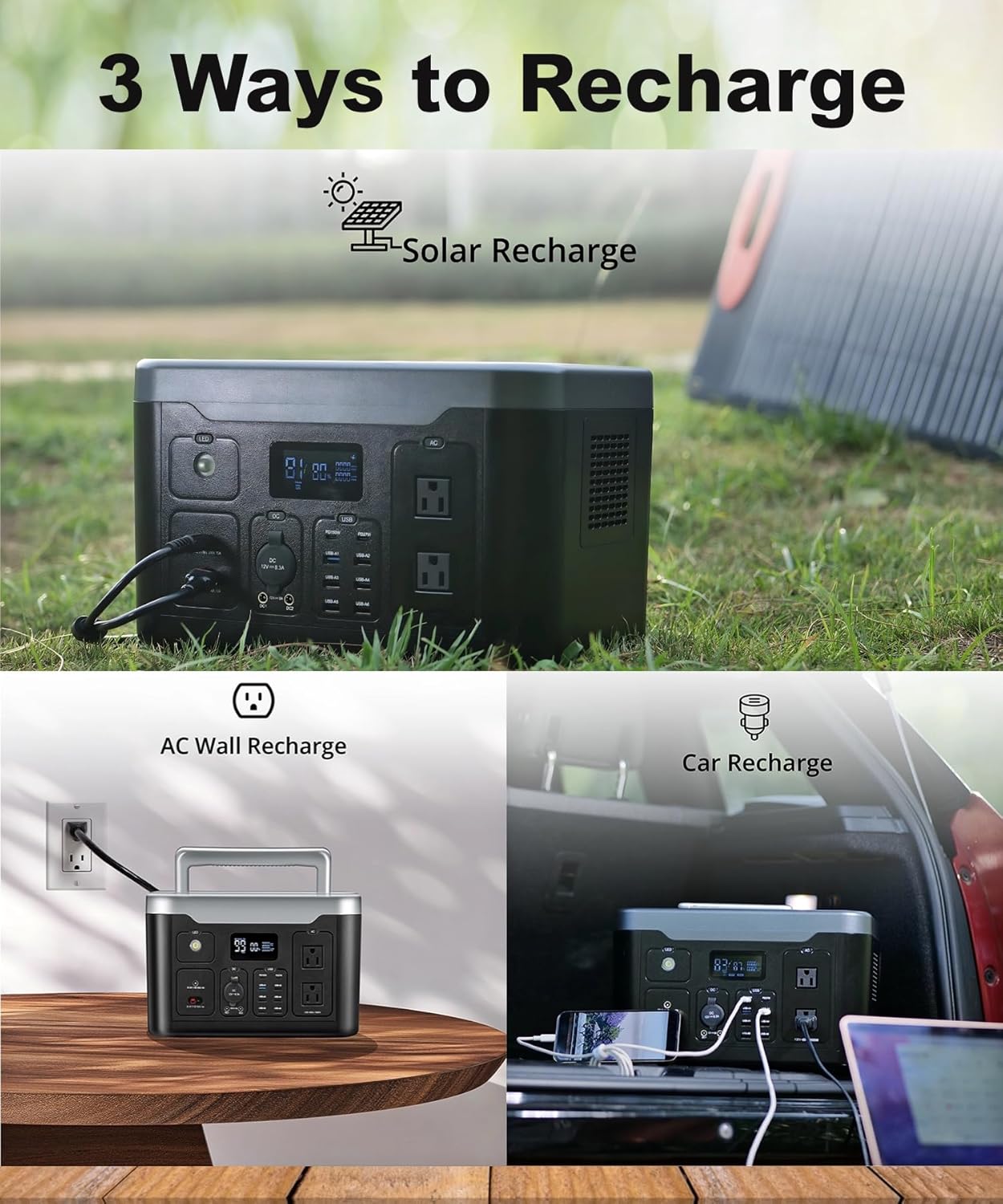
Figure 4.1: Overview of the three recharging methods.
AC Wall Recharging:
Connect the provided AC input line to the power station's AC input port and then to a standard wall outlet. The LCD screen will indicate charging status. Fast recharging can be achieved in approximately two hours.

Figure 4.2: Charging the power station using an AC wall outlet.
Solar Panel Recharging:
Connect a compatible solar panel (not included) to the power station using the provided MC4 charging line. Place the solar panel in direct sunlight for optimal charging efficiency. The LCD screen will show the solar input power.

Figure 4.3: Charging the power station using a solar panel.
Car Recharging:
Use the provided car charger cable to connect the power station to your vehicle's 12V cigarette lighter port. This method is convenient for recharging while on the go.

Figure 4.4: Charging the power station using a car charger.
4.2 Using the Power Station to Power Devices
To power your devices, simply plug them into the appropriate output ports (AC, USB-A, Type-C, DC, or place on the wireless charging pad). Ensure the power station is sufficiently charged. The LCD screen will display the output power and estimated remaining usage time.

Figure 4.5: Estimated power duration for common devices based on 1089Wh capacity.
4.3 Applications
The Portable Power Station is suitable for a wide range of scenarios:
- Outdoor Activities: Power smartphones, laptops, cameras, drones during camping, road trips, RV activities, yacht sails, fishing, or outdoor photography and fieldwork.
- Home Use: Power small appliances for kitchen, bedroom, yard/garden gatherings, and barbecues.
- Emergency Backup: Provides continuous power supply during blackouts or disasters for essential medical facilities or laboratory equipment.

Figure 4.6: Diverse applications of the portable power station.
5. Safety and Protection Features
The power station is equipped with multiple safety features to ensure reliable and safe operation:

Figure 5.1: Internal battery system and protection features.
- Pure Sine Wave AC Output: Provides clean and stable power, safe for sensitive electronics.
- Intelligent BMS (Battery Management System): Optimizes battery performance and extends lifespan.
- Overload Protection: Automatically shuts down if connected devices exceed the rated output.
- Short-Circuit Protection: Prevents damage from short circuits.
- Over Temperature Protection: Monitors internal temperature and prevents overheating.
Warning: This product contains chemicals known to the State of California to cause cancer and birth defects or other reproductive harm. For more information, go to www.P65Warnings.ca.gov.
6. Maintenance
Proper maintenance ensures the longevity and optimal performance of your power station.
- Storage: Store the power station in a cool, dry place away from direct sunlight and extreme temperatures. For long-term storage, recharge the unit to 50-80% every 3-6 months to preserve battery health.
- Cleaning: Use a soft, dry cloth to clean the exterior of the unit. Do not use abrasive cleaners or immerse the unit in water.
- Ventilation: Ensure the ventilation vents are clear of dust and debris to prevent overheating during operation.
- Avoid Drops and Impacts: Handle the unit with care to prevent internal damage.
7. Troubleshooting
If you encounter issues with your power station, refer to the following common problems and solutions:
- Unit Not Turning On:
- Ensure the power button is pressed and held for a few seconds.
- Check if the battery is completely depleted. Recharge the unit.
- Devices Not Charging/Powering:
- Verify that the specific output port (AC, USB, DC) is activated (check LCD screen).
- Ensure the device's power consumption does not exceed the port's or the unit's maximum output.
- Check if the cable connecting the device is working correctly.
- Slow Charging of Power Station:
- For solar charging, ensure the solar panel is in direct sunlight and free from obstructions.
- Verify that the charging cable is securely connected and not damaged.
- Check the input power displayed on the LCD screen.
- Overload Indication:
- Disconnect the device causing the overload.
- Restart the power station.
- Ensure total power draw is within the unit's specifications.
If the problem persists after attempting these solutions, please contact customer service.
8. Specifications
Detailed technical specifications for the Portable Power Station ZH-CN-1000A.
| Brand | Generic |
| Model Name | ZH-CN-1000A |
| Wattage | 1089 Watt-hours |
| Output Wattage | 1000.0 W |
| Power Source | Battery Powered, Solar Powered |
| Item Weight | 22.4 Pounds (10.16 kg) |
| Product Dimensions | 13.4"L x 9.3"W x 8"H (34cm x 23.6cm x 20.3cm) |
| Battery Type | Lithium Ion |
| Special Features | Power Stream Alternator, Overload Protection, Foldable Handle, Short Circuit Protection, USB Port |
| Recommended Uses | Residential, Camping |
| Date First Available | May 23, 2024 |
9. Warranty and Support
Your Portable Power Station ZH-CN-1000A comes with a 24-month warranty from the date of purchase, covering manufacturing defects and workmanship. This warranty does not cover damage caused by misuse, accidents, unauthorized modifications, or normal wear and tear.
We are committed to providing lifelong customer service. If you have any questions, concerns, or require technical assistance, please do not hesitate to contact our support team.
Customer Service Contact:
- Email: support@genericpower.com (Example Email)
- Phone: 1-800-XXX-XXXX (Example Phone Number)
- Website: www.genericpower.com/support (Example Website)
Please have your model number (ZH-CN-1000A) and purchase date ready when contacting support.


