
1. Introduction
Thank you for choosing the BAOFENG UV-25 Tri-Band Walkie Talkie. This device is designed for reliable communication across multiple frequency bands, featuring a high-capacity battery, USB-C charging, and advanced programming options. This manual provides essential information for the proper setup, operation, and maintenance of your UV-25 walkie talkie.
Package Contents
Please check the package carefully to ensure all items are present:
- 2 x BAOFENG UV-25 Portable Radios
- 2 x Original Goose Tube Antennas
- 2 x Type-C Charger Cables
- 2 x US Charger Adapters
- 2 x Li-ion Batteries (5200mAh)
- 2 x Belt Clips
- 2 x Slings
- 2 x User Manuals

Image 1.1: Contents of the BAOFENG UV-25 Walkie Talkie package.
2. Safety Information
To ensure safe and efficient operation, please observe the following safety precautions:
- Do not disassemble or modify the radio. Unauthorized modifications can void your warranty and may cause damage.
- Do not expose the radio to direct sunlight for extended periods or to extreme temperatures.
- Avoid using the radio in explosive atmospheres (e.g., near flammable gas, dust, or powders).
- Keep the radio away from medical devices, as it may interfere with their operation.
- Use only BAOFENG approved batteries and chargers.
- Do not short-circuit the battery terminals.
- Ensure the antenna is properly attached before transmitting to prevent damage to the radio.
3. Product Overview and Components
The BAOFENG UV-25 is a robust tri-band walkie talkie designed for versatile communication. Familiarize yourself with its main features and components:
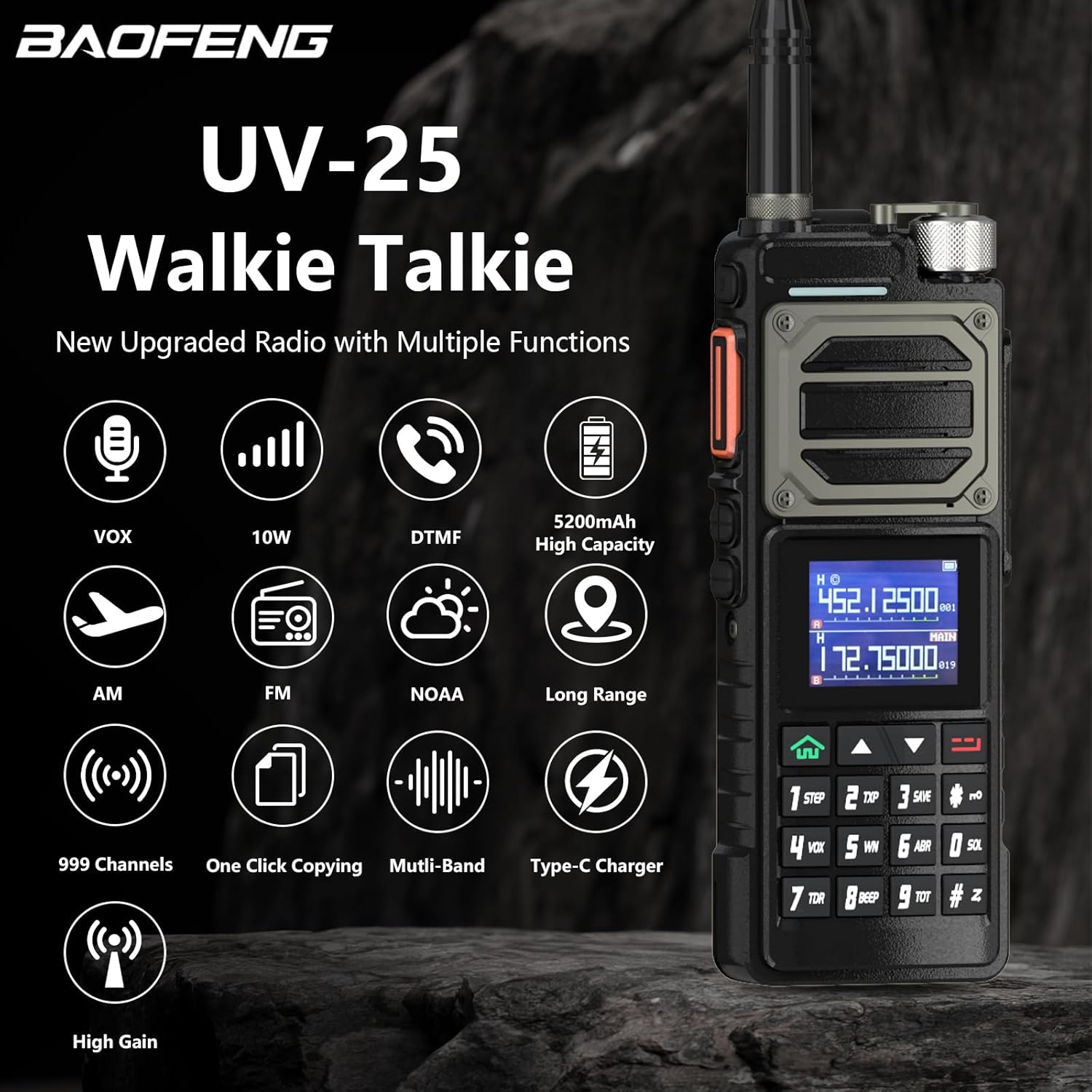
Image 3.1: BAOFENG UV-25 Walkie Talkie with feature icons.
Key Features:
- Tri-Band Operation: Supports FM, VHF (144-148MHz), and UHF (420-450MHz) frequencies.
- Wireless Frequency Copy: Quickly replicate frequencies from other radios.
- USB-C Charging: Convenient and universal charging method.
- PC & Manual Programmable: Configure settings via computer software or directly through the keypad.
- Goose Tube Gain Antenna: Flexible, high-gain antenna for enhanced signal transmission.
- 1.77-inch Color Large Screen Display: Clear and intuitive interface.
- 999 Channels: Ample storage for your preferred frequencies.
- NOAA Weather Alarm: Timely alerts for extreme weather events.
4. Initial Setup
4.1 Battery Installation
- Align the battery pack with the grooves on the back of the radio.
- Slide the battery upwards until it clicks into place.
- To remove, press the release latch (if present) and slide the battery downwards.
4.2 Antenna Attachment
- Screw the goose tube antenna clockwise into the antenna connector on top of the radio until it is finger-tight.
- Do not overtighten.
4.3 Charging the Battery
The UV-25 features a convenient USB-C charging port. The battery has a real capacity of 5200mAh, providing extended usage.
- Connect the Type-C charger cable to the USB-C port on the side of the radio.
- Plug the other end of the cable into the US charger adapter, a power bank, a laptop, or a car charger.
- The charging indicator light will be red while charging.
- The indicator light will turn green when the battery is fully charged.

Image 4.1: USB-C Charging for the BAOFENG UV-25.
5. Basic Operation
5.1 Power On/Off and Volume Control
- Power On: Rotate the power/volume knob clockwise until you hear a click.
- Power Off: Rotate the power/volume knob counter-clockwise until you hear a click.
- Volume Adjustment: Rotate the power/volume knob to increase or decrease the audio level.
5.2 Channel Selection
The UV-25 supports up to 999 channels. You can select channels using the keypad or the channel knob (if available).
- Use the UP/DOWN arrow keys on the keypad to navigate through channels.
- Alternatively, enter the channel number directly using the numeric keypad.
5.3 Transmitting and Receiving (PTT)
- To transmit, press and hold the Push-To-Talk (PTT) button on the side of the radio. Speak clearly into the microphone.
- Release the PTT button to receive.
5.4 Wireless Frequency Copy
The UV-25 allows for quick wireless frequency copying from another radio, making setup convenient.
- Access the frequency copy function through the radio's menu. Refer to the on-screen prompts.
- Place the UV-25 near the radio you wish to copy from.
- Initiate the copying process. The UV-25 will scan and replicate the frequency.
5.5 Programming Options
The UV-25 offers both manual and PC-based programming.
- Manual Programming: Most settings, including adding/deleting memory channels, adjusting VOX/squelch/power save levels, can be configured directly via the keypad and menu system.
- PC Programming: For advanced configuration and bulk channel management, connect the radio to a computer using a compatible programming cable (sold separately) and use the appropriate software.
- Wireless Programming: The radio also supports wireless programming via a dedicated app and wireless programmer (sold separately).

Image 5.1: Wireless Programming for the BAOFENG UV-25.
6. Advanced Features
6.1 Tri-Band Frequency Support
The UV-25 operates across three main frequency bands, providing flexibility for various communication needs:
- FM: 65-108MHz (Receive only)
- AM: 108-136MHz (Receive only)
- VHF: 136-174MHz (Receive & Transmit)
- 220-260MHz: (Receive & Transmit)
- 350-390MHz: (Receive only)
- UHF: 400-480MHz (Receive & Transmit)
- 480-520MHz: (Receive only)
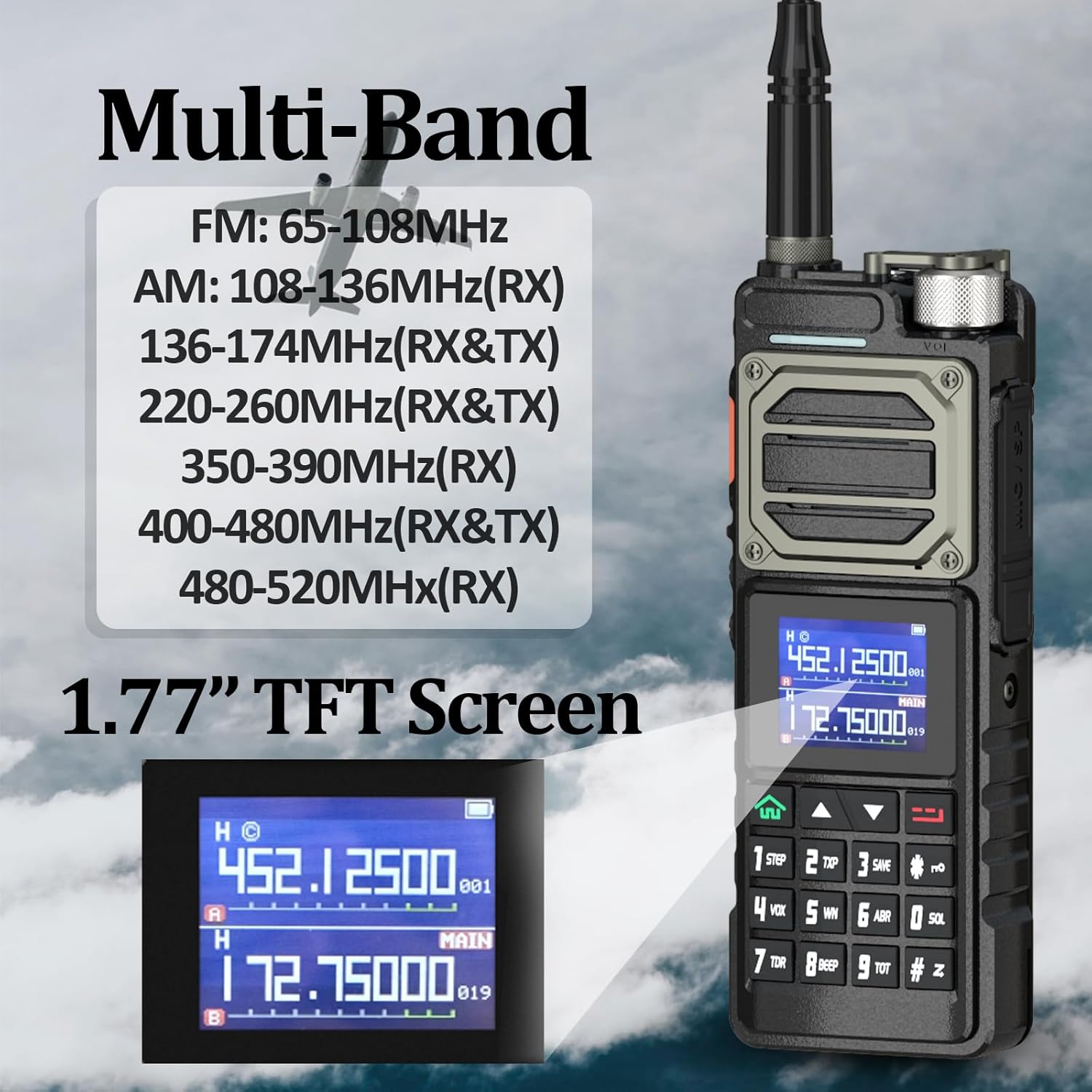
Image 6.1: Multi-Band Frequency Display on UV-25.
6.2 Goose Tube Gain Antenna
The included goose tube antenna is designed for optimal signal performance. Its flexible nature allows for durability and ease of positioning, contributing to a stronger and more stable signal transmission over longer distances (up to 10km under ideal conditions).

Image 6.2: High Gain Gooseneck Antenna.
6.3 NOAA Weather Alarm
The NOAA Weather Alarm feature provides timely alerts for severe weather conditions, helping users stay informed and safe. The radio can detect and predict extreme weather events such as sandstorms, heavy rain, blizzards, and thunderstorms.

Image 6.3: NOAA Weather Alarm Feature.
7. Maintenance
- Cleaning: Use a soft, damp cloth to clean the radio's surface. Do not use harsh chemicals or abrasive cleaners.
- Storage: When not in use for extended periods, store the radio in a cool, dry place with the battery partially charged.
- Battery Care: Avoid fully discharging the Li-ion battery frequently. Recharge it regularly to maintain battery health.
8. Troubleshooting
| Problem | Possible Cause | Solution |
|---|---|---|
| Radio does not power on | Battery is low or not installed correctly | Charge the battery or re-install it properly. |
| Cannot transmit or receive | Incorrect frequency/channel, antenna not attached, out of range | Verify frequency/channel, attach antenna, move closer to other radios. |
| Poor audio quality | Low battery, weak signal, incorrect squelch setting | Charge battery, check antenna, adjust squelch level. |
| Battery not charging | Charger cable/adapter faulty, poor connection | Check connections, try a different USB-C cable or adapter. |
9. Technical Specifications
| Specification | Detail |
|---|---|
| Model Number | UV-25 |
| Output Power | 9-10W |
| Battery Capacity | 5200mAh (Li-ion) |
| Water Resistance Level | IP45 (Not Water Resistant) |
| Material | Plastic |
| Storage Channels | 999 channels |
| Range | Up to 10km (environment dependent) |
| Dimensions | 180mm x 70mm x 45mm (approx. 1.77"D x 2.76"W x 1.77"H) |
| Display | 1.77-inch Color Large Screen Display |
| Frequency Range | FM, VHF: 144-148MHz, UHF: 420-450MHz (Tri-Band) |
| Voltage | 7.4 Volts (DC) |
| Antenna Compatibility | SMA-Female |
| Accessory Port | K-port (2 Pin) for headset, speaker mic, programming cable |
10. Warranty and Support
10.1 Warranty Information
A 1-year warranty is provided exclusively through "Shiqun Electronics Co., Ltd." for the BAOFENG UV-25 walkie talkie. Please retain your proof of purchase for warranty claims.
10.2 Customer Support
For any issues, questions, or support regarding compatible models, please contact Shiqun Electronics Co., Ltd. directly. Refer to your purchase documentation for specific contact details.