
Dpofirs Dpofirsgwkbm8h1un
Dpofirs 700ML Portable Air Conditioner Fan User Manual
Model: Dpofirsgwkbm8h1un
1. Introduction
This manual provides instructions for the safe and efficient operation of your Dpofirs 700ML Portable Air Conditioner Fan. This device functions as a desktop cooling fan, a mini air conditioner, an air humidifier, and features a 7-color night light. It is designed for personal use in various environments such as home, office, or during travel.
2. Safety Instructions
- Read all instructions before using the appliance.
- Do not immerse the unit, cord, or plug in water or other liquids.
- Keep the appliance out of reach of children and pets.
- Use only the provided USB power cable.
- Ensure the unit is placed on a stable, level surface to prevent water spillage.
- Unplug the unit before cleaning or refilling the water tank.
- Do not block the air inlet or outlet.
- Avoid placing the unit near heat sources or in direct sunlight.
3. Package Contents
Verify that all items are present in the package:
- Dpofirs Portable Air Conditioner Fan
- USB Power Cable
- User Manual
4. Product Overview
Familiarize yourself with the components of your portable air conditioner fan.

Image 1: Front view of the Dpofirs 700ML Portable Air Conditioner Fan, showing the control panel, air outlet, and water tank.

Image 2: Dimensions of the Dpofirs portable air conditioner fan, indicating a height of 6.5 inches.
Key Components:
- Control Panel: Buttons for power, speed, timer, and night light.
- Water Tank: 700ML capacity for water or ice.
- Air Outlet: Adjustable louvers for directing airflow.
- Air Inlet: Located at the rear, with a filter.
- USB Port: For power connection.
5. Setup
5.1 Unpacking and Placement
- Remove the unit from its packaging.
- Place the unit on a flat, stable, and level surface.
- Ensure there is adequate space around the unit for proper airflow.
5.2 Filling the Water Tank
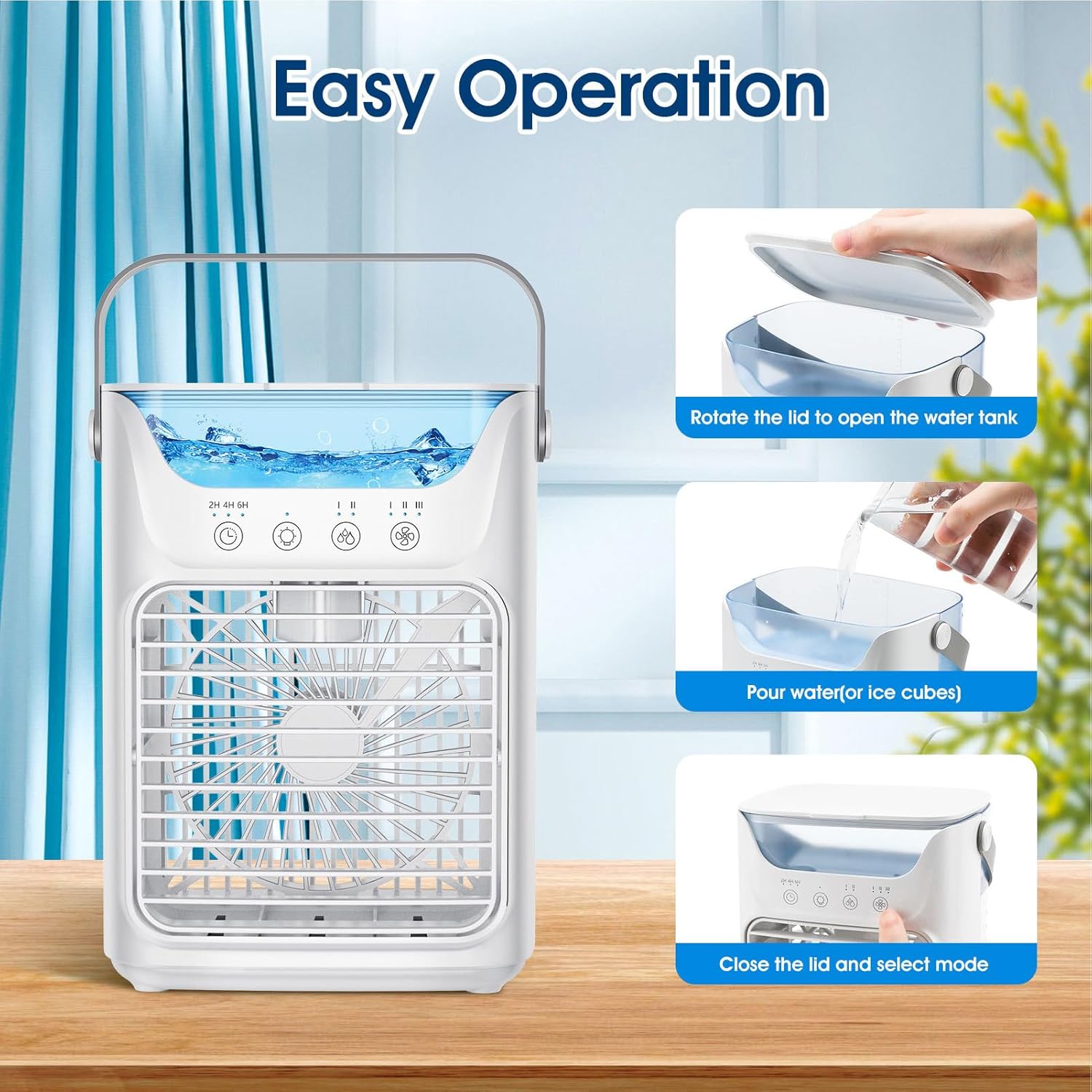
Image 3: Visual guide for filling the water tank, showing opening the lid, pouring water/ice, and closing the lid.
- Rotate the lid on top of the unit to open the water tank.
- Carefully pour clean water into the tank. For enhanced cooling, add ice cubes. Do not exceed the maximum fill line.
- Close the lid securely.
5.3 Connecting Power
- Connect the USB power cable to the unit's USB port.
- Plug the other end of the USB cable into a compatible USB power source (e.g., adapter, PC, power bank, car charger).
6. Operating Instructions
6.1 Power On/Off
- Press the power button (O) on the control panel to turn the unit on or off.
6.2 Adjusting Fan Speed

Image 4: Depiction of the three fan speed settings: Low, Middle, and High.
- Press the fan speed button (Fan icon) to cycle through the three available wind speeds: Low, Medium, and High.
6.3 Cooling Modes

Image 5: Visual representation of the fan's operation modes: fan only, humidification with water, and enhanced cooling with ice.
- Fan Only: Operate the unit without water or ice for a gentle breeze.
- Humidification/Cooling: Fill the water tank with water to activate the humidification and evaporative cooling function. This provides up to 8 hours of humidification.
- Enhanced Cooling: Add ice cubes to the water tank along with water for a stronger cooling effect.
6.4 Timer Function
- Press the timer button (Clock icon) to set an automatic shut-off timer for 2, 4, or 6 hours.
6.5 Night Light

Image 6: The portable air conditioner fan displaying its 7-color night light feature in a bedroom setting, demonstrating low noise operation (≤58dB).
- Press the light button (Lightbulb icon) to activate the 7-color night light feature. Press again to cycle through colors or turn off.
6.6 Adjusting Air Direction
- Manually adjust the louvers on the front air outlet to direct the airflow up or down within a 60° range.
7. Maintenance
7.1 Cleaning the Water Tank
- Unplug the unit from the power source.
- Empty any remaining water from the tank.
- Wipe the inside of the tank with a soft, damp cloth. For stubborn deposits, use a mild detergent and rinse thoroughly.
- Allow the tank to air dry completely before refilling or storing.
7.2 Cleaning the Exterior
- Wipe the exterior of the unit with a soft, dry, or slightly damp cloth.
- Do not use abrasive cleaners or solvents.
7.3 Storage
- If storing the unit for an extended period, ensure the water tank is empty and clean.
- Store the unit in a cool, dry place, away from direct sunlight.
8. Troubleshooting
| Problem | Possible Cause | Solution |
|---|---|---|
| Unit does not turn on | No power supply; USB cable not connected properly. | Ensure the USB cable is securely connected to both the unit and a working power source. Try a different USB port or adapter. |
| No cooling effect | Water tank is empty; no ice added for enhanced cooling. | Fill the water tank with water. For stronger cooling, add ice cubes. |
| Water leakage | Water tank overfilled; unit not on a level surface; lid not closed properly. | Do not overfill the water tank. Place the unit on a level surface. Ensure the water tank lid is securely closed. |
| Weak airflow | Air inlet/outlet blocked; fan speed set too low. | Clear any obstructions from the air inlet and outlet. Increase the fan speed setting. |
9. Specifications
| Feature | Detail |
|---|---|
| Brand | Dpofirs |
| Model Number | Dpofirsgwkbm8h1un |
| Mounting Type | Freestanding |
| Color | White |
| Controls Type | Button |
| Reservoir Capacity | 700 Milliliters |
| Item Weight | 0.79 Kilograms |
| Form Factor | Personal |
| Wattage | 10 watts |
| Number of Speeds | 3 |
| Amperage | 2 Milliamps |
| Item Dimensions (D x W x H) | 6.5"D x 6.5"W x 6.5"H |
| Manufacturer | Dpofirs |
10. Warranty and Support
For warranty information or technical support, please refer to the contact details provided with your purchase documentation or visit the official Dpofirs website. Keep your purchase receipt as proof of purchase.
Ask a question about this manual
Ask about setup, troubleshooting, compatibility, parts, safety, or missing instructions. Manuals+ will review the question and use this page’s manual context to help answer it.