
Introduction
This manual provides essential information for setting up, operating, maintaining, and troubleshooting your Apple iPad Pro 2024 (13-inch, Wi-Fi, 2TB). This device is a renewed product, professionally inspected, tested, and cleaned by Amazon-qualified suppliers. While not Apple certified, it meets high functional standards. Expect no visible cosmetic imperfections when held at arm's length, and the battery capacity will exceed 80% relative to new. Accessories included may not be original but are compatible and fully functional.
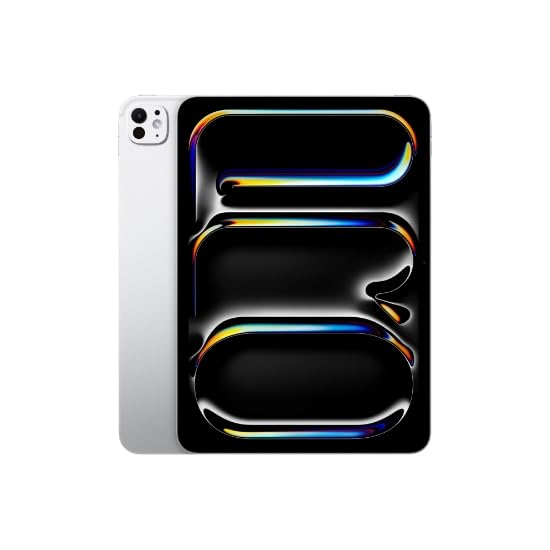
Image: Apple iPad Pro 2024 (13-inch) in Silver, showcasing its sleek design.
Setup
- Unboxing and Initial Charge: Carefully remove the iPad Pro and its accessories from the packaging. Connect the included 20W USB-C Power Adapter to the iPad Pro and a power outlet to ensure it has sufficient charge for initial setup.
- Power On: Press and hold the Top button until the Apple logo appears.
- Initial Configuration: Follow the on-screen instructions to select your language, region, and connect to a Wi-Fi network (Wi-Fi 6E supported).
- Apple ID: Sign in with your existing Apple ID or create a new one. This is essential for accessing the App Store, iCloud, and other Apple services.
- Data Transfer (Optional): If you are upgrading from another device, you may have the option to transfer data from an iCloud backup, another iOS device, or an Android device.
- Face ID/Passcode Setup: Configure Face ID for secure unlocking and authentication, or set up a passcode.
Operating
- Navigation: The iPad Pro uses intuitive multi-touch gestures for navigation. Swipe up from the bottom to go home, swipe down from the top-right for Control Center, and swipe down from the top-left for Notifications.
- App Store: Download and install applications from the App Store. An Apple ID is required.
- Camera: Utilize the Front and Rear 12MP Ultra Wide Cameras for photos, videos, and video calls.
- Connectivity: Connect to wireless networks using Wi-Fi 6E (802.11ax) and accessories via Bluetooth 5.3. The Thunderbolt port supports high-speed data transfer up to 40 Gb/s and external displays.
- Apple Pencil Pro: This iPad Pro model supports the Apple Pencil Pro for drawing, note-taking, and precise interaction. Refer to the Apple Pencil Pro manual for specific usage instructions.
- iPadOS: Your device runs on iPadOS, offering a powerful and versatile tablet experience. Keep your software updated for the latest features and security enhancements.
Maintenance
- Cleaning: Use a soft, lint-free cloth to clean the screen and exterior. Avoid abrasive materials or harsh chemicals. For stubborn smudges, slightly dampen the cloth with water.
- Software Updates: Regularly check for and install iPadOS updates to ensure optimal performance, security, and access to new features. Go to Settings > General > Software Update.
- Battery Care: To prolong battery life, avoid extreme temperatures. For renewed products, the battery is guaranteed to exceed 80% of its original capacity.
- Storage Management: Periodically review your installed apps and media to manage the 2TB storage effectively. Delete unnecessary files or offload them to cloud services. Go to Settings > General > iPad Storage.
Troubleshooting
- Device Not Responding: If your iPad Pro becomes unresponsive, press and quickly release the Volume Up button, then press and quickly release the Volume Down button, then press and hold the Top button until the Apple logo appears.
- Wi-Fi Connectivity Issues: Ensure Wi-Fi is enabled in Control Center or Settings. Try restarting your Wi-Fi router and the iPad Pro. If issues persist, forget the network and reconnect.
- Battery Draining Quickly: Check battery usage in Settings > Battery to identify apps consuming significant power. Adjust brightness, disable background app refresh for non-essential apps, and ensure software is up to date.
- App Crashes: If an app crashes frequently, try force-quitting it and reopening. If the problem persists, delete and reinstall the app. Ensure iPadOS is updated.
- Factory Reset (Last Resort): If severe issues persist, you may need to perform a factory reset. Warning: This will erase all data on your iPad. Back up your data to iCloud or a computer before proceeding. Go to Settings > General > Transfer or Reset iPad > Erase All Content and Settings.
Specifications
| Brand | Apple |
| Model Name | Apple iPad Pro |
| Model Number | MVX93LL/A |
| Screen Size | 13 Inches |
| Display Type | Ultra Retina XDR OLED |
| Display Resolution | 2752x2064 Pixels |
| Processor | Apple M4 |
| RAM Memory | 16 GB |
| Storage Capacity | 2 TB |
| Operating System | iPadOS |
| Wireless Technology | Wi-Fi 6E (802.11ax), Bluetooth 5.3 |
| Connectivity Technology | Wireless, Thunderbolt (USB-C) |
| Cameras | Front & Rear 12MP Ultra Wide |
| Color | Silver |
| Item Dimensions (L x W x Th) | 8.48"L x 11.09"W x 0.2"Th |
| UPC | 724129007695 |
Warranty
This renewed Apple iPad Pro is covered by a 90-Day Amazon Renewed Guarantee. If you are not satisfied with your purchase, the product is eligible for a replacement or refund within 90 days of receipt. Please refer to the Amazon Renewed program terms and conditions for full details.
Support
For further assistance, please refer to the following resources:
- Apple Support: Visit the official Apple iPad Support website for comprehensive guides, software updates, and community forums.
- Amazon Renewed Support: For inquiries related to your renewed product's guarantee or specific purchase details, contact Amazon Renewed Customer Service.


