
1. Introduction
This manual provides detailed instructions for the installation, operation, and maintenance of your YESKAMO 2K 3MP Solar Wireless Outdoor PTZ Surveillance Camera (Model GQ1-FR). Please read this manual thoroughly before using the product to ensure proper functionality and safety. Keep this manual for future reference.
2. Product Overview
The YESKAMO GQ1-FR is a 2K 3MP solar-powered wireless outdoor surveillance camera designed for comprehensive property monitoring. It features pan-tilt-zoom (PTZ) capabilities, advanced night vision, and motion detection.
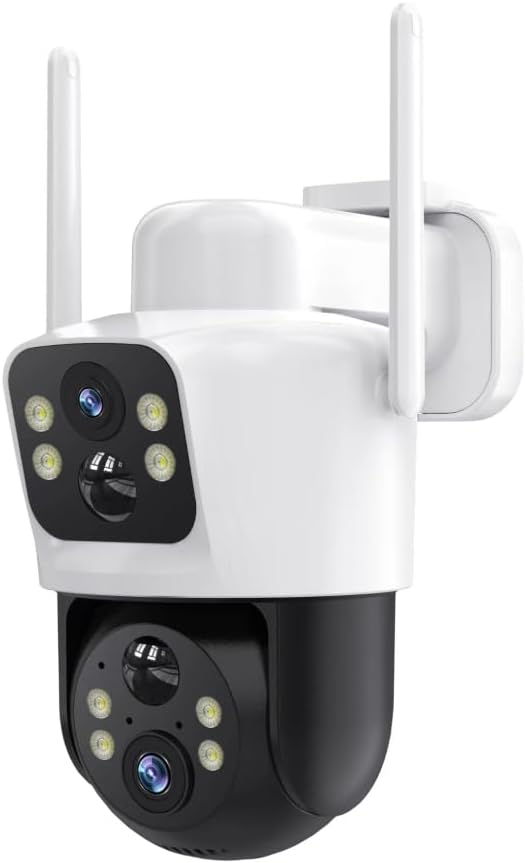
Image 2.1: Front view of the YESKAMO 2K 3MP Solar Wireless Outdoor PTZ Surveillance Camera, showing the main lens, IR/white light LEDs, and two external antennas.
Key Features:
- 2K 3MP Resolution: Equipped with a 3MP CMOS sensor for clear video recording.
- 360° PTZ Functionality: Supports 355° horizontal rotation and 120° vertical tilt for wide area coverage.
- Solar Powered: 100% wireless design with an included solar panel for continuous power.
- Three Night Vision Modes: Provides enhanced visibility in low-light conditions.
- Motion Detection: Adjustable sensitivity for accurate detection of movement.
- Dual Storage Options: Supports local SD card storage (up to 128GB) and cloud storage with video encryption.
- Wireless Connectivity: Supports 2.4G WiFi, 5G WiFi, and Bluetooth for flexible network integration.
3. Setup and Installation
3.1 Package Contents
Verify that all components are present in the package:
- YESKAMO 2K 3MP PTZ Camera
- Solar Panel
- Mounting Bracket and Screws
- User Manual (this document)
- AAA Battery (included for initial setup/internal clock)
3.2 Charging the Battery
Before initial use, ensure the camera's internal lithium-ion battery is fully charged. Connect the camera to the solar panel and place the solar panel in direct sunlight for several hours, or use a compatible USB charger (not included) if available.
3.3 App Download and Account Creation
Download the official YESKAMO application from your smartphone's app store (iOS or Android). Follow the on-screen instructions to create an account and log in.
3.4 Camera Pairing
- Power on the camera.
- Open the YESKAMO app and select "Add Device" or the "+" icon.
- Follow the in-app instructions to connect the camera to your 2.4G or 5G WiFi network. This typically involves scanning a QR code displayed on your phone with the camera lens.
- Once connected, name your camera and complete the setup process.
3.5 Mounting the Camera and Solar Panel
Select a suitable outdoor location for mounting. The camera is designed for ceiling mounting. Ensure the solar panel receives maximum direct sunlight throughout the day for optimal charging. Use the provided mounting bracket and screws to securely attach both the camera and the solar panel.
4. Operating Instructions
4.1 Live View and PTZ Control
Access the live video feed through the YESKAMO app. Use the on-screen controls to pan (rotate horizontally 355°) and tilt (rotate vertically 120°) the camera lens to adjust the viewing angle.
4.2 Night Vision Modes
The camera features three night vision modes. These can typically be configured within the app settings:
- Infrared (IR) Night Vision: Provides black and white video in complete darkness.
- Color Night Vision: Utilizes built-in white lights to provide full-color video at night.
- Smart Night Vision: Automatically switches between IR and color night vision based on detected motion or ambient light.
4.3 Motion Detection and Alerts
Configure motion detection settings in the app. You can adjust sensitivity levels to minimize false alarms. When motion is detected, the camera can send push notifications to your smartphone and begin recording.
4.4 Video Storage
The camera supports two storage methods:
- Micro SD Card: Insert a Micro SD card (up to 128GB, not included) into the designated slot on the camera. Recordings will be stored locally.
- Cloud Storage: Subscribe to the cloud storage service via the app for encrypted video backup.
5. Maintenance
- Cleaning: Periodically clean the camera lens and solar panel with a soft, damp cloth to ensure optimal performance. Avoid abrasive cleaners.
- Firmware Updates: Check the YESKAMO app regularly for firmware updates. Keeping the firmware updated ensures the best performance and security features.
- Battery Health: Ensure the solar panel is positioned to receive adequate sunlight to maintain battery charge. In prolonged periods of low sunlight, manual charging may be required.
6. Troubleshooting
- Camera Not Connecting to Wi-Fi:
- Ensure the camera is within range of your Wi-Fi router.
- Verify your Wi-Fi password is correct.
- Restart your router and the camera.
- Confirm your router supports 2.4G or 5G WiFi.
- Poor Video Quality:
- Check your Wi-Fi signal strength.
- Clean the camera lens.
- Ensure there are no obstructions blocking the camera's view.
- Solar Panel Not Charging:
- Ensure the solar panel is clean and free of debris.
- Verify the solar panel is positioned to receive direct sunlight for several hours daily.
- Check the connection cable between the solar panel and the camera.
- Motion Detection Not Working:
- Check motion detection settings in the app, including sensitivity and detection zones.
- Ensure the camera's view is not obstructed.
For further assistance, please refer to the support section of the YESKAMO app or visit the official YESKAMO website.
7. Specifications
| Feature | Detail |
|---|---|
| Model Name | GQ1-FR |
| Resolution | 2K 3MP |
| Pan/Tilt Range | Pan 355°, Tilt 120° |
| Connectivity | 2.4G WiFi, 5G WiFi, Bluetooth |
| Power Source | Solar Powered (Lithium-ion battery included) |
| Storage Options | Micro SD Card (max 128GB), Cloud Storage |
| Special Features | Motion Detection, Night Vision (3 modes) |
| Usage Environment | Outdoor |
| Mounting Type | Ceiling Mount |
| Material | Metal |
| Dimensions (L x W x H) | 12 x 10 x 8 cm |
| Weight | 880 grams |
8. Warranty and Support
For warranty information, product registration, or technical support, please visit the official YESKAMO website or contact their customer service directly. Details can typically be found on the product packaging or within the YESKAMO application.
Note: Availability of spare parts information is not provided.