
1. Product Overview
The SHANLING M0s is a compact and portable digital audio player designed for high-fidelity sound reproduction. It supports various high-resolution audio formats and offers versatile connectivity options, including two-way Bluetooth 5.0. Its intuitive touch screen interface and custom MTouch OS ensure a user-friendly experience for managing and enjoying your music library.

Figure 1: Front and back view of the SHANLING M0s MP3 Player, highlighting its compact design and available ports.
2. What's in the Box
- 1X SHANLING M0s MP3 Player
- 1X USB-A to USB-C Cable
- 1X Quick Start Guide
- 2X Front Protective Film (one pre-applied)
- 1X Maintenance Card
Figure 2: All items included in the SHANLING M0s product packaging.
3. Setup
3.1. Charging the Device
Before first use, fully charge the SHANLING M0s. Connect the provided USB-A to USB-C cable to the device's Type-C port and a compatible USB power adapter (not included) or a computer's USB port. The device supports up to 10 hours of playback on a full charge.

Figure 3: The SHANLING M0s connected via its USB-C port for charging.
3.2. Inserting a MicroSD Card
The SHANLING M0s does not include internal storage for music files. A MicroSD card (up to 2TB, not included) is required to store your music. Locate the MicroSD card slot on the side of the device. Gently insert the MicroSD card until it clicks into place. Ensure the card is inserted correctly to avoid damage.

Figure 4: Proper insertion of a MicroSD card into the device's dedicated slot.
3.3. Applying the Screen Protector
The device comes with two screen protectors, one of which may be pre-applied. To apply a new screen protector:
- Clean the screen thoroughly with a soft, lint-free cloth.
- Carefully peel off the protective film from the adhesive side of the screen protector.
- Align the screen protector with the device's screen, ensuring it is centered and straight.
- Gently press down from one edge to the other, smoothing out any air bubbles.
- Remove the top protective film once the screen protector is securely in place.
Video 1: Demonstration of unboxing and applying the screen protector to the SHANLING M0s (0:00-0:45).
4. Operating Instructions
4.1. Power On/Off
To power on the device, press and hold the power button located on the side until the screen illuminates. To power off, press and hold the power button until the shutdown prompt appears, then confirm.
4.2. Navigating the Interface
The SHANLING M0s features a 1.54-inch LCD HD touch screen with a resolution of 240x240 for navigation. Swipe left or right to access different main menu options such as Now Playing, My Music, Folders, Playback Settings, and System. The physical volume wheel on the side also provides tactile control for volume adjustment and menu navigation.

Figure 5: The MTouch OS system on the SHANLING M0s, showing various menu options and touch interaction.
4.3. Changing Language
To change the system language:
- From the main screen, swipe to the 'System' (gear icon) menu.
- Scroll down and locate the 'Language' option (represented by an orange icon).
- Tap on 'Language' and select 'English' from the available options.
Video 2: Steps to change the language setting on the SHANLING M0s (0:45-1:05).
4.4. Bluetooth Pairing
The SHANLING M0s supports two-way Bluetooth 5.0, allowing it to transmit audio to Bluetooth headphones/speakers or receive audio from a smartphone.
4.4.1. Pairing with Bluetooth Headphones/Speakers (Transmitter Mode)
- Ensure your Bluetooth headphones or speaker are in pairing mode.
- On the M0s, swipe to the 'System' menu (gear icon).
- Tap on 'Bluetooth'.
- Toggle the Bluetooth switch to 'On'. The device will begin searching for nearby Bluetooth devices.
- Select your desired device from the list to initiate pairing. Confirm any pairing requests on both devices.
4.4.2. Pairing with a Smartphone (Receiver Mode)
- On your smartphone, enable Bluetooth and search for devices.
- On the M0s, ensure Bluetooth is enabled as described above.
- Select 'SHANLING M0s' from your smartphone's Bluetooth device list.
- Confirm the pairing code displayed on both devices.
Video 3: Detailed steps for Bluetooth pairing the SHANLING M0s with a smartphone (1:37-2:08).
4.5. Playing Music
Once your MicroSD card is inserted and recognized, or a Bluetooth connection is established, you can navigate to the 'My Music' or 'Folders' section to browse and play your audio files. The M0s supports various high-resolution formats including 384 kHz/32-bit and DSD 128.
4.5.1. AB Repeat & Playback Speed
The M0s supports customized chapter rereading (AB Repeat) and adjustable playback speeds (1.0X, 1.25X, 1.5X, 2.0X, etc.), which can be useful for language learning or detailed audio analysis. These options are typically found within the 'Playback Settings' menu or directly on the 'Now Playing' screen.

Figure 6: The SHANLING M0s interface showing options for AB Repeat and playback speed adjustment.
4.6. Using as DAC/AMP and External Sound Card
The two-way Type-C USB port allows the M0s to function as a Digital-to-Analog Converter (DAC), Amplifier (AMP), or an external sound card for your computer or laptop. Connect the M0s to your device via the USB-C cable. The M0s should be recognized as an external audio device, allowing you to route audio through its high-quality Cirrus Logic CS43131 DAC.
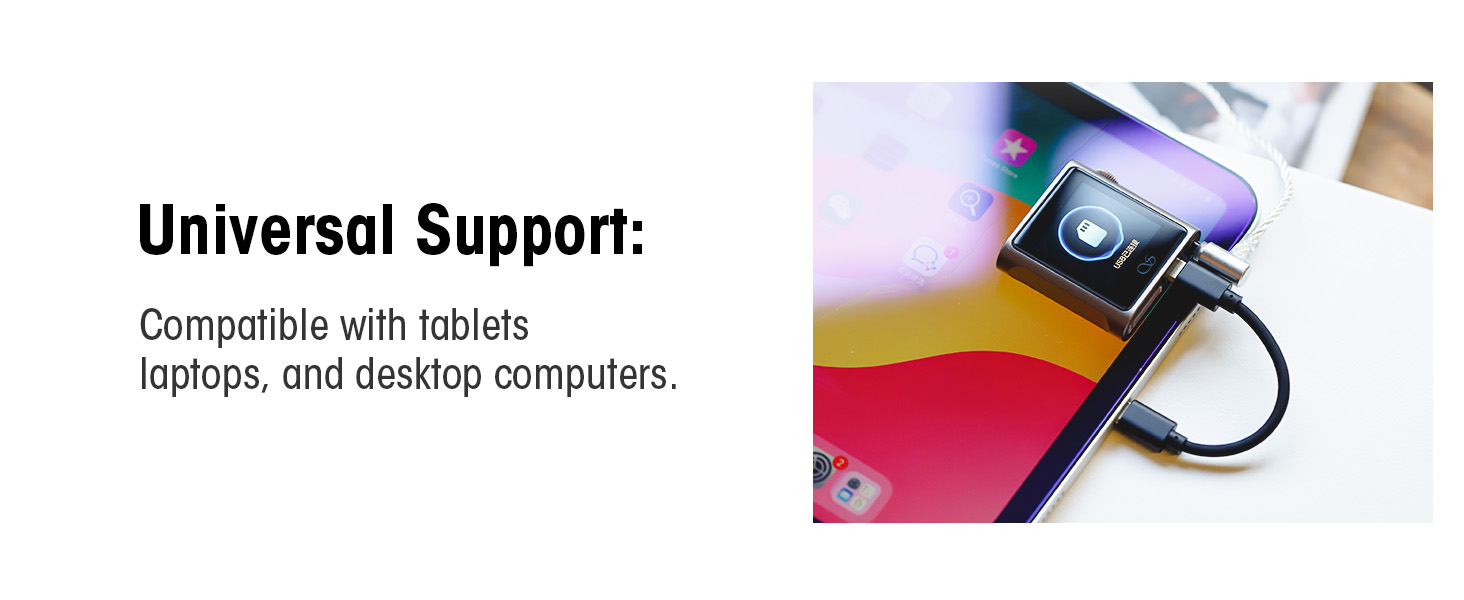
Figure 7: The SHANLING M0s connected to a laptop, demonstrating its use as an external DAC/AMP.
4.7. SyncLink Remote Control
For enhanced control, the SHANLING M0s can be remotely operated via the EDDICT PLAYER app on your smartphone. This allows for convenient song selection, volume adjustment, and playlist management.
- Download the EDDICT PLAYER app on your mobile phone.
- Open the app and click the icon in the upper left corner, then select 'SyncLink'.
- On your SHANLING M0s, open the 'SyncLink' option and connect to your phone.
- In the app, click 'Music Scan' to scan for songs on your M0s.
- Click 'Scan' to complete the process.

Figure 8: Visual guide for the SyncLink remote control operation process using the EDDICT PLAYER app.
5. Maintenance
5.1. Cleaning
Use a soft, dry cloth to clean the exterior of the device. Avoid using harsh chemicals or abrasive materials, which may damage the finish or screen. For the screen, a microfiber cloth is recommended.
5.2. Battery Care
To prolong battery life, avoid fully discharging the device frequently. Store the device in a cool, dry place when not in use for extended periods. Charge the device regularly, even if not in active use, to maintain battery health.
5.3. Firmware Updates
Periodically check for firmware updates to ensure optimal performance and access to new features. Firmware updates can typically be found on the official SHANLING website or through the EDDICT PLAYER app. Follow the provided instructions carefully when performing updates.
6. Troubleshooting
This section addresses common issues you might encounter with your SHANLING M0s.
| Issue | Possible Cause | Solution |
|---|---|---|
| Device does not power on | Low battery; System crash | Charge the device for at least 30 minutes. If unresponsive, perform a hard reset by holding the power button for an extended period (e.g., 10-15 seconds). |
| MicroSD card not found | Card not inserted correctly; Incompatible card; Corrupted card | Re-insert the MicroSD card firmly until it clicks. Ensure the card is formatted correctly (e.g., FAT32, exFAT). Try a different MicroSD card to rule out card issues. |
| Bluetooth pairing issues | Device not in pairing mode; Interference; Already paired to another device | Ensure both devices are in pairing mode. Move closer to the M0s. Disconnect from other Bluetooth devices. Restart both the M0s and the pairing device. |
| Unresponsive touch screen/UI glitches | Temporary software glitch; Excessive files on SD card | Restart the device. If the issue persists, consider a factory reset (this will erase all data). Ensure your MicroSD card does not exceed the recommended song limit (approx. 20,000 songs). |
| No sound output | Volume too low; Incorrect output mode; Headphone connection issue | Increase volume using the wheel. Check headphone connection. Ensure the correct output mode is selected in settings if using DAC/AMP features. |
For issues not covered here, or for further technical assistance, please contact SHANLING customer support.
7. Specifications
| Feature | Detail |
|---|---|
| Model Name | M0s |
| Brand | SHANLING |
| Product Dimensions | 1.38 x 4.38 x 4.5 inches |
| Item Weight | 7.8 ounces |
| Display Technology | LCD |
| Screen Size | 1.54-inch (240x240 resolution) |
| DAC Chip | Cirrus Logic CS43131 |
| Audio Output Power | Up to 60mW@32Ω (3.5mm single-ended) |
| Signal-to-Noise Ratio (SNR) | 126dB |
| Supported Audio Formats | 384 kHz/32-bit, DSD 128, WAV, Apple Lossless, AAC, MPEG, FLAC (and more) |
| Bluetooth Version | 5.0 (Bi-directional) |
| Bluetooth Transmitter Codecs | LDAC, aptX, AAC, SBC |
| Bluetooth Receiver Codecs | LDAC, SBC, AAC |
| Connectivity Technology | Bluetooth, USB (Type-C) |
| Media Type | Micro SD (supports up to 2TB) |
| Battery Type | 1 Lithium Ion battery (included) |
| Approx. Playback Time | 6-10 hours |
8. Warranty and Support
SHANLING provides a 1-year maintenance service for the M0s MP3 Player. For any technical advice or after-sales service inquiries, you can contact SHANLING customer support. They are available to assist you 24 hours a day. If the product experiences quality problems within the warranty period, it will be replaced unconditionally.
For the most up-to-date support information and contact details, please refer to the official SHANLING website or the contact information provided in your product packaging.


