
Introduction
Thank you for choosing the FILIEKEU Smart Watch FW16E. This manual provides essential information for setting up, operating, and maintaining your new smartwatch. Please read it carefully to ensure proper use and to fully utilize all its features.
What's in the Box
- FILIEKEU Smart Watch (1 unit)
- Charger (1 unit)
- Instruction Manual (1 unit)
- Straps (2 units)
Setup
1. Charging the Smart Watch
Before first use, fully charge your smartwatch. Connect the magnetic charger to the charging points on the back of the watch. Ensure the charger is properly aligned for a secure connection. A full charge provides approximately 20 days of battery life with moderate use, thanks to its 300mAh battery.
2. App Installation and Pairing
- Download the H Band app from your smartphone's app store (compatible with Android and iPhone).
- Open the app and create an account or log in.
- Enable Bluetooth on your smartphone.
- In the H Band app, navigate to the device pairing section and search for your FILIEKEU Smart Watch (FW16E).
- Select your watch from the list to establish a Bluetooth connection. Follow any on-screen prompts to complete the pairing process.
3. Strap Installation
Your watch comes with two straps: a Milanese steel bracelet and a silicone band. To attach a strap, align the spring bar with the lug holes on the watch body and gently push until it clicks into place. Ensure both ends are securely fastened before wearing.
Operating Instructions
1. Basic Navigation
The FILIEKEU Smart Watch features a 1.96-inch HD AMOLED full touch screen. Swipe left, right, up, or down to navigate through menus and functions. Tap to select an option. The adjustable brightness ensures clear visibility in various lighting conditions.

Image: The 1.96-inch AMOLED HD screen provides a high-definition visual experience with ultra-wide color gamut and accurate color reproduction.
2. Hands-Free Calling and Message Notifications
With its built-in microphone and speaker, the smartwatch allows you to make and receive calls directly from your wrist. Ensure Bluetooth is enabled and connected to your phone for call functionality. You will also receive instant notifications from various apps, which are displayed on the screen and accompanied by a vibration alert.

Image: The smartwatch supports Bluetooth calls, displaying call records, contacts, and allowing direct dialing. It also shows notifications from various social media and messaging applications.
3. Health Monitoring
The watch provides 24-hour monitoring of key health indicators:
- SpO2 (Blood Oxygen): Measures blood oxygen saturation levels.
- Heart Rate: Continuously tracks your heart rate.
- Blood Pressure: Provides blood pressure readings.
- Sleep Monitoring: Analyzes light sleep, deep sleep, and wake times to help you understand and adjust your sleeping habits.
- Female Cycle Tracking: Offers menstrual, pregnancy, and ovulation reminders for women.
Additionally, the watch reminds you to drink water regularly to maintain hydration.
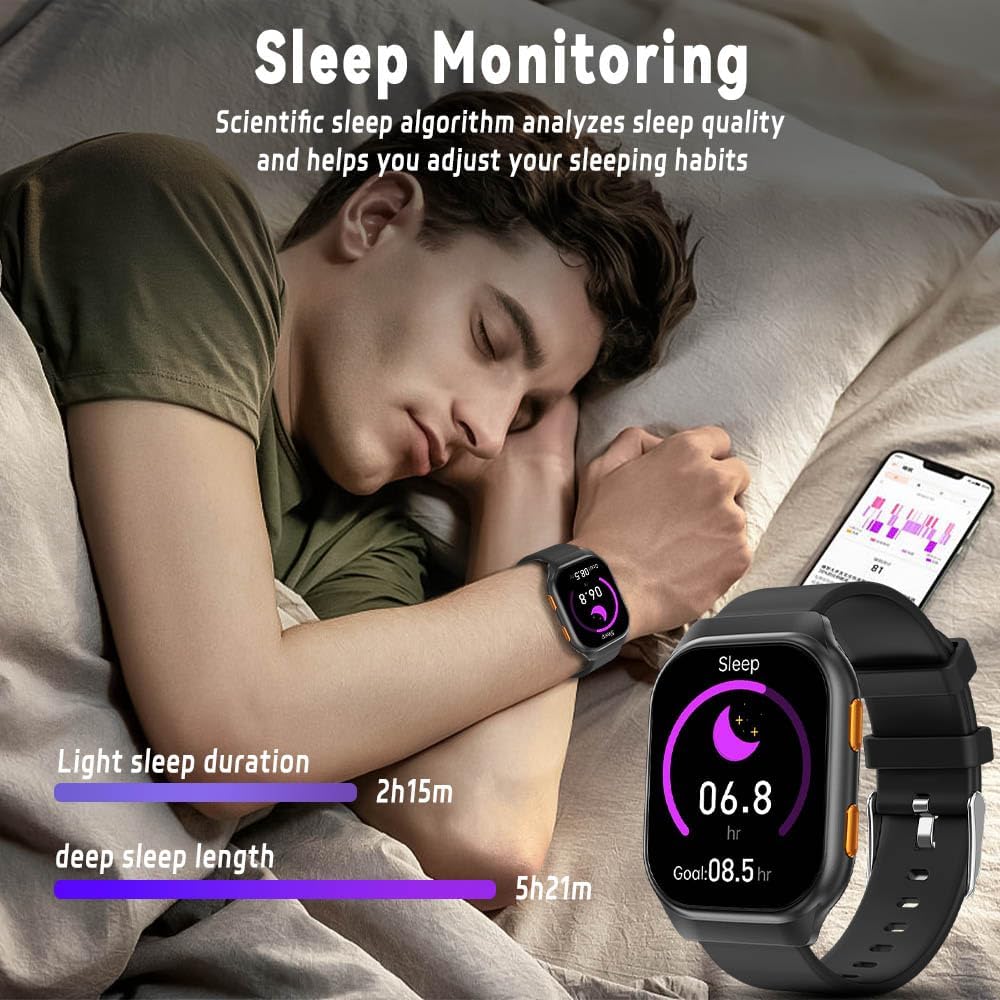
Image: The sleep monitoring feature scientifically analyzes sleep quality, displaying light sleep duration and deep sleep length.
4. Sport Modes and IP68 Waterproof Rating
The smartwatch supports over 100 sport modes, including running, walking, cycling, swimming, badminton, and yoga. It records real-time statistics directly on your wrist and automatically detects exercise, logging data in the H Band app. With an IP68 professional waterproof rating, the watch is resistant to sweat, dust, handwashing, and rain, making it suitable for daily use and showering.

Image: The watch offers over 100 sport modes, providing professional targeted sports data such as steps, calories burned, heart rate, and distance for various activities.

Image: The IP68 waterproof rating ensures the watch is protected against water, dust, handwashing, and rain, allowing for worry-free use during exercise and daily activities.
5. Custom Watch Faces
Personalize your smartwatch with over 200 available dials in the H Band app. You can also customize watch faces by setting any image from your phone as the background, allowing you to change your screen daily.

Image: The watch features a 300mAh battery for extended use, supports custom watch faces with various exquisite dials, and offers an always-on screen display.
6. Smart Voice Assistant
Utilize the smart voice assistant for hands-free control. Simply speak commands to play music, make calls, check the weather, or perform other operations.

Image: The Smart Voice Assistant allows users to control the watch and perform tasks such as playing music, setting alarms, making calls, and checking the weather using voice commands.
Maintenance
1. Cleaning
Regularly clean your smartwatch and straps. Use a soft, damp cloth to wipe the screen and watch body. For silicone straps, mild soap and water can be used. For Milanese steel straps, wipe with a dry cloth. Avoid using harsh chemicals or abrasive materials.
2. Battery Care
To prolong battery life, avoid fully discharging the watch frequently. Charge it when the battery level is low. Store the watch in a cool, dry place when not in use for extended periods.
Troubleshooting
- Watch not turning on: Ensure the watch is fully charged. Connect it to the charger and wait a few minutes before attempting to power it on.
- Unable to pair with phone:
- Ensure Bluetooth is enabled on your phone and the watch.
- Make sure the watch is within the Bluetooth range of your phone.
- Restart both your phone and the watch.
- Try unpairing and re-pairing the device through the H Band app.
- Inaccurate health data: Ensure the watch is worn snugly on your wrist, not too tight or too loose. Clean the sensors regularly. Note that smartwatch health data is for reference only and should not be used for medical diagnosis.
- Notifications not appearing: Check the notification settings in the H Band app and your phone's system settings to ensure permissions are granted for the app to display notifications.
- Charging issues: Ensure the magnetic charger is clean and properly aligned with the charging contacts on the watch. Try a different USB power source.
Specifications
| Feature | Detail |
|---|---|
| Model Number | FW16E |
| Screen Size | 1.96 Inches AMOLED |
| Battery Capacity | 300 Milliamp Hours (Lithium Polymer) |
| Connectivity | Bluetooth |
| Operating System | Android (compatible with Android/iPhone) |
| Water Resistance | IP68 |
| Item Weight | 6.5 ounces (0.19 Kilograms) |
| Special Features | Activity Tracker, Alarm Clock, Always On Display, Cycle Tracking, Phone Call |
Warranty and Support
For warranty information, technical support, or any inquiries regarding your FILIEKEU Smart Watch FW16E, please refer to the manufacturer's official website or contact their customer service directly. Contact details are typically provided in the packaging or on the product's support page online.