
1. Product Overview
The FITCAMX 4K Dash Cam (Model HD2-6386) is designed to integrate seamlessly into your Land Rover Range Rover (2023-2026) or Range Rover Sport Hybrid, providing an OEM factory look without visible wiring. It captures Ultra High Definition (UHD) 2160P video, ensuring clear and detailed recordings of your journeys. Key features include loop recording, G-sensor for impact detection, Wi-Fi connectivity with a dedicated app, and enhanced night vision capabilities.

Image: Before and After installation of the Fitcamx dash cam, highlighting its seamless integration for an OEM factory look.
2. Package Contents
Please verify that all items are present in your package:
- FITCAMX Front Camera (4K)
- 64GB SD Card
- Y Cable (for power connection)
- Card Reader
- Pry Tool
- User Manual

Image: Detailed view of the FITCAMX dash cam package contents.
3. Setup and Installation
The FITCAMX dash cam is designed for a plug-and-play installation, utilizing existing power sources from your vehicle's rearview mirror assembly. No complex wiring is required.
3.1 Compatibility Check
Ensure your vehicle is a Land Rover Range Rover or Range Rover Sport Hybrid manufactured between 2023 and 2026. If unsure, compare your rearview mirror style and year of manufacture, or contact FITCAMX support with a picture of your rearview mirror.
3.2 Installation Steps
- Prepare the Area: Carefully remove the existing plastic cover around your rearview mirror base. Use the provided pry tool to gently separate the console and mirror base pieces.
- Disconnect Mirror Power: Once the mirror base is exposed, disconnect the existing power cable from the rearview mirror.
- Connect Y-Cable: Connect the provided Y-cable to the vehicle's power source and then to the rearview mirror. The Y-cable will split the power to both the mirror and the dash cam.
- Install Dash Cam: The FITCAMX dash cam comes in a casing that replaces the original mirror base cover. Carefully route the dash cam's power cable through the new casing.
- Secure Casing: Align the new dash cam casing with the mirror base and snap it into place. Ensure all clips are securely engaged.
- Test Functionality: Before fully reassembling, turn on your vehicle to ensure the dash cam powers on and records correctly.
- Final Assembly: Reattach any remaining console pieces, ensuring a clean and secure fit.
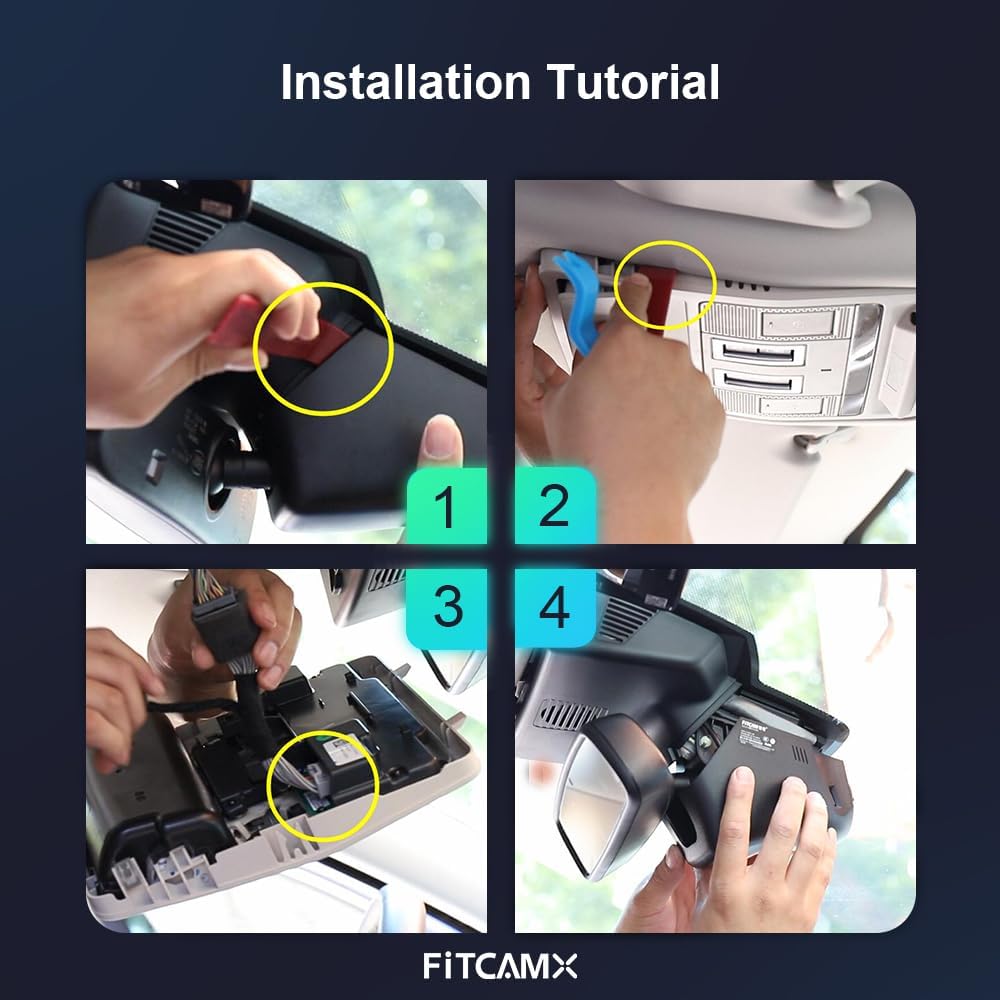
Image: Visual guide illustrating the key steps for dash cam installation.
3.3 Video Installation Guide
For a detailed visual walkthrough of the installation process, please refer to the official installation video below. This video demonstrates the steps for Land Rover Range Rover (HD2-6386) models.
Video: Official installation guide for the FITCAMX Dash Cam (HD2-6386) in a Land Rover Range Rover. This video provides step-by-step visual instructions for removing trim, connecting power, and securing the dash cam.
4. Operating Instructions
4.1 Automatic Recording
The dash cam will automatically begin recording when your vehicle starts. No manual intervention is required for standard operation.
4.2 UHD 2160P Video Recording
Equipped with a state-of-the-art CMOS sensor and f/1.6 large aperture lens, the dash cam records video at up to 2160P/30fps. Wide Dynamic Range (WDR) technology ensures precise color and superior picture quality, even in low-light conditions, making details like license plates and road signs clearly visible.

Image: Demonstration of the UHD 2160P video quality captured by the dash cam.
4.3 Loop Recording
The dash cam features loop recording, which automatically overwrites the oldest videos when the memory card is full. This ensures continuous recording without manual management. Recording time can be set to 1, 3, or 5-minute segments via the FITCAMX APP.

Image: Explanation of the automatic loop recording feature.
4.4 G-Sensor (Emergency Recording)
The built-in G-sensor detects sudden impacts or collisions. When an event is detected, the current video footage is automatically locked and protected from being overwritten, serving as a reliable witness.

Image: The G-Sensor automatically locks video during impacts.
4.5 Wi-Fi & FITCAMX APP
Connect your smartphone to the dash cam via Wi-Fi to access the FITCAMX APP. Through the app, you can view real-time video, download recordings, and manage settings. The camera records automatically, so continuous Wi-Fi connection is only needed for video management or downloads, not for recording itself. This does not affect CarPlay or Bluetooth functionality.
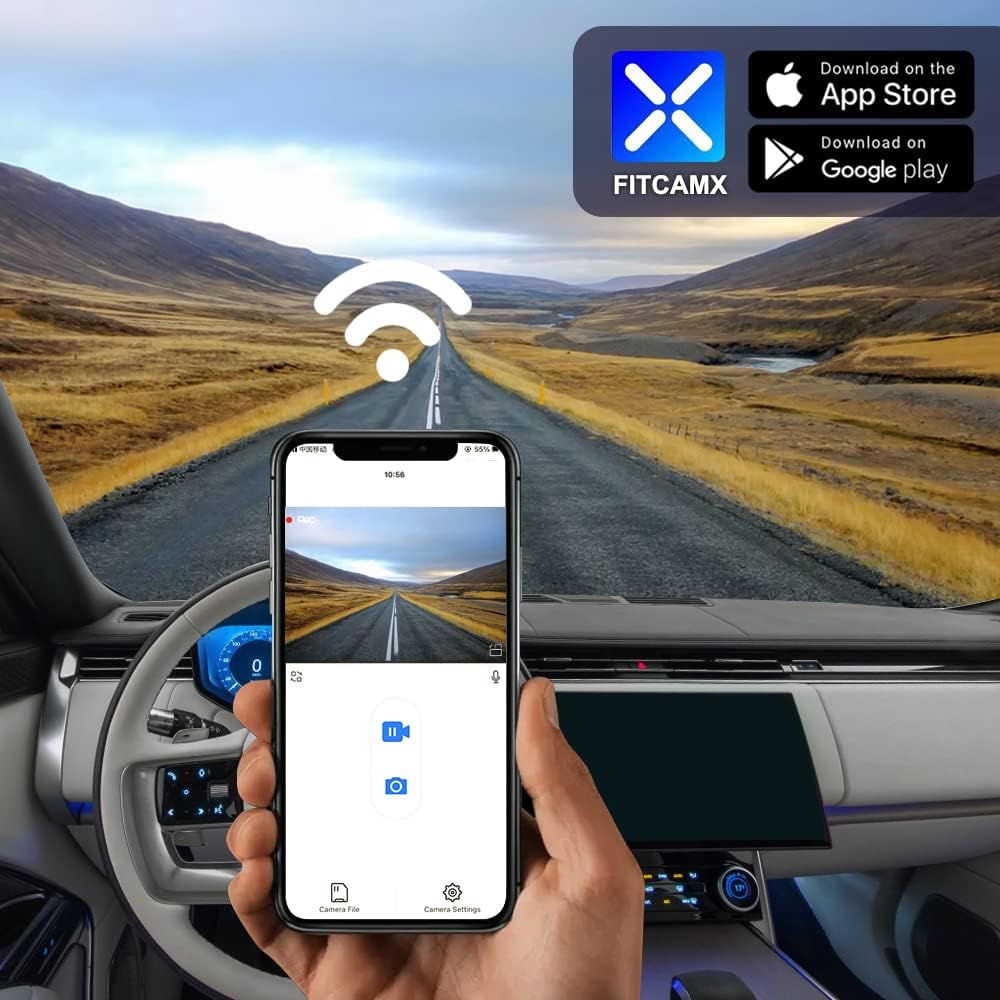
Image: Using the FITCAMX App to view and manage dash cam footage.
4.6 Night Vision
The dash cam is equipped with advanced night vision technology, ensuring clear video capture even in low-light or nighttime driving conditions.

Image: Enhanced night vision capability for clear recordings in the dark.
4.7 Parking Mode (Optional Upgrade)
To enable parking monitoring, an optional fuse box cable is required. This accessory allows the dash cam to continue recording or monitor impacts while the vehicle is parked. Search for ASIN: B09PQ9KDYX to order the fuse box cable.

Image: Optional accessory for enabling parking mode.
5. Maintenance
To ensure optimal performance and longevity of your FITCAMX Dash Cam, regular maintenance is recommended:
- SD Card Management: Periodically format the microSD card (every 1-2 months) to prevent data corruption and ensure smooth loop recording. Back up any important footage before formatting.
- Lens Cleaning: Gently clean the camera lens with a soft, lint-free cloth to remove dust or smudges that could affect video clarity.
- Firmware Updates: Check the FITCAMX official website or app for any available firmware updates to ensure your dash cam has the latest features and bug fixes.
- Temperature Range: The dash cam is designed to operate in temperatures from -20°C to 85°C (-4°F to 185°F). Avoid exposing it to extreme temperatures outside this range for extended periods.
6. Troubleshooting
Here are some common questions and their solutions:
- How to ensure the correct model?
Compare your vehicle style, year, and rearview mirror cover shape. If uncertain, contact FITCAMX with vehicle details. - Can I use CarPlay/Bluetooth when driving?
Yes. The dash cam records automatically after the car starts, so you do not need to keep Wi-Fi connected to the camera constantly. Your phone can connect to CarPlay/Bluetooth independently. - Can I add a rear camera if I already have a front cam?
No, the PCB boards are different for front-only and front+rear camera systems. You would need to replace the entire unit if you wish to change video resolution or add a rear camera.
7. Specifications
| Brand | FITCAMX |
| Model Name | Fitcamx |
| Model Number | HD2-6386 |
| Vehicle Service Type | Range Rover 2023-2026 & Sport/SportHybrid |
| Connectivity Technology | Powerline, Wi-Fi |
| Special Feature | FITCAMX APP, OEM Style, G-Sensor, Loop Recording, WDR, Night Vision |
| Video Capture Resolution | Front 2160P Only |
| Optical Sensor Technology | CMOS |
| Flash Memory Type | microSD |
| Maximum Aperture | f/1.6 |
| Frame Rate | 30 fps |
| Flash Memory Supported Size Maximum | 256 GB |
| Color | Black |
| Item Weight | 1 Pounds |
| Item Dimensions (D x W x H) | 9"D x 7"W x 4"H |
8. Warranty and Support
The FITCAMX Dash Cam comes with a 1-Year Warranty. We are committed to providing prompt responses and lifetime after-sales support. Should you have any questions or require assistance with your product, please do not hesitate to contact FITCAMX customer service.