
1. Introduction
The XMSJSIY DB9 RS485 Connector Serial Adapter Cable provides a reliable and convenient solution for connecting devices with serial network functions. This cable features a D-SUB 9-pin connector on one end and a 2-pin breakout with solderless terminals on the other, allowing for easy and secure wire connections without the need for soldering. Its robust design ensures stable data transmission and broad compatibility with various computer systems and industrial equipment.

Image 1.1: Overview of the XMSJSIY DB9 RS485 Connector Serial Adapter Cable.
2. Package Contents
Please verify that all items are present upon opening the package:
- 1 x XMSJSIY DB9 RS485 Connector Serial Adapter Cable
3. Product Features
- Solder-Free Connection: Easily connect wires to the terminal end using a screwdriver, eliminating the need for soldering.
- Gold-Plated DB9 Plug: Features fine gold-plated treatment for oxidation resistance, abrasion resistance, corrosion resistance, and durability, ensuring stable signal transmission.
- High-Quality Copper Terminals: Made of high-quality copper for tight contact and good conductivity, capable of withstanding approximately 3A current.
- Broad Compatibility: Compatible with various computer systems including Windows XP, Vista, 7, 8, 10, Mac OS, and Linux 2.4.0 or later, as well as industrial control equipment.
- Durable Construction: Flexible PVC body provides durability and stretch resistance.
- Enhanced Signal Protection: Features woven mesh and aluminum foil double-layer anti-interference shielding for stable data transmission.

Image 3.1: The cable features a flexible PVC body for enhanced durability and resistance to stretching.

Image 3.2: Internal structure showing woven mesh and aluminum foil shielding for stable data transmission.
4. Setup and Installation
This cable is designed for easy, solder-free installation. Follow these steps to connect your devices:
- Identify Connections: The DB9 female connector has pins labeled 1 through 9. The 2-pin breakout cable typically uses red for positive (+) and black for negative (-). For RS485 applications, pin 3 is commonly used for Red (+) and pin 8 for Black (-). Refer to your device's documentation for specific pin assignments.
- Prepare Wires: Ensure the wires from your device are stripped to an appropriate length for insertion into the terminal blocks.
- Connect Wires: Insert the prepared wires into the corresponding red and black cold-crimp terminals on the breakout end of the cable. Use a small screwdriver to tighten the screws on the terminals, securing the wires firmly. No soldering is required.
- Connect DB9: Plug the DB9 female connector into the male DB9 port of your compatible device (e.g., computer, PLC controller, industrial instrument).
- Secure Connection: If your DB9 port has screws, tighten them to secure the connection and prevent accidental disconnections.

Image 4.1: DB9 Female pinout showing common RS485 connections (Pin 3: Red +, Pin 8: Black -).

Image 4.2: Detail of the solderless terminal connection for the red (+) and black (-) wires.

Image 4.3: Example of the DB9 connector and 2-pin breakout cable connected to a terminal block for easy wiring.
5. Operating Instructions
Once the cable is securely connected to your devices, it facilitates serial data communication. The operation of the connected devices will depend on their specific functions and software configurations. Ensure that the drivers for any connected serial devices are correctly installed on your computer system.
This cable is suitable for a wide range of applications, including:
- Automatic control equipment
- PLC controllers
- Touch screens
- Programmers
- Data converters
- Servo motors
- Industrial control equipment
- Cash registers and tax controllers
- Desktop PCs and other computer systems
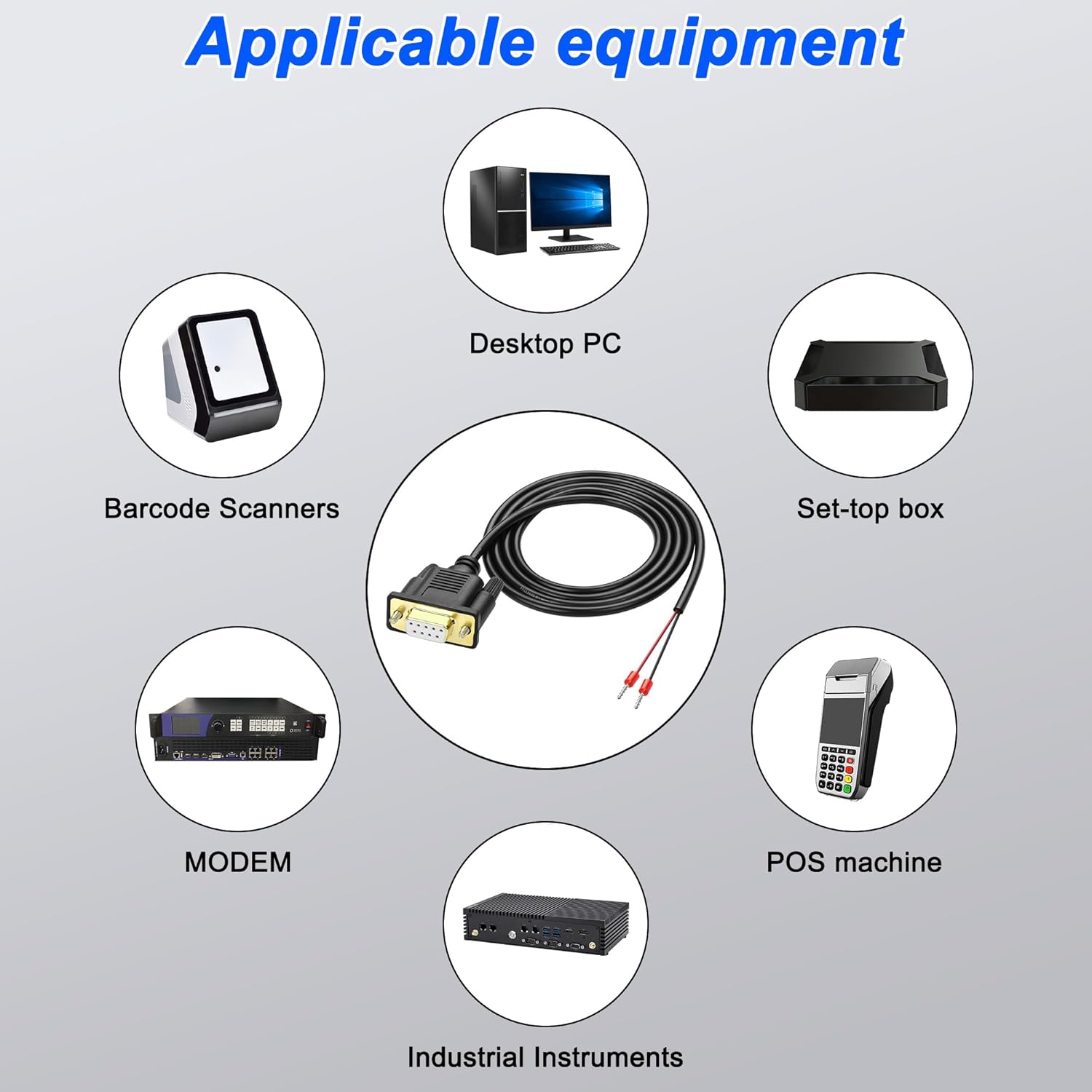
Image 5.1: Examples of devices compatible with the DB9 RS485 serial adapter cable.
6. Maintenance
To ensure the longevity and optimal performance of your XMSJSIY DB9 RS485 Connector Serial Adapter Cable, follow these maintenance guidelines:
- Storage: Store the cable in a cool, dry place away from direct sunlight and extreme temperatures.
- Cleaning: If necessary, gently wipe the cable and connectors with a soft, dry cloth. Avoid using harsh chemicals or abrasive materials.
- Handling: Avoid excessive bending, twisting, or pulling of the cable, especially near the connectors, to prevent internal wire damage.
- Inspection: Periodically inspect the cable and connectors for any signs of wear, damage, or corrosion. Replace the cable if any damage is observed.
7. Troubleshooting
If you encounter issues while using the DB9 RS485 Connector Serial Adapter Cable, consider the following troubleshooting steps:
- No Connection/Data Transfer:
- Ensure both the DB9 connector and the terminal wires are securely connected.
- Verify that the wire connections at the terminal end match the correct pin assignments for your device (e.g., Red to +, Black to -).
- Check if the connected devices are powered on and functioning correctly.
- Confirm that the correct drivers are installed for your serial device on the computer.
- Test the cable with another compatible device if possible to rule out a cable fault.
- Intermittent Connection/Signal Loss:
- Ensure all connections are tight and free from movement.
- Check for any physical damage to the cable or connectors.
- Verify that the cable is not exposed to excessive electromagnetic interference (EMI). The double-layer shielding helps, but extreme environments can still cause issues.
- Incorrect Data:
- Double-check the pin assignments and ensure they are correct for your specific application.
- Verify the serial communication settings (baud rate, data bits, parity, stop bits) on both connected devices.
8. Specifications
| Brand | XMSJSIY |
| Model | DB91323 |
| Connector Type | DB9 Female |
| Cable Type | Serial |
| Number of Pins | 9 |
| Cable Length | 1.5 meters (approximately 4.9 feet) |
| Wire Diameter | 5.0mm (approximate) |
| Compatible Devices | Computers, PLC controllers, industrial instruments, barcode scanners, POS machines, modems, set-top boxes, etc. |
| Special Features | Solderless terminals, Gold-plated connector, Double-layer anti-interference shielding, Flexible PVC body |
| Indoor/Outdoor Usage | Indoor, Outdoor |
| Item Weight | 0.08 Kilograms |

Image 8.1: Key dimensions of the DB9 RS485 Connector Serial Adapter Cable.
9. Warranty and Support
For warranty information or technical support regarding your XMSJSIY DB9 RS485 Connector Serial Adapter Cable, please refer to the product packaging or contact the retailer where the product was purchased. You may also visit the official XMSJSIY website for further assistance.