1. Product Overview
The ULANZI MA33 Metal Phone Tripod Mount is a versatile and durable accessory designed to securely hold your smartphone for various photography and videography needs. It features a robust aluminum construction, dual cold shoe mounts, and compatibility with Arca-Swiss and Falcam F38 quick-release systems, offering extensive expansion possibilities for external accessories.
Key Features:
- Wide Compatibility: Adjustable clamp width from 60mm to 95mm (2.36-3.74 inches) to fit most smartphones.
- Dual Cold Shoe Mounts: Integrated cold shoes for attaching lights, microphones, or other accessories.
- Multiple 1/4" Thread Holes: For flexible mounting options on tripods, stands, and other gear.
- Quick Release System: Compatible with Arca-Swiss and Falcam F38 quick-release plates for efficient device transitions.
- Durable Construction: Made from aluminum with an anodized finish and anti-slip silicone pads for secure grip and protection.
What's in the Box:
- ULANZI MA33 Metal Phone Tripod Mount Adapter

This image displays the ULANZI MA33 mount holding a smartphone. On the left, the phone is mounted vertically with a microphone and an LED light attached to the cold shoe mounts. On the right, the phone is mounted horizontally, also with an LED light attached. This illustrates the versatility of the mount for different shooting orientations and accessory integration.
2. Setup Instructions
2.1 Attaching Your Smartphone
- Adjust Clamp Width: Rotate the screw knob at the top of the mount counter-clockwise to expand the phone clamp to a width greater than your smartphone. The clamp adjusts from 60mm (2.36 inches) to 95mm (3.74 inches).
- Insert Smartphone: Carefully place your smartphone into the clamp, ensuring it sits securely against the anti-slip silicone pads.
- Secure Smartphone: Rotate the screw knob clockwise to tighten the clamp until your smartphone is held firmly in place. Do not overtighten.
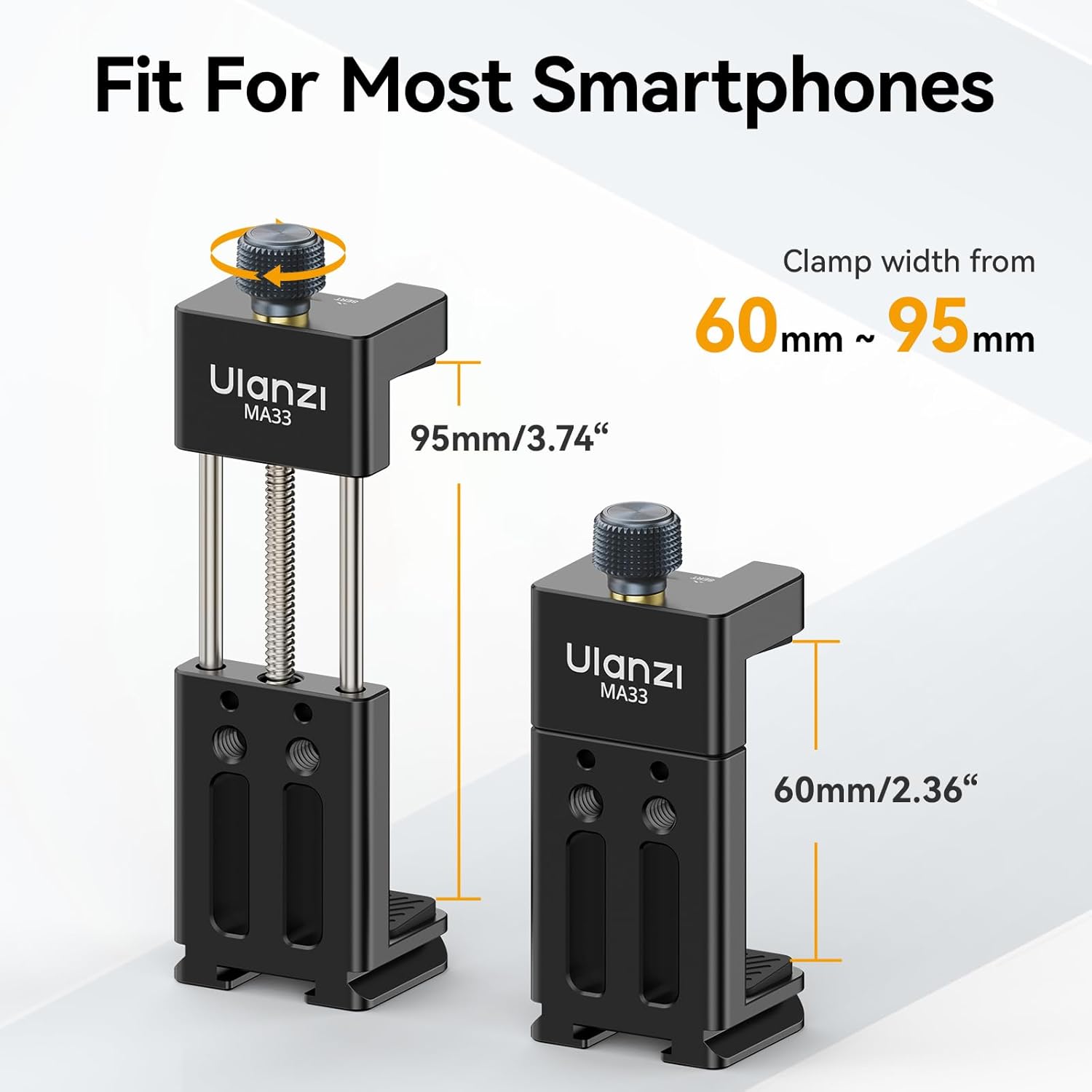
This image illustrates the adjustable clamp mechanism of the ULANZI MA33. It shows the mount in its minimum (60mm) and maximum (95mm) expanded states, indicating how to adjust it to fit various smartphone sizes.
2.2 Mounting on a Tripod or Stand
The MA33 mount offers multiple ways to attach to tripods, stands, or other camera accessories:
- 1/4" Screw Holes: The mount features multiple 1/4" threaded holes on its base and sides. Align one of these holes with the 1/4" screw on your tripod or stand and rotate to secure.
- Arca-Swiss / Falcam F38 Compatibility: The base of the MA33 mount is designed with an Arca Swiss rail, allowing direct attachment to Arca-Swiss compatible tripod heads or quick-release plates. It is also compatible with Falcam F38 quick-release plates for seamless transitions between different setups.

This image highlights the quick-release compatibility of the ULANZI MA33 mount. It shows the mount's base fitting into an Arca-Swiss style clamp and also indicates compatibility with Uka (Falcam F38) quick-release systems, allowing for fast and secure attachment to various support systems.
2.3 Attaching Accessories (Cold Shoe Mounts)
The MA33 mount includes two cold shoe mounts, one on top and one on the side, for expanding your setup with additional accessories.
- Identify Cold Shoe: Locate the cold shoe slots on the top and side of the mount.
- Slide Accessory: Slide your cold shoe compatible accessory (e.g., microphone, LED light) into the desired cold shoe slot until it is fully seated.
- Secure Accessory: If your accessory has a locking mechanism (e.g., a tightening wheel), secure it to prevent accidental detachment.

This image provides a detailed view of the ULANZI MA33 mount, highlighting its key components. It clearly labels the cold shoe mounts, the screw knob for adjusting the clamp, the protective rubber pads, the Arca Swiss rail at the base, and the 1/4" screw holes for various mounting options.
3. Operating the Mount
3.1 Adjusting Phone Orientation
The ULANZI MA33 mount allows for both horizontal (landscape) and vertical (portrait) phone orientations, depending on how it is attached to your tripod or stand. If your tripod head has a ball joint or a rotating plate, you can easily switch between orientations without re-mounting the phone.
- Horizontal (Landscape) Mode: Typically achieved by mounting the phone clamp directly onto a tripod head in its standard position.
- Vertical (Portrait) Mode: Can be achieved by rotating the tripod head or by utilizing a dedicated L-bracket if your setup allows. The MA33 itself holds the phone in a fixed orientation relative to its mounting point.
3.2 Using with Various Setups
The MA33's multiple mounting points and cold shoe slots make it suitable for a variety of applications:
- Desktop Tripod: Ideal for video calls, streaming, or stable tabletop recording.
- Full-Size Tripod: For professional-grade stability in photography and videography.
- Monopod/Selfie Stick: Extends reach for vlogging or group shots.
- Handheld Rig: Combine with handles and other accessories for mobile filmmaking.
4. Maintenance and Care
- Cleaning: Wipe the mount with a soft, dry cloth to remove dust and fingerprints. For stubborn dirt, a slightly damp cloth can be used, followed by immediate drying. Avoid harsh chemicals or abrasive materials.
- Storage: Store the mount in a clean, dry place away from extreme temperatures and direct sunlight.
- Screw Mechanism: Periodically check the screw knob for smooth operation. If it becomes stiff, a small drop of machine oil can be applied to the threads to ensure smooth adjustment.
- Silicone Pads: Ensure the anti-slip silicone pads are clean and free from debris to maintain optimal grip on your smartphone.
5. Troubleshooting
- Phone not holding securely:
- Ensure the screw knob is tightened sufficiently.
- Verify that your phone's width is within the 60mm-95mm range.
- Check if the silicone pads are clean and intact.
- Screw knob feels loose or stiff:
- If the screw knob feels loose, ensure it is fully engaged with the threading.
- If stiff, apply a small amount of machine oil to the screw threads as part of routine maintenance.
- Accessories not fitting cold shoe mounts:
- Ensure your accessory is cold shoe compatible.
- Check for any obstructions in the cold shoe slot.
- Mount not attaching to tripod:
- Verify that your tripod has a 1/4" screw or is Arca-Swiss compatible.
- Ensure the mount is correctly aligned and tightened onto the tripod's screw or quick-release plate.
6. Specifications
| Model Name | UKA MA33 |
| Item Model Number | MA33-US-10 |
| Brand | ULANZI |
| Material | Aluminum, Silicone |
| Color | Black |
| Product Dimensions | 1.25 x 3.7 x 1.49 inches |
| Item Weight | 4.5 ounces (0.28 Pounds) |
| Compatible Devices | Smartphones (width 60-95mm / 2.36-3.74 inches) |
| Special Feature | Slip Resistant |
| Mounting Points | 2 Cold Shoe Mounts, Multiple 1/4" Threaded Ports, Arca Swiss Rail |
7. Warranty and Support
ULANZI products are manufactured to high-quality standards. For information regarding warranty coverage, terms, and conditions, please refer to the warranty card included with your product or visit the official ULANZI website.
For technical support, product inquiries, or assistance with your ULANZI MA33 Metal Phone Tripod Mount, please contact ULANZI customer service through their official website or the retailer where the product was purchased.


