
Monster Monster Cycle Plus
Monster Cycle Plus Bluetooth Speaker User Manual
Model: Monster Cycle Plus
Brand: Monster
1. Introduction
Thank you for purchasing the Monster Cycle Plus Bluetooth Speaker. This portable party speaker is designed to deliver powerful audio with dynamic lighting effects, making it ideal for various indoor and outdoor events. This manual provides essential information for setting up, operating, maintaining, and troubleshooting your speaker to ensure optimal performance and longevity.
2. Important Safety Information
Please read all safety instructions carefully before using this product. Keep this manual for future reference.
- Do not expose the speaker to extreme temperatures, direct sunlight, or high humidity.
- Avoid dropping or subjecting the speaker to strong impacts.
- Do not disassemble, repair, or modify the speaker yourself. Refer all servicing to qualified personnel.
- Use only the provided or approved charging cables and adapters.
- Keep the speaker away from medical devices, as its magnetic components may interfere with their operation.
- Ensure all ports are securely closed when using the speaker near water to maintain its IPX6 waterproof rating.
3. Package Contents
Verify that all items are present in the package:
- Monster Cycle Plus Bluetooth Speaker
- AUX Cable
- USB-C Charging Cable
- Quick Start Guide
- Warranty Letter
4. Product Overview
Familiarize yourself with the components and controls of your Monster Cycle Plus speaker.

Figure 4.1: Front view of the Monster Cycle Plus speaker, showcasing its dual speaker design and integrated lighting.
4.1 Control Panel

Figure 4.2: Top control panel with various function buttons and a rotary knob.
- Power Button: Press and hold to turn the speaker on or off.
- Bluetooth Button: Press to enter Bluetooth pairing mode.
- Volume Knob: Rotate to adjust the master volume.
- Sound Mode Button (Bass Boost): Cycles through different EQ modes (e.g., Bass Boost).
- Backup/Original Vocals Switch: Toggles vocal effects for karaoke.
- Microphone Priority: Prioritizes microphone audio over music.
- Light Mode Button: Cycles through various lighting effects.
- Play/Pause Button: Controls media playback.
- Previous/Next Track Buttons: Skips tracks.
- Mic Volume +/-: Adjusts microphone input volume.
- Echo +/-: Adjusts echo effect for microphone.
4.2 Ports and Connections
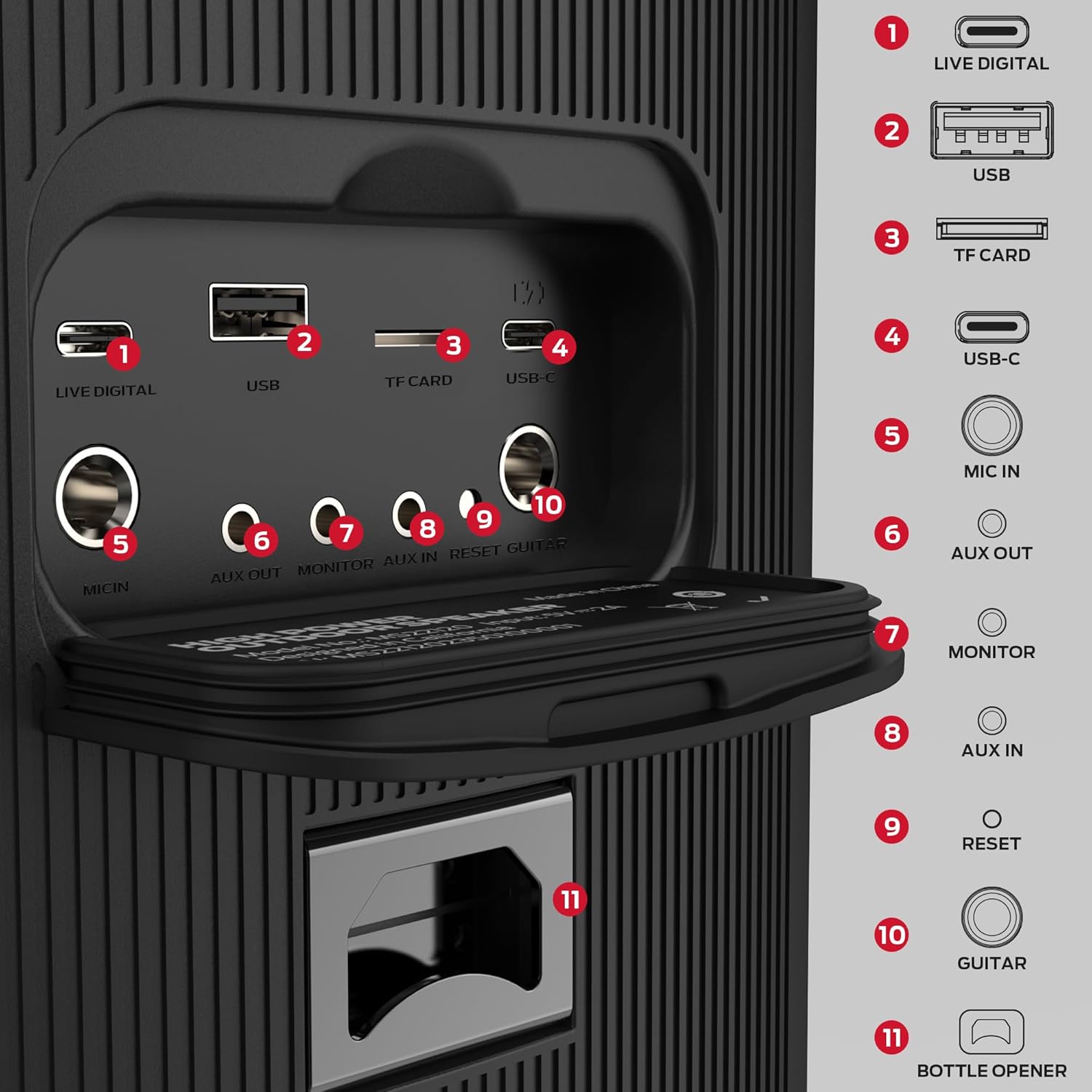
Figure 4.3: Rear panel with input/output ports and integrated bottle opener.
- LIVE DIGITAL: Digital audio input.
- USB: USB port for media playback.
- TF CARD: MicroSD card slot for media playback.
- USB-C: Charging port.
- MIC IN: 6.35mm input for microphone.
- AUX OUT: 3.5mm audio output.
- MONITOR: Monitor output.
- AUX IN: 3.5mm audio input.
- RESET: Reset button (use a pin to press).
- GUITAR: 6.35mm input for guitar.
- BOTTLE OPENER: Integrated bottle opener for convenience.
5. Setup
5.1 Charging the Speaker
Before first use, fully charge the speaker. Connect the supplied USB-C cable to the speaker's USB-C port and the other end to a compatible USB power adapter (not included) or a computer USB port. The charging indicator will illuminate. A full charge provides up to 24 hours of playtime, depending on volume and audio content.
5.2 Initial Power On
Press and hold the Power button on the control panel for approximately 3 seconds until you hear an audible prompt and the lights illuminate. The speaker is now ready for operation.
6. Operating Instructions
6.1 Bluetooth Pairing
The Monster Cycle Plus speaker features Bluetooth 5.3 for stable wireless connectivity up to 66 feet (20 meters).

Figure 6.1: Bluetooth pairing process on a mobile device.
- Turn on the Monster Cycle Plus speaker. It will automatically enter Bluetooth pairing mode.
- On your mobile device (smartphone, tablet, laptop), enable Bluetooth.
- Search for "Monster Cycle Plus" in the list of available devices.
- Select "Monster Cycle Plus" to connect. A confirmation sound will indicate successful pairing.
6.2 Audio Playback (USB, TF Card, AUX)
In addition to Bluetooth, the speaker supports audio playback from various sources:
- USB Drive: Insert a USB flash drive into the USB port. The speaker will automatically detect and play compatible audio files.
- TF Card: Insert a TF (MicroSD) card into the TF CARD slot. The speaker will automatically detect and play compatible audio files.
- AUX Input: Connect an external audio device (e.g., MP3 player, computer) to the AUX IN port using the supplied 3.5mm AUX cable. The speaker will switch to AUX mode.
6.3 Lighting Modes
The speaker features 7 dynamic lighting effects to enhance your audio experience.
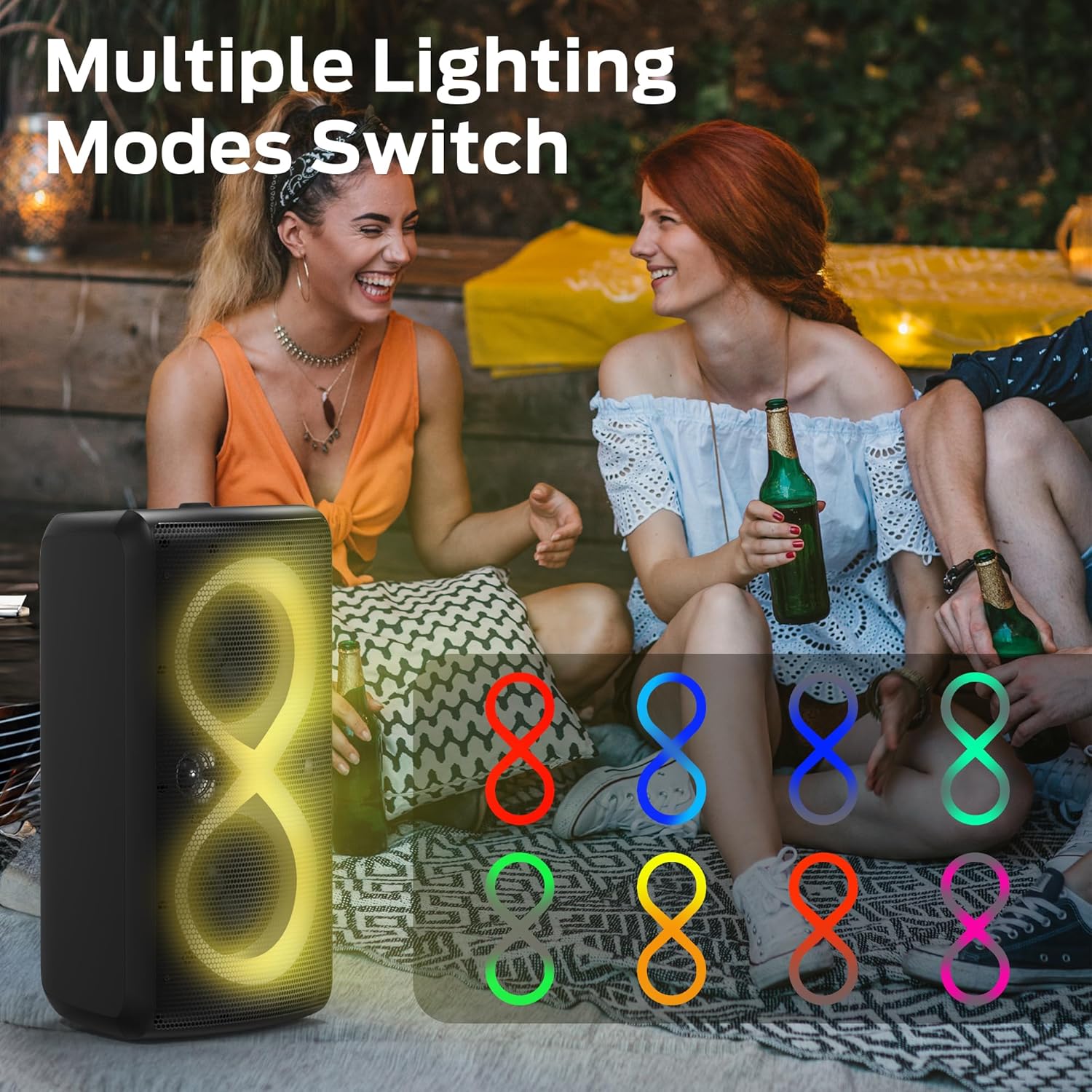
Figure 6.2: Examples of dynamic lighting modes.
Press the Light Mode button on the control panel to cycle through the available lighting effects. Press and hold the button to turn the lights off or on.
6.4 EQ Modes
The speaker offers 3 EQ modes to optimize sound for different content.
Press the Sound Mode button (often labeled 'Bass Boost') to switch between modes such as Bass Boost, Vocal, and Classic. Each mode adjusts the audio profile for a specific listening experience.
6.5 True Wireless Stereo (TWS) / Bluetooth Broadcast Link
You can connect multiple Monster Cycle Plus speakers together for a synchronized audio experience, extending your sound coverage up to 100 units.
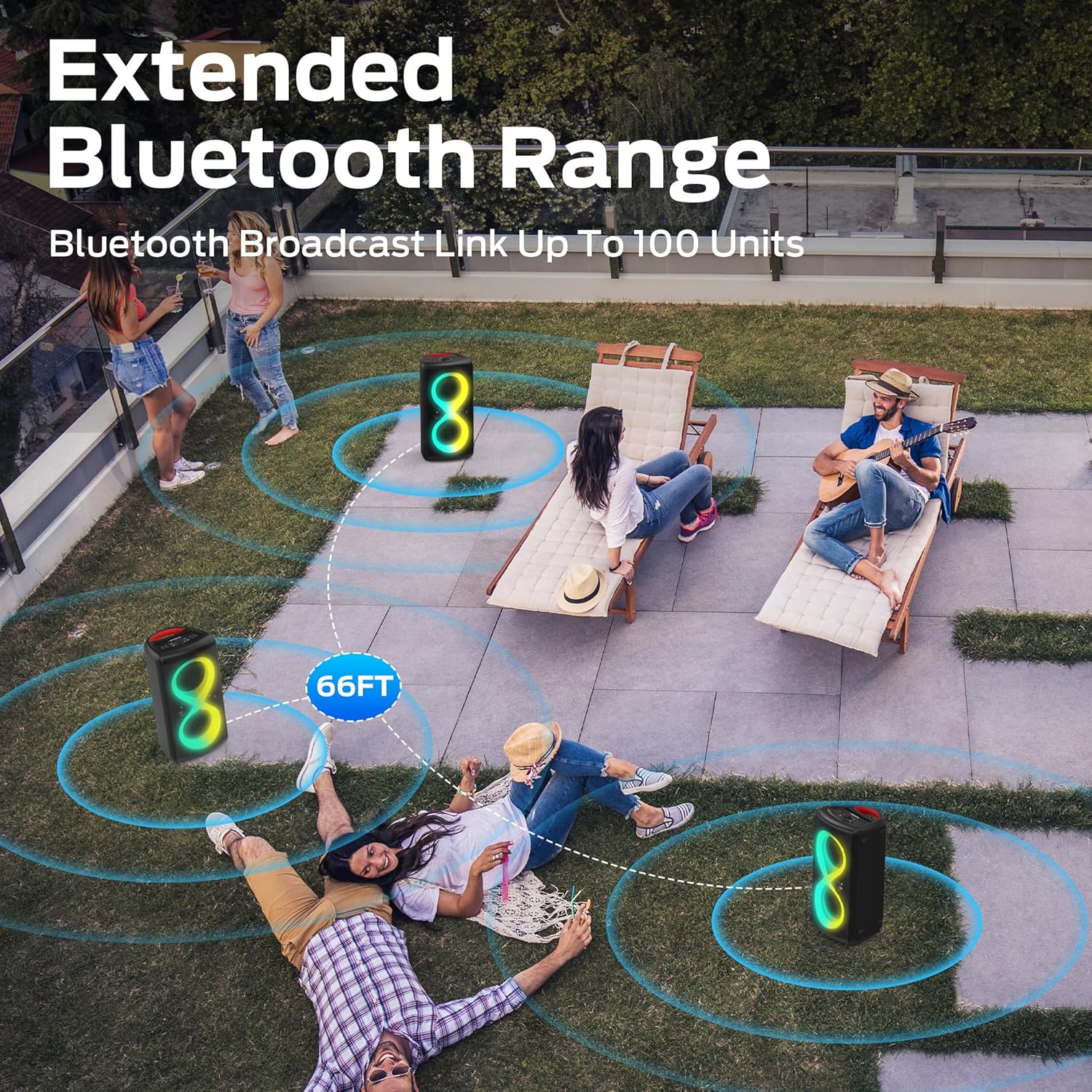
Figure 6.3: Multiple speakers linked via Bluetooth Broadcast for extended range.
- Ensure both (or all) speakers are powered on and not connected to any Bluetooth device.
- On one speaker (this will be the primary speaker), press and hold the Bluetooth button until you hear a pairing prompt.
- On the second speaker (and any subsequent speakers), press the Bluetooth button briefly. They should automatically search for and connect to the primary speaker.
- Once connected, the primary speaker's Bluetooth indicator will remain solid, and the secondary speakers will indicate a successful connection.
- Now, connect your mobile device to the primary speaker via Bluetooth as described in Section 6.1. Audio will play through all linked speakers.
6.6 Microphone and Guitar Input
Connect a microphone to the MIC IN port or a guitar to the GUITAR port. Use the dedicated Mic Volume and Echo controls on the control panel to adjust the sound. The Microphone Priority button can be used to automatically lower music volume when the microphone is in use.
6.7 Phone Holder Function
The speaker features an integrated slot on top designed to hold smartphones and tablets, providing a convenient viewing angle for lyrics or videos during karaoke or general use.

Figure 6.4: Integrated phone and tablet holder for convenience.
6.8 Portability
The Monster Cycle Plus is designed for easy transport with integrated grab handles, allowing for single-handed or two-handed carrying.

Figure 6.5: Ergonomic handles for easy portability.
7. Maintenance
7.1 Cleaning
To clean the speaker, use a soft, dry cloth. For stubborn dirt, slightly dampen the cloth with water. Do not use abrasive cleaners, alcohol, benzene, or other chemical solvents, as these may damage the surface.
7.2 Storage
When not in use for extended periods, store the speaker in a cool, dry place away from direct sunlight and extreme temperatures. It is recommended to charge the battery at least once every three months to maintain its health.
8. Troubleshooting
If you encounter issues with your Monster Cycle Plus speaker, refer to the following common problems and solutions:
| Problem | Possible Cause | Solution |
|---|---|---|
| Speaker does not turn on. | Battery is depleted. | Charge the speaker using the USB-C cable. |
| No sound from speaker. | Volume is too low; Incorrect input source; Device not connected. | Increase volume; Select correct input (Bluetooth, AUX, USB, TF); Re-pair Bluetooth device. |
| Bluetooth pairing fails. | Speaker is already connected to another device; Device is out of range; Bluetooth not enabled on source. | Disconnect from other devices; Move device closer to speaker; Ensure Bluetooth is enabled. |
| TWS (multi-speaker) connection fails. | Speakers are already paired to other devices; Incorrect pairing sequence. | Ensure all speakers are disconnected from other devices before initiating TWS pairing. Follow the TWS pairing steps precisely. |
| Sound distortion at high volume. | Volume is too high; Audio source quality is poor. | Reduce volume; Use a high-quality audio source. |
| Lights are not working. | Lights are turned off. | Press the Light Mode button to cycle through effects or turn lights on. |
| Speaker shuts down randomly. | Low battery; Internal error. | Charge the speaker fully. If the issue persists, try pressing the RESET button with a thin object. If still unresolved, contact customer service. |
9. Specifications
Technical specifications for the Monster Cycle Plus Bluetooth Speaker:
| Feature | Detail |
|---|---|
| Model Name | Monster Cycle Plus |
| Speaker Type | Outdoor, Portable Party Speaker |
| Peak Power Output | 380 Watts |
| Speaker Configuration | 2 x 6.5" Subwoofers, 2 x 2" Tweeters |
| Surround Sound Channel | 2.2 |
| Bluetooth Version | 5.3 |
| Wireless Range | Up to 66 feet (20 meters) |
| Battery Life | Up to 24 hours (varies with volume and content) |
| Waterproof Rating | IPX6 |
| Control Method | On-device controls, App (if available) |
| Compatible Devices | Smartphone, Tablet, Laptop, USB drives, TF cards |
| Connectivity | Bluetooth, AUX In, USB, TF Card, Mic In, Guitar In |
| Dimensions (L x W x H) | 35.56 x 38.1 x 68.58 cm (14 x 15 x 27 inches) |
| Weight | 10.28 kg (22.66 lbs) |
| Power Source | Battery Powered |
| Batteries Required | 1 A battery (included) |
10. Warranty and Customer Support
The Monster Cycle Plus speaker comes with a warranty. Please refer to the included warranty letter for detailed terms and conditions. For any questions, pre-sales inquiries, or after-sales support, please contact Monster customer service. They provide 24-hour support to assist you.
For further assistance, visit the official Monster website or contact their support channels as provided in your warranty documentation.
Related documentsMonster Cycle Plus


Ask a question about this manual
Ask about setup, troubleshooting, compatibility, parts, safety, or missing instructions. Manuals+ will review the question and use this page’s manual context to help answer it.