
hamgeek ATS25 Max Decoder II
Hamgeek ATS25 Max Decoder II Full Band Receiver User Manual
Model: ATS25 Max Decoder II
1. Introduction
Thank you for choosing the Hamgeek ATS25 Max Decoder II Full Band Receiver. This manual provides essential information for setting up, operating, and maintaining your device. Please read it thoroughly before use to ensure optimal performance and longevity.
1.1 Package Contents
Verify that all items listed below are included in your package:
- 1 x ATS25 Max Decoder II Radio Receiver
- 1 x Telescopic Radio Antenna
- 1 x WiFi Antenna
- 1 x Stylus Pen
- 1 x USB Cable
- 1 x Protective Mat
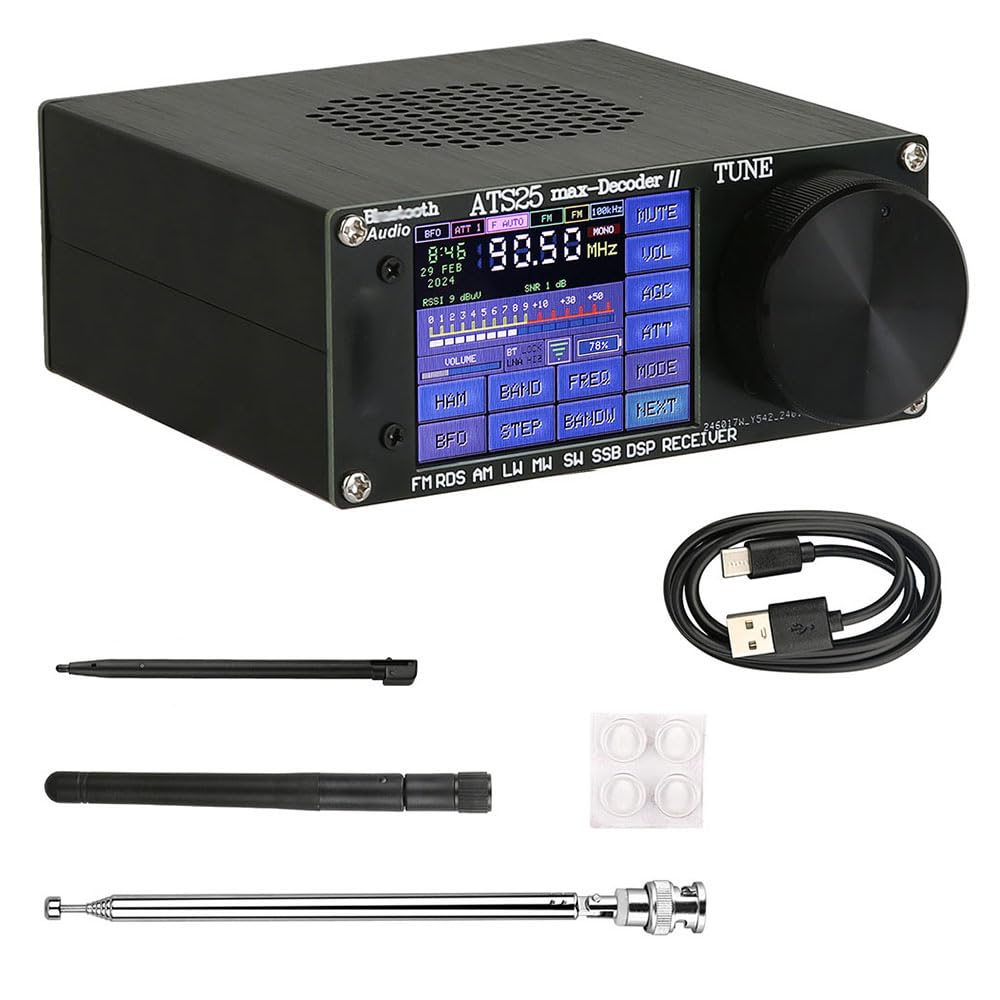
Figure 1.1: The Hamgeek ATS25 Max Decoder II receiver with its telescopic and WiFi antennas extended, showcasing the 2.4-inch touch screen display.
2. Setup
2.1 Powering On and Battery
The receiver comes with a built-in 4000mAh Lithium-Ion battery. To power on the device, locate the power switch, typically on the side or back panel, and slide it to the 'ON' position. Ensure the battery is sufficiently charged for operation. Use the provided USB cable to charge the device via a standard USB power adapter (not included).
2.2 Antenna Connection
For optimal reception, connect the appropriate antennas:
- Telescopic Radio Antenna: Extend the telescopic antenna fully for FM and SW reception.
- WiFi Antenna: Connect the WiFi antenna to the designated port for network connectivity features.

Figure 2.1: Rear view of the receiver, highlighting the WiFi antenna port, main antenna port, USB charging/download port, power switch, and headphone jack.
3. Operating Instructions
3.1 User Interface Overview
The ATS25 Max Decoder II features a 2.4-inch touch screen for intuitive navigation and control. Key functions are accessible via on-screen buttons and a rotary tuning knob.
3.2 Frequency Bands and Modes
The receiver supports a wide range of frequency bands and modulation modes:
- FM: 64-108 MHz (with RDS function)
- LW: 153-500 KHz
- MW: 520-1710 kHz
- SW: 1730-30000 KHz
- SSB: 17030 kHz (Single Side Band)
3.3 Tuning and Scanning
- Manual Tuning: Use the large rotary knob on the right side of the device to adjust the frequency. The touch screen will display the current frequency.
- Direct Frequency Input: Tap the 'FREQ' button on the touch screen to bring up a digital keypad. Enter the desired frequency directly.
- Automatic Scanning: Press the 'SCAN' button to initiate an automatic scan for available stations within the current band.
- Band Selection: Tap the 'BAND' button to cycle through available frequency bands (FM, LW, MW, SW, SSB).
- Mode Selection: For SW and SSB bands, use the 'MODE' button to select between AM, LSB, and USB modulation modes.
3.4 Volume Control
Adjust the volume using the 'VOL' button on the touch screen or a dedicated volume control if present. The device features integrated full-range speakers and a headphone jack for private listening.

Figure 3.1: Side profile of the receiver, showing its compact structure and robust aluminum alloy casing.
4. Maintenance
4.1 Cleaning
To clean the receiver, use a soft, dry cloth. For the touch screen, a microfiber cloth is recommended. Avoid using harsh chemicals, solvents, or abrasive cleaners, as these can damage the surface and internal components.
4.2 Battery Care
To prolong battery life:
- Charge the battery regularly, even if the device is not in frequent use.
- Avoid fully discharging the battery before recharging.
- Do not expose the device to extreme temperatures.
4.3 Storage
When storing the receiver for extended periods, ensure it is turned off and kept in a cool, dry place away from direct sunlight and moisture. It is advisable to partially charge the battery (around 50%) before long-term storage.
5. Troubleshooting
If you encounter issues with your ATS25 Max Decoder II, please refer to the following common problems and solutions:
| Problem | Possible Cause | Solution |
|---|---|---|
| Device does not power on | Low battery; Power switch off | Charge the battery using the USB cable; Ensure the power switch is in the 'ON' position. |
| Poor reception or static | Antenna not extended/connected; Weak signal; Interference | Fully extend the telescopic antenna; Ensure WiFi antenna is connected if using WiFi features; Relocate the receiver to an area with better signal; Check for nearby electronic interference. |
| No sound | Volume too low; Mute function active; Headphones connected | Increase volume; Check if the 'MUTE' function is active on the screen; Disconnect headphones if you want sound from the internal speaker. |
| Touch screen unresponsive | Temporary software glitch; Screen dirty | Restart the device; Clean the screen with a soft, dry cloth; Use the provided stylus for precise input. |
6. Specifications
Key technical specifications for the Hamgeek ATS25 Max Decoder II:
| Feature | Detail |
|---|---|
| Model Number | ATS25 Max Decoder II |
| Frequency Range | FM: 64-108 MHz (with RDS) LW: 153-500 KHz MW: 520-1710 kHz SW: 1730-30000 KHz SSB: 17030 kHz |
| Display | 2.4-inch Touch Screen, LCD Technology |
| Battery | 1 x Lithium Ion (included), 4000mAh capacity |
| Dimensions (L x W x H) | 12 x 11.5 x 4.8 cm (Product); 16 x 15 x 5 cm (Item) |
| Weight | 530 g |
| Material | Aluminum Alloy |
| Connectivity | USB |
| Special Features | Portable, RDS function, Direct digital keyboard frequency input, HAM fast tape channel support |
7. Warranty and Support
7.1 Warranty Information
This product is covered by a standard manufacturer's warranty. Please refer to the warranty card included in your package or contact your retailer for specific terms and conditions regarding warranty coverage and duration.
7.2 Customer Support
For technical assistance, troubleshooting beyond this manual, or service inquiries, please contact the retailer or manufacturer's customer support. Keep your purchase receipt and product model number (ATS25 Max Decoder II) handy when contacting support.
Ask a question about this manual
Ask about setup, troubleshooting, compatibility, parts, safety, or missing instructions. Manuals+ will review the question and use this page’s manual context to help answer it.