1. Introduction
This manual provides essential information for setting up, operating, and maintaining your iiyama STYLE INFINITY Desktop PC, model STYLE-S07M-147-UHX-M. Please read this manual thoroughly before using the product to ensure proper and safe operation.
The iiyama STYLE INFINITY Desktop PC is a slim-type microATX system featuring an Intel Core i7-14700 processor, 8GB DDR5 RAM, and a 500GB NVMe M.2 SSD, running on Windows 11 Home. It is designed for general computing tasks.
2. Safety Information
Observe the following safety precautions to prevent damage to the product or injury to yourself.
- Power Supply: Use only the power cable provided with the system. Ensure the power outlet is properly grounded.
- Ventilation: Do not block ventilation openings. Ensure adequate airflow around the PC to prevent overheating.
- Liquid and Moisture: Keep the PC away from liquids and excessive moisture. Do not operate the PC with wet hands.
- Placement: Place the PC on a stable, flat surface. Avoid placing it in direct sunlight or near heat sources.
- Servicing: Do not attempt to service the PC yourself. Refer all servicing to qualified service personnel.
3. Package Contents
Verify that all items listed below are included in your product package:
- iiyama STYLE INFINITY Desktop PC (STYLE-S07M-147-UHX-M)
- Power Cable
- Japanese Keyboard
- Optical Mouse
- Various Manuals
- Warranty Card
- DVD/CD Writing Software (on disc)
4. Setup
4.1 Unpacking and Placement
Carefully remove the PC from its packaging. Choose a suitable location that is well-ventilated and away from direct heat or moisture. Ensure there is enough space around the PC for proper airflow.
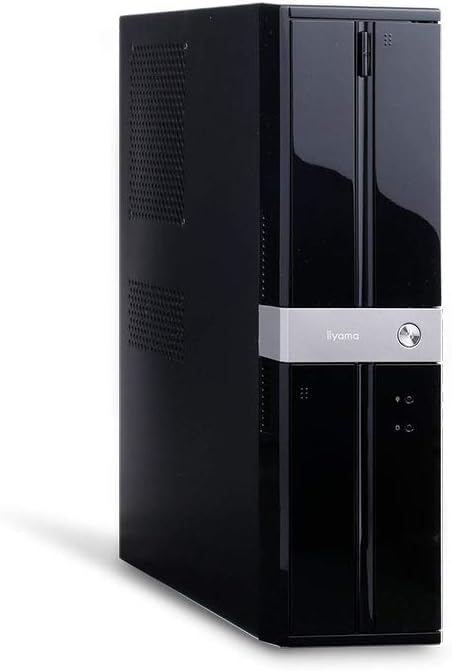
Figure 4.1: Front-angled view of the iiyama STYLE INFINITY Desktop PC. The PC is a black, slim tower with a silver band across the front, featuring the 'iiyama' logo and a power button.
4.2 Connecting Peripherals
Connect your monitor, keyboard, mouse, and other peripherals to the appropriate ports on the rear of the PC. Refer to the port diagram below for identification.

Figure 4.2: Rear view of the iiyama STYLE INFINITY Desktop PC, showing various input/output ports and the power supply unit.
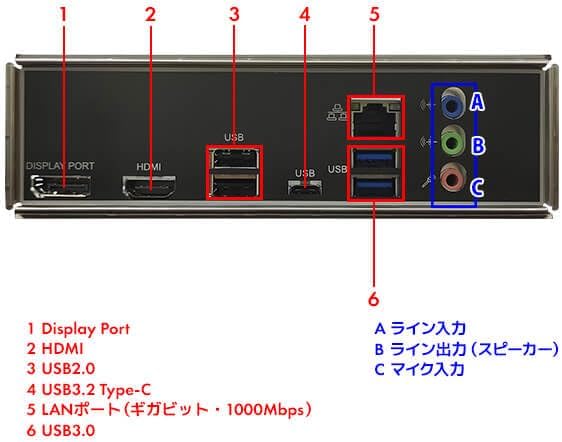
Figure 4.3: Detailed diagram of the rear I/O ports. Key ports include DisplayPort, HDMI, USB 2.0, USB 3.2 Type-C, LAN, USB 3.0, and analog audio jacks (Line In, Line Out, Mic In).
- Monitor: Connect your monitor to either the DisplayPort or HDMI port on the rear panel.
- Keyboard and Mouse: Connect the keyboard and mouse to any available USB ports (USB 2.0 or USB 3.0).
- Network: For a wired internet connection, connect an Ethernet cable to the LAN port.
- Audio: Connect speakers or headphones to the Line Out (green) audio jack. Use the Mic In (pink) for a microphone.
4.3 Power Connection
After connecting all peripherals, plug the provided power cable into the power input on the rear of the PC, then plug the other end into a grounded electrical outlet.
5. Operating Instructions
5.1 Powering On
Press the power button located on the front of the PC. The system will begin to boot up.
5.2 Initial Windows 11 Setup
Upon first boot, you will be guided through the Windows 11 setup process. Follow the on-screen instructions to configure your language, region, network settings, and user account.
5.3 Shutting Down
To properly shut down the PC, click the Start button, then select the Power icon, and choose "Shut down."
6. Maintenance
- Cleaning: Use a soft, dry cloth to clean the exterior of the PC. Do not use liquid cleaners or aerosols. For dust accumulation in vents, use compressed air.
- Software Updates: Regularly update your operating system and drivers to ensure optimal performance and security.
- Data Backup: Periodically back up important data to an external storage device or cloud service to prevent data loss.
7. Troubleshooting
If you encounter issues with your PC, refer to the following common troubleshooting steps:
- No Power: Ensure the power cable is securely connected to both the PC and the electrical outlet. Check if the outlet is functional.
- No Display: Verify that the monitor is powered on and correctly connected to the PC's display output port. Try a different display cable or monitor if available.
- Peripheral Not Working: Ensure the peripheral (keyboard, mouse, etc.) is properly connected to a USB port. Try connecting it to a different USB port.
- System Slowdown: Check for excessive background applications or malware. Ensure sufficient free space on the primary drive.
- Operating System Issues: If Windows is not booting correctly, you may need to use Windows recovery options. Refer to Microsoft's support documentation for detailed steps.
8. Specifications
| Feature | Specification |
|---|---|
| Brand | iiyama |
| Model Number | STYLE-S07M-147-UHX-M |
| Form Factor | Slim Type / microATX |
| Operating System | Windows 11 Home |
| CPU | Intel Core i7-14700 Processor (5.4GHz max, 20 Cores/28 Threads, 33MB Cache) |
| CPU Cooler | Top-flow Air Cooler |
| Graphics | Intel UHD Graphics 770 (Integrated) |
| Memory Standard | DDR5 |
| Installed RAM | 8GB (8GB x 1) |
| Memory Slots | 2 |
| Primary Storage | 500GB NVMe M.2 SSD |
| Optical Drive | DVD Super Multi |
| Chipset | Intel B760 |
| Audio Function | High Definition Audio subsystem (Analog 6ch) |
| Wired LAN | 1000BASE-T |
| Wireless LAN | None (USB adapter sold separately) |
| Keyboard | Japanese Keyboard |
| Mouse | Optical Mouse |
| Power Supply | 400W 80PLUS BRONZE TFX Power Supply |
| Expansion Slots | PCI Express 4.0 [x16] LowProfile x1, PCI Express 4.0 [x1] LowProfile x1, PCI Express 4.0 [x16] (x4 operation) LowProfile x1 |
| Expansion Bays | 5.25-inch x1, 3.5-inch x1, 3.5-inch internal x1, 2.5-inch internal x1 |
| Front Ports | Headphone x1, Microphone x1, USB 3.0 x2 |
| Rear Ports | Analog 6ch Sound (Line Out x1, Line In x1, Mic In x1), USB 3.2 Type-C x1, USB 3.0 x2, USB 2.0 x2, 1000BASE-T LAN x1, DisplayPort x1, HDMI x1 |
| Internal Ports | M.2 x2 (Key ID:M/PCIe Gen4 x4 /Type:2260/2280), SATA 6Gbps x4, Internal USB 3.0 (4 ports/20Pin x2), Internal USB 2.0 (4 ports/10Pin x2) |
| TPM | TPM2.0 (Intel PTT) |
| Dimensions (W x D x H) | Approx. 98mm x 403mm x 363mm (excluding maximum protrusions) |
| First Available Date | 2024/05/21 |
9. Warranty and Support
This product comes with a standard 1-year warranty. Please refer to the included warranty card for detailed terms and conditions.
For technical support or warranty claims, please contact iiyama customer service. Contact information can be found on the official iiyama website or in the documentation provided with your PC.
Note: Monitors are not included and are sold separately.


