1. Introduction
Thank you for choosing the GOXAWEE G4007-US Rotary Tool Kit. This versatile electric drill set is designed for a wide range of crafting projects and DIY creations, offering variable speed control and a comprehensive set of accessories. This manual provides essential information for safe operation, proper setup, and effective maintenance of your tool.
2. Safety Instructions
Always read and understand all safety warnings and instructions before operating this tool. Failure to follow these instructions may result in electric shock, fire, and/or serious injury.
- Work Area Safety: Keep your work area clean and well-lit. Cluttered or dark areas invite accidents. Do not operate power tools in explosive atmospheres, such as in the presence of flammable liquids, gases, or dust.
- Electrical Safety: Power tool plugs must match the outlet. Never modify the plug in any way. Avoid body contact with earthed or grounded surfaces, such as pipes, radiators, ranges, and refrigerators.
- Personal Safety: Always wear appropriate eye protection (safety glasses or goggles) and hearing protection. Use a dust mask if operations create dust. Dress properly; avoid loose clothing or jewelry that can get caught in moving parts.
- Tool Use and Care: Do not force the power tool. Use the correct power tool for your application. Disconnect the plug from the power source before making any adjustments, changing accessories, or storing power tools.
- Maintenance: Maintain power tools and accessories. Check for misalignment or binding of moving parts, breakage of parts, and any other condition that may affect the power tool’s operation.
3. Package Contents
The GOXAWEE G4007-US Rotary Tool Kit includes the following items, neatly organized in a durable carrying case:

Image: The complete GOXAWEE Rotary Tool Kit, including the main tool, flexible shaft, keyless chuck, and a wide array of accessories, all stored within its black carrying case.
- GOXAWEE Rotary Tool (G4007-US)
- MultiPro Keyless Chuck
- Flexible Shaft
- Cover Shield
- Drill Locator
- Plastic Case for Accessories
- Storage Case
- Spanner
- Extra Carbon Brushes (pair)
- Assorted 140+ Accessories:
- Sanding Drums and Bands
- Cutting Wheels (Mini HSS, Diamond, Resin)
- Polishing Felt Wheels and Compound
- Steel Brushes
- Carving/Engraving Bits
- HSS Twist Drills
- Grinding Wheels (Aluminum Oxide)
- Collets and Mandrels
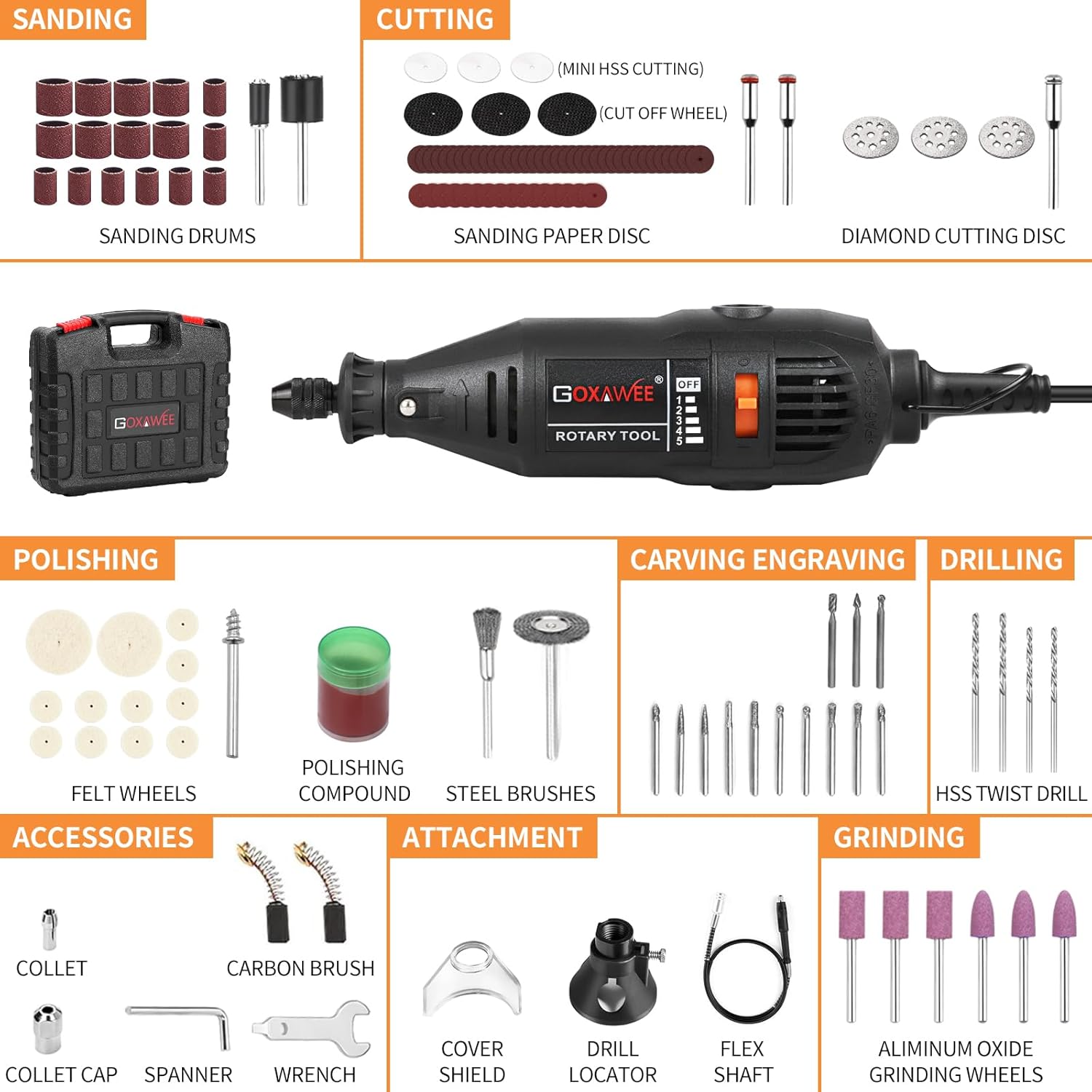
Image: A detailed view of the rotary tool and its extensive collection of accessories, categorized for sanding, cutting, polishing, carving, engraving, drilling, and grinding.
4. Setup
4.1 Attaching and Changing Accessories
The GOXAWEE Rotary Tool features a MultiPro Keyless Chuck for quick accessory changes. Follow these steps:

Image: A three-step visual guide demonstrating how to loosen the chuck, insert an accessory, and tighten it securely using the spindle lock button and a wrench.
- Step 1: Press the spindle lock button located on the tool body and rotate the chuck counter-clockwise to loosen it.
- Step 2: Insert the desired accessory shank into the chuck. Ensure the accessory is fully seated.
- Step 3: While holding the spindle lock button, rotate the chuck clockwise to tighten it securely. For optimal stability, use the provided spanner to ensure the keyless chuck is fully tightened. The chuck accepts accessories with shank sizes from 1/64" to 1/8".
4.2 Attaching the Flexible Shaft
For precise and detailed work, attach the flexible shaft:

Image: A user demonstrating the use of the flexible shaft attachment for intricate work, holding the handpiece like a pen for enhanced control.
- Step 1: Ensure the rotary tool is unplugged. Remove the standard collet nut and collet from the tool.
- Step 2: Screw the flexible shaft coupling onto the threaded end of the rotary tool until it is finger-tight.
- Step 3: Insert the inner drive cable of the flexible shaft into the rotary tool's collet opening.
- Step 4: Secure the flexible shaft handpiece by inserting the desired accessory and tightening its collet nut.
5. Operating Instructions
5.1 Power and Variable Speed Control
The GOXAWEE Rotary Tool features a variable speed dial, allowing you to adjust the rotational speed from 8,000 to 30,000 RPM for optimal control across different materials and tasks.

Image: A detailed view of the rotary tool's body, highlighting the variable speed control dial with settings from 1 to 5 (8,000-30,000 RPM) and the MultiPro Keyless Chuck.
- To Turn On: Plug the tool into a 110V power outlet. Slide the ON/OFF switch to the 'ON' position.
- Adjusting Speed: Rotate the variable speed dial to select the desired RPM. Lower speeds (1-2) are suitable for polishing, delicate engraving, and working with softer materials. Higher speeds (3-5) are ideal for cutting, grinding, and drilling harder materials.
- To Turn Off: Slide the ON/OFF switch to the 'OFF' position.
5.2 Applications
This rotary tool is suitable for a variety of tasks:
- Sanding: Use sanding drums or discs for smoothing surfaces, shaping, or removing rust.
- Cutting: Employ cutting wheels for precise cuts on metal, plastic, or ceramic. Always use the cover shield for protection.
- Polishing: Attach felt wheels with polishing compound to bring a shine to metals, plastics, and other materials.
- Drilling: Use HSS twist drills for creating small holes in various materials. The drill locator attachment can assist with precision.
- Engraving & Carving: Utilize various carving and engraving bits for detailed work on wood, glass, metal, and plastic.

Image: A user operating the rotary tool with a cutting disc to cut through a metal bolt, illustrating the tool's capability for material removal.
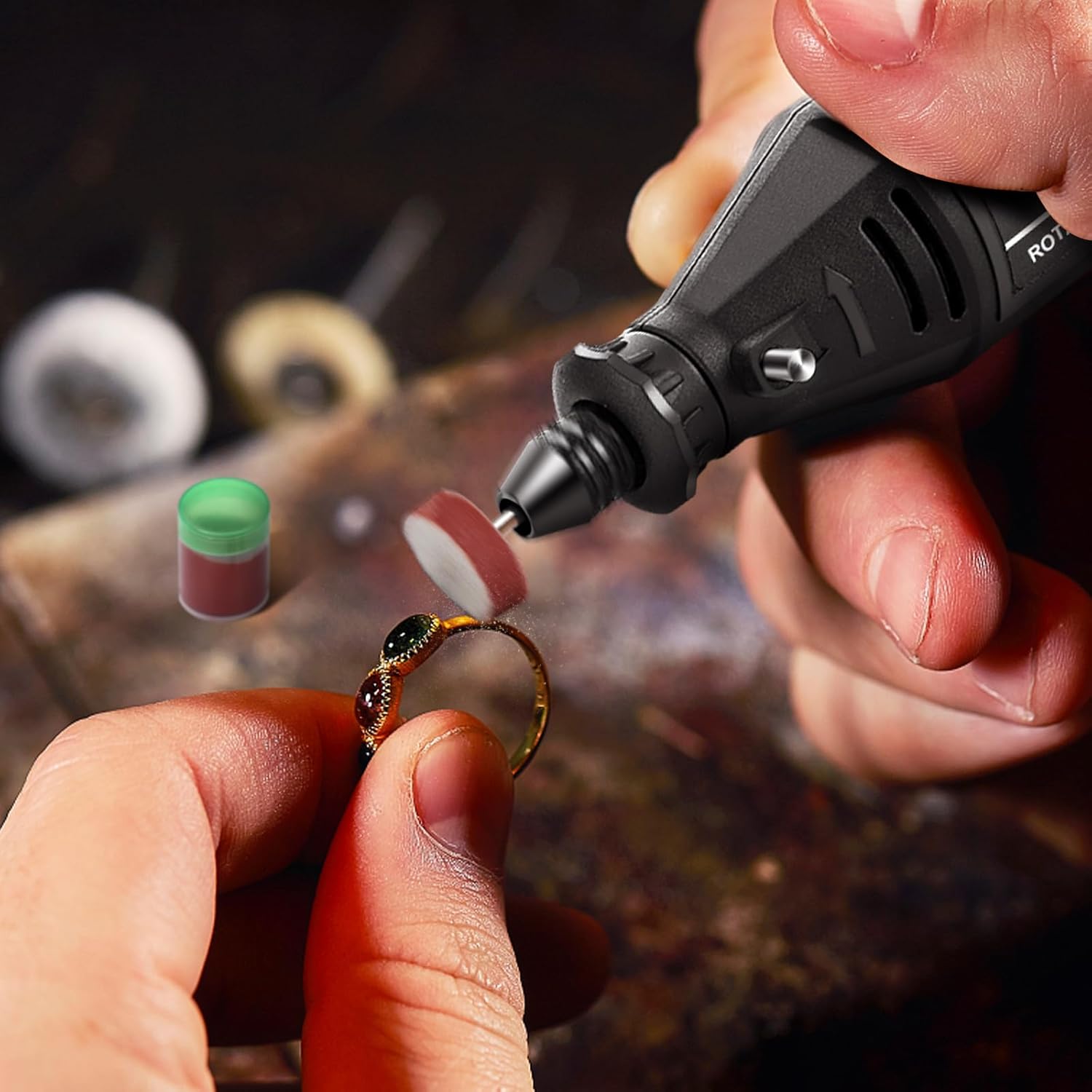
Image: A close-up of a user polishing a gold ring with the rotary tool, demonstrating its use for fine finishing and restoration tasks.

Image: A user operating the rotary tool with the drill locator attachment, providing stability and accuracy for drilling into a wooden workpiece.
6. Maintenance
Regular maintenance ensures the longevity and optimal performance of your GOXAWEE Rotary Tool.
- Cleaning: After each use, unplug the tool and clean the housing with a soft, damp cloth. Use a brush to remove dust and debris from the ventilation openings. Do not use harsh chemicals or abrasive cleaners.
- Carbon Brush Replacement: The tool includes a pair of extra carbon brushes. If the tool experiences reduced power or intermittent operation, the carbon brushes may need replacement. Consult a qualified technician or refer to detailed instructions for brush replacement.
- Accessory Storage: Store all accessories in the provided plastic case to keep them organized and protected.
- Tool Storage: Store the rotary tool and its carrying case in a dry, secure location, out of reach of children.
7. Troubleshooting
If you encounter issues with your GOXAWEE Rotary Tool, refer to the following common troubleshooting tips:
- Tool does not turn on:
- Check if the tool is properly plugged into a live 110V outlet.
- Ensure the ON/OFF switch is in the 'ON' position.
- Inspect the power cord for any damage.
- Reduced power or intermittent operation:
- The carbon brushes may be worn and require replacement.
- Ensure the accessory is not jammed or overloaded.
- Excessive vibration or noise:
- Ensure the accessory is correctly inserted and tightened in the chuck.
- Check if the accessory is damaged or bent and replace if necessary.
- Chuck not holding accessories securely:
- Ensure the keyless chuck is fully tightened with the spanner.
- Verify that the accessory shank size is compatible with the chuck (1/64" to 1/8").
For issues not resolved by these steps, please contact GOXAWEE customer support.
8. Specifications
| Feature | Specification |
|---|---|
| Brand | GOXAWEE |
| Model Number | G4007-US |
| Voltage | 110 Volts |
| Wattage | 130 watts |
| Power Source | Corded Electric |
| Maximum Rotational Speed | 30,000 RPM |
| Minimum Speed | 8,000 RPM |
| Chuck Compatibility | 1/64" to 1/8" shank |
| Item Weight | 3.31 Pounds |
| Product Dimensions | 11.02 x 9.45 x 2.95 inches |
| Special Features | Compact, Keyless Chuck, Lightweight, Multi Use, Variable Speed |
9. Warranty and Support
GOXAWEE products are manufactured to high-quality standards. For information regarding warranty coverage, product support, or to purchase replacement parts, please refer to the official GOXAWEE website or contact their customer service directly. Keep your purchase receipt as proof of purchase for any warranty claims.
For additional assistance, you may visit the GOXAWEE Store on Amazon.