
Introduction
This manual provides essential instructions for the proper installation, operation, and maintenance of your HOBBYWING XERUN Axe R3 Combo, featuring the 540-2300KV FOC motor. This brushless power system is designed to enhance the performance of your rock crawler with advanced Field Oriented Control (FOC) technology, ensuring precise control and durability in various conditions. Please read this manual thoroughly before use to ensure safe and optimal performance.
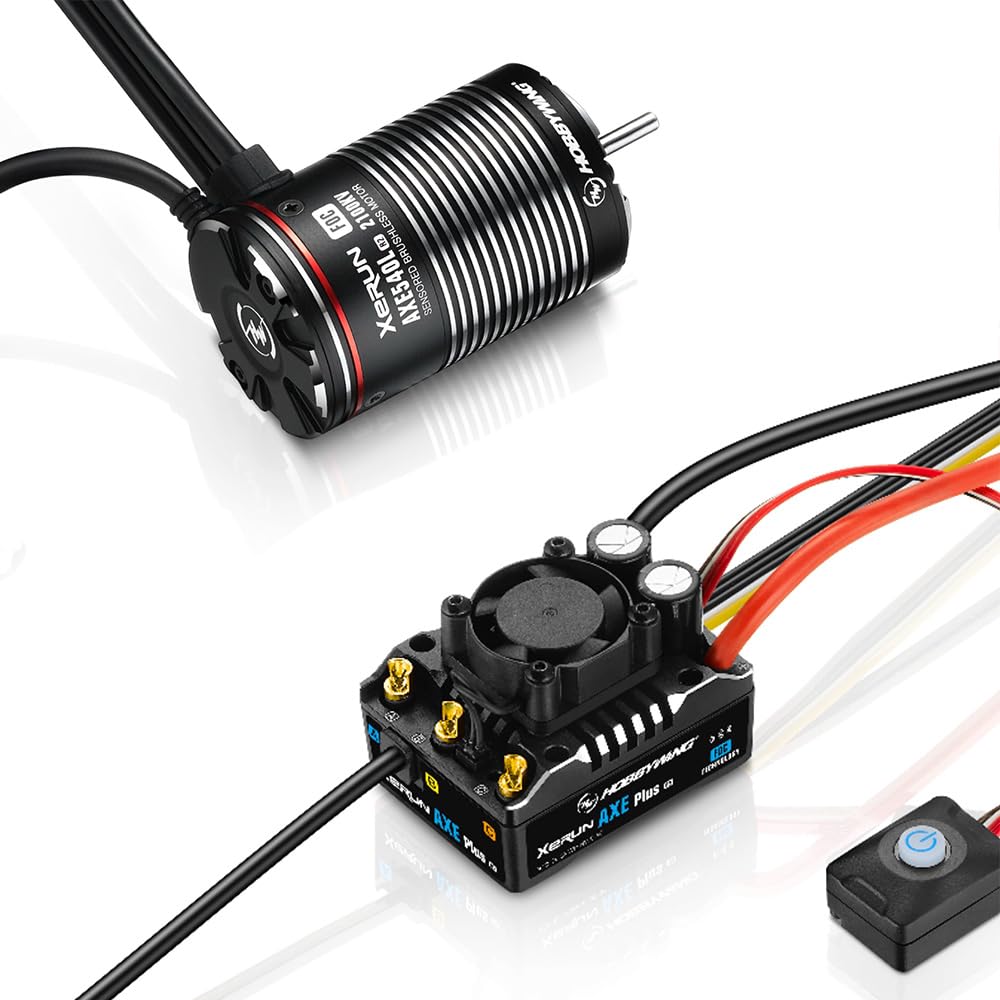
Image: The HOBBYWING XERUN Axe R3 Combo, showing the Electronic Speed Controller (ESC) and the 540-2300KV FOC motor. This system is designed for high-performance RC rock crawlers.
Safety Information
Adhering to these safety guidelines is crucial for preventing damage to your equipment and ensuring user safety:
- Ensure all wires and connections are well insulated before connecting the ESC to related devices, as a short circuit will damage your ESC.
- Ensure all devices in the system are connected correctly to prevent any damage to the system.
- Read through the manuals of all power devices and chassis and ensure the power configuration is correct before using this unit.
- Please use a soldering iron with a power of at least 60W to solder all input/output wires and connectors.
- Do not allow the ESC and motor temperatures (external temp.) to go above 90°C/194°F, as high temperature may cause damage to both the ESC and motor.
- The battery must be disconnected after use. There is a small draw even when the system is off, and will eventually fully drain the battery. This may cause damage to the ESC, and will NOT BE COVERED UNDER WARRANTY.
Package Contents
Verify that all components are present in your package:
- (1) AXE R3 ESC
- (1) AXE Motor (540-2300KV FOC)
Setup and Installation
Follow these steps for proper installation and initial setup of your XERUN Axe R3 Combo:
- Motor and ESC Placement: Install the AXE R3 ESC and 540-2300KV FOC motor into your 1/8th, 1/7th, or 1/6th scale crawler chassis. Ensure adequate ventilation for the ESC. Note that the AXE R3 ESC has a compact design, but verify dimensions for fit (49.5 x 37.9 x 22.8 mm without fan).
- Wiring Connections: Carefully connect the motor to the ESC and the ESC to your receiver and battery. Use a soldering iron of at least 60W for all input/output wires and connectors to ensure secure connections.
- Battery Connection: The ESC supports 2-6S LiPo batteries. Ensure your battery is fully charged and correctly connected, observing polarity.
- Receiver Connection: Connect the ESC's throttle cable to the throttle channel on your receiver.
- Optional External Control Channels: For real-time parameter adjustments, connect the white and yellow signal cables from the ESC to open channels (e.g., Channel 3/4) on your receiver. Refer to the parameter table for specific functions.
- Initial Calibration: Perform ESC calibration with your radio system according to the detailed instructions in the full product manual (not provided here, but implied for a complete setup).
Operating Instructions
The XERUN Axe R3 Combo offers advanced features for superior rock crawling performance:
- Field Oriented Control (FOC): Experience strong low-speed torque and precise control, surpassing traditional brushless and brushed systems.
- Intelligent Torque Output: The ESC automatically adjusts torque to maintain consistent motor RPM under varying loads, providing smooth control uphill and stable speed downhill.
- Superior Drag Brake: Utilize the adjustable drag brake with up to 200% holding power for confident control on steep inclines.
- All-Weather Durability: The IP67 waterproof and dustproof design allows operation in challenging conditions. Always monitor your vehicle in muddy or wet environments.
- HW LINK App Connectivity: Use the built-in Bluetooth to connect to the HW LINK app on your iOS or Android smartphone for ESC setup, data monitoring, and firmware updates. The effective distance for Bluetooth transmission is approximately 5 meters.
- Real-time Data Function: Through the HW LINK app, monitor throttle, voltage, current, temperature (ESC/motor), and speed in real-time to understand the system's operating status.
- Flysky i-BUS2 Protocol Support: For users with Flysky Noble controllers, achieve real-time ESC parameter adjustments and view data such as battery voltage, motor RPM, operating current, and temperatures directly on the transmitter.
Maintenance
Regular maintenance ensures the longevity and optimal performance of your HOBBYWING XERUN Axe R3 Combo:
- Cleaning: After each use, especially in dusty or wet conditions, clean the ESC and motor to remove dirt and debris. Use a soft brush or compressed air.
- Inspection: Periodically inspect all wires and connectors for signs of wear, damage, or loose connections. Ensure all insulation is intact.
- Temperature Monitoring: Regularly monitor ESC and motor temperatures during operation. If temperatures consistently exceed 90°C/194°F, investigate potential causes such as gearing, load, or airflow.
- Firmware Updates: Check for and apply firmware updates via the HW LINK app to ensure your ESC has the latest features and performance enhancements.
- Storage: Always disconnect the battery from the ESC after use and before storage. Store the components in a dry, cool place.
Troubleshooting
This section addresses common issues you might encounter. For more detailed troubleshooting, refer to the full product manual or contact Hobbywing support.
- No Power/No Response:
- Check battery connection and charge level.
- Verify all wiring connections are secure and correctly polarized.
- Ensure the ESC is properly calibrated with your radio.
- Motor Not Spinning Correctly/Erratic Behavior:
- Inspect motor wires for damage or loose connections.
- Check for obstructions in the motor or drivetrain.
- Ensure the motor type setting in the ESC is correct (only XERUN AXE R3/R2 Series motors are supported).
- Overheating (ESC or Motor):
- Reduce vehicle load or adjust gearing.
- Ensure adequate airflow around the ESC and motor.
- Check for short circuits or damaged components.
- Bluetooth Connectivity Issues:
- Ensure the HW LINK app is installed and updated on your smartphone.
- Verify Bluetooth is enabled on your phone and the ESC is powered on.
- Stay within the effective Bluetooth range (approx. 5 meters).
The system includes multiple built-in protections such as low-voltage cutoff, thermal protection, fail-safe (throttle signal loss), motor lock-up protection, and battery reversal protection. If a protection is triggered, the system may stop or reduce power. Consult the full manual for indicator codes.
Specifications
| Feature | Detail |
|---|---|
| Applications | 1/8th, 1/7th, and 1/6th scale crawlers |
| Cont./Peak Current | 135A/600A |
| LiPo Cells | 2-6S LiPo |
| Motor Type | Only XERUN AXE R3/R2 Series motors |
| BEC Output | 6V/7.4V/8.4V adjustable, Continuous Current of 6A |
| ESC Dimensions (without fan) | 49.5 x 37.9 x 22.8 mm |
| ESC Weight (including wire) | 126.5g |
| Programming Port | iOS or Android smartphone (HW LINK app) |
| Waterproof/Dustproof | IP67 standard |
| Motor KV | 2300KV (for 540 motor) |
Note: The AXE R3 ESC is compatible with all Axe R2 motors. For AXE R2 motors (2800KV/2100KV/1400KV/2300KV), 3-4S LiPo is recommended.
Warranty and Support
For warranty information, technical support, or service inquiries, please contact Hobbywing Technology directly through their official website or authorized distributors. Keep your purchase receipt as proof of purchase for warranty claims.
Important: Damage caused by improper use, exceeding temperature limits, or failure to disconnect the battery after use may void your warranty.