
1. Introduction
Thank you for choosing the Mycket DAB Plus Portable Digital Radio HS-D009. This device offers a versatile listening experience with DAB, DAB+, FM radio, and Bluetooth connectivity. It features a 2.4-inch color display, dual alarms, a sleep timer, and 40 station presets. This manual provides essential information for setting up, operating, and maintaining your radio to ensure optimal performance.
2. Product Overview
Familiarize yourself with the components and controls of your Mycket HS-D009 radio.

Image 2.1: Front View of the Mycket HS-D009 Radio. This image displays the front of the radio, highlighting the speaker grille on the left, the 2.4-inch color display on the right, and the control buttons below the display. Key buttons visible include MODE, OK, directional arrows, FAV, and numbered preset buttons (1-4).

Image 2.2: Mycket HS-D009 Radio Dimensions. This image illustrates the compact size of the radio, showing its approximate dimensions: 5.5 inches in length, 3.1 inches in height, and 1.6 inches in depth. A glass with a drink is placed next to it for scale.
2.1 Controls and Ports
- Power/Mode Button: Turns the radio on/off and switches between DAB, FM, and Bluetooth modes.
- OK Button: Confirms selections and enters menus.
- Directional Buttons (Left/Right): Navigates through menus and adjusts settings.
- FAV Button: Accesses and saves favorite stations.
- Preset Buttons (1-4): Quick access to saved favorite stations.
- Volume Knob: Adjusts volume and navigates menu options.
- DC 5V Port: For charging the radio.
- Headphone Jack: For private listening.
- Antenna: Extendable telescopic antenna for radio reception.
- Reset Button: Small pinhole button to reset the device.
3. Setup
3.1 Charging the Battery
The radio is equipped with a built-in 2200mAh rechargeable Lithium-ion battery. Before first use, fully charge the radio.
- Connect the provided USB charging cable to the DC 5V port on the side of the radio.
- Connect the other end of the USB cable to a compatible USB power adapter (not included) or a computer USB port.
- The charging indicator on the display will show the charging status. Once fully charged, the indicator will change.
A full charge provides over 12 hours of playback time.

Image 3.1: Battery Life Indication. This image highlights the radio's capability to play for more than 12 hours on its built-in 2200mAh rechargeable battery, emphasizing its portability.
3.2 Initial Power On
- Extend the telescopic antenna for better reception.
- Press and hold the Power/Mode button to turn on the radio.
- Upon first use, the radio may automatically initiate a DAB station scan.
4. Operating Instructions
4.1 Mode Selection
Press the Power/Mode button repeatedly to cycle through the available modes: DAB, FM, and Bluetooth.
4.2 DAB/DAB+ Radio
- Switch to DAB mode using the Power/Mode button.
- If it's the first time or if you want to rescan, the radio will automatically perform a full scan for available DAB/DAB+ stations.
- Use the Volume Knob or Directional Buttons to navigate through the list of found stations.
- Press the OK button to select and listen to a station.
Saving DAB Presets
The radio supports saving up to 20 DAB presets.
- Tune to the desired DAB station.
- Press and hold the FAV button for 1-2 seconds until the preset recall menu appears on the screen.
- Use the Volume Knob or Directional Buttons to select a preset number (1-20).
- Press OK to confirm and save the station. A confirmation message will appear.
Recalling DAB Presets
To quickly access saved stations:
- For presets 1-4, simply press the corresponding numbered button (1, 2, 3, or 4).
- For other presets (5-20), press the FAV button briefly. Use the Volume Knob or Directional Buttons to select the desired preset, then press OK.

Image 4.1: Auto Scan and Presets. This image illustrates the radio's auto-scan function for radio stations and its capacity to save up to 40 presets (20 DAB and 20 FM) using the FAV button.
4.3 FM Radio
- Switch to FM mode using the Power/Mode button.
- To auto-scan for FM stations, press and hold the OK button. The radio will scan and save stations automatically.
- Alternatively, use the Directional Buttons to manually tune to a frequency.
- Press OK to confirm the selection.
Saving FM Presets
The radio supports saving up to 20 FM presets.
- Tune to the desired FM station.
- Press and hold the FAV button for 1-2 seconds until the preset recall menu appears.
- Use the Volume Knob or Directional Buttons to select a preset number (1-20).
- Press OK to confirm and save the station.
Recalling FM Presets
To quickly access saved stations:
- For presets 1-4, simply press the corresponding numbered button (1, 2, 3, or 4).
- For other presets (5-20), press the FAV button briefly. Use the Volume Knob or Directional Buttons to select the desired preset, then press OK.
4.4 Bluetooth Mode
Connect your smartphone, tablet, or other Bluetooth-enabled device to play audio wirelessly.
- Switch to Bluetooth mode using the Power/Mode button. The display will show "Bluetooth" and indicate it's ready for pairing.
- On your external device, enable Bluetooth and search for available devices.
- Select "Mycket D009" from the list of devices.
- Once paired, the radio will confirm the connection, and you can play audio from your device through the radio's speaker.
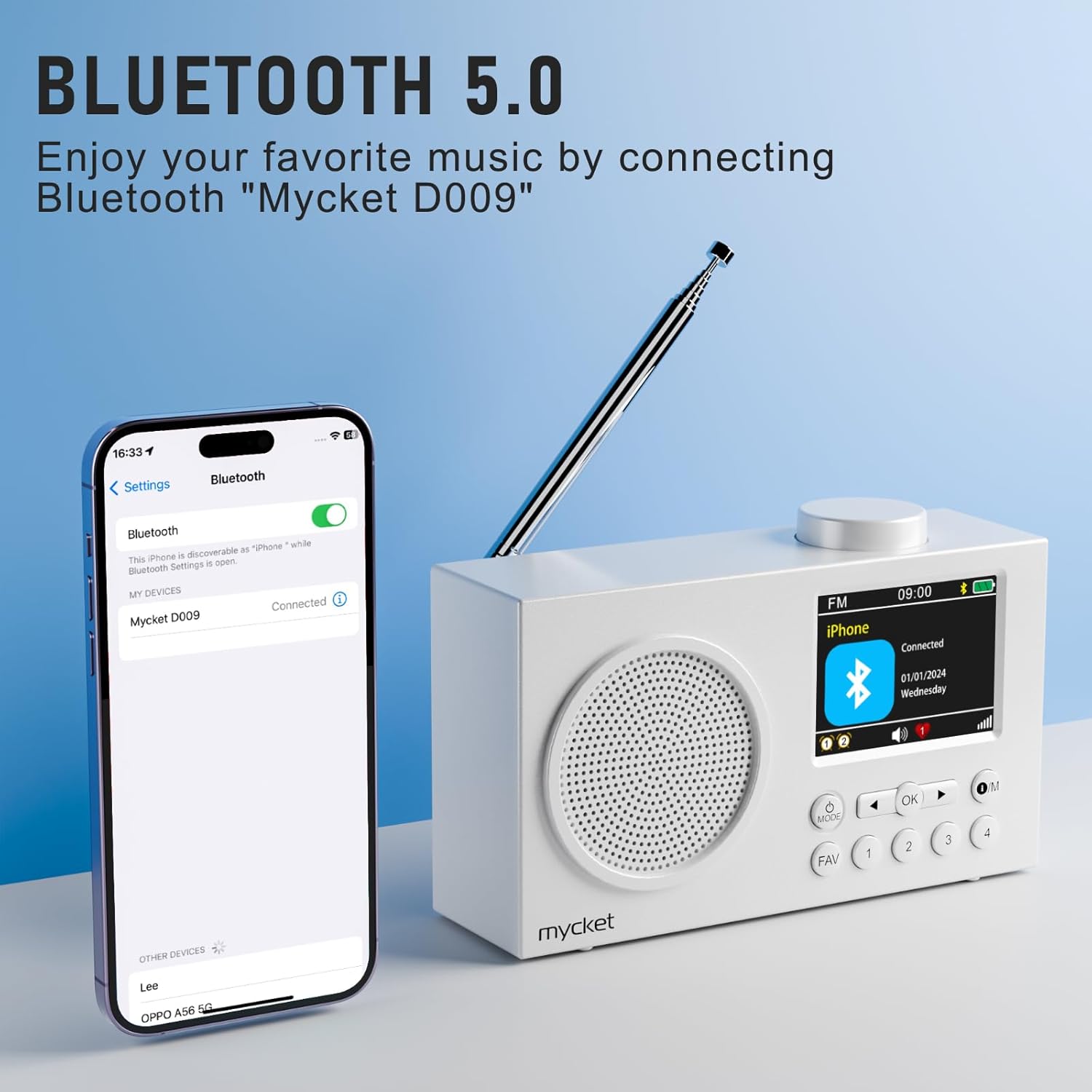
Image 4.2: Bluetooth 5.0 Connectivity. This image demonstrates the radio's Bluetooth 5.0 capability, showing it connected to a smartphone for wireless audio playback. The radio's display shows 'Mycket D009' as the connected device.
4.5 Dual Alarm Function
The radio features a dual alarm function. Refer to the on-screen menu for setting alarm times, sources (DAB/FM/Buzzer), and recurrence.
4.6 Sleep Timer
The sleep timer allows the radio to turn off automatically after a set period. Access the sleep timer settings through the menu to choose your desired duration.
4.7 Display Information
The 2.4-inch TFT color display provides clear information about the current mode, station, time, battery status, and other settings.

Image 4.3: Large Color Screen. This image highlights the radio's 2.4-inch TFT large color display, which allows for clear visibility of content such as station information, time, and battery status.

Image 4.4: Hi-Fi Sound. This image emphasizes the radio's built-in Hi-Fi speaker, designed to provide enhanced audio quality for an improved listening experience.
5. Maintenance
5.1 Cleaning
- Always turn off the radio and disconnect it from the power source before cleaning.
- Use a soft, dry cloth to wipe the exterior surfaces.
- Do not use abrasive cleaners, waxes, or solvents as they may damage the finish.
5.2 Battery Care
- To prolong battery life, avoid fully discharging the battery frequently.
- Charge the radio regularly, even if not in use for extended periods.
- Store the radio in a cool, dry place away from direct sunlight and extreme temperatures.
5.3 Storage
When storing the radio for a long time, ensure it is fully charged and then turn it off. Store it in a protective case or original packaging to prevent dust and damage.
6. Troubleshooting
| Problem | Possible Cause | Solution |
|---|---|---|
| No power / Radio does not turn on | Battery is depleted. | Charge the radio using the USB cable. |
| Poor radio reception (DAB/FM) | Antenna not extended or poor signal area. | Fully extend the telescopic antenna. Try repositioning the radio or moving to an area with better signal. Perform a full scan for stations. |
| Bluetooth device cannot pair | Radio not in Bluetooth mode or device too far. | Ensure the radio is in Bluetooth mode. Make sure your device's Bluetooth is on and within range (approx. 10 meters). Forget "Mycket D009" on your device and try pairing again. |
| No sound | Volume too low or muted. | Increase the volume using the volume knob. Check if headphones are connected. |
| Radio unresponsive | Temporary software glitch. | Press the reset button with a thin object (e.g., a paperclip). This will restart the radio without losing presets. |
7. Specifications
| Feature | Detail |
|---|---|
| Brand | Mycket |
| Model Number | HS-D009 |
| Color | White |
| Tuning Technology | DAB, DAB+, FM |
| Connectivity Technology | Bluetooth 5.0 |
| Supported Radio Bands | FM, DAB, DAB+ |
| Power Source | Battery powered (Rechargeable Lithium-ion) |
| Battery Capacity | 2200mAh |
| Battery Life | More than 12 hours |
| Voltage | 3.7 Volts |
| Max Speaker Output Power | 5 Watts |
| Display | 2.4-inch TFT Color Screen |
| Presets | 40 (20 DAB, 20 FM) |
| Compatible Devices | Headphones, Tablet, Smartphone, MP3 Player, Laptop, Earphones, Speakers |
8. Warranty and Support
Mycket is committed to providing high-quality products and customer satisfaction.
- Warranty: This product comes with a 12-month warranty from the date of purchase. Please retain your proof of purchase for warranty claims.
- Customer Support: For any questions, technical assistance, or warranty inquiries, please contact our customer support team. We offer 24-hour customer support to assist you.

Image 8.1: Warranty and Support Information. This image details the customer support offerings, including a 12-month warranty and 24-hour customer support.
For further assistance, please visit our official website or contact the retailer where you purchased the product.

