
1. Product Overview
The Sovol SV08 Core-XY 3D Printer is engineered for high-performance 3D printing, offering a blend of speed, precision, and user-friendly features. Designed for both demanding users and beginners, it incorporates advanced technology to streamline the printing process and ensure high-quality results.
- High-Speed Printing: Achieve print speeds of up to 700 mm/s for rapid project completion.
- Quad-Gantry Automatic Leveling: Four independent Z-motors automatically calibrate and compensate for wear or damage, ensuring precise layering and reducing printing errors.
- Large Build Volume: Print objects up to 350 x 350 x 345 mm, accommodating larger designs.
- Integrated Camera Monitoring: Remotely monitor print progress via the Sovol application and record time-lapse videos.
- Open-Source Software: Compatible with open-source 3D printing software like OrcaSlicer, offering advanced slicing features and customization.
- High-Temperature Hotend & Heated Bed: Features a 300°C integrated hotend and AC heated bed for fast heating and compatibility with various filaments.
2. Safety Information
- Always operate the printer in a well-ventilated area.
- Keep hands clear of moving parts during operation.
- The hotend and heated bed reach high temperatures. Avoid touching them during or immediately after printing.
- Ensure the power supply is correctly connected and grounded.
- Do not leave the printer unattended for extended periods while operating.
- Keep the printer away from flammable materials and moisture.
3. Package Contents
Verify that all items listed below are present in your package:
- Sovol SV08 3D Printer (partially assembled)
- Power Cable
- Filament Sample
- Tool Kit (Allen wrenches, screwdriver, etc.)
- USB Cable
- SD Card with Test Files and Manual
4. Setup and Assembly
The Sovol SV08 is designed for quick setup, with approximately 90% of the assembly completed at the factory. Follow these steps to prepare your printer for its first use:
- Unboxing: Carefully remove all components from the packaging. Retain the packaging for future transport or storage.
- Base and Gantry Assembly: The printer comes with the base and gantry largely pre-assembled. Secure any remaining loose components as indicated in the quick start guide included in the box.
- Power Connection: Connect the power cable to the printer and a suitable power outlet.
- Filament Holder Installation: Attach the filament holder to the designated position on the printer frame.
- Initial Calibration: Power on the printer. The SV08 features Quad-Gantry Automatic Leveling, which will initiate upon startup or can be manually triggered from the touchscreen interface. This process uses four independent Z-motors to ensure the print bed is perfectly level.

Figure 1: Illustration of the 90% pre-assembled components of the Sovol SV08 3D Printer, showing the base, flying gantry, Z-axis pillars, and upper frame.
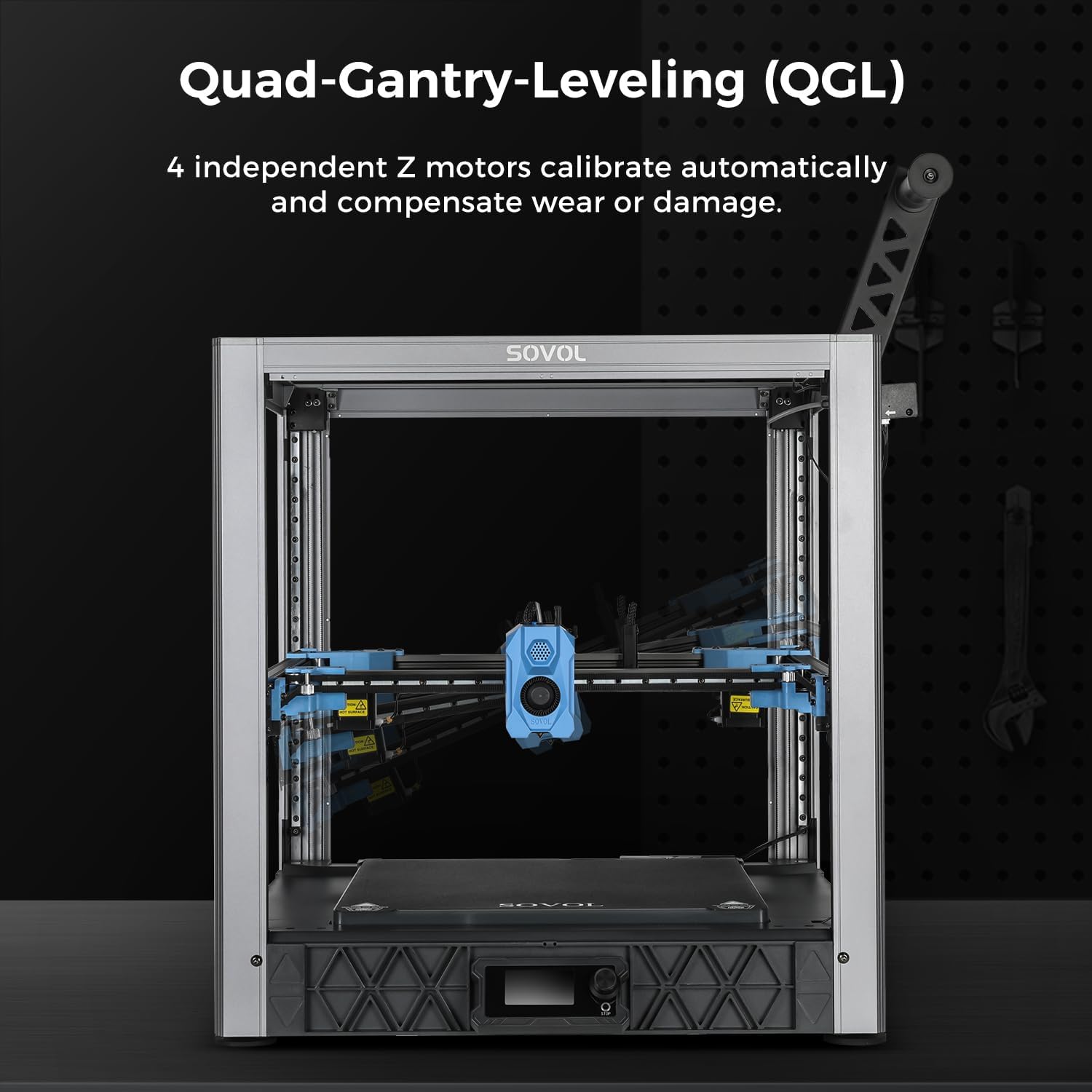
Figure 2: The Quad-Gantry-Leveling (QGL) system of the Sovol SV08, demonstrating how four independent Z-motors automatically calibrate the print bed for optimal precision.
5. Operating Instructions
Operating your Sovol SV08 3D Printer involves preparing your 3D model, loading filament, and initiating the print.
- Software Preparation: Use a compatible open-source slicer software like OrcaSlicer to prepare your 3D model. This involves adjusting print settings, generating G-code, and transferring the file to the printer via SD card, USB, WiFi, or Ethernet.
- Filament Loading: Insert your chosen filament (e.g., PLA, ABS, PETG, TPU, PLA-CF, PETG-CF, PC, ASA) into the filament sensor and feed it into the extruder until it emerges from the nozzle. The SV08's 300°C integrated hotend and AC heated bed support a wide range of materials.
- Start Printing: Select your G-code file from the printer's touchscreen interface and initiate the print. The printer will automatically perform any necessary pre-print checks and begin printing at high speeds up to 700 mm/s.
- Monitoring: Utilize the integrated camera to monitor your print remotely via the Sovol app. This allows for real-time observation and time-lapse recording of the printing process.

Figure 3: The Sovol SV08 3D Printer showcasing its high-speed printing capability at 700 mm/s.

Figure 4: Key features of the Sovol SV08, including the integrated time-lapse camera, planetary geared extruder (5.2:1 ratio, 25N extrusion), and pressure sensor for automatic Z-offset compensation.

Figure 5: The 300°C integrated hotend and AC heated bed of the Sovol SV08, designed for fast heating and compatibility with various filament types.
6. Maintenance
Regular maintenance ensures optimal performance and longevity of your 3D printer:
- Clean the Print Bed: After each print, clean the print bed to remove any residue. Use isopropyl alcohol for best results.
- Nozzle Cleaning: Periodically clean the nozzle to prevent clogs. Use the provided nozzle cleaning tool or perform a cold pull.
- Lubricate Moving Parts: Apply a small amount of lubricant to the linear rails and Z-axis lead screws every few weeks to ensure smooth movement.
- Check Belts: Ensure that the belts are properly tensioned. Loose belts can lead to print quality issues.
- Firmware Updates: Check the Sovol website regularly for firmware updates to ensure your printer has the latest features and bug fixes.
7. Troubleshooting
Here are some common issues and their potential solutions:
- Poor First Layer Adhesion: Ensure the print bed is clean and properly leveled. Adjust the Z-offset if necessary. Increase bed temperature for certain filaments.
- Filament Not Extruding: Check for clogged nozzle, ensure filament is loaded correctly, and verify the hotend temperature is appropriate for the filament type.
- Layer Shifting: Check belt tension on X and Y axes. Ensure the printer is on a stable surface. Reduce print speed if necessary.
- Stringing/Oozing: Adjust retraction settings in your slicer software. Ensure filament is dry.
- Printer Not Connecting: Verify WiFi/Ethernet connection. Check USB cable connection. Restart the printer and your computer.
8. Specifications
| Feature | Specification |
|---|---|
| Brand | Sovol |
| Model | SV08 |
| Printing Technology | FDM (Fused Deposition Modeling) |
| Build Volume | 350 x 350 x 345 mm |
| Max Print Speed | 700 mm/s |
| Nozzle Temperature | Up to 300°C |
| Heated Bed Temperature | AC Heated Bed |
| Leveling System | Quad-Gantry Automatic Leveling (QGL) |
| Extruder Type | Planetary Geared Extruder (5.2:1 ratio, 25N extrusion) |
| Filament Compatibility | PLA, ABS, PETG, TPU, PLA-CF, PETG-CF, PC, ASA |
| Connectivity | USB 2.0 / USB 3.0 / WiFi 2.4 GHz / Ethernet |
| Operating System | Win7/8/10/11/Linux Ubuntu 20.04+/Mac OS 10.10+ |
| Product Dimensions | 55 x 53 x 57 cm |
| Product Weight | 17.69 kg |
9. Warranty and Support
For warranty information, technical support, or service inquiries, please refer to the official Sovol website or contact their customer service directly. Keep your purchase receipt as proof of purchase for warranty claims.


