
Lufeiya LFY-JC4D2SMS47-White
Lufeiya White Desk with Drawers Storage - User Manual
Comprehensive guide for assembly, operation, and maintenance of your Lufeiya Home Office Computer Gaming Desk.
Product Overview
The Lufeiya White Desk is designed for home office, computer, and gaming use, offering a blend of functionality and modern aesthetics. It features integrated storage solutions, a monitor stand, LED lighting, and a built-in power strip for convenience.
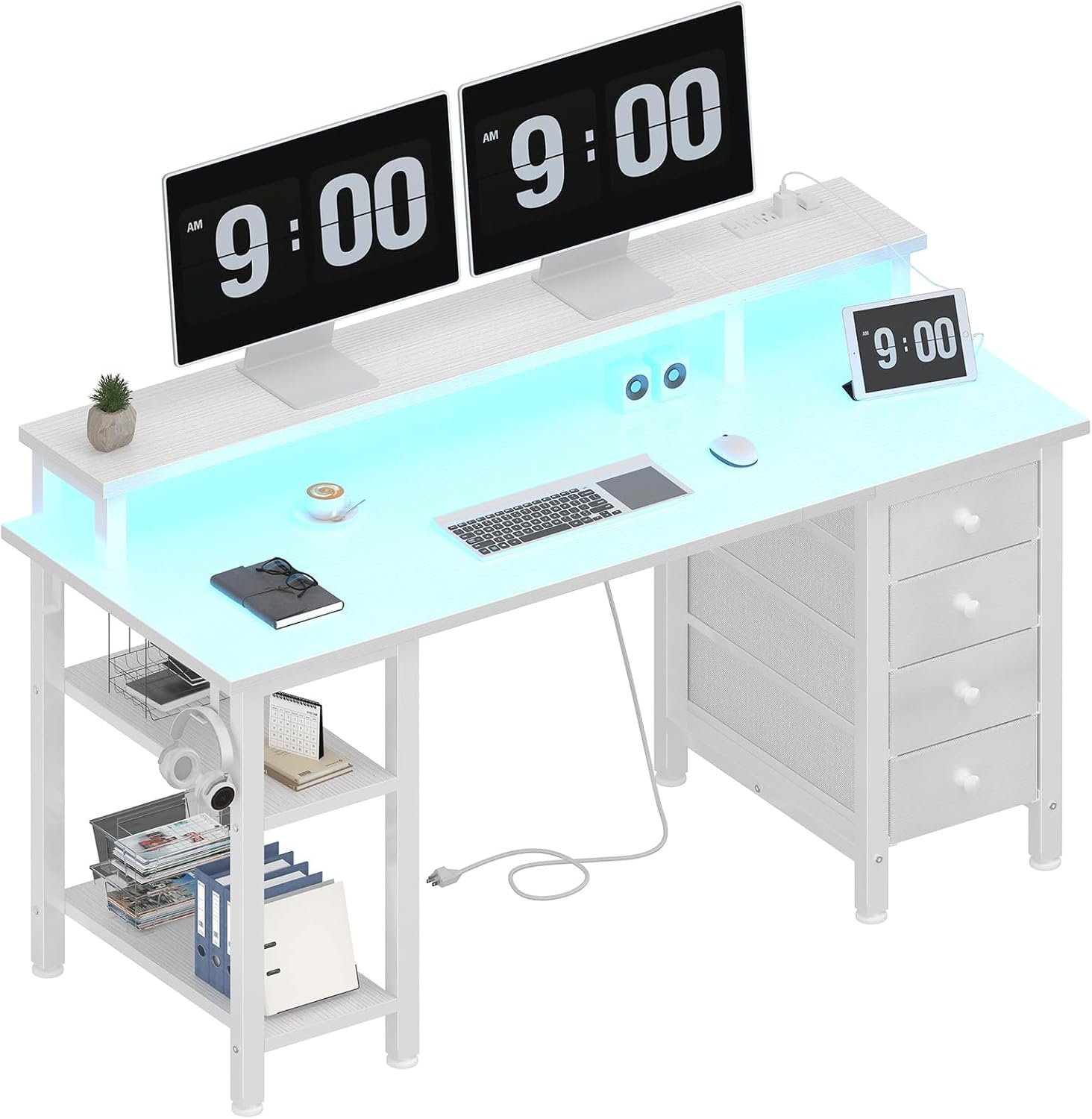
Figure 1: Overview of the Lufeiya White Desk with LED lighting and dual monitor setup.
Key Features:
- Safety Multifunctional Power Strip: Includes 3 power outlets and 2 USB charging ports for various electronic devices.
- Ample Storage Options: Features 4 fabric drawers, 2 storage shelves, a side storage bag, and 2 iron hooks for organization.
- Gaming Desk with LED Lights: Customizable LED strips controllable via a mobile app for color, brightness, temperature, and flash modes, including music rhythm synchronization.
- Sturdy Structure with Monitor Stand: Elevated monitor stand accommodates up to two monitors, promoting ergonomic posture.
- Durable Construction: Built with heavy-duty metal design and a waterproof tabletop.
Setup and Assembly
The Lufeiya desk is designed for quick and easy assembly. All necessary tools and a detailed instruction manual are provided. No additional tools are required.
Assembly Steps:
- Unpack Components: Carefully unbox all parts and verify against the included parts list.
- Assemble Frame: Follow the step-by-step instructions to connect the metal frame components.
- Attach Tabletop and Monitor Stand: Secure the main tabletop and then the monitor stand to the frame. Ensure all screws are tightened for stability.
- Install Storage Elements:
- Insert the 4 fabric drawers into their designated slots. The front of the drawers are designed to appear like wood.
- Place the 2 storage shelves into the side compartment. These shelves offer two different heights of installation to customize your storage space.
- Attach the side storage bag and the 2 removable iron hooks as desired for additional organization.
- Connect Power Strip and LED Lights: Integrate the built-in power strip and connect the LED light strips according to the manual.

Figure 2: The side storage shelves can be adjusted to two different heights to accommodate various items, such as a computer tower or books.

Figure 3: The desk features four fabric drawers with sturdy fronts, providing ample space for books, wallets, files, and laptops.

Figure 4: Two removable iron hooks are included for organizing headphones, bags, or other accessories, keeping your workspace tidy.
Operating Instructions
Using the Built-in Power Strip:
The monitor stand integrates a power strip with 3 standard AC outlets and 2 USB charging ports. Simply plug your devices into the available ports. This feature is ideal for powering your computer, monitor, gaming gear, tablets, and phones directly from your desk.

Figure 5: The integrated power strip provides convenient access to 3 AC outlets and 2 USB ports for all your electronic devices.
Controlling the LED Lights:
The desk features RGB LED strips for customizable lighting. You can control these lights using a mobile application or the included remote control.
- Mobile App Control: Download the dedicated mobile application (refer to the assembly manual for QR code or app name). The app allows for comprehensive control over color, brightness, color temperature, and various flash modes. It also supports music rhythm synchronization, allowing the lights to change with your audio.
- Remote Control: Use the provided remote to turn the lights on/off, adjust speed, switch between different modes, and select various colors. The remote also features timer settings (e.g., 1H, 2H, 3H, 4H) and a lock function to prevent accidental changes.

Figure 6: The RGB LED strips can be controlled via a mobile app, offering extensive customization options for color, brightness, and dynamic lighting modes to enhance your gaming or work environment.
Maintenance
To ensure the longevity and appearance of your Lufeiya desk, follow these simple maintenance guidelines:
- Cleaning: Wipe surfaces with a soft, damp cloth. Avoid harsh chemicals or abrasive cleaners that could damage the finish.
- Water Resistance: The tabletop is designed to be waterproof, allowing for easy cleanup of spills. However, it is recommended to wipe up liquids promptly to prevent any potential long-term damage.
- Structural Integrity: Periodically check all screws and connections to ensure they remain tight. Re-tighten if necessary to maintain stability.
- Adjustable Leg Pads: Utilize the adjustable leg pads to ensure the desk remains stable on uneven ground, preventing wobbling and stress on the frame.

Figure 7: Key features for durability and stability include a waterproof surface, enhanced structural design with heavy-duty metal, and adjustable leg pads for stability on various floor types.
Troubleshooting
| Problem | Possible Cause | Solution |
|---|---|---|
| Desk wobbles or is unstable. | Loose screws; uneven floor. | Ensure all assembly screws are tightened. Adjust the leg pads at the bottom of the desk to level it on uneven surfaces. |
| LED lights are not working. | Power connection issue; remote battery low; app not connected. | Check if the USB plug for the LED lights is securely connected to the power strip. Ensure the power strip is turned on. Replace remote batteries if needed. Verify mobile app connection and settings. |
| Drawers do not slide smoothly or align. | Incorrect assembly of drawer supports or frame. | Review the assembly instructions for the drawer section. Ensure all fabric drawers are inserted correctly and the frame is assembled squarely. |
| Missing parts during assembly. | Packaging error. | Contact Lufeiya customer service immediately for assistance. Refer to the "Warranty and Support" section. |
Specifications
| Attribute | Detail |
|---|---|
| Brand | Lufeiya |
| Model Number | LFY-JC4D2SMS47-White |
| Product Dimensions | 19.7"D x 47.2"W x 33.46"H |
| Color | White |
| Style | Modern |
| Base Material | Metal |
| Finish Type | Powder Coated |
| Special Features | Built-In USB Outlet, Monitor Stand, LED Lights, Fabric Drawers, Storage Shelves, Side Storage Bag, Iron Hooks |
| Room Type | Bedroom, Living Room, Office, Study Room |
| Recommended Uses | Drafting, Gaming, Working, Writing |
| Mounting Type | Freestanding |
| Included Components | Built-in Outlet, Built-in USB Port, Headphone Hook, Storage Bag, LED Lights, Fabric Drawers, Monitor Stand |
| Item Weight | 39.1 Pounds |
| Number of Drawers | 4 |
| Number of Shelves | 2 |
| Top Material Type | Tabletop made of FSC-Certified Wood |
| Required Assembly | Yes |
| Includes All Assembly Tools | Yes |

Figure 8: Detailed product dimensions, highlighting the overall size and specific measurements of key components like the monitor stand and storage areas.
Warranty and Support
Lufeiya provides professional customer service to ensure your satisfaction. The product comes with a limited warranty.
- Warranty Type: Limited Warranty.
- Return Policy: The product is eligible for a refund or replacement within 30 days of purchase.
- Customer Service: For any quality problems, missing parts, or assembly assistance, please contact Lufeiya customer service. They are committed to providing easy and fast service.
- Contact Information: Please refer to your purchase documentation or the Lufeiya brand store on Amazon for the most current contact details. You can visit the Lufeiya Store for more information.
Related documentsLFY-JC4D2SMS47-White


Ask a question about this manual
Ask about setup, troubleshooting, compatibility, parts, safety, or missing instructions. Manuals+ will review the question and use this page’s manual context to help answer it.