
1. Product Overview
The JOYIN 72-inch Hunchback Witch Animatronic is a life-size animated Halloween decoration designed to create a spooky atmosphere. This impressive prop stands at 6 feet tall and features eerie light, creepy sound effects, and sound-activated waving movements. It is suitable for both indoor and outdoor use, enhancing your Halloween display with its realistic details and interactive elements.

Figure 1.1: The JOYIN 72-inch Hunchback Witch Animatronic.
Key features include:
- Realistic-Size Prop: Standing at an impressive 6 feet tall, it serves as a dominant centerpiece for Halloween decor.
- Spooky and Interactive: Features eerie light and creepy sound effects, with waving movements activated by sound.
- Built-in LED Lights: Eyes light up with a red glow when activated.
- Poseable Joints: Highly flexible arms allow for various poses.
- Durable Construction: Made from high-quality materials for lasting use.
2. Safety Information
WARNING: For outdoor use only. Keep away from flammable materials. Unplug during inclement weather. Do not allow children to play on or near the display. Always follow manufacturer's instructions for setup, operation, and storage.
- Ensure the product is placed on a stable, level surface to prevent tipping.
- Keep electrical components dry and protected from moisture.
- Do not modify the product in any way.
- Store in a dry, protected area when not in use.
3. Package Contents
Please verify that all components are present before beginning assembly:
- 1 x Hunchback Witch Animatronic Figure (body, head, arms)
- 1 x Witch Hat
- 1 x Cane Prop
- Assembly Poles/Stand Components
- Instruction Manual
Note: 3 x AA batteries are required for operation and are not included.
4. Setup Instructions
Follow these steps to assemble your Hunchback Witch Animatronic:
- Unpack Components: Carefully remove all parts from the packaging and lay them out on a clean, flat surface.
- Assemble Stand: Connect the stand components according to the diagrams provided in the included paper manual. Ensure all connections are secure.
- Attach Body to Stand: Securely attach the witch's body to the assembled stand. The body is designed to fit onto the central poles.
- Install Batteries: Locate the battery compartment, typically at the back of the head or body. Open the compartment (may require a screwdriver) and insert 3 x AA batteries, ensuring correct polarity.
- Attach Head and Arms: Place the witch hat on the head. Attach the head and arms to the body. The arms feature poseable joints, allowing you to adjust their position.
- Position Cane: Place the cane prop in one of the witch's hands.
- Secure Placement: If placing outdoors, it is highly recommended to anchor the stand to the ground using stakes (not included) to prevent it from blowing over, especially in windy conditions.
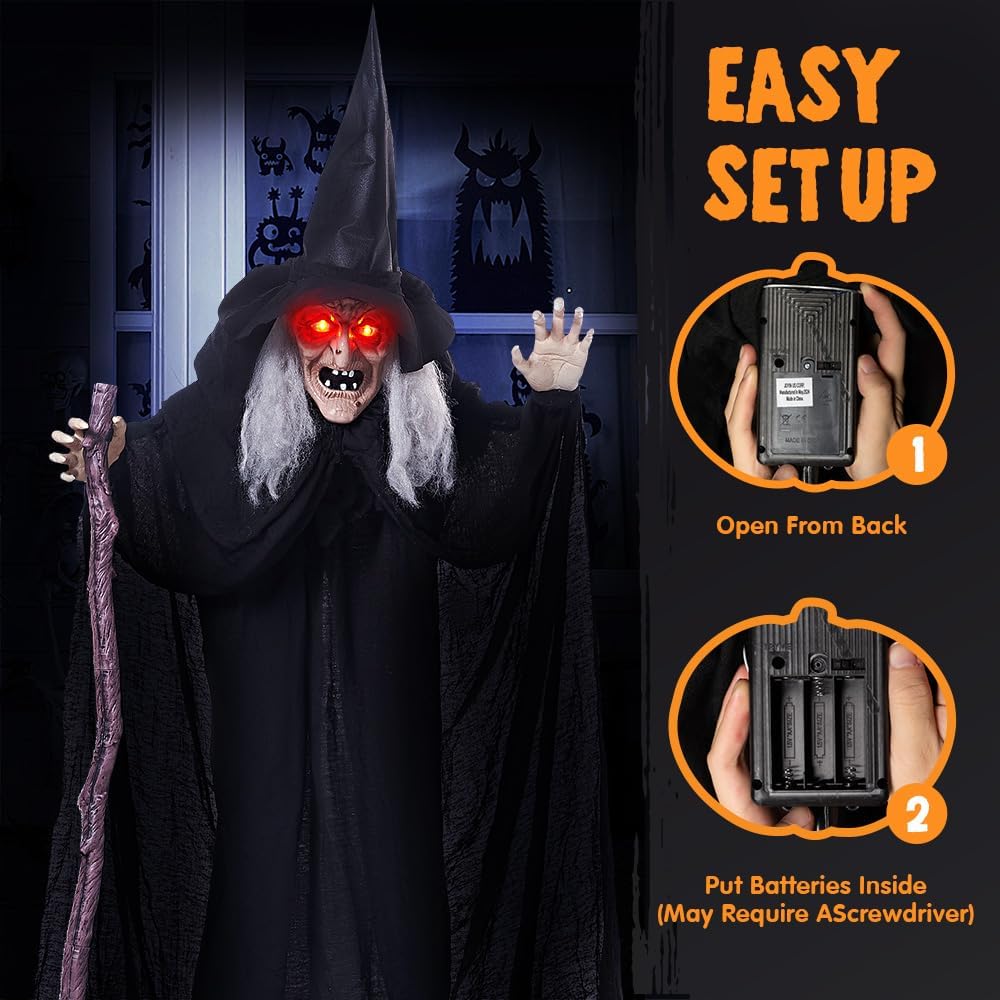
Figure 4.1: Battery installation process.
5. Operating Instructions
The JOYIN Hunchback Witch Animatronic is designed for simple operation:
- Power On: Locate the ON/OFF switch, usually near the battery compartment. Switch it to the 'ON' position.
- Sound Activation: The witch is sound-activated. When a noise is made nearby (e.g., clapping, talking, footsteps), the animatronic will trigger its sequence.
- Activation Sequence: Upon activation, the witch's eyes will light up with a red glow, creepy sound effects will play, and her arms will perform waving movements.
- Deactivation: To conserve battery life, switch the unit to the 'OFF' position when not in use for extended periods.
6. Maintenance
Proper maintenance will ensure the longevity of your animatronic:
- Cleaning: Gently wipe the surface of the witch with a soft, dry cloth. Do not use harsh chemicals or abrasive cleaners.
- Battery Care: Always remove batteries when the animatronic is not in use for a prolonged period to prevent corrosion.
- Storage: Store the animatronic in a cool, dry place, ideally in its original packaging or a protective tote, to prevent dust accumulation and damage.
- Outdoor Use: While designed for outdoor use, avoid prolonged exposure to extreme weather conditions such as heavy rain, snow, or strong winds. Bring indoors during inclement weather.
7. Troubleshooting
If you encounter issues with your animatronic, refer to the following common problems and solutions:
| Problem | Possible Cause | Solution |
|---|---|---|
| Animatronic does not activate. | Batteries are dead or incorrectly installed. Switch is OFF. Sensor is obstructed or not sensitive enough. | Replace batteries with fresh ones, ensuring correct polarity. Check if the ON/OFF switch is in the 'ON' position. Ensure the sensor area is clear. Try making a louder or closer sound to activate. |
| Sound is distorted or too quiet. | Low batteries. Speaker obstruction. | Replace batteries. Check for any debris or obstructions around the speaker. |
| Witch is unstable or falls over. | Not properly assembled. Not anchored (outdoor use). Uneven surface. | Re-check all assembly connections. For outdoor use, use ground stakes to secure the base. Place on a flat, stable surface. |
| Lights are dim or not working. | Low batteries. Loose connection. | Replace batteries. Check internal wiring connections if accessible (refer to paper manual). |
8. Specifications
- Product Dimensions: 47.24 x 7.87 x 72.05 inches
- Item Weight: 4.95 pounds
- Model Number: 16941
- ASIN: B0D4Q2TMCR
- Power Source: 3 x AA Batteries (not included)
- Activation: Sound-activated
9. Warranty and Support
For warranty information or technical support, please contact JOYIN customer service directly. Refer to the contact details provided on the product packaging or visit the official JOYIN website.
Manufacturer: Joyin US Corp
Website: Visit the JOYIN Store on Amazon