
1. Introduction
Welcome to the user manual for your funxwe 128GB TF Card Flash Memory Card with SD Adapter. This guide provides essential information for the proper installation, operation, and maintenance of your memory card to ensure optimal performance and longevity. Please read this manual thoroughly before using the product.
2. Product Overview
The funxwe 128GB TF Card (also known as a microSDXC card) is a high-speed flash memory solution designed for expanding storage in various digital devices. It is supplied with an SD adapter, allowing for compatibility with devices that utilize standard SD card slots.
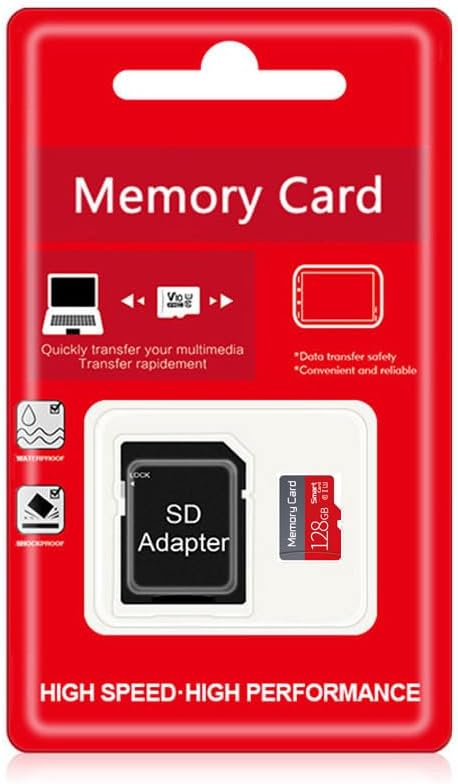
Image: The funxwe 128GB TF Card and its accompanying SD adapter, presented in their retail packaging.
Key Features:
- High-Speed Performance: Type U3 Class 10, V30, UHS-I interface, supporting read speeds up to 90MB/s and write speeds up to 50MB/s.
- Durable Design: Engineered to be waterproof, shockproof, X-ray radiation proof, anti-static, and resistant to extreme temperatures (-25°C to 85°C).
- Versatile Compatibility: Suitable for use with a wide range of devices including security cameras, computers, smartphones, tablets, digital cameras, drones, car recorders, and game consoles.
- Included Adapter: Comes with an SD adapter for expanded compatibility with devices featuring standard SD card slots.
3. Setup
3.1 Inserting the TF Card into a Device
- Locate the memory card slot on your electronic device (e.g., smartphone, tablet, camera, drone). Refer to your device's manual for exact location.
- Orient the funxwe TF card correctly. The gold contacts on the card should align with the contacts in the device's slot.
- Gently push the TF card into the slot until it clicks into place. Do not force the card.
- To remove, gently push the card inward until it springs out slightly, then pull it out.
3.2 Using the SD Adapter
- Insert the funxwe TF card into the designated slot on the SD adapter. Ensure it is fully seated and flush with the adapter.
- Insert the SD adapter (with the TF card inside) into a device that accepts standard SD cards, such as a computer's SD card reader or a digital camera.
- To remove the TF card from the adapter, gently pull it out. To remove the adapter from a device, gently pull it straight out of the slot.
4. Operating Instructions
4.1 Data Transfer
To transfer files to or from your funxwe TF card:
- Insert the TF card into your device or into the SD adapter and then into a computer's card reader.
- Your computer or device should recognize the card as a removable storage drive.
- Open the drive and drag-and-drop files (photos, videos, documents, etc.) between your computer/device and the memory card.

Image: Visual representation of high-speed data transfer from a laptop to a memory card.
4.2 Formatting the Card
Formatting a memory card erases all data on it. Always back up important files before formatting.
- Insert the TF card into your computer or device.
- Access the storage settings or disk management utility on your computer/device.
- Select the funxwe TF card and choose the "Format" option.
- For 128GB cards, the recommended file system is exFAT.
4.3 Available Capacity
Please note that due to different capacity algorithms and space reserved for system files, management, and performance optimization, the actual usable capacity of a 128GB card will typically be between 115GB and 120GB.
5. Compatibility
The funxwe 128GB TF Card is designed for broad compatibility with a variety of digital devices that support microSDXC cards. These include, but are not limited to:
- Smartphones
- Tablets
- Digital Cameras
- Security Cameras
- Drones
- Car Recorders
- Game Consoles
- Computers (via SD adapter)

Image: A graphic illustrating the wide range of devices compatible with the memory card, including smartphones, tablets, and cameras.
6. Maintenance and Care
To ensure the longevity and reliable performance of your funxwe TF card, follow these care guidelines:
- Durability Features: The card is built with robust features including waterproof, shockproof, temperature-proof, X-ray proof, and anti-static properties.
- Temperature Range: The card is designed to operate and be stored in temperatures ranging from -25°C to 85°C. Avoid exposing it to temperatures outside this range for extended periods.
- Handling: Avoid bending or applying excessive force to the card. Keep the gold contacts clean and free from dust or debris. Use a soft, dry cloth for cleaning if necessary.
- Data Backup: Regularly back up important data stored on the memory card to another storage device to prevent potential data loss.

Image: A visual representation highlighting the card's resistance to water, extreme temperatures, magnetic fields, and physical shocks.
7. Troubleshooting
7.1 Card Not Recognized
- Ensure the TF card is fully and correctly inserted into the device or SD adapter.
- Try inserting the card into a different compatible device or card reader to rule out a device-specific issue.
- Verify that your device supports microSDXC cards and the 128GB capacity.
- Gently clean the gold contacts on the card with a soft, dry, lint-free cloth.
7.2 Slow Performance
- Ensure your device's card slot and internal hardware support UHS-I speeds to fully utilize the card's capabilities.
- Avoid filling the card to its absolute maximum capacity, as this can sometimes affect performance.
- If performance degrades significantly, consider backing up all data and then formatting the card.
7.3 Data Loss
In the event of unexpected data loss, immediately stop using the card to prevent further corruption. If the data is critical, consult professional data recovery services.
8. Specifications
| Feature | Description |
|---|---|
| Brand | funxwe |
| Model Name | SD128 |
| Flash Memory Type | Micro SD (TF Card) |
| Memory Storage Capacity | 128 GB (Actual usable: 115GB-120GB) |
| Read Speed | Up to 90 MB/s |
| Write Speed | Up to 50 MB/s |
| Speed Class | UHS-I, U3, Class 10, V30 |
| Hardware Interface | microSDXC |
| Special Features | Drop Proof, Magnetic Proof, Water Proof, Write Protect Switch, X-Ray Proof |
| Operating Temperature | -25°C to 85°C |
| TF Card Dimensions | 11mm x 15mm (0.43 x 0.59 inches) |
| SD Adapter Dimensions | 24mm x 32mm (0.94 x 1.26 inches) |
| UPC | 712383791399 |

Image: A diagram detailing the physical dimensions of both the funxwe TF card and its SD adapter.
9. Warranty and Support
The funxwe 128GB TF Card and its accompanying SD adapter are covered by a 10-year replacement warranty. This warranty covers manufacturing defects and ensures your product performs as expected under normal use.
For warranty claims, technical assistance, or any product-related inquiries, please contact funxwe customer service. You can typically find contact information through your original retailer or on the official funxwe website.