
Introduction
Thank you for choosing the JENABOM 47-in-1 Cordless Electric Screwdriver. This manual provides essential information for the safe operation, maintenance, and troubleshooting of your new tool. Please read it thoroughly before first use and keep it for future reference.
Important Safety Instructions
Always follow basic safety precautions when using electric tools to reduce the risk of fire, electric shock, and personal injury.
- Work Area Safety: Keep your work area clean and well-lit. Cluttered or dark areas invite accidents. Do not operate power tools in explosive atmospheres, such as in the presence of flammable liquids, gases, or dust.
- Electrical Safety: Avoid body contact with earthed or grounded surfaces. Do not expose power tools to rain or wet conditions. Water entering a power tool will increase the risk of electric shock.
- Personal Safety: Stay alert, watch what you are doing, and use common sense when operating a power tool. Do not use a power tool while you are tired or under the influence of drugs, alcohol, or medication. Always wear appropriate personal protective equipment, such as safety glasses, dust mask, non-skid safety shoes, hard hat, or hearing protection.
- Tool Use and Care: Do not force the power tool. Use the correct power tool for your application. Disconnect the plug from the power source and/or the battery pack from the power tool before making any adjustments, changing accessories, or storing power tools.
- Battery Pack Use and Care: Recharge only with the charger specified by the manufacturer. Do not use battery packs with any other power tools.
Package Contents
Please check the package to ensure all items are present and undamaged:
- JENABOM Cordless Electric Screwdriver
- Assorted Screwdriver Bits (47-in-1 set)
- Flexible Shaft Extension
- USB Charging Cable
- Storage Case

Image: Complete kit contents including the screwdriver, bits, flexible shaft, USB cable, and case.
Product Diagram and Parts Identification
Familiarize yourself with the components of your electric screwdriver:
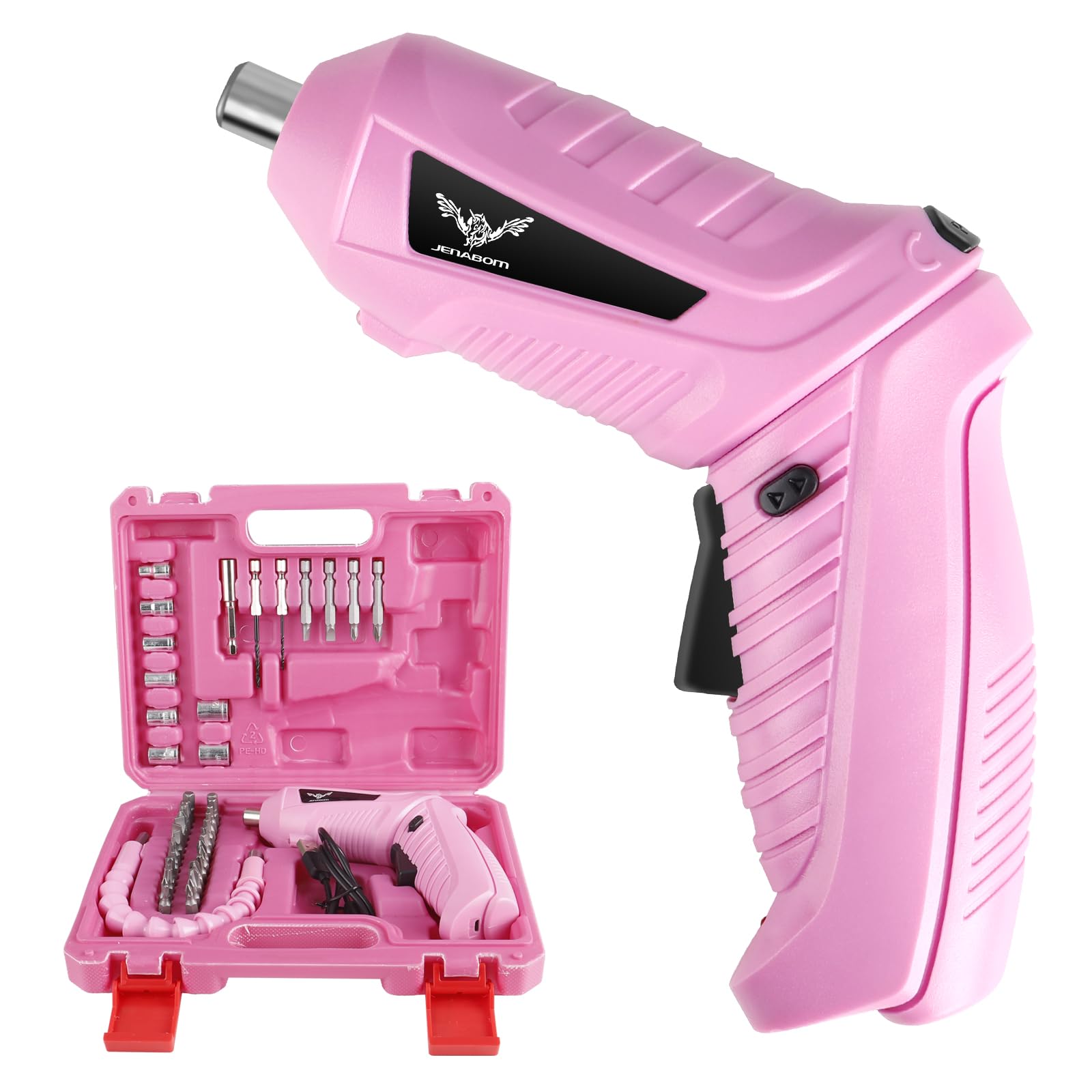
Image: Labeled diagram of the electric screwdriver showing its main parts.
- Durable Chuck: Holds screwdriver bits securely.
- LED Headlamp: Illuminates the work area.
- Positive and Negative Switch: Controls forward (tighten) and reverse (loosen) rotation.
- Switch Button: Activates the screwdriver.
- Rotary Switch: Allows adjustment of the handle position.
- Handle: Ergonomic grip for comfortable use.
- Pilot Lamp: Indicates power status or charging.
Setup
1. Charging the Screwdriver
Before first use, fully charge the electric screwdriver. The device uses a 3.6V Li-ion battery.
- Connect the provided USB charging cable to the charging port on the screwdriver.
- Plug the other end of the USB cable into a compatible USB power adapter (not included) or a computer USB port.
- The pilot lamp will indicate charging status. Allow sufficient time for a full charge before use.

Image: Electric screwdriver being charged via USB.
2. Installing Screwdriver Bits
The screwdriver features a durable chuck for quick bit changes.
- Ensure the screwdriver is off and the forward/reverse switch is in the neutral (locked) position.
- Insert the desired screwdriver bit firmly into the chuck until it clicks into place.
- To remove a bit, pull it straight out from the chuck.
- For hard-to-reach areas, attach the flexible shaft extension to the chuck before inserting a bit.
Operating Instructions
1. Adjusting Handle Position
The screwdriver handle can be adjusted for different grip styles and access to tight spaces.
- Locate the rotary switch (often labeled "PUSH") on the top of the screwdriver.
- Press the rotary switch.
- Rotate the handle to your desired position (straight grip or pistol grip).
- Release the rotary switch to lock the handle in place.

Image: Demonstration of the screwdriver's rotatable handle feature.
2. Powering On and Off
To operate the screwdriver:
- Press the main switch button (trigger) to activate the screwdriver.
- Release the switch button to turn off the screwdriver.
3. Selecting Rotation Direction (Forward/Reverse)
The forward/reverse switch controls the direction of rotation:
- Push the switch to the left for forward rotation (to tighten screws).
- Push the switch to the right for reverse rotation (to loosen screws).
- Position the switch in the center to lock the trigger and prevent accidental activation.
4. Using the LED Headlamp
The integrated LED headlamp automatically illuminates when the screwdriver is in operation, providing visibility in dark or confined spaces.

Image: The LED headlamp in action, illuminating a work area.
Maintenance
- Cleaning: Regularly wipe the tool with a soft, damp cloth. Do not use harsh chemicals or abrasive cleaners. Ensure no liquids enter the tool.
- Storage: Store the screwdriver and its accessories in the provided case in a dry, cool place, away from direct sunlight and out of reach of children.
- Battery Care: For optimal battery life, avoid completely draining the battery before recharging. If storing for extended periods, charge the battery partially (around 50%) every few months.
- Bit Inspection: Inspect screwdriver bits for wear or damage before each use. Replace worn bits to ensure efficient and safe operation.
Troubleshooting
| Problem | Possible Cause | Solution |
|---|---|---|
| Screwdriver does not turn on. | Battery is depleted. Forward/Reverse switch is in the neutral (locked) position. | Charge the battery fully. Move the switch to the forward or reverse position. |
| Screwdriver lacks power. | Low battery charge. | Recharge the battery. |
| Bit slips or does not engage. | Bit not fully inserted. Bit is worn or damaged. Incorrect bit type for screw. | Ensure bit is fully seated in the chuck. Replace with a new bit. Use the correct bit for the screw head. |
| Handle does not rotate or lock. | Rotary switch not fully pressed or released. | Ensure the "PUSH" button is fully pressed when rotating and fully released to lock. |
Specifications
| Feature | Detail |
|---|---|
| Model | 47 in 1 Electric Screwdriver |
| Power Source | Battery Powered |
| Voltage | 3.6 Volts |
| Battery Cell Type | Lithium Ion |
| Max Torque | 3.5 Newton Meters |
| Speed | 180 RPM |
| Product Dimensions | 17.5 x 14 x 4.7 cm |
| Item Weight | 435 g |
| Manufacturer | NINGBO TIANYI TOOLS CO., LTD |
| UPC | 764807109013 |
Warranty and Support
Warranty information for this product was not provided in the available data. For specific warranty details or technical support, please contact JENABOM customer service directly or refer to the product packaging for contact information.