1. Introduction
This manual provides detailed instructions for the installation, maintenance, and troubleshooting of the VERBANA Propeller Blade Grip Kit, designed as a replacement part for SYMA S033 and S33 RC Helicopters. Please read this manual thoroughly before attempting any installation or maintenance to ensure proper function and safety.
2. Product Overview
The VERBANA Propeller Blade Grip Kit is a direct replacement component for the upper propeller blade grips on SYMA S033 and S33 RC Helicopters. This kit is essential for maintaining the flight stability and performance of your RC helicopter by ensuring the propellers are securely attached and can articulate correctly.
Key Features:
- Direct fit for SYMA S033 and S33 models.
- Durable construction for reliable performance.
- Restores original flight characteristics.
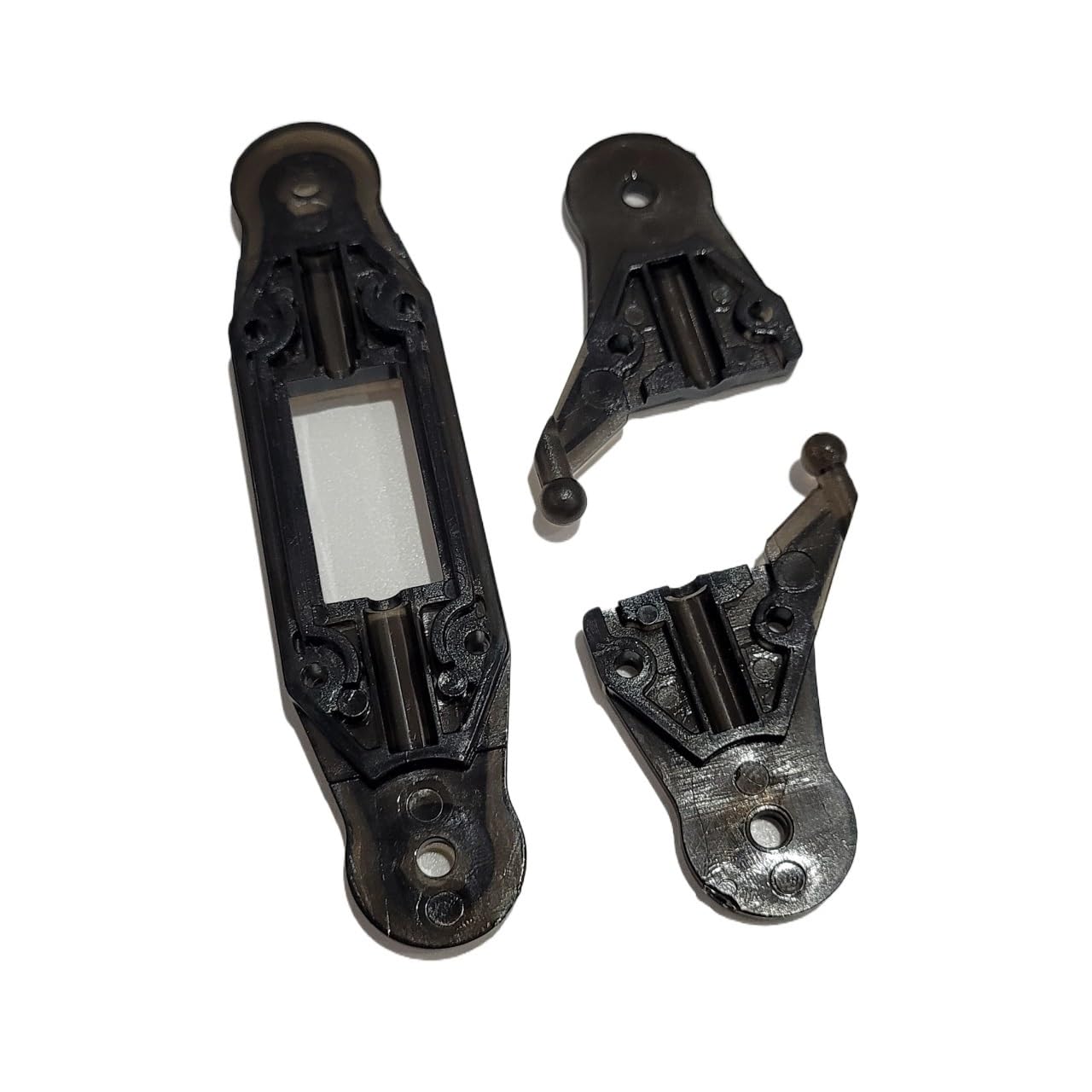
Figure 2.1: VERBANA Propeller Blade Grip Kit. This image shows the various components included in the kit, such as the blade grips and associated hardware.
3. Safety Information
Always prioritize safety when working with RC helicopter parts. Improper installation can lead to equipment damage or personal injury.
- Ensure the RC helicopter is powered off and the battery is disconnected before beginning any installation or maintenance.
- Use appropriate tools for installation to avoid damaging parts.
- Keep small parts away from children and pets.
- If you are unsure about any step, consult a qualified technician or refer to the original helicopter's manual.
4. Package Contents
Verify that all components are present in your package before proceeding with installation. The kit typically includes:
- Propeller Blade Grips (Quantity: 2)
- Associated Screws and Pins (Quantity: 1 set)
Note: The exact number of screws and pins may vary slightly. Refer to the product packaging for precise details.
5. Setup and Installation
Follow these steps carefully to replace the propeller blade grips on your SYMA S033 or S33 RC Helicopter.
- Prepare the Helicopter: Ensure the helicopter is turned off and the battery is removed. Place the helicopter on a clean, flat surface.
- Remove Old Blade Grips:
- Carefully identify the screws or pins securing the existing propeller blade grips to the main rotor shaft or rotor head.
- Using a small screwdriver (typically a Phillips head), gently unscrew and remove these fasteners. Keep track of all removed parts.
- Once fasteners are removed, detach the old blade grips and the propeller blades from the rotor head.
- Attach New Blade Grips:
- Take one new VERBANA propeller blade grip. Align it with the corresponding slot on the rotor head.
- Insert the propeller blade into the new grip. Ensure it is seated correctly.
- Secure the new blade grip and propeller blade to the rotor head using the provided screws or pins. Do not overtighten, as this can strip the threads or crack the plastic.
- Repeat for Second Blade Grip: Follow the same procedure for the second propeller blade grip and propeller blade.
- Final Check: After installation, gently move the propeller blades to ensure they can articulate freely without excessive play or binding. Confirm all screws are snug.
6. Operating Instructions (Post-Installation)
After successfully installing the new propeller blade grips, perform a brief functional check before full operation.
- Power On: Reconnect the battery and power on the RC helicopter.
- Initial Spin-Up: With the helicopter on a stable surface, slowly increase the throttle to allow the propellers to spin at a low speed. Observe for any unusual vibrations, wobbling, or sounds.
- Gentle Lift-Off: If the initial spin-up is stable, attempt a very gentle lift-off to a low height. Check for stable flight characteristics.
- Adjustments: If any instability is observed, land the helicopter immediately and re-check the installation of the blade grips and propellers. Ensure no parts are loose or misaligned.
Note: This kit replaces mechanical parts. Any issues related to electronic controls or other helicopter components are outside the scope of this manual.
7. Maintenance
Regular maintenance of your propeller blade grips will extend the lifespan of your RC helicopter and ensure safe operation.
- Visual Inspection: Before each flight, visually inspect the blade grips for any signs of cracks, damage, or wear.
- Fastener Check: Periodically check that all screws and pins securing the blade grips are snug. Do not overtighten.
- Cleaning: Keep the blade grips free from dirt, dust, and debris. Use a soft, dry cloth for cleaning.
- Replacement: If any damage or excessive wear is noted, replace the blade grips immediately to prevent flight instability or further damage.
8. Troubleshooting
This section addresses common issues related to the propeller blade grips.
| Problem | Possible Cause | Solution |
|---|---|---|
| Helicopter vibrates excessively after blade grip replacement. |
|
|
| Propeller blades feel loose in the grips. |
|
|
| Helicopter drifts or is unstable. |
|
|
9. Specifications
| Feature | Detail |
|---|---|
| Product Name | VERBANA Propeller Blade Grip Kit |
| Compatibility | SYMA S033, SYMA S33 RC Helicopters |
| Material | Durable Composite Material |
| Weight | Approximately 50 Grams (for the kit) |
| Part Type | RC Helicopter Replacement Part (Propeller Blade Grip) |
Note: The material listed as "paper" in some product descriptions is likely an error. RC helicopter parts are typically made from durable plastics or composites.
10. Warranty and Support
Information regarding specific warranty terms for VERBANA products is not provided in this manual. For warranty claims, technical support, or inquiries about replacement parts, please refer to the retailer or the VERBANA official website if available. Keep your purchase receipt as proof of purchase.


