1. Introduction
Thank you for choosing the SLOTHMORE Full Body Massage Mat. This innovative product is designed to provide a comprehensive massage experience through 3D stretching and lumbar traction, offering relief and relaxation for your entire body. Please read this manual carefully before use to ensure proper operation and maintenance.
2. Important Safety Information
WARNING: To reduce the risk of burns, fire, electric shock, or injury to persons:
- Always unplug the appliance from the electrical outlet immediately after using and before cleaning.
- Do not use while bathing or in a shower.
- Do not place or store appliance where it can fall or be pulled into a tub or sink.
- Do not place in or drop into water or other liquid.
- Never use pins or other metallic fasteners with this appliance.
- Close supervision is necessary when this appliance is used by, on, or near children, invalids, or disabled persons.
- Use this appliance only for its intended use as described in this manual. Do not use attachments not recommended by the manufacturer.
- Never operate this appliance if it has a damaged cord or plug, if it is not working properly, if it has been dropped or damaged, or dropped into water.
- Keep the cord away from heated surfaces.
- Never use while sleeping or drowsy.
- Never drop or insert any object into any opening.
- Do not operate where aerosol (spray) products are being used or where oxygen is being administered.
- Do not use on sensitive skin areas or in the presence of poor circulation.
- This product is designed for individuals between 155-183 cm (5'1"-6'0") in height.
- Do not use on chairs or recliners; it is designed for use on a bed, sofa, or floor.
3. Product Components and Features
The SLOTHMORE Full Body Massage Mat is equipped with multiple airbags and heating elements to provide a comprehensive massage experience.

Figure 3.1: Overview of the SLOTHMORE Full Body Massage Mat, showing the mat, remote control, and folded carrying bag.

Figure 3.2: Diagram illustrating the specific massage areas covered by the mat: Neck (Twist Left & Right), Back (Curve Stretching), Waist (Traction Up & Down + Heat), Hip (Support & Relaxation), and Leg (Massage & Pressure).
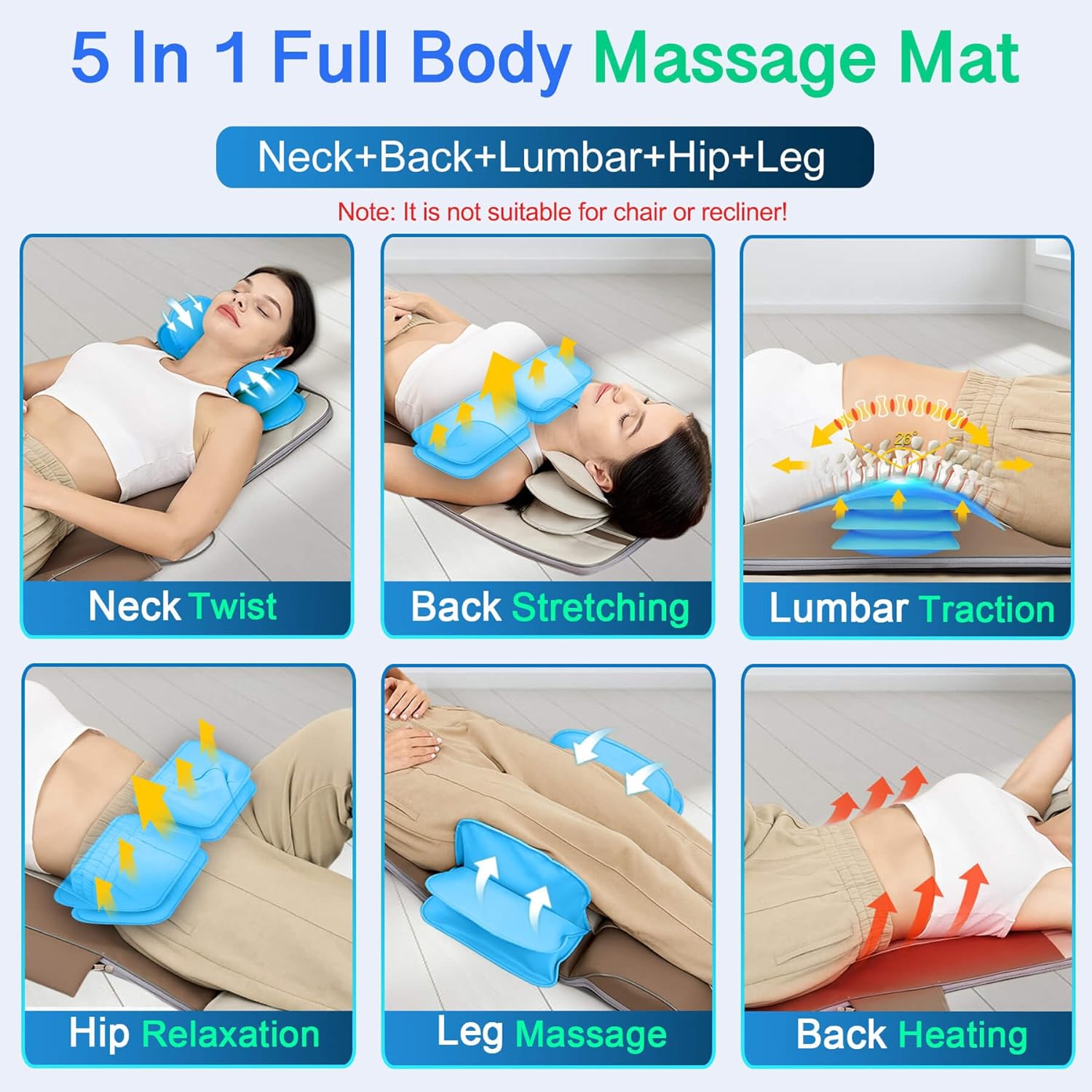
Figure 3.3: Visual representation of the 5-in-1 full body massage functions, including Neck Twist, Back Stretching, Lumbar Traction, Hip Relaxation, Leg Massage, and Back Heating.

Figure 3.4: Illustration of the 3D Yoga Traction capabilities, demonstrating Traction Up & Down, Curve Stretching, and Twist Left & Right movements for full body stretching.

Figure 3.5: The mat's foldable and portable design, highlighting the adjustable pillow (suitable for 5'1"-6'0" height), anti-sweat PU leather, and its lightweight nature (approx. 10 lbs).

Figure 3.6: Detailed view of the remote controller, showing buttons for 4 massage modes (Auto, Stretch, Twist, Flow), Pause function, 3 massage parts (Full Body, Neck, Back, Hip), 3 heating levels (Heat1, Heat2, Heat3/Off), 3 massage intensities (Low, Medium, High), and a 20-minute smart timer.

Figure 3.7: The benefits of soothing heat for blood circulation and how the mat addresses common pain points such as sedentary work, long driving, waist pain, and spine soreness.
Key Features:
- 3D Body Stretching & Lumbar Traction: Unique massage type that moves up and down, bends, and twists the entire body (neck, back, waist, hip, leg).
- Integrated Heating Therapy: Optional back heating to relieve stress, tension, and fatigue.
- Multiple Modes & Intensities: 4 program modes (Auto, Stretch, Twist, Flow) and 3 intensity levels (Low, Medium, High).
- Targeted Massage Areas: Options for neck, back, and hip massage.
- Adjustable Heat Levels: 3 heat levels (46.1°C/115°F, 54.4°C/130°F, 65.0°C/149°F).
- User-Friendly Remote Control: Portable controller for easy customization.
- Foldable & Portable Design: Equipped with Velcro fasteners and a handle for easy storage and transport. Weighs approximately 4.5 kg (10 lbs).
- Adjustable Neck Pillow: Ensures proper fit for users within the recommended height range.
4. Setup Instructions
- Unpack the Mat: Carefully remove the massage mat from its packaging.
- Choose a Flat Surface: Lay the mat flat on a bed, sofa, or the floor. Ensure the surface is stable and provides adequate support for your body. Do not use on chairs or recliners.
- Position Yourself: Lie down on the mat, ensuring your head is comfortably positioned on the adjustable neck pillow. Adjust the pillow if necessary to align with your height (suitable for 155-183 cm / 5'1"-6'0").
- Connect Power: Plug the power adapter into the mat's power input, then plug the adapter into a standard electrical outlet.
- Prepare Remote Control: Ensure the remote control is connected to the mat. It is designed for easy access during use.
5. Operating Instructions
The massage mat is operated via the wired remote control. Familiarize yourself with the buttons and their functions.
5.1 Power On/Off
- Press the Power button on the remote control to turn the mat on. The indicator light will illuminate.
- Press the Power button again to turn the mat off.
5.2 Selecting Massage Modes
The mat offers 4 distinct massage modes:
- Auto: A pre-programmed sequence combining various stretching and traction movements.
- Stretch: Focuses on full body stretching and elongation.
- Twist: Emphasizes left and right twisting motions for spinal mobility.
- Flow: A gentle, continuous flow of movements for relaxation.
Press the Mode button repeatedly to cycle through the available modes.
5.3 Adjusting Intensity
There are 3 intensity levels for the massage functions:
- Low
- Medium
- High
Press the Intensity button to adjust the strength of the massage.
5.4 Selecting Massage Parts
You can choose to target specific areas of your body:
- Neck
- Back
- Hip
- Full Body (default or combined selection)
Press the Part button to select the desired massage area.
5.5 Using Heat Function
The mat features an optional heating function for the back area with 3 levels:
- Heat1: Approximately 46.1°C (115°F)
- Heat2: Approximately 54.4°C (130°F)
- Heat3: Approximately 65.0°C (149°F)
Press the Heat button repeatedly to cycle through the heat levels or turn the heat off.
5.6 Pause Function
During a stretching or traction program, you can pause the movements to hold a specific position. Press the Pause button to activate or deactivate the pause function.
5.7 Smart Timer
The mat is equipped with a 20-minute smart timer. After 20 minutes of continuous operation, the mat will automatically shut off to prevent overuse and ensure safety.
6. Maintenance and Care
- Cleaning: Always unplug the mat before cleaning. Wipe the surface with a soft, damp cloth. Do not use abrasive cleaners or immerse the mat in water.
- Storage: When not in use, fold the mat using the Velcro fasteners and store it in a cool, dry place. Use the integrated handle for easy transport. Avoid placing heavy objects on the mat during storage.
- Avoid Sharp Objects: Keep the mat away from sharp objects that could puncture the airbags or damage the material.
- Power Cord Care: Do not wrap the power cord around the mat. Store it loosely to prevent damage.
7. Troubleshooting
| Problem | Possible Cause | Solution |
|---|---|---|
| Mat does not turn on. | Power cord not properly connected. Power outlet not working. | Ensure the power cord is securely plugged into both the mat and the electrical outlet. Test the outlet with another device. |
| Massage function is weak or inconsistent. | Incorrect intensity setting. Mat not fully inflated (air leak). | Increase the intensity level using the remote control. Check for any visible damage or punctures. Contact customer support if an air leak is suspected. |
| Heat function is not working. | Heat function is off or set to low. Overheating protection activated. | Ensure the heat function is turned on and set to a desired level (Heat1, Heat2, or Heat3). Unplug the mat and let it cool down for 30 minutes before trying again. |
| Mat automatically shuts off. | 20-minute smart timer activated. Overheating protection. | This is normal operation. If you wish to continue, restart the mat after a short break. Allow the mat to cool down before restarting. |
8. Specifications
| Feature | Detail |
|---|---|
| Product Name | Back Massager Device |
| Brand | SLOTHMORE |
| Model Number | HY-8639 |
| ASIN | B0D4PSTF7R |
| UPC | 605646791680 |
| Dimensions (L x W x H) | 3 x 4 x 5 cm (approx. 1.2 x 1.6 x 2 inches) |
| Weight | 4.83 kg (approx. 10.65 lbs) |
| Massage Type | 3D Stretching & Traction (Airbag-based) |
| Massage Modes | 4 (Auto, Stretch, Twist, Flow) |
| Massage Intensities | 3 (Low, Medium, High) |
| Heating Levels | 3 (115°F/46.1°C, 130°F/54.4°C, 149°F/65.0°C) |
| Timer | 20 minutes auto-shutoff |
| Recommended User Height | 155-183 cm (5'1"-6'0") |
| Material | PU Leather (Anti-Sweat) |
9. Warranty and Support
For warranty information and customer support, please refer to the documentation included with your purchase or contact SLOTHMORE customer service directly. Keep your purchase receipt as proof of purchase.
For further assistance, please visit the official SLOTHMORE website or contact their support team through the contact information provided on the product packaging.


