1. Introduction
This user manual provides comprehensive instructions for the PZL 55Q20 Replacement Remote Control. This remote is designed to function as a direct replacement for various Skyworth Smart Android TV models, offering essential control without voice functionality. Please read this manual carefully to ensure proper setup and operation.

Image 1.1: The PZL 55Q20 Replacement Remote Control.
2. Package Contents
Upon opening the package, please verify that all items are present and in good condition:
- 1 x PZL 55Q20 Replacement Remote Control
Note: Batteries and additional instructions are not included in the package.
3. Setup
The PZL 55Q20 Replacement Remote Control is designed for immediate use without the need for programming or pairing. Simply insert the batteries, and it will be ready to operate your compatible Skyworth Smart Android TV.
3.1 Battery Installation
- Locate the battery compartment on the back of the remote control.
- Slide the battery compartment cover downwards or outwards to open it.
- Insert two (2) AAA batteries, ensuring the positive (+) and negative (-) terminals align correctly with the markings inside the compartment.
- Replace the battery compartment cover by sliding it back into position until it clicks securely.

Image 3.1: The remote control requires no setup or pairing after battery installation.
Once batteries are installed, the remote is ready for use with your compatible Skyworth Smart Android TV.
4. Operating Instructions
The PZL 55Q20 remote control utilizes infrared (IR) 3.0 technology, providing a strong signal and fast response. It offers precise control over distances of up to 12 meters (approximately 40 feet) and supports multi-angle control.
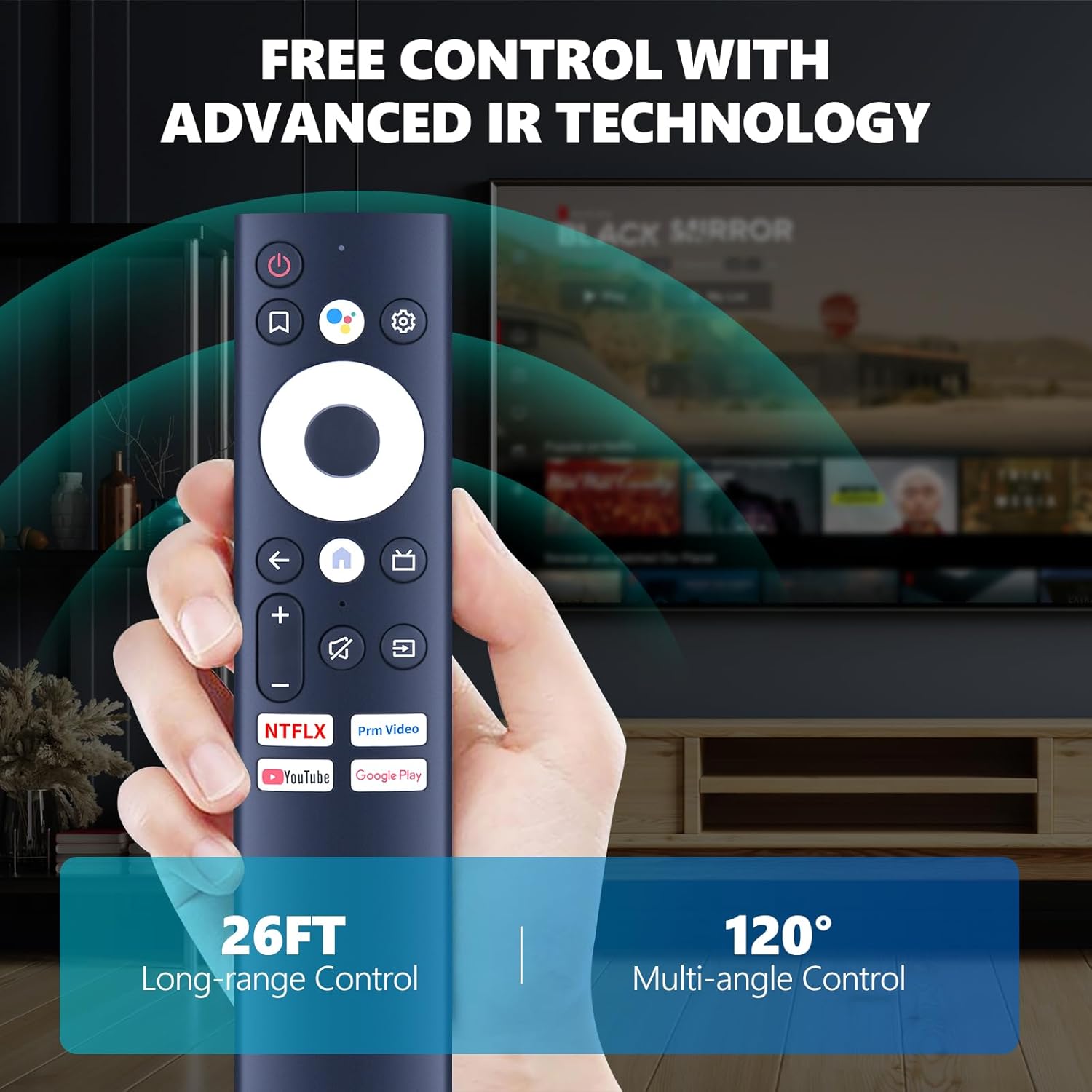
Image 4.1: The remote offers long-range and multi-angle control via advanced IR technology.
4.1 Button Functions
Familiarize yourself with the primary functions of the remote control buttons:
- Power Button (Red Circle with Line): Turns the TV on or off.
- Navigation Pad (Large White Circle): Use the directional arrows (Up, Down, Left, Right) to navigate menus and select options. The central button acts as 'OK' or 'Enter'.
- Back Button (Left Arrow): Returns to the previous screen or menu.
- Home Button (House Icon): Accesses the TV's home screen or main menu.
- Input/Source Button (Rectangle with Arrow): Changes the input source (e.g., HDMI 1, HDMI 2, AV).
- Volume Up/Down (+/-): Adjusts the TV's volume level.
- Mute Button (Speaker with Cross): Mutes or unmutes the TV audio.
- Channel Up/Down (Up/Down Arrows): Changes TV channels.
- Netflix Button: Direct access to the Netflix application.
- Prime Video Button: Direct access to the Prime Video application.
- YouTube Button: Direct access to the YouTube application.
- Google Play Button: Direct access to the Google Play Store.
Point the remote control directly at your TV's IR receiver for optimal performance.
5. Maintenance
5.1 Battery Replacement
Replace batteries when the remote's response becomes sluggish or it stops functioning. Always replace both batteries simultaneously with new AAA batteries. Do not mix old and new batteries, or different types of batteries.
5.2 Cleaning
To clean the remote control, gently wipe it with a soft, dry cloth. Avoid using liquid cleaners, abrasive materials, or chemical solvents, as these can damage the remote's surface or internal components.
5.3 Storage
When not in use for extended periods, it is recommended to remove the batteries to prevent leakage, which could damage the remote control.
6. Troubleshooting
If you encounter issues with your PZL 55Q20 Replacement Remote Control, please refer to the following common solutions:
- Remote not responding:
- Check if the batteries are inserted correctly with the correct polarity.
- Replace the batteries with fresh AAA batteries.
- Ensure there are no obstructions between the remote control and the TV's IR receiver.
- Confirm you are within the operating range (up to 12 meters) and pointing the remote directly at the TV.
- Buttons not working:
- Clean the remote control surface, especially around the buttons, to remove any dirt or debris that might be causing sticking.
- If only specific buttons are not working, it might indicate a fault with the remote.
- Remote works intermittently:
- This often indicates low battery power. Replace the batteries.
- Ensure consistent line of sight to the TV's IR receiver.
If these steps do not resolve the issue, please contact customer support for further assistance.
7. Specifications
Detailed specifications for the PZL 55Q20 Replacement Remote Control:
| Feature | Specification |
|---|---|
| Model Number | 55Q20 |
| Brand | PZL |
| Compatible TV Brands | Skyworth Smart Android TV |
| Compatible TV Models | UB5100, TB5000, TB7000, 55Q20, CT9010, HS-8A00J-01, 65Q20, 50Q20 |
| Voice Function | Not Supported |
| Connectivity Technology | Infrared (IR) 3.0 |
| Operating Range | Up to 12 meters (40 feet) |
| Power Source | 2 x AAA Batteries (Not Included) |
| Dimensions (L x W x H) | 7.48 x 2.32 x 0.51 inches |
| Item Weight | 1.58 ounces |
| Material | New ABS material |

Image 7.1: Physical dimensions and battery requirements of the remote control.
8. Warranty and Support
PZL is committed to providing quality products and professional after-sales service. If you have any questions regarding your order, product compatibility, or require assistance, please do not hesitate to contact us directly. We aim to respond to inquiries within 12 hours on weekdays.
For the most current support information or to verify compatibility for models not listed, please refer to the official PZL store page or contact their customer service.


