
1. Introduction
Thank you for choosing the KSADBOSSBO Body Camera 908B-BK05 P. This compact and versatile device is designed for various recording needs, offering 1080P video, audio recording, and a multi-mode LED flashlight. Please read this manual carefully to understand its features and ensure proper operation and maintenance.
2. What's in the Box
- Small Body Cam with 64GB Card x1
- 16-inch Adjustable Neck Magnetic Lanyard x1
- 16.5-inch Fixing Strap x1
- User Manual x1
- Charge Cable / Card Pin x1
3. Product Overview
Familiarize yourself with the components and controls of your KSADBOSSBO Body Camera.
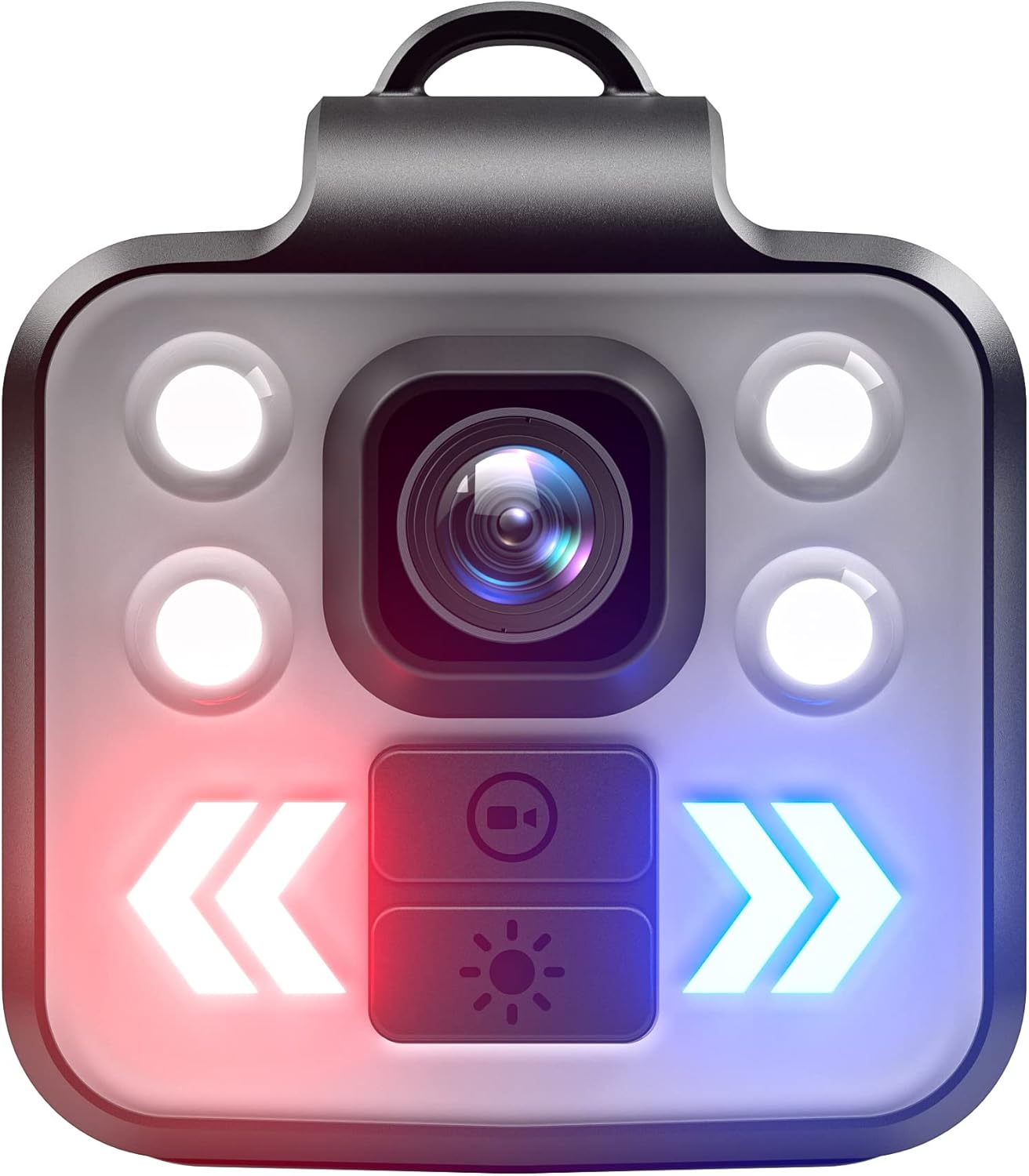
Image 1: Front View of KSADBOSSBO Body Camera
This image displays the front of the KSADBOSSBO Body Camera. Prominently featured in the center is the camera lens. Surrounding the lens are four circular LED lights, two on each side, which provide illumination. Below the lens and lights, there are two rectangular buttons. The top button features a video camera icon, indicating its function for video recording. The bottom button displays a sunburst icon, signifying its control over the flashlight modes. To the left and right of these buttons are large, illuminated chevron arrows, which are red on the left and blue on the right, likely indicating warning or directional light functions.
Key Components:
- Camera Lens: Captures video and still images.
- LED Lights: Four white LEDs for illumination, adaptable to various environments.
- Video/Record Button: Initiates and stops video recording.
- Flashlight Button: Controls the flashlight modes.
- Directional Warning Lights: Red and blue chevron lights for signaling.
- USB Port: For charging and data transfer (typically located on the side or bottom).
- MicroSD Card Slot: For storage (pre-installed 64GB card).
4. Setup
4.1 Charging the Device
- Connect the provided charge cable to the camera's USB port.
- Plug the other end of the cable into a standard USB power adapter (not included) or a computer's USB port.
- The charging indicator light will illuminate. A full charge typically takes approximately 2-3 hours.
- Once fully charged, the indicator light may change color or turn off. The internal 1000 mAh battery provides up to 5.5 hours of 1080P video recording time.
4.2 MicroSD Card Installation
Your camera comes with a 64GB MicroSD card pre-installed. If you need to replace it:
- Ensure the camera is powered off.
- Locate the MicroSD card slot (refer to the product diagram if available).
- Gently insert the MicroSD card with the gold contacts facing down until it clicks into place.
- To remove, gently push the card in until it clicks, then release, and it will spring out.
4.3 Attaching Accessories
- Magnetic Lanyard: Attach the 16-inch adjustable neck magnetic lanyard to the camera's loop for convenient wearing around your neck.
- Fixing Strap: Use the 16.5-inch fixing strap to secure the camera to various objects or clothing as needed.
5. Operating Instructions
5.1 Power On/Off
- Power On: Press and hold the Power button (or designated button) for a few seconds until the indicator light illuminates.
- Power Off: Press and hold the Power button again for a few seconds until the indicator light turns off.
5.2 Video Recording
- Ensure the camera is powered on.
- Press the Video/Record Button (with the camera icon) once to start 1080P video recording. The indicator light will flash to confirm recording is in progress.
- Press the Video/Record Button again to stop recording. The indicator light will stop flashing.
- Videos are saved in AVI format to the MicroSD card.
5.3 Audio Recording
The camera records audio simultaneously with video. There is no separate audio-only recording function specified.
5.4 Photo Capture
Specific instructions for still photo capture are not detailed. Typically, a short press of the video button or a dedicated photo button would capture a 2 MP still image. Refer to the quick start guide if included for exact button functions.
5.5 Flashlight Operation
The camera features four large white light LEDs with adjustable modes:
- Press the Flashlight Button (with the sunburst icon) to cycle through the main light modes: Strong Light, Middle Light, Low Light.
- Continue pressing the Flashlight Button to activate SOS mode, where red and blue lights will flash continuously.
- Press again to turn off the flashlight.
5.6 Data Transfer
- Connect the camera to a computer using the provided charge cable.
- The camera should appear as a removable disk drive.
- You can then access and transfer your recorded video and image files.
6. Maintenance
- Cleaning: Use a soft, dry cloth to clean the camera body. For the lens, use a specialized lens cleaning cloth and solution. Avoid harsh chemicals.
- Storage: Store the camera in a cool, dry place away from direct sunlight and extreme temperatures.
- Water Resistance: The camera is designed to be waterproof. However, avoid prolonged submersion or exposure to high-pressure water jets to prevent damage. Ensure all ports are securely closed if applicable.
- Battery Care: For optimal battery life, avoid fully discharging the battery frequently. Charge the camera regularly, even if not in use for extended periods.
7. Troubleshooting
- Camera not powering on: Ensure the battery is charged. Connect to a power source and try again.
- Recording issues (e.g., not saving, corrupted files): Check if the MicroSD card is properly inserted and has sufficient free space. Try formatting the card (this will erase all data).
- Computer not recognizing camera: Try a different USB port or cable. Ensure the camera is powered on when connected.
- Short battery life: Ensure the camera is fully charged before use. Reduce usage of high-power features like continuous flashlight if not needed.
8. Specifications
| Feature | Detail |
|---|---|
| Model Name | Mini Bodycam 908B-BK05 P |
| Brand | KSADBOSSBO |
| Color | Black |
| Video Capture Resolution | 1080p |
| Video Capture Format | AVI |
| Effective Still Resolution | 2 MP |
| Photo Sensor Technology | CMOS |
| Flash Memory Type | Micro SD (64GB included) |
| Battery | 1 Lithium Ion battery (1000 mAh, included) |
| Battery Life (Video) | Up to 5.5 hours (1080P) |
| Special Features | 4 Modes Adjustable Flashlight, Magnetic Lanyard, Comes with 64GB Card |
| Connectivity Technology | Wired (No Wi-Fi/Bluetooth/Hotspot) |
| Item Weight | 4.6 ounces |
| Package Dimensions | 3.86 x 3.35 x 1.73 inches |
9. Warranty and Support
The KSADBOSSBO Body Camera is manufactured by KSADBOSSBO. For specific warranty information, please refer to the documentation included with your purchase or contact the manufacturer directly.
Extended protection plans may be available for purchase separately. Please check with your retailer for details on 2-Year or 3-Year Protection Plans.
For technical support or inquiries, please visit the official KSADBOSSBO website or contact their customer service.