
Majnesvon Ceiling Fan
Majnesvon 52" Modern Ceiling Fan
Model: Ceiling Fan with LED Light
User Instruction Manual
1. Introduction
Thank you for choosing the Majnesvon 52" Modern Ceiling Fan. This fan is designed to provide efficient air circulation and adjustable lighting for your home. Featuring a quiet, energy-efficient DC motor and elegant solid wood blades, it offers both functionality and a modern aesthetic. The included remote control allows for convenient adjustment of fan speeds, light settings, and airflow direction for year-round comfort.

Figure 1.1: Majnesvon 52" Modern Ceiling Fan in a living room setting.
2. Safety Information
Please read all safety instructions carefully before installation and use. Failure to follow these instructions may result in electric shock, fire, or personal injury.
- Electrical Safety: Ensure the power is turned off at the circuit breaker before installation or maintenance. All wiring must be in accordance with national and local electrical codes.
- Mounting: The mounting structure must be capable of supporting the weight of the fan (approximately 13.01 pounds) plus the dynamic load during operation.
- Blade Clearance: Maintain a minimum clearance of 7 feet (2.13 meters) from the floor to the bottom of the fan blades. Ensure there is adequate clearance from walls and other obstructions.
- Professional Installation: If you are unsure about the installation process, consult a qualified electrician.
- Damage: Do not operate the fan if any part is damaged. Contact customer support for replacement parts.
3. Package Contents
Verify that all components are present and undamaged before beginning installation. If any parts are missing or damaged, please contact customer service.
- Fan Motor Assembly
- Solid Wood Blades (3)
- LED Light Kit
- Remote Control with Wall Dock
- Downrod (various lengths may be included)
- Mounting Bracket
- Hardware Pack (screws, washers, wire nuts, etc.)
- Instruction Manual
4. Setup and Installation
This section outlines the general steps for installing your ceiling fan. Refer to the detailed diagrams and instructions provided in the separate installation guide for specific wiring and mounting procedures.
- Prepare the Installation Site: Turn off power at the circuit breaker. Ensure the ceiling electrical box is securely mounted and rated for fan support.
- Install Mounting Bracket: Secure the mounting bracket to the ceiling electrical box.
- Assemble Downrod and Fan Motor: Attach the downrod to the fan motor assembly.
- Hang Fan Assembly: Carefully lift the fan assembly and hang it on the mounting bracket.
- Wire the Fan: Connect the electrical wires according to the wiring diagram (typically black to black, white to white, ground to ground).
- Attach Blades: Securely attach the solid wood blades to the fan motor hub.
- Install Light Kit: Connect and mount the LED light kit to the bottom of the fan motor assembly.
- Final Checks: Ensure all connections are secure and all screws are tightened. Restore power at the circuit breaker.
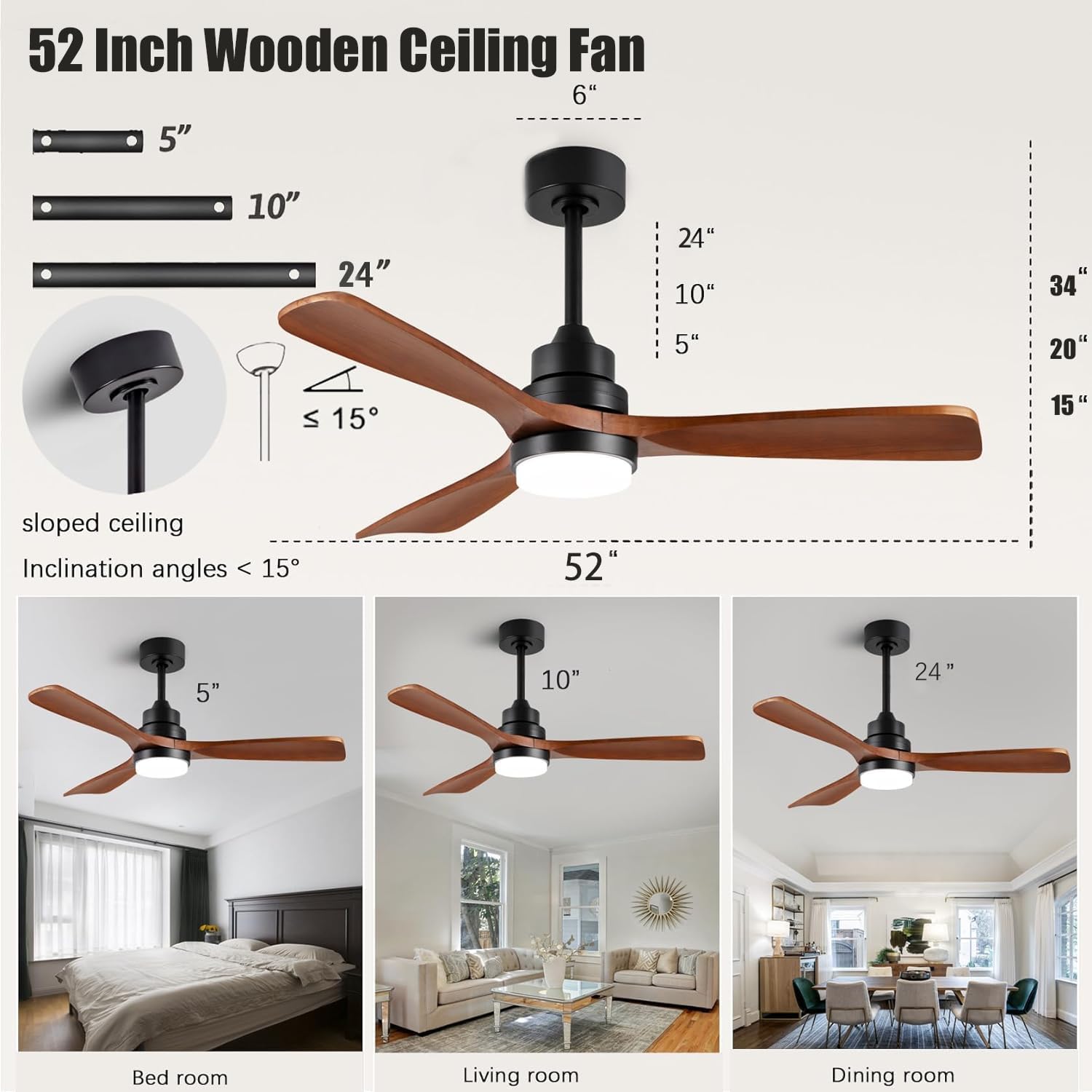
Figure 4.1: Fan dimensions and sloped ceiling compatibility.

Figure 4.2: Example installations in different room types.
5. Operating Instructions
Your Majnesvon ceiling fan is controlled by the included remote. Ensure the remote has fresh batteries installed.
5.1 Fan Speed Control
The fan features 6 adjustable speeds to suit your comfort needs. Use the speed buttons on the remote to cycle through the settings.

Figure 5.1: Fan speed settings and their corresponding modes.
5.2 LED Light Control
The integrated LED light offers 3 color temperature settings (Warm White, Neutral White, Cool White) and dimming capabilities. Use the light buttons on the remote to adjust brightness and color temperature. The light features a convenient memory function, recalling the last setting used.

Figure 5.2: Adjustable LED light color temperatures.
5.3 Reversible Airflow
The fan features a reversible DC motor for year-round comfort. Use the reverse button on the remote to change the blade direction.
- Summer Mode (Downward Airflow): Blades rotate counter-clockwise to create a cooling breeze.
- Winter Mode (Upward Airflow): Blades rotate clockwise to circulate warm air trapped near the ceiling, helping to reduce heating costs.

Figure 5.3: Reversible airflow for seasonal comfort.
5.4 Timer Function
The remote control includes a timer function, allowing you to set the fan to turn off automatically after a specified period. Refer to your remote's specific instructions for setting the timer.
6. Maintenance
Regular maintenance will ensure the longevity and optimal performance of your ceiling fan.
- Cleaning: To clean the fan, wipe surfaces with a soft, damp cloth. Do not use abrasive cleaners or solvents as they may damage the finish or blades.
- Blade Care: The solid wood blades can be gently wiped with a dry or slightly damp cloth. Avoid excessive moisture.
- Tighten Fasteners: Periodically check and tighten all screws and fasteners on the fan and mounting hardware to ensure safe operation.
- Light Source: The LED light source is integrated and designed for long life. If the light fails, contact customer support for assistance. Do not attempt to replace individual LED components.
7. Troubleshooting
If you experience issues with your fan, refer to the following common problems and solutions:
| Problem | Possible Cause | Solution |
|---|---|---|
| Fan does not start | No power; Loose wire connections; Remote control issues. | Check circuit breaker; Ensure all wires are securely connected; Replace remote batteries or re-pair remote. |
| Light does not work | Loose wire connection; Faulty LED driver; Remote control issues. | Check light kit wiring; Contact customer support if LED driver is suspected; Check remote batteries. |
| Fan wobbles | Loose blades; Unbalanced blades; Loose mounting hardware. | Ensure all blade screws are tight; Use a balancing kit (not included) if necessary; Tighten mounting bracket screws. |
| Remote control not working | Dead batteries; Not paired correctly; Obstruction. | Replace batteries; Refer to remote pairing instructions; Ensure no obstructions between remote and fan receiver. |
If the problem persists after attempting these solutions, please contact Majnesvon customer support.
8. Specifications
| Feature | Detail |
|---|---|
| Brand | Majnesvon |
| Model Name | Ceiling Fan with LED Light |
| Size | 52 inches |
| Color | Matte Black Brown |
| Material | Wood, Metal |
| Motor Type | DC Motor (Reversible) |
| Light Source Type | LED |
| Light Color Temperature | 3000K (Warm White), 4500K (Neutral White), 6500K (Cool White) |
| Control Method | Remote Control |
| Number of Blades | 3 |
| Voltage | 120 Volts (DC) |
| Item Weight | 13.01 pounds |
| Product Dimensions | 52 x 52 x 15 inches |
| Indoor/Outdoor Usage | Indoor (as per product description, though one image shows 'Outdoor' crossed out, 'Indoor' checked) |
| Assembly Required | Yes |

Figure 8.1: Indoor usage suitability.
9. Warranty and Support
For warranty information or technical support, please contact Majnesvon customer service. Keep your purchase receipt as proof of purchase for any warranty claims.
Customer Service Contact: Please refer to the contact information provided on the product packaging or the retailer's website where you purchased this product.
Ask a question about this manual
Ask about setup, troubleshooting, compatibility, parts, safety, or missing instructions. Manuals+ will review the question and use this page’s manual context to help answer it.