1. Introduction
This manual provides detailed instructions for the safe and effective use of your ULANZI UKA01 Quick Release Plate Kit. This versatile accessory is designed to streamline the process of mounting and dismounting cameras and other equipment on various support systems, including gimbals, tripods, and sliders.
2. Safety Information
- Always ensure the quick release plate is securely attached to your camera and the base is firmly mounted to your support system before use.
- Verify the locking mechanism is engaged to prevent accidental detachment of your equipment.
- Do not exceed the maximum load capacity of 20 kg (44 lbs) to avoid damage to the product or connected equipment.
- Keep the product away from extreme temperatures, water, and corrosive substances.
- Handle with care to prevent drops or impacts that could compromise the integrity of the mechanism.
3. Package Contents
The ULANZI UKA01 Quick Release Plate Kit includes the following components:
- 1x Quick Release Plate
- 1x Quick Release Base
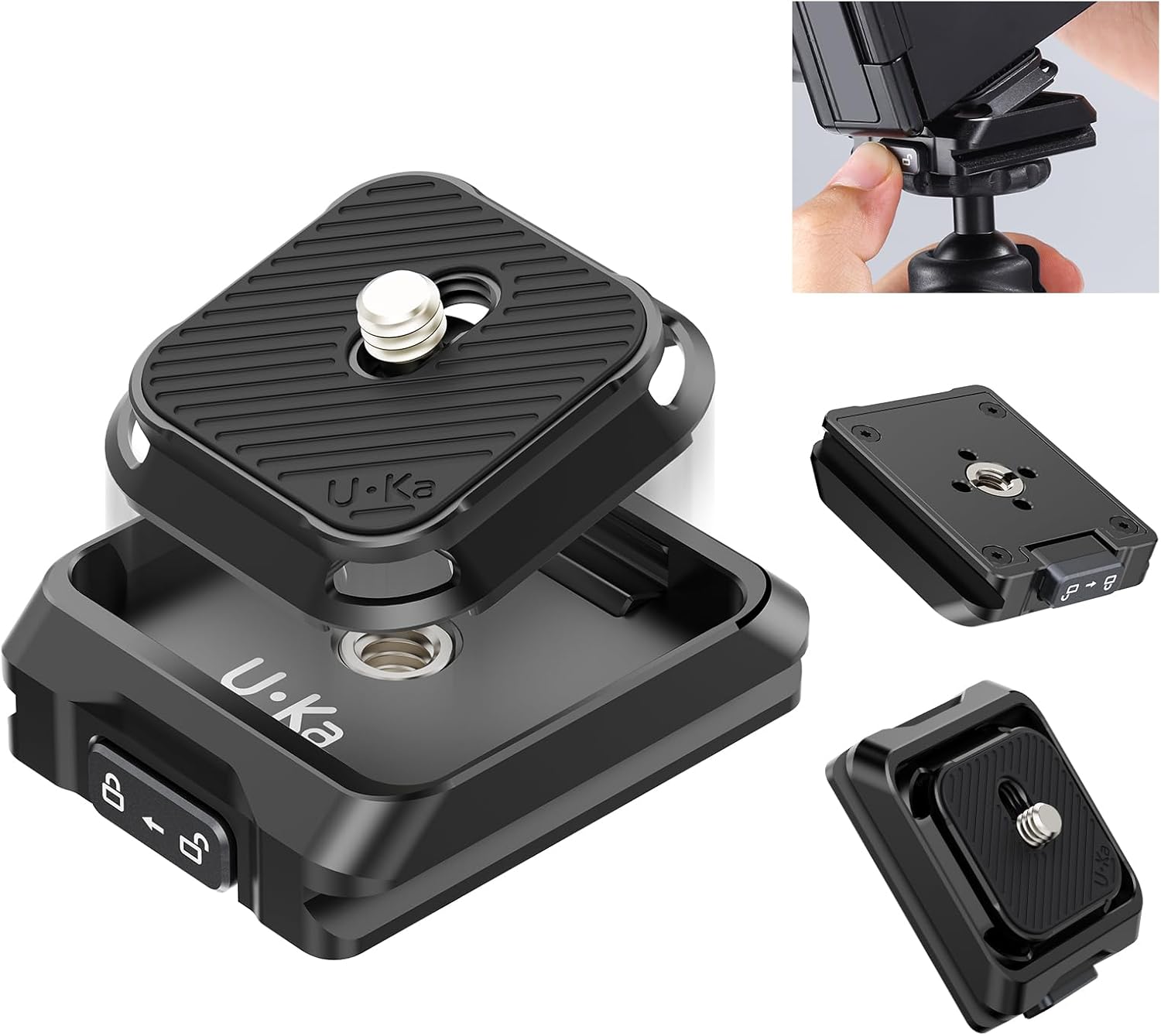
Figure 3.1: The ULANZI UKA01 Quick Release Plate Kit, showing the top plate and base unit.
4. Product Overview
The UKA01 kit features a robust design for quick and secure equipment changes. It is compatible with Arca-Swiss and F38 interfaces, offering broad versatility.

Figure 4.1: Detailed view highlighting key features such as the anti-slip pad, 1/4" screw hole, lanyard hole, Arca-Swiss interface, safe lock, and 1/4" and 3/8" screw holes with ARRI positioning points.
Key Features:
- Arca-Swiss & F38 Compatibility: The mounting base supports both Arca-Swiss and F38 plates, while the base itself has 1/4" and 3/8" threaded holes for wide compatibility.
- Quick One-Step Attachment: Designed for rapid connection of cameras to various support systems.
- Safety Lock: A dedicated button and slide mechanism ensures the plate is securely locked, preventing accidental release.
- High Load Capacity: Supports equipment up to 20 kg (44 lbs).
- Compact and Lightweight: Constructed from aluminum alloy, weighing only 53g.
5. Setup Instructions
5.1 Attaching the Quick Release Plate to Your Camera
- Locate the 1/4" screw on the top of the Quick Release Plate.
- Align the screw with the 1/4" tripod mounting hole on the bottom of your camera or camera cage.
- Turn the screw clockwise to tighten the plate securely to your camera. Ensure it is firm and does not wobble.

Figure 5.1: The quick release plate being attached to the bottom of a camera.
5.2 Attaching the Quick Release Base to Your Support System
- Identify the 1/4" and 3/8" threaded holes on the bottom of the Quick Release Base.
- Choose the appropriate thread size for your tripod, gimbal, or slider.
- Screw the Quick Release Base onto your support system until it is firmly attached.
- If your support system has an Arca-Swiss clamp, the Quick Release Base can be directly clamped into it.

Figure 5.2: The quick release base mounted on a tripod head, ready to receive a camera.
6. Operating Instructions
6.1 Attaching Camera to Base
- Ensure the safety lock on the Quick Release Base is in the unlocked position (indicated by an open padlock icon).
- Align the Quick Release Plate (attached to your camera) with the slot on the Quick Release Base.
- Gently press the camera down into the base until you hear a "click" sound, indicating it is securely latched.
- Slide the safety lock to the locked position (indicated by a closed padlock icon) to prevent accidental release.
Figure 6.1: A camera with the quick release plate being inserted into the quick release base.

Figure 6.2: The safety lock mechanism, showing both locked and unlocked positions for secure operation.
6.2 Detaching Camera from Base
- Ensure a firm grip on your camera before proceeding.
- Slide the safety lock on the Quick Release Base to the unlocked position.
- Press the release button on the side of the Quick Release Base.
- Lift your camera straight up from the base to detach it.
Video 6.1: Demonstration of attaching and detaching the ULANZI UKA01 Quick Release Plate Kit, showcasing the one-step attachment and safety lock features.
7. Maintenance
- Clean the product regularly with a soft, dry cloth to remove dust and debris.
- Avoid using harsh chemicals or abrasive materials, as these can damage the finish and functionality.
- Inspect the screws and locking mechanism periodically for any signs of wear or loosening. Tighten as necessary.
- Store the kit in a dry, clean environment when not in use.
8. Troubleshooting
8.1 Equipment feels loose after attachment
- Ensure the 1/4" screw on the Quick Release Plate is fully tightened to your camera.
- Verify the Quick Release Base is securely mounted to your tripod or support system.
- Check that the safety lock on the Quick Release Base is in the locked position.
8.2 Difficulty detaching equipment
- Confirm the safety lock is fully in the unlocked position.
- Press the release button firmly and lift the camera straight up. Avoid twisting or forcing the equipment.
9. Specifications
| Feature | Detail |
|---|---|
| Product Dimensions | 2.25 x 1.63 x 0.05 inches |
| Item Weight | 1.76 ounces (53g) |
| Model Number | US-UKA01 |
| Brand | ULANZI |
| Compatible Devices | Cameras, Gimbals, Stabilizers, Tripods, Sliders, Camera Cages |
| Mounting Interfaces | Arca-Swiss, F38, 1/4" threaded hole, 3/8" threaded hole |
| Load Capacity | Up to 20 kg (44 lbs) |
| Material | Aluminum Alloy |
10. Warranty and Support
For warranty information or technical support, please refer to the official ULANZI website or contact their customer service directly. Keep your purchase receipt for warranty claims.


