Introduction
Thank you for choosing the Arzum Airtasty Smart Air Fryer. This appliance is designed to provide a healthy and convenient way to cook your favorite dishes with little to no oil. Featuring a generous 7.5-liter capacity, a glass-paneled bin for easy monitoring, and smart control via the Arzum Smart Life application, this air fryer offers versatility and precision for your culinary needs. Please read this manual thoroughly before first use to ensure safe and optimal operation.
Important Safety Instructions
When using electrical appliances, basic safety precautions should always be followed to reduce the risk of fire, electric shock, and injury to persons.
- Read all instructions before using the appliance.
- Do not touch hot surfaces. Use handles or knobs.
- To protect against electric shock, do not immerse cord, plugs, or appliance in water or other liquid.
- Close supervision is necessary when any appliance is used by or near children.
- Unplug from outlet when not in use and before cleaning. Allow to cool before putting on or taking off parts.
- Do not operate any appliance with a damaged cord or plug or after the appliance malfunctions or has been damaged in any manner.
- The use of accessory attachments not recommended by the appliance manufacturer may cause injuries.
- Do not use outdoors.
- Do not let cord hang over edge of table or counter, or touch hot surfaces.
- Do not place on or near a hot gas or electric burner, or in a heated oven.
- Extreme caution must be used when moving an appliance containing hot oil or other hot liquids.
- Always attach plug to appliance first, then plug cord into the wall outlet. To disconnect, turn any control to "off", then remove plug from wall outlet.
- Do not use appliance for other than intended use.
- Ensure the appliance is placed on a stable, heat-resistant surface.
- Do not block any ventilation openings.
Product Overview
Familiarize yourself with the components of your Arzum Airtasty Smart Air Fryer.

Figure 1: Arzum Airtasty Smart Air Fryer. This image shows the overall design of the air fryer, highlighting its red exterior, digital display, and the transparent viewing window of the cooking basket.
- Digital Control Panel: Touch-sensitive display for temperature, time, and program selection.
- Cooking Basket with Handle: Removable basket for holding food, featuring a comfortable handle for safe removal.
- Glass-Paneled Bin: Transparent window on the cooking basket allows for easy monitoring of food during cooking without opening the drawer.
- Interior Light: Illuminates the cooking chamber for clear visibility through the glass panel.
- Air Inlet/Outlet: Located at the top and rear of the appliance for proper air circulation.
- Power Cord: For connecting the appliance to an electrical outlet.
Setup
Unpacking
- Carefully remove the air fryer and all accessories from the packaging.
- Remove any packaging materials, stickers, or labels.
- Retain the packaging for future storage or transport.
Initial Cleaning
- Before first use, wash the cooking basket, grill rack, and cake mold with hot water, dish soap, and a non-abrasive sponge.
- Rinse thoroughly and dry all parts completely.
- Wipe the interior and exterior of the appliance with a damp cloth.
- Do not immerse the main unit in water or any other liquid.
Placement
- Place the air fryer on a stable, flat, heat-resistant surface.
- Ensure there is at least 10 cm (4 inches) of free space around the back and sides of the appliance, and 10 cm (4 inches) above it, to allow for proper air circulation.
- Do not place the appliance against a wall or other appliances.
- Plug the power cord into a grounded electrical outlet.
Operating Instructions
Control Panel Overview

Figure 2: Front view of the Arzum Airtasty Smart Air Fryer, showing the digital display and touch controls.
The digital display provides information on cooking time, temperature, and selected programs. Touch controls allow for easy adjustment.
- Power Button: Turns the appliance on/off.
- Temperature Control: Adjusts cooking temperature.
- Time Control: Adjusts cooking time.
- Program Selection: Cycles through 7 automatic cooking programs.
- Start/Pause Button: Starts or pauses the cooking process.
- Wi-Fi Indicator: Shows connection status to the Arzum Smart Life application.
- Interior Light Button: Toggles the interior light on/off.
Basic Operation (Manual Mode)
- Place the food in the cooking basket. Ensure not to overfill the basket.
- Slide the cooking basket back into the air fryer until it clicks into place.
- Press the Power Button to turn on the appliance.
- Use the Temperature Control buttons to set the desired cooking temperature (e.g., 180°C).
- Use the Time Control buttons to set the desired cooking time (e.g., 20 minutes).
- Press the Start/Pause Button to begin cooking.
- During cooking, you can use the glass-paneled bin and interior light to monitor your food.
- Some recipes may require shaking or flipping food halfway through. Carefully pull out the basket, shake/flip, and reinsert. The air fryer will resume cooking automatically.
- Once cooking is complete, the air fryer will beep. Carefully pull out the basket and remove the food.
Using Preset Programs
The air fryer comes with 7 automatic cooking programs for common dishes.
- Prepare food and place it in the cooking basket.
- Insert the basket into the air fryer.
- Press the Power Button.
- Press the Program Selection button repeatedly to cycle through the available programs (e.g., fries, chicken, fish, pastries). The display will show the corresponding icon and default time/temperature.
- You can adjust the default time and temperature of a preset program if needed using the respective control buttons.
- Press the Start/Pause Button to begin cooking.
Using the Arzum Smart Life Application (Wi-Fi)
The Arzum Airtasty Smart Air Fryer can be controlled remotely via the Arzum Smart Life application.
- Download the "Arzum Smart Life" application from your smartphone's app store.
- Register or log in to your account.
- Follow the in-app instructions to connect your air fryer to your home Wi-Fi network. Ensure your air fryer is powered on and in pairing mode (refer to app for specific instructions).
- Once connected, you can control the air fryer's settings, start/stop cooking, and monitor progress from your smartphone.
Using Accessories
The air fryer includes a grill rack and a cake mold to expand your cooking possibilities.
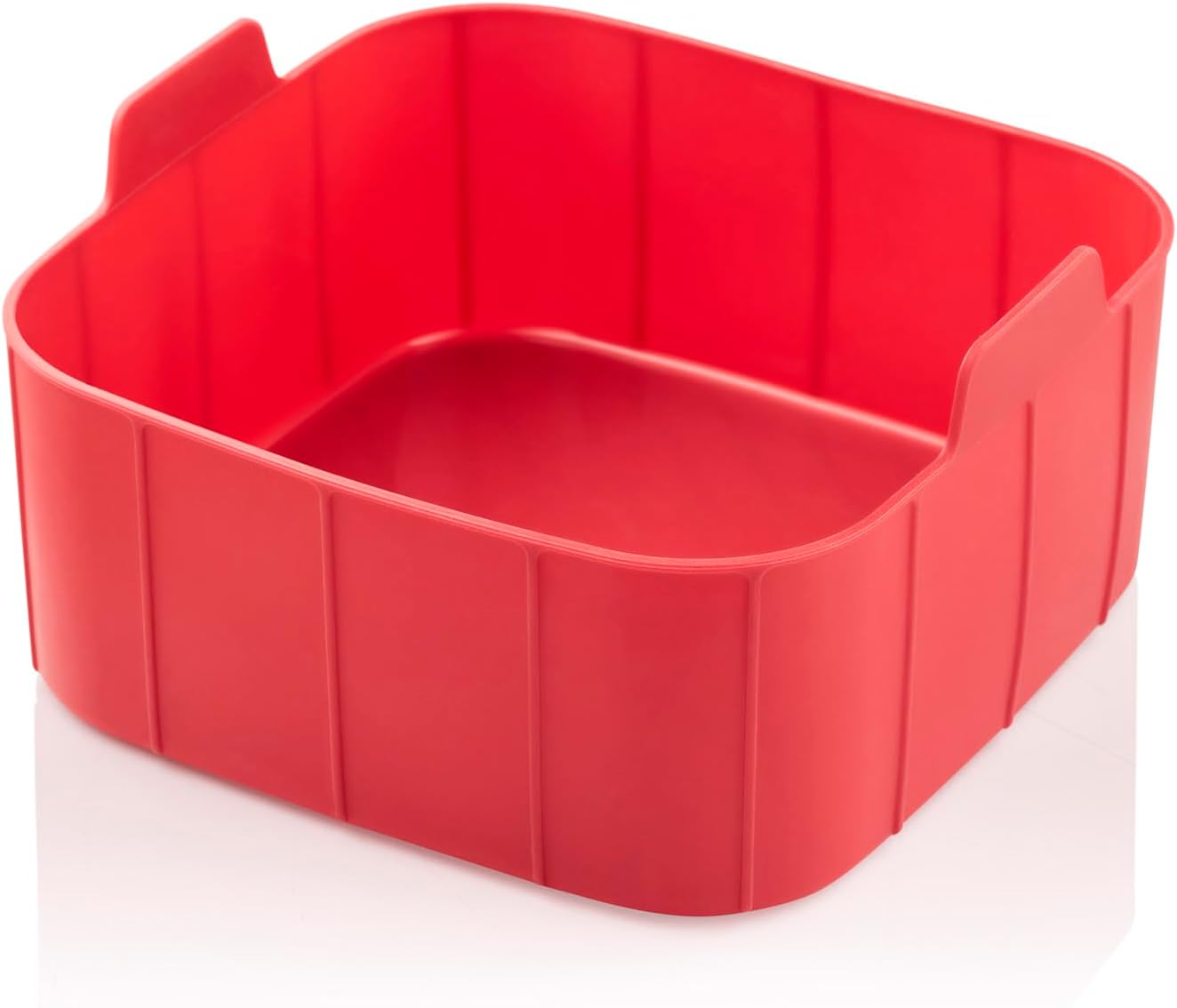

Figure 3: Included accessories: Cake mold (left) and Grill rack (right, shown in use). These accessories enhance the versatility of the air fryer, allowing for baking and grilling.
- Grill Rack: Place the grill rack inside the cooking basket to elevate food, allowing for better air circulation and grilling results. Ideal for meats and vegetables.
- Cake Mold: Use the cake mold for baking cakes, bread, or other baked goods directly in the air fryer basket.
Cooking Guide and Tips
- Preheating: For best results, preheat the air fryer for 3-5 minutes at the desired cooking temperature before adding food.
- Oil Usage: While an air fryer requires little to no oil, a light spray of oil can help achieve a crispier texture, especially for fresh vegetables or homemade fries.
- Do Not Overfill: Overfilling the basket can prevent food from cooking evenly and becoming crispy. Cook in batches if necessary.
- Shake or Flip: For even cooking and browning, shake the basket or flip food halfway through the cooking time.
- Food Size: Cut food into uniform pieces for consistent cooking.
- Parchment Paper/Foil: You can use parchment paper or aluminum foil in the basket, but ensure it does not block air circulation.
Maintenance and Cleaning
Regular cleaning ensures optimal performance and extends the life of your air fryer.
Daily Cleaning
- Unplug the air fryer and allow it to cool completely before cleaning.
- Remove the cooking basket and accessories.
- Wash the basket, grill rack, and cake mold with hot water, dish soap, and a non-abrasive sponge. These parts are generally dishwasher safe, but hand washing is recommended for longevity.
- Wipe the exterior of the air fryer with a damp cloth. Do not use abrasive cleaners.
- Clean the interior of the appliance with a damp cloth. For stubborn residue, use a soft brush.
Deep Cleaning
For baked-on food or grease, soak the basket and accessories in hot, soapy water for 10-15 minutes before scrubbing.
Storage
Ensure the air fryer is clean and completely dry before storing. Store it in a cool, dry place, preferably in its original packaging.
Troubleshooting
If you encounter any issues with your air fryer, refer to the table below for common problems and solutions.
| Problem | Possible Cause | Solution |
|---|---|---|
| Air fryer does not turn on. | Not plugged in; Power outlet issue; Appliance malfunction. | Ensure the power cord is securely plugged into a working outlet. Check the circuit breaker. If problem persists, contact customer support. |
| Food is not cooked evenly. | Basket is overfilled; Food pieces are too large or uneven; Not shaken/flipped. | Cook in smaller batches. Cut food into uniform sizes. Shake or flip food halfway through cooking. |
| Food is not crispy. | Not enough oil (for certain foods); Basket overfilled; Temperature too low. | Lightly spray food with oil. Do not overfill the basket. Increase temperature slightly. |
| White smoke coming from appliance. | Grease from previous use; High-fat food cooking. | Clean the basket and interior thoroughly. For high-fat foods, drain excess fat during cooking. |
| Cannot connect to Wi-Fi. | Incorrect Wi-Fi password; Router too far; App issues. | Double-check Wi-Fi password. Move air fryer closer to router. Restart app and air fryer. Consult app's troubleshooting guide. |
Specifications
| Feature | Specification |
|---|---|
| Brand | Arzum |
| Model Number | AR2076-K |
| Color | Red |
| Product Dimensions (D x W x H) | 39 x 40 x 44 cm |
| Item Weight | 5 Kilograms |
| Capacity | 7.5 Liters |
| Power / Wattage | 1750 watts |
| Material | Plastic |
| Auto Shutoff | Yes |
| Special Features | Programmable, Temperature Control, Wi-Fi Connectivity, Interior Light, Digital Display with Touch Control |
| Included Accessories | Grill rack, Cake mold |
Warranty and Support
The Arzum Airtasty Smart Hot Air Fryer comes with a 2-year warranty for home use, provided by “New Star,” the official agent in Egypt.
For warranty claims, technical support, or service inquiries, please contact the official agent directly. Keep your purchase receipt as proof of purchase for warranty validation.
Please note: Contact information for the official agent is typically provided at the point of purchase or on the product packaging.