
1. Product Overview
The Sandberg Survivor Powerbank 27000 PD65W is a robust and high-capacity portable charging solution designed for various mobile devices, including smartphones and laptops. Its durable construction is IP66 certified, providing resistance against water, shock, and dust, making it suitable for demanding environments. This power bank features multiple charging outputs, including USB-C Power Delivery, standard USB-A ports, and wireless charging capabilities, alongside an integrated flashlight.

Image 1.1: Front view of the Sandberg Survivor Powerbank, highlighting the power button, USB-A ports, and USB-C port.
2. Package Contents
- Sandberg Survivor Powerbank 27000 PD65W (Model 420-99)
- USB-C to USB-C Charging Cable
- User Manual (this document)
3. Product Features
- High Capacity: 27000 mAh / 99.9 Wh for extended power.
- Rugged Design: IP66 certified for water, shock, and dust resistance.
- USB-C Power Delivery: Up to 65W output for laptops and fast-charging devices, 60W input for rapid recharging.
- Dual USB-A Outputs: Two 18W (QC 3.0) ports for standard device charging.
- Wireless Charging: 15W maximum output for compatible devices.
- Integrated Flashlight: Powerful 120 lumen LED flashlight with a range of 12-15 meters.
- DC5525 Output: 12V/2A output.

Image 3.1: Rear view of the power bank, illustrating the wireless charging area and the integrated lanyard attachment point.
4. Setup
4.1 Initial Charging
- Before first use, fully charge the power bank.
- Connect the provided USB-C cable to the power bank's USB-C input port.
- Connect the other end of the USB-C cable to a compatible USB-C power adapter (not included) with a minimum output of 60W for optimal charging speed.
- The LED indicators on the power bank will illuminate to show the charging status. All indicators lit steadily signify a full charge.
4.2 Power Indicators
The power bank features LED indicators to display the remaining battery level. Press the power button once to check the current charge status. The number of lit LEDs corresponds to the approximate charge level.
5. Operating Instructions
5.1 Charging Devices via USB-C
- Connect your device's USB-C charging cable to the power bank's USB-C output port.
- Connect the other end of the cable to your device.
- The power bank will automatically begin charging. If not, press the power button once.
5.2 Charging Devices via USB-A
- Connect your device's USB-A charging cable to one of the power bank's USB-A output ports.
- Connect the other end of the cable to your device.
- The power bank will automatically begin charging. If not, press the power button once.
5.3 Wireless Charging
- Ensure your device supports wireless charging (Qi standard).
- Place your wireless charging compatible device directly onto the designated wireless charging pad on the power bank.
- The power bank will detect the device and begin wireless charging. An indicator light may illuminate to confirm wireless charging is active.
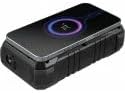
Image 5.1: Top view of the power bank demonstrating a device being charged wirelessly, indicated by a glowing circle.
5.4 Using the Flashlight
- To turn on the flashlight, press and hold the power button for approximately 2-3 seconds.
- To turn off the flashlight, press and hold the power button again for approximately 2-3 seconds.
6. Maintenance
- Cleaning: Use a soft, dry cloth to clean the power bank. Avoid using harsh chemicals or abrasive materials.
- Storage: Store the power bank in a cool, dry place away from direct sunlight and extreme temperatures. For long-term storage, it is recommended to keep the power bank charged to approximately 50-75% capacity.
- Water Exposure: While IP66 rated, ensure all port covers are securely closed before exposing the device to water or dust. After exposure, dry the device thoroughly before opening port covers or charging.
7. Troubleshooting
- Power bank not charging:
- Ensure the USB-C cable is securely connected to both the power bank and the power adapter.
- Verify that the power adapter is functioning correctly and provides sufficient power (e.g., 60W USB-C PD adapter).
- Try a different USB-C cable and/or power adapter.
- Device not charging from power bank:
- Press the power button on the power bank to activate output.
- Ensure the charging cable is securely connected to both the power bank and your device.
- Verify that your device's charging port is clean and undamaged.
- Try a different charging cable or port on the power bank.
- Check if the power bank has sufficient charge.
- Wireless charging not working:
- Ensure your device is placed centrally on the wireless charging pad.
- Remove any thick cases from your device that might interfere with wireless charging.
- Verify your device supports Qi wireless charging.
- Flashlight not turning on/off:
- Ensure you are pressing and holding the power button for the correct duration (2-3 seconds).
- Check if the power bank has sufficient charge.
8. Specifications
| Model Number | 420-99 |
| Battery Capacity | 27000 mAh / 99.9 Wh |
| Ingress Protection (IP) Rating | IP66 (Water, Shock, Dust Resistant) |
| USB-C Input | 5V/3A, 9V/3A, 12V/3A, 15V/3A, 20V/3A (PD60W max) |
| USB-C Output | 5V/3A, 9V/3A, 12V/3A, 15V/3A, 20V/3.25A (PD65W max) |
| USB-A 1 Output | 5V/3A, 9V/2A, 12V/1.5A (18W max, QC 3.0) |
| USB-A 2 Output | 5V/3A, 9V/2A, 12V/1.5A (18W max, QC 3.0) |
| Wireless Charging Output | 15W max |
| DC5525 Output | 12V/2A |
| Flashlight | 120 lumens, 12-15 meter range |
| Weight | 805 Grams |
9. Safety Information
- Do not disassemble, open, or shred the power bank.
- Do not expose the power bank to heat or fire. Avoid storage in direct sunlight.
- Do not short-circuit the power bank.
- Do not expose the power bank to mechanical shock.
- In case of a battery leak, do not allow the liquid to come into contact with skin or eyes. If contact has been made, wash the affected area with copious amounts of water and seek medical advice.
- Keep the power bank out of reach of children.
- Ensure proper ventilation when charging.
- Dispose of the power bank responsibly according to local regulations.
10. Warranty and Support
Sandberg products are built to high quality standards. For information regarding warranty terms and technical support, please refer to the official Sandberg website or contact your local retailer. Keep your purchase receipt for warranty claims.
For further assistance, visit: www.sandberg.it


