
PINDOWS PDS-629
PINDOWS Women's Digital Sports Watch
Model: PDS-629
Introduction
Thank you for choosing the PINDOWS PDS-629 Women's Digital Sports Watch. This multi-functional timepiece is designed for active individuals, offering robust features and a stylish appearance suitable for both daily wear and various indoor and outdoor activities. Please read this manual carefully to understand the watch's functions and ensure proper use and maintenance.

Figure 1: PINDOWS PDS-629 Digital Sports Watch (Green)
Key Features
- Multi-functional Display: Features an automatic calendar, LED backlight, alarm, 12/24-hour format, hourly chime, and stopwatch.
- 50M Water Resistance: Designed to withstand splashes, rain, and brief immersion. Note: Avoid exposure to steam or hot water, and do not operate buttons underwater.
- Stylish Design: Available in 8 vibrant colors with a modern sports dial, enhancing your personal style.
- High Brightness LED: Ensures clear time readability even in low-light conditions or during rainy weather.
- Durable Construction: Equipped with a long-lasting Japanese battery (up to 2 years), high-quality TPU band, robust ABS case, and a clear plexiglass mirror.
- Comfort and Resilience: Offers a comfortable wearing experience, with shock-resistant and drop-resistant properties, high transparency, pressure resistance, and wear resistance.

Figure 2: Watch showcasing its stylish design
Product Specifications
| Specification | Detail |
|---|---|
| Battery | 1 CR2032 battery (included) |
| Product Size | 4.4 x 3.6 x 1.35 cm |
| Weight | 110 g |
| Manufacturer | PINDOWS |
| Product Model Number | PDS-629 |
| Department | Womens |
| Band Material | TPU |
| Case Material | ABS |
| Bottom Cover Material | Stainless Steel |
| Case Diameter | 1.7 inch / 43 mm |
| Case Thickness | 0.65 inch / 16.5 mm |
| Band Width | 0.78 inch / 20 mm |
| Band Length | 6.9 inch - 8.7 inch |

Figure 3: Product Parameters and Dimensions
Setup Guide
Your PINDOWS watch comes with several buttons for various functions. Familiarize yourself with the button layout:

Figure 4: Watch Button Layout and Functions
1. Time and Date Setting
- In normal time display mode, press the MODE button repeatedly until the seconds begin to flash.
- Press the RESET button to cycle through the setting options: Seconds → Hour → Minute → Month → Date → Day of Week.
- Use the START button to adjust the flashing value.
- Once all settings are complete, press the MODE button to exit setting mode.
2. Alarm Setting
- From normal time display, press the MODE button twice to enter Alarm Mode.
- The hour digits will flash. Use the START button to set the desired alarm hour.
- Press the RESET button to move to the minute digits, then use the START button to set the desired alarm minute.
- Press MODE to exit Alarm Setting Mode.
- To activate/deactivate the alarm, press START and RESET simultaneously in Alarm Mode. An alarm icon will appear/disappear.
3. 12/24 Hour Format
In normal time display mode, press the RESET button to toggle between 12-hour (AM/PM indicator) and 24-hour formats.
Operating Instructions
1. LED Backlight
Press the LIGHT button (top left) to illuminate the display. The backlight will stay on for a few seconds, making it easy to read the time in dark environments.

Figure 5: LED Backlight in action
2. Stopwatch Function
- From normal time display, press the MODE button once to enter Stopwatch Mode. The display will show '00:00:00'.
- Press the START button to begin timing.
- Press START again to pause the stopwatch. Press START to resume.
- To reset the stopwatch to zero, press RESET while the stopwatch is paused.
- Press MODE to return to normal time display.
3. Hourly Chime
To activate or deactivate the hourly chime, press and hold the RESET button while in normal time display mode. A chime icon will appear/disappear on the display to indicate its status.
Water Resistance Guidelines
Your PINDOWS watch is rated for 50 meters (5ATM) water resistance. This means it is suitable for daily use, hand washing, rain, and brief immersion in water. However, it is important to adhere to the following guidelines to prevent damage:
- Do not press any buttons while the watch is submerged in water.
- Avoid exposing the watch to hot water, steam, or saunas. Extreme temperature changes can compromise the watch's seals.
- After exposure to saltwater, rinse the watch with fresh water and dry it thoroughly.

Figure 6: Watch demonstrating 50M water resistance
Maintenance and Care
- Cleaning: Wipe the watch regularly with a soft, dry cloth. For stubborn dirt, a slightly damp cloth can be used, followed by immediate drying.
- Storage: Store your watch in a cool, dry place away from direct sunlight and extreme temperatures when not in use.
- Chemicals: Avoid contact with solvents, detergents, perfumes, and cosmetics, as these can damage the watch band and case.
- Battery Replacement: When the display dims or functions become erratic, it may be time to replace the CR2032 battery. It is recommended to have battery replacement performed by a qualified watch technician to ensure water resistance is maintained.
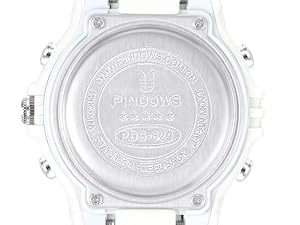
Figure 7: Watch back cover detail
Troubleshooting
| Problem | Possible Cause | Solution |
|---|---|---|
| Display is blank or dim. | Low battery. | Replace the CR2032 battery. |
| Buttons are unresponsive. | Watch is in an incorrect mode or internal malfunction. | Try pressing the MODE button repeatedly to cycle through modes. If issue persists, contact support. |
| Time is inaccurate. | Incorrect setting or low battery. | Re-set the time following the 'Time and Date Setting' instructions. Consider battery replacement if problem recurs. |
| Water inside the watch. | Water resistance compromised due to improper use (e.g., pressing buttons underwater, exposure to hot water). | Immediately stop using the watch and seek professional repair. Water damage is typically not covered under warranty if guidelines are not followed. |
Warranty and Support
PINDOWS values its customers and provides a 12-month warranty service from the date of purchase. This warranty covers manufacturing defects under normal use. It does not cover damage caused by misuse, accidents, unauthorized repairs, or failure to follow the water resistance guidelines.
For warranty claims, technical support, or any inquiries regarding your PINDOWS watch, please contact our customer service team through the platform where you purchased the product. We are committed to providing products and services that satisfy our customers.
Ask a question about this manual
Ask about setup, troubleshooting, compatibility, parts, safety, or missing instructions. Manuals+ will review the question and use this page’s manual context to help answer it.