
1. Introduction
This document provides comprehensive instructions for the installation and use of the Deal4GO SD4.0 Reader Board, part number L15895-001 (compatible part number L02CR001). This module allows you to add an SD card reader slot to compatible HP ProDesk and EliteDesk desktop computer series. Please read this manual carefully before proceeding with installation.
2. Compatibility
This SD4.0 Reader Board is designed for specific HP desktop models. It is crucial to verify your system's compatibility and the motherboard connector type before installation.
2.1 Compatible Desktop Models:
- HP ProDesk 600 G3 SFF Small Form Factor
- HP ProDesk 600 G4 SFF Small Form Factor
- HP ProDesk 600 G5 SFF Small Form Factor
- HP ProDesk 600 G6 SFF Small Form Factor
- HP ProDesk 400 G7 SFF
- HP ProDesk 400 G4 SFF
- HP ProDesk 400 G5 SFF MT
- HP ProDesk 400 G6 SFF MT
- HP ProDesk 405 G6 SFF
- HP ProDesk 405 G8 SFF
- HP EliteDesk 800 G4 SFF
- HP EliteDesk 800 G5 SFF
- HP EliteDesk 805 G6 SFF
- HP EliteDesk 805 G8 SFF
CAUTION: There are different types of optional module ports (Vertical, Bending, 9-pin). Please check the connector type on your motherboard BEFORE purchasing and installing to ensure compatibility.
3. Package Contents
Verify that all items are present in your package:
- 1x SD4.0 Card Reader Board (Service P/N: L15895-001, Compatible P/N: L02CR001)
- 1x Mounting Screw
The cable overall length is approximately 18.00 cm (7.10 inches).
4. Safety Information
Always observe the following safety precautions when working inside a computer:
- Disconnect the computer from the power outlet before opening the chassis.
- Discharge any static electricity by touching a grounded metal object (e.g., the computer chassis) before handling components.
- Handle components by their edges to avoid touching sensitive circuitry.
- Use appropriate tools and avoid excessive force.
5. Setup and Installation
Follow these steps to install the SD4.0 Reader Board into your compatible HP desktop PC. For detailed system-specific instructions, refer to your HP desktop's official service manual.
5.1 Identify the SD Card Reader Board
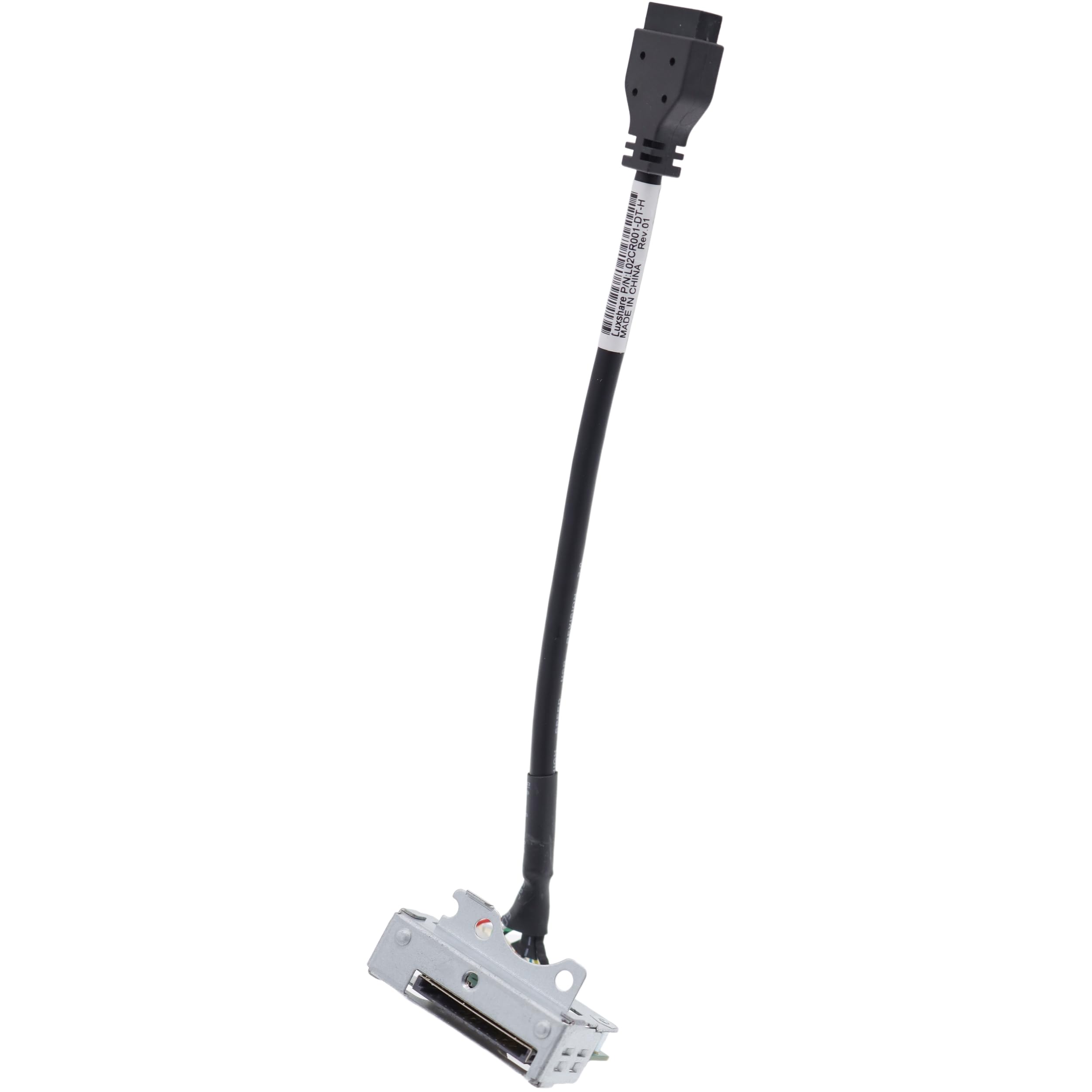
Figure 1: Deal4GO SD4.0 Reader Board (L15895-001) with its integrated cable and motherboard connector.

Figure 2: Top view of the SD4.0 Reader Board module, showing the SD card slot.

Figure 3: Side view of the SD4.0 Reader Board, illustrating the cable connection point.

Figure 4: Rear view of the SD4.0 Reader Board, highlighting the motherboard connector.
5.2 Installation Steps:
- Prepare the Computer: Power off your HP desktop PC completely and disconnect all cables (power, display, USB, etc.).
- Open the Chassis: Remove the side panel or cover of your desktop PC to access the internal components. Refer to your computer's service manual for specific instructions on opening the chassis.
- Locate the Optional Module Slot: Identify the designated slot on the rear panel or internal chassis where the SD card reader module is to be installed. This is typically a small bay or bracket.
- Identify the Motherboard Connector: Locate the appropriate header on your motherboard for the SD card reader. This is often a USB 3.0 header or a dedicated optional module connector. Ensure the connector type matches the one on the SD4.0 Reader Board cable.
- Install the Board: Carefully place the SD4.0 Reader Board into its designated slot or bracket within the chassis. Align the screw holes.
- Secure the Board: Use the provided mounting screw to secure the SD4.0 Reader Board to the chassis. Do not overtighten.
- Connect the Cable: Gently connect the cable from the SD4.0 Reader Board to the identified header on your motherboard. Ensure the connection is firm and correctly oriented.
- Close the Chassis: Once the board is securely installed and connected, replace the computer's side panel or cover.
- Reconnect and Power On: Reconnect all external cables to your computer and power it on.
6. Operation
After successful installation, the SD4.0 Reader Board will function as an integrated SD card reader. Insert an SD card into the slot, and your operating system should automatically detect it as a removable storage device. You can then access, read, and write data to the SD card as you would with any other storage device.
7. Troubleshooting
7.1 SD Card Reader Not Recognized:
- Check Connections: Ensure the cable from the SD4.0 Reader Board is securely connected to the motherboard header.
- Verify Compatibility: Double-check that your motherboard's connector type is compatible with the SD4.0 Reader Board.
- Driver Installation: While most modern operating systems automatically install drivers for SD card readers, you may need to check your system's Device Manager for any unrecognized devices or install specific drivers from HP's official website if prompted. The chip used is Realtek RTS5342.
- BIOS/UEFI Settings: In rare cases, ensure that the relevant USB or card reader functionality is enabled in your computer's BIOS/UEFI settings.
- Test with Another SD Card: Try a different, known-good SD card to rule out issues with the card itself.
7.2 Slow Transfer Speeds:
- Ensure you are using a high-speed SD card (e.g., Class 10, UHS-I, UHS-II).
- Verify that the motherboard header supports USB 3.0 speeds if applicable.
8. Specifications
- Model Number: L02CR001
- Service Part Number: L15895-001
- Part Description: ASSY, USB3.0, SD4, SFF, SD Card
- Chipset: Realtek RTS5342
- Connectivity: USB Type A (internal motherboard header)
- Media Type: SD Card
- Cable Length: Approximately 18.00 cm (7.10 inches)
- Dimensions (Board): Approximately 1.6 x 1.5 x 0.6 inches (4.06 x 3.81 x 1.52 cm)
- Weight: Approximately 0.704 ounces (20 grams)
- Special Feature: Compact, Plug & Play (after installation)
9. Warranty and Support
This product is supplied by Deal4GO. For warranty information, returns, or technical support, please refer to the seller's policies or contact Deal4GO directly through your purchase platform. Ensure you retain your proof of purchase for any warranty claims.