
Introduction
The AJAZZ AJ159 is an ultralight gaming mouse designed for high-performance gaming and versatile use. Featuring a custom flagship PAW3950 APEX optical sensor, it offers exceptional accuracy and sensitivity. The mouse supports tri-mode connectivity and comes with an innovative RGB magnetic screen charging dock. This manual provides essential information for setting up, operating, maintaining, and troubleshooting your AJ159 mouse.

Image: The AJAZZ AJ159 APEX Lightweight 8K Gaming Mouse, showcasing multiple color options and its sleek design.
Setup
1. Package Contents
- AJAZZ AJ159 Gaming Mouse
- RGB Magnetic Screen Charging Dock
- USB-C Charging Cable
- 2.4GHz USB Dongle (stored inside the mouse)
- Replacement ETFE Foot Pads
- User Manual
2. Initial Charging
Before first use, fully charge the mouse. Place the mouse onto the magnetic charging dock, ensuring the contacts align. Alternatively, connect the mouse directly to your computer using the provided USB-C cable.

Image: The AJAZZ AJ159 mouse being charged on its magnetic RGB screen charging dock, illustrating the ease of charging.
3. Connecting the Mouse (Tri-Mode)
The AJ159 supports three connection modes: 2.4GHz Wireless, Bluetooth, and Wired USB-C. A switch on the bottom of the mouse allows you to select your preferred mode.
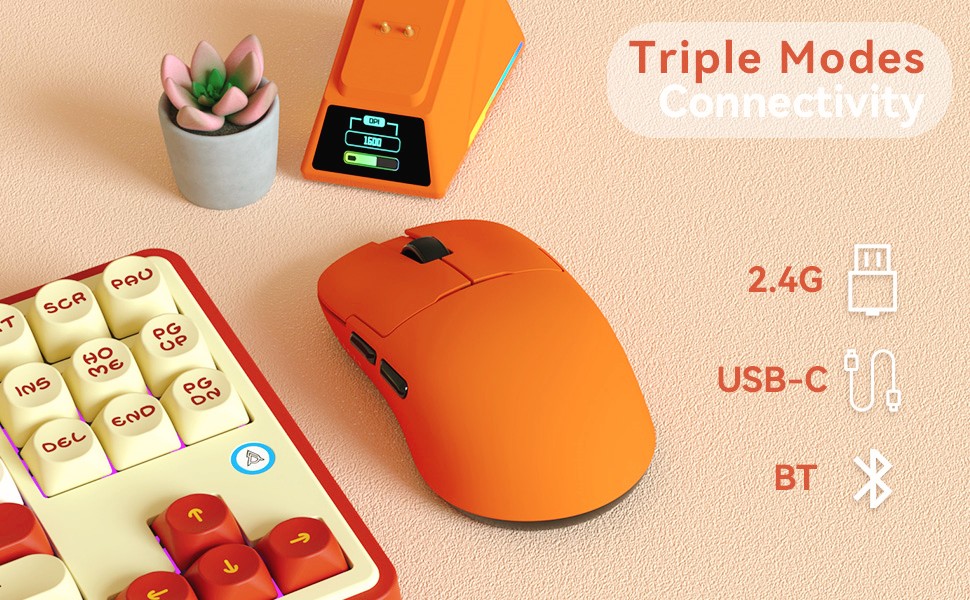
Image: The AJAZZ AJ159 mouse demonstrating its tri-mode connectivity options: 2.4GHz, Bluetooth, and USB-C.
3.1. 2.4GHz Wireless Connection
- Locate the 2.4GHz USB dongle stored in the compartment on the underside of the mouse.
- Plug the dongle into an available USB port on your computer.
- Slide the switch on the bottom of the mouse to the '2.4G' position. The mouse will automatically connect.
3.2. Bluetooth Connection
- Slide the switch on the bottom of the mouse to the 'BT' position.
- On your computer, go to Bluetooth settings and search for new devices.
- Select 'AJ159' from the list of available devices to pair.
3.3. Wired USB-C Connection
- Connect the provided USB-C cable to the front of the mouse and the other end to your computer.
- Slide the switch on the bottom of the mouse to the 'USB' position. The mouse will function as a wired device and charge simultaneously.
4. Software Installation
For full customization and advanced features, download the official driver software from QMK.TOP. The software allows you to assign macros, remap buttons, redefine DPI, adjust polling rate, and personalize the charging base display.
Video: An official product video demonstrating the features and functionality of the AJAZZ AJ159APEX 8K Lightweight Mouse with PAW3950 sensor.
Operating
1. DPI Adjustment
The mouse features a dedicated DPI button, typically located near the scroll wheel, to cycle through preset DPI levels. For fine-tuning and custom DPI settings up to 30K DPI (42K DPI overclocked), use the driver software.
2. Polling Rate
The AJ159 supports an 8000Hz polling rate in wireless mode, providing ultra-low latency of 0.125ms. In wired mode, it operates at 1000Hz. The polling rate can be adjusted via the driver software.

Image: Key features of the AJAZZ AJ159 mouse, highlighting the 8000Hz polling rate and the PAW3950 APEX optical sensor.
3. Programmable Buttons
Utilize the powerful driver software to assign macros, remap button functions, and customize other settings for an optimized gaming experience. The mouse features Huanuo green-translucent white dot micro switches, rated for over 100 million clicks.

Image: The user interface of the Programmable Macro Driver software for the AJAZZ AJ159 mouse, showing key remapping and macro assignment options.
4. RGB Magnetic Screen Charging Dock
The charging dock features a colorful screen that displays the mouse's connection mode, DPI, LOD (Lift-Off Distance), and custom GIF patterns. It also has adjustable RGB lighting to enhance your desktop aesthetics.


Image: Various color options of the AJAZZ AJ159 mouse, each resting on its magnetic RGB screen charging dock.
Maintenance
1. Cleaning
Regularly clean your mouse with a soft, dry cloth. Avoid using harsh chemicals or abrasive materials that could damage the ice-feel coating.
2. Battery Care
The mouse is equipped with a 400mAh Lithium Ion battery. To prolong battery life, avoid fully discharging it frequently. Store the mouse in a cool, dry place when not in use.
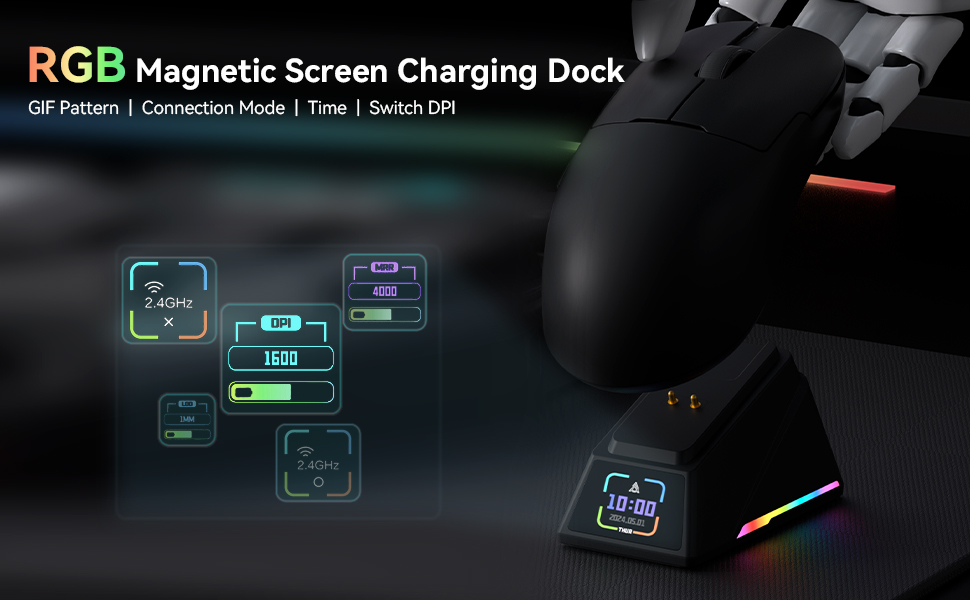
Image: Features of the AJAZZ AJ159 mouse, detailing the 100 million click switches, ice sensation coating, and the rechargeable 400mAh battery.
3. Foot Pad Replacement
The mouse uses pure Teflon (ETFE) foot pads for enhanced wear resistance and smooth gliding. If the foot pads show significant wear, replace them with the provided spares to maintain optimal performance.
Troubleshooting
1. Connectivity Issues (Disconnections/Lag)
- Check Connection Mode: Ensure the switch on the bottom of the mouse is set to the correct mode (2.4G, BT, or USB) for your intended use.
- Battery Level: Low battery can affect wireless performance. Charge the mouse fully.
- Interference: Move the 2.4GHz dongle closer to the mouse or try a different USB port to reduce potential interference.
- Driver Update: Ensure your mouse drivers are up to date by checking QMK.TOP.
- Try Wired Mode: If wireless issues persist, connect the mouse via USB-C cable to rule out wireless interference or battery problems.
2. Charging Problems
- Dock Alignment: Ensure the mouse is correctly placed on the magnetic charging dock with contacts aligned. The dock's screen should indicate charging status.
- Cable Connection: If charging via USB-C, ensure the cable is securely connected to both the mouse and the power source/computer.
3. Button or Scroll Wheel Malfunction
- Software Check: Verify button assignments in the driver software. Ensure no buttons are accidentally disabled or remapped incorrectly.
- Clean Buttons: Dust or debris might affect button performance. Gently clean around the buttons and scroll wheel.
Specifications
- Model Number: AJ159
- Product Dimensions: 4.7 x 2.5 x 0.1 inches
- Item Weight: 1.98 ounces (approx. 56g)
- Sensor: AJAZZ Custom Flagship PAW3950 APEX Optical Sensor
- DPI: Up to 30,000 DPI (42,000 DPI overclocked)
- IPS: 750
- Acceleration: 50G
- Polling Rate: 8000Hz (Wireless), 1000Hz (Wired)
- Connectivity: 2.4GHZ Wireless, Bluetooth, USB-C Wired
- Switches: Huanuo Green-Translucent White Dot Micro Switches (100 Million Click lifespan)
- Coating: Ice-Feel Coating
- Battery: 1 Lithium Ion battery (included)
- Special Features: Ergonomic Design, LED Lights, Lightweight, Programmable Buttons, RGB Magnetic Screen Charging Dock
Warranty and Support
The AJAZZ AJ159 APEX mouse comes with a 12-month warranty. If you encounter any problems or require assistance, please contact AJAZZ customer support. We are committed to providing service within 24 hours, even on weekends.
Video: An official product video showcasing the white version of the AJAZZ AJ159 APEX Mouse.
Video: An official product video highlighting the RGB Magnetic Screen Charging Dock and wireless features of the AJ159-APEX mouse.
Video: An official product video demonstrating the lightweight design and wireless capabilities of the AJ159 APEX mouse.


