
1. Introduction
The Caddytek CaddyLite One Swivel Version 8 Golf Push Cart is designed for golfers seeking convenience, durability, and ease of use on the course. Its lightweight aluminum frame and one-click folding mechanism ensure effortless transport and storage. Key features include a 360° swivel front wheel for superior maneuverability, an adjustable handle for customized comfort, and a comprehensive multi-functional console to keep all your essentials organized.
2. Setup and Assembly
Your Caddytek CaddyLite One Swivel Version 8 Golf Push Cart comes largely pre-assembled. The primary steps involve unfolding the cart and attaching the wheels and accessories.
2.1 Unfolding the Cart
The cart features a convenient one-click folding design. To unfold, locate the main release button and gently pull the handle upwards until the frame locks into its extended position. Ensure all locking mechanisms are securely engaged before use.

Figure 1: The Caddytek CaddyLite One Swivel Version 8 Golf Push Cart shown both folded for compact storage and fully unfolded for use.

Figure 2: Detail of the one-click folding mechanism, highlighting the push button for quick and easy setup or storage.
2.2 Attaching Wheels and Accessories
The three wheels easily attach to the cart frame. Ensure they click securely into place. The umbrella holder and other accessories can be snapped into their designated slots without the need for additional tools.
Video 1: Official Caddytek video demonstrating the features, assembly, and folding of the CaddyLite ONE Swivel, Version 8 golf push cart.
3. Operating Instructions
Familiarize yourself with the cart's features to enhance your golfing experience.
3.1 Swivel Front Wheel with Lock
The 360° swivel front wheel provides exceptional maneuverability, allowing you to navigate the course with ease. For straight tracking on longer stretches or uneven terrain, engage the swivel lock mechanism located near the front wheel assembly.

Figure 3: The 360° swivel front wheel, designed for effortless maneuverability, with its lockable feature for straight-line movement.
3.2 Adjustable Handle
The handle height can be easily adjusted to suit your preference, ensuring comfortable pushing for golfers of all heights. Simply use the adjustment points on the handle to find your optimal position.

Figure 4: The ergonomic adjustable handle, illustrating its multiple height adjustments for custom comfort.
3.3 Foot-Activated Brake
The cart is equipped with a foot-activated brake for secure parking on inclines or when stationary. Press down on the brake pedal to engage and press again to release.
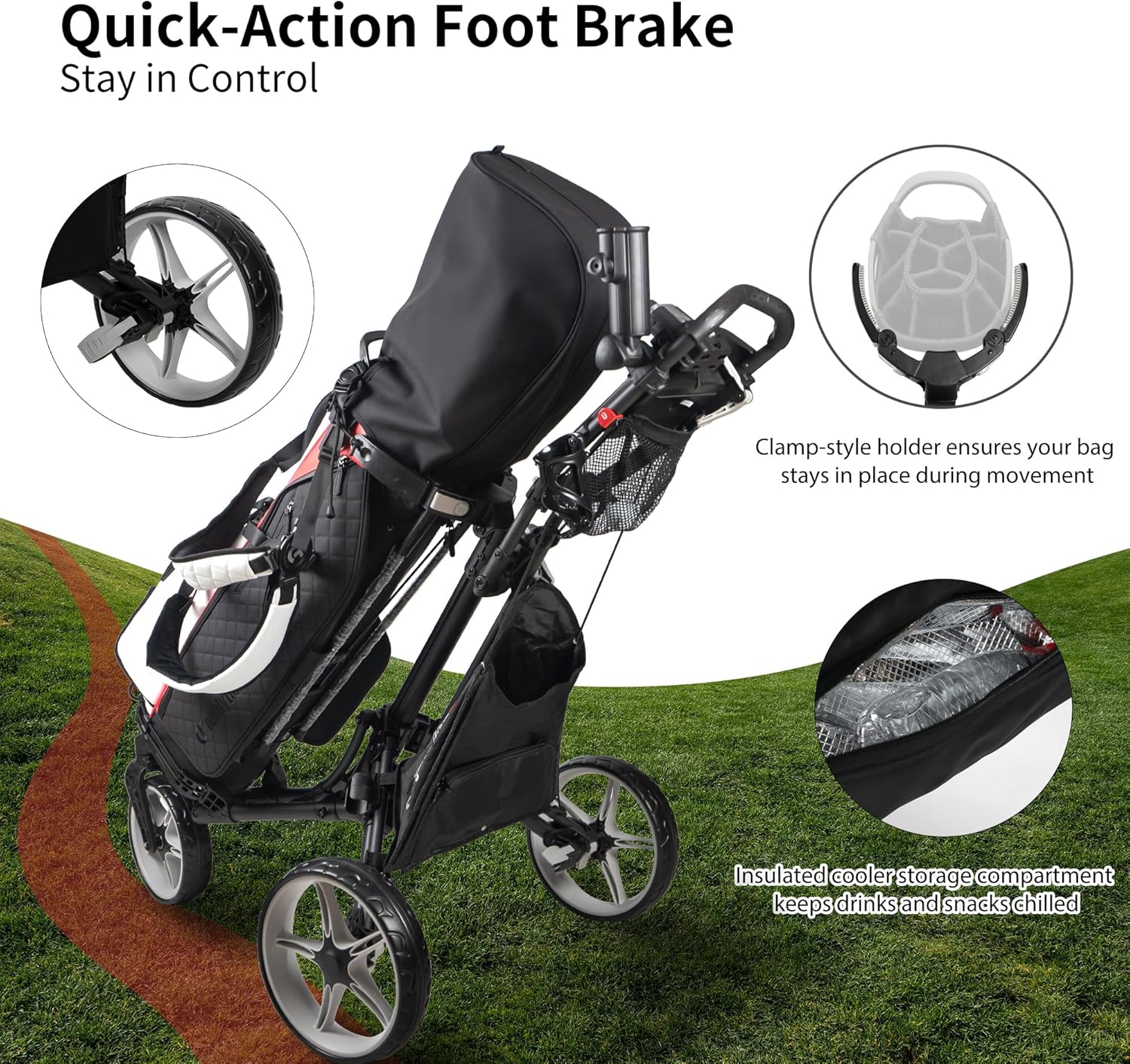
Figure 5: The quick-action foot brake, ensuring the cart remains stationary when engaged.
3.4 Multi-Functional Storage Console
The console provides ample storage and convenience features, including a scorecard holder, storage compartment, beverage holder, cell phone/GPS holder, and a mesh net for additional items.

Figure 6: The multi-functional storage console, designed to keep all your essentials within reach.
3.5 Securing Your Golf Bag
The cart features adjustable elastic straps and a clamp-style holder to securely accommodate golf bags of any size, ensuring stability during movement.

Figure 7: The Caddytek golf push cart with a golf bag, demonstrating how the bag is secured for stability on the course.
4. Maintenance
Regular maintenance will ensure the longevity and optimal performance of your Caddytek golf push cart.
- Cleaning: Wipe down the aluminum frame and plastic components with a damp cloth after each use to remove dirt and debris. Avoid abrasive cleaners.
- Wheel Care: Periodically check the wheels for any lodged debris and ensure they spin freely. If necessary, clean the wheel axles.
- Storage: Always fold the cart using the one-click mechanism and store it in a dry, cool place to prevent damage from moisture or extreme temperatures.
- Fasteners: Occasionally check all screws and fasteners to ensure they are tight. Do not overtighten.
5. Troubleshooting
Here are some common issues and their potential solutions:
- Cart pulls to one side: Check the front wheel alignment. The cart has a front wheel alignment system to ensure steady tracking. Adjust as needed according to the instructions in the manual.
- Difficulty folding/unfolding: Ensure the release button is fully depressed and there are no obstructions in the folding mechanism. Lubricate moving parts if necessary.
- Brake not engaging/releasing: Check for any debris obstructing the foot brake mechanism. Ensure the brake cable is not kinked or damaged.
- Golf bag slipping: Ensure the adjustable elastic straps are tightened securely around your golf bag and the clamp-style holder is properly positioned.
6. Specifications
| Feature | Detail |
|---|---|
| Item Package Dimensions L x W x H | 30.24 x 14.88 x 12.64 inches |
| Package Weight | 10.79 Kilograms |
| Item Dimensions LxWxH | 51.2 x 30.3 x 45.3 inches |
| Item Weight | 19.6 Pounds |
| Brand Name | Caddytek |
| Model Name | CaddyLite ONE - Swivel V8, Blue |
| Color | Blue |
| Material | Aluminum |
| Number of Items | 1 |
| Style | 3 wheel Swivel |
| Included Components | Cart Frame, 3 wheels, Umbrella holder |
| Size | Version 8 |
7. Warranty and Support
The Caddytek CaddyLite One Swivel Version 8 Golf Push Cart comes with a 1 year manufacturer warranty.
For warranty claims, technical support, or any inquiries regarding your product, please refer to the contact information provided in your product packaging or visit the official Caddytek website.
