
Dynasonic DYNAPRO15PACKTRIPODE
DYNASONIC DYNAPRO 15 Plus Portable Bluetooth Speaker System User Manual
Model: DYNAPRO15PACKTRIPODE
1. Introduction
This manual provides detailed instructions for the setup, operation, and maintenance of your DYNASONIC DYNAPRO 15 Plus Portable Bluetooth Speaker System. This 15-inch audio system features 800W audio power, TWS technology for stereo pairing, Bluetooth connectivity, USB/SD player, FM radio, and includes two karaoke microphones, a tablet stand, and a tripod. Please read this manual thoroughly before use to ensure proper functionality and to maximize your product experience.
2. Package Contents
Verify that all items listed below are included in your package:
- DYNAPRO 15 Plus Portable Bluetooth Speaker
- Tripod for Speaker
- Wireless Microphone
- Headband Microphone
- Tablet Stand
- Remote Control
- Charging Cable
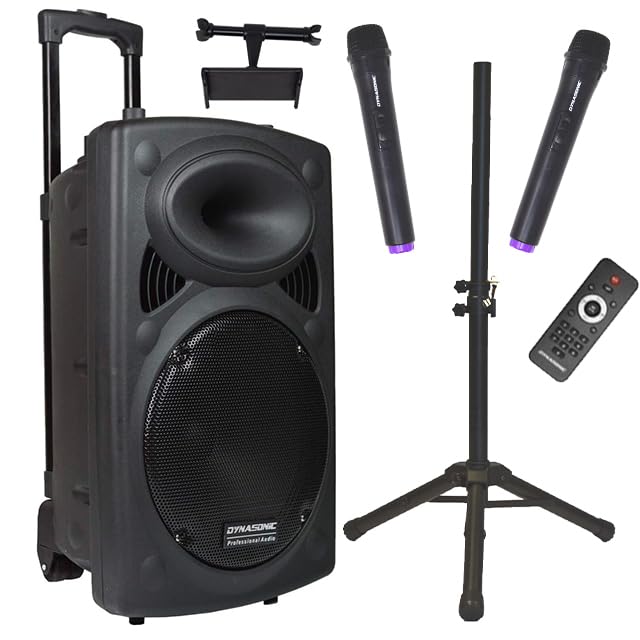
Image 2.1: All components included in the DYNASONIC DYNAPRO 15 Plus package, featuring the main speaker unit, two microphones, a remote control, a tablet stand, and a speaker tripod.
3. Setup
3.1. Tripod Assembly
- Unfold the tripod legs until they are fully extended and stable.
- Adjust the height of the tripod using the locking mechanism to your desired level. Ensure it is securely locked before placing the speaker.

Image 3.1: The speaker tripod, shown both collapsed (56 cm) and fully extended (96 cm), illustrating its adjustable height for optimal sound projection.
3.2. Speaker Placement
- Carefully lift the DYNAPRO 15 Plus speaker and place it onto the top pole of the assembled tripod.
- Ensure the speaker is seated firmly and stably on the tripod.

Image 3.2: The DYNASONIC DYNAPRO 15 Plus speaker securely mounted on its tripod, ready for use, demonstrating proper elevation for sound distribution.
3.3. Tablet Stand Attachment
- Locate the tablet stand accessory.
- Attach the tablet stand to the designated slot on the top handle of the speaker.
- Adjust the stand to securely hold your tablet or smartphone.

Image 3.3: The DYNASONIC DYNAPRO 15 Plus speaker with a tablet securely placed in the integrated tablet stand, illustrating its convenience for media playback or karaoke lyrics.
3.4. Power Connection
- Connect the charging cable to the speaker's power input.
- Plug the other end into a suitable power outlet to charge the internal battery or operate the speaker directly.
4. Controls and Ports
The rear panel of the DYNAPRO 15 Plus speaker features various controls and input/output ports for comprehensive audio management.

Image 4.1: Detailed view of the rear control panel, showing various inputs, volume controls, equalization settings, and power switch.
Key Controls:
- Master Volume: Adjusts the overall sound output level.
- Bass/Treble Control: Fine-tunes the low and high frequencies of the audio.
- Echo Control: Adjusts the echo effect for microphones.
- Microphone Volume: Controls the volume of connected microphones.
- Playback Controls: Buttons for play/pause, skip track, and mode selection (Bluetooth, USB, SD, FM).
Input/Output Ports:
- USB Port: For playing audio files from USB drives.
- SD Card Slot: For playing audio files from SD cards.
- Microphone Inputs: Connect wired microphones (if applicable) or use for wireless microphone receiver.
- Instrument Input: Connect instruments such as guitars.
- AUX Input: Connect external audio devices via a 3.5mm or RCA cable.
- External 12V Input: For connecting to an external 12V power source.
5. Operating Instructions
5.1. Power On/Off
Press the power switch on the rear panel to turn the speaker on or off.
5.2. Bluetooth Pairing
- Turn on the speaker. The display will show 'BLUE' or a similar indicator, and a pairing tone will sound.
- Enable Bluetooth on your mobile device (smartphone, tablet, etc.).
- Search for available Bluetooth devices and select 'DYNAPRO 15 Plus' from the list.
- Once paired, a confirmation tone will sound. You can now play audio from your device through the speaker.
5.3. USB/SD Playback
- Insert a USB drive or SD card (pre-loaded with MP3 audio files) into the respective port/slot on the rear panel.
- The speaker will automatically switch to USB/SD mode and begin playing audio. If not, press the 'Mode' button to select USB or SD.
- Use the playback controls (play/pause, next/previous track) on the speaker or remote control to manage your music.
5.4. FM Radio
- Press the 'Mode' button until 'FM' is displayed.
- Press the play/pause button to initiate an automatic scan for available radio stations. The speaker will save them.
- Use the next/previous track buttons to navigate through the saved stations.
5.5. TWS (True Wireless Stereo) Function
To pair two DYNAPRO 15 Plus speakers for stereo sound:
- Ensure both speakers are powered on and not connected to any Bluetooth device.
- On one speaker (this will be the primary speaker), press and hold the 'TWS' button (or a similar designated button, refer to the specific button on your unit's control panel).
- The primary speaker will search for the secondary speaker. Once connected, a confirmation tone will sound.
- Now, connect your Bluetooth device to the primary speaker as described in section 5.2. Audio will play in stereo through both speakers.
5.6. Karaoke Microphones
- Insert batteries into the wireless microphone(s).
- Turn on the microphone(s). They should automatically connect to the speaker.
- Adjust the microphone volume and echo effect using the controls on the rear panel.
5.7. Instrument Input
- Connect your instrument (e.g., guitar) to the 'Instrument Input' jack on the rear panel using an appropriate cable.
- Adjust the instrument's volume and the speaker's master volume for desired sound output.
6. Maintenance
6.1. Battery Care
- To prolong battery life, fully charge the speaker before first use.
- Avoid completely draining the battery frequently. Recharge when the low battery indicator appears.
- If storing the speaker for an extended period, charge it to approximately 50-70% every few months.
6.2. Cleaning
- Disconnect the speaker from power before cleaning.
- Use a soft, dry cloth to wipe the exterior surfaces.
- Do not use abrasive cleaners, waxes, or solvents.
- Keep liquids away from the control panel and ports.
7. Troubleshooting
| Problem | Possible Cause | Solution |
|---|---|---|
| No power | Battery drained; Power cable not connected | Charge the battery; Ensure power cable is securely connected. |
| No sound output | Volume too low; Incorrect input mode; Device not connected | Increase master volume; Select correct input mode (Bluetooth, USB, etc.); Reconnect device. |
| Bluetooth not pairing | Speaker not in pairing mode; Device too far; Interference | Ensure speaker is in Bluetooth mode; Move device closer; Restart speaker and device. |
| Microphone not working | Microphone off; Batteries low; Volume too low | Turn on microphone; Replace batteries; Increase microphone volume. |
| TWS pairing failed | Speakers too far apart; Already connected to another device | Ensure speakers are close; Disconnect any Bluetooth devices from both speakers before TWS pairing. |
8. Specifications
| Feature | Detail |
|---|---|
| Model Name | DYNAPRO15PACKTRIPODE |
| Audio Wattage | 800 Watts |
| Speaker Type | Active, Portable Bluetooth Speaker |
| Connectivity Technology | Bluetooth, USB |
| Power Source | Battery Powered (Lithium Polymer, rechargeable) |
| Battery Life | 4-5 hours (approx.) |
| Audio Inputs | Microphone, Instrument, AUX |
| Media Playback | USB, SD Card, FM Radio |
| Special Features | TWS (True Wireless Stereo), Karaoke Function, Tablet Stand, Wheels & Extendable Handle |
| Product Dimensions (LxWxH) | 50 x 50 x 40 cm |
| Item Weight | 14 kg |
| Mounting Type | Pole Mount (Tripod included) |
9. Safety Information
- Do not expose the speaker to rain or moisture to prevent fire or electric shock.
- Do not open the speaker casing. Refer all servicing to qualified personnel.
- Keep the speaker away from heat sources, direct sunlight, and extreme temperatures.
- Ensure proper ventilation around the speaker during operation.
- Use only the provided charging cable and accessories.
- When using the tripod, ensure it is placed on a stable, level surface to prevent tipping.
10. Warranty and Support
For warranty information, technical support, or service inquiries, please refer to the warranty card included with your product or contact DYNASONIC customer service through their official website or the retailer where the product was purchased. Please have your model number (DYNAPRO15PACKTRIPODE) and purchase date available when contacting support.
Ask a question about this manual
Ask about setup, troubleshooting, compatibility, parts, safety, or missing instructions. Manuals+ will review the question and use this page’s manual context to help answer it.