
1. Product Overview
The UGREEN Qi2 Certified 15W 2-in-1 Magnetic Wireless Charging Stand (Model 45382) is designed to provide efficient and convenient wireless charging for compatible devices. This stand features dual charging capabilities, allowing simultaneous charging of an iPhone and AirPods. It incorporates Qi2 certification for 15W fast charging to iPhones and includes multiple safety protections.

Image 1.1: The UGREEN Qi2 Certified 15W 2-in-1 Magnetic Wireless Charging Stand in use, showing an iPhone magnetically attached and AirPods charging on the base.
2. Package Contents
Please verify that all items are present in the package:
- 1 x MagFlow Qi2 Charging Stand
- 1 x 3.3FT USB-C to USB-C Charging Cable
- 1 x User Manual
Note: A USB-C power adapter is not included and must be purchased separately. For optimal performance, a 20W or higher power adapter is recommended.

Image 2.1: The complete package contents of the UGREEN Qi2 Charging Stand.
3. Safety Information
This device is equipped with multiple safety features to ensure safe operation:
- FOD (Foreign Object Detection): Prevents charging when foreign metallic objects are detected on the charging surface.
- UL94-V0 Flame Retardancy: Highest level of flame retardancy for enhanced safety.
- Overvoltage Protection: Safeguards against excessive voltage input.
- Overcurrent Protection: Protects against excessive current output.
- Overheat Protection: Monitors and regulates temperature to prevent overheating.
- Short-Circuit Protection: Prevents damage from short circuits.
Always use the charger in a well-ventilated area and avoid exposing it to extreme temperatures or humidity. Do not disassemble or attempt to repair the device yourself.

Image 3.1: Visual representation of the multi-protection features integrated into the charging stand.
4. Setup Instructions
- Connect Power: Insert one end of the provided USB-C to USB-C charging cable into the USB-C input port on the back of the charging stand. Connect the other end of the cable to a compatible USB-C power adapter (not included).
- Power On: Plug the power adapter into a wall outlet. The indicator light on the base of the stand will illuminate briefly, indicating it is powered on and ready for use.
- Placement: Place the charging stand on a stable, flat surface. Ensure there is adequate space around the stand for proper ventilation.
5. Operating Instructions
5.1 Charging an iPhone
- Ensure your iPhone is MagSafe-compatible or has a MagSafe-compatible case.
- Align your iPhone with the magnetic charging pad on the stand. The magnets will automatically snap your iPhone into place, ensuring optimal charging alignment.
- The iPhone will begin charging wirelessly at up to 15W. The charging status will be displayed on your iPhone screen.
5.2 Charging AirPods or Other Wireless Earbuds
- Place your AirPods case (or other Qi-compatible wireless earbuds case) onto the designated charging area on the base of the stand.
- The indicator light on the base will show charging status (refer to your AirPods manual for specific light indications). Charging will occur at up to 5W.

Image 5.1: Dual functionality of the charging stand, providing 15W for iPhone and 5W for AirPods.
5.3 Adjusting the Stand Angle and Orientation
- The magnetic charging pad can be adjusted from 15° to 90° to achieve your desired viewing angle. Gently tilt the pad to adjust.
- Your iPhone can be rotated 360° while attached to the magnetic pad, allowing for both vertical (portrait) and horizontal (landscape) viewing orientations.
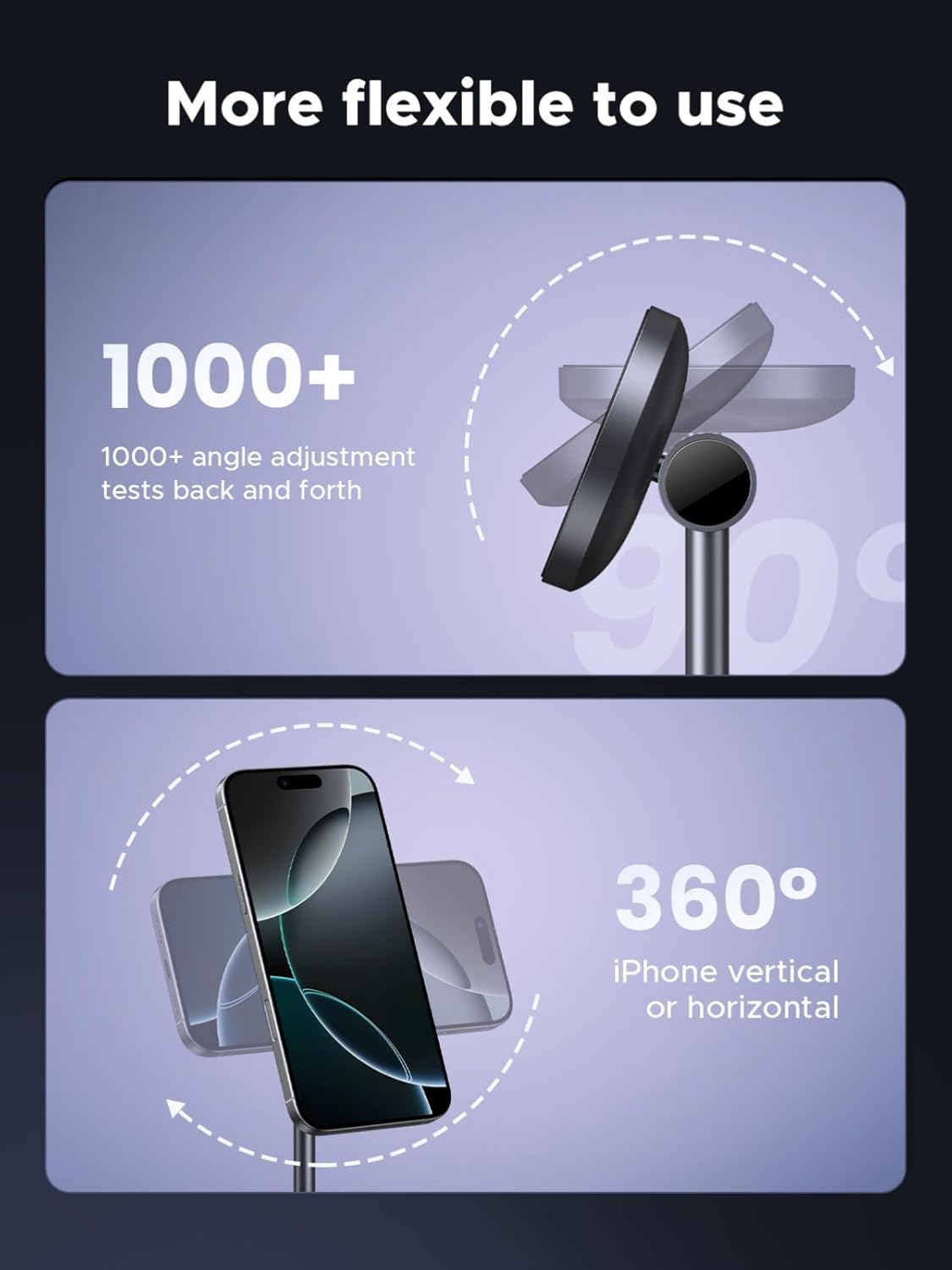
Image 5.2: Demonstrating the flexible angle adjustment and 360-degree rotation capabilities of the stand.

Image 5.3: iPhone in landscape orientation on the charging stand, suitable for nightstand mode.
6. Compatibility
The UGREEN Qi2 Charging Stand is compatible with the following devices:
- iPhones (15W Qi2 Charging): iPhone 17 / 17 Air / 17 Pro / 17 Pro Max, iPhone 16 / 16 Plus / 16 Pro / 16 Pro Max, iPhone 15 / 15 Plus / 15 Pro / 15 Pro Max, iPhone 14 / 14 Plus / 14 Pro / 14 Pro Max, iPhone 13 / 13 mini / 13 Pro / 13 Pro Max, iPhone 12 / 12 mini / 12 Pro / 12 Pro Max.
- Earbuds (5W Qi Charging): AirPods Pro 2 / 1, AirPods 4 / 3, and other Qi-enabled wireless earbuds (e.g., Galaxy Buds).
Important Note on Cases: For magnetic attachment and optimal charging, use your iPhone without a case or with a MagSafe-compatible case. Non-MagSafe cases may prevent proper magnetic alignment and charging.

Image 6.1: Universal compatibility chart for various iPhone models, AirPods, and guidance on phone cases.
7. Maintenance
- Cleaning: Disconnect the charger from power before cleaning. Use a soft, dry, lint-free cloth to wipe the surfaces of the charging stand. Avoid using abrasive cleaners, solvents, or aerosol sprays.
- Storage: When not in use for extended periods, store the charging stand in a cool, dry place away from direct sunlight and extreme temperatures.
- Handling: Handle the device with care. Avoid dropping or subjecting it to strong impacts, which could damage internal components.
8. Troubleshooting
- Device not charging:
- Ensure the charging stand is properly connected to a working power outlet and a compatible USB-C power adapter (20W or higher recommended).
- Verify that your device is correctly aligned on the charging pad. For iPhones, ensure magnetic attachment.
- Remove any non-MagSafe cases or thick cases that might interfere with wireless charging.
- Check for foreign objects between the device and the charging pad.
- Try a different USB-C cable or power adapter.
- Slow charging:
- Ensure you are using a power adapter that provides sufficient wattage (20W or higher is recommended for 15W fast charging).
- Confirm your device supports 15W Qi2 charging. Older devices or non-Qi2 devices may charge at slower speeds.
- Ensure your phone case is MagSafe-compatible and not too thick.
- Weak magnetic attachment:
- Ensure your iPhone is MagSafe-compatible or has a certified MagSafe case.
- Check if there are any obstructions or debris on the magnetic surface of the stand or your phone/case.
- Indicator light not on:
- Check the power connection to the stand and the wall outlet.
- Ensure the USB-C cable is securely inserted into both the stand and the power adapter.
9. Specifications
| Feature | Detail |
|---|---|
| Model Number | 45382 |
| Brand | UGREEN |
| Input Voltage | 12 Volts (AC) |
| Wireless Output (iPhone) | Up to 15W (Qi2 Certified) |
| Wireless Output (Earbuds) | Up to 5W |
| Connector Type | USB Type C |
| Total USB Ports | 2 (1 input, 1 output for additional device charging) |
| Special Features | 2-in-1 Magnetic Wireless Charging, Qi2 15W Fast Charging, Adjustable Stand, Multiple Safety Protections |
| Color | Grey |
| Item Weight | 10.9 ounces (approx. 309 grams) |
| Package Dimensions | 6.22 x 4.09 x 3.86 inches |
10. Warranty and Support
UGREEN products are designed and manufactured to high-quality standards. This product comes with a standard manufacturer's warranty. For detailed warranty information, please refer to the warranty card included in your package or visit the official UGREEN website.
If you encounter any issues or have questions regarding your UGREEN Qi2 Certified 15W 2-in-1 Magnetic Wireless Charging Stand, please contact UGREEN customer support through their official website or the contact information provided in your product documentation.
UGREEN Official Website: www.ugreen.com