
DOOGEE V MAX PLUS
DOOGEE V MAX Plus (2024) 5G Rugged Smartphone User Manual
Model: V MAX PLUS
1. Introduction
The DOOGEE V MAX Plus (2024) is a robust 5G rugged smartphone designed for durability and high performance. It features an exceptionally large battery, advanced camera system, and a resilient build to withstand challenging environments. This manual provides essential information for setting up, operating, maintaining, and troubleshooting your device.
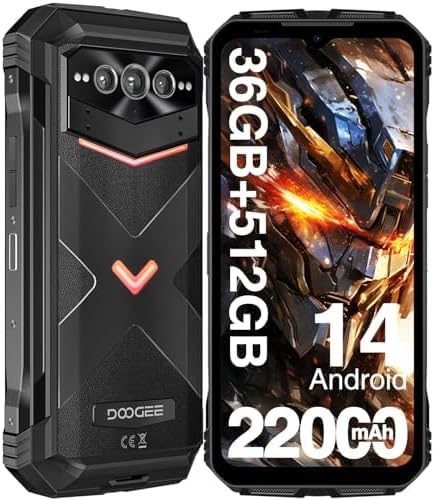
Image: Front and back view of the DOOGEE V MAX Plus smartphone, highlighting its rugged design and key specifications like 36GB+512GB memory and 22000mAh battery.
2. Setup
2.1. SIM Card Installation
The DOOGEE V MAX Plus supports dual SIM cards. To install your SIM cards:
- Locate the SIM card tray on the side of the device.
- Use the provided SIM ejector tool to open the tray.
- Carefully place your Nano-SIM cards into the designated slots on the tray. Ensure they are correctly oriented.
- Gently push the tray back into the phone until it is flush with the device body.

Image: Illustration showing the dual SIM card tray and other features like Wi-Fi 6, GPS, NFC, lighting effects, and side fingerprint recognition.
2.2. Initial Power On
Press and hold the Power button located on the side of the phone until the DOOGEE logo appears. Follow the on-screen prompts to complete the initial setup, including language selection, Wi-Fi connection, and Google account sign-in.
3. Operating Your Device
3.1. Android 14 Operating System
The DOOGEE V MAX Plus runs on the latest Android 14 operating system, providing a seamless and efficient user experience with enhanced privacy features and improved performance.

Image: Screenshot of the Android 14 interface on the DOOGEE V MAX Plus, showing various app icons and system settings.
3.2. Display Features
Experience vibrant visuals on the 6.58-inch FHD+ IPS display with a resolution of 1080x2408. The 120Hz adaptive refresh rate ensures smooth scrolling and fluid animations, protected by Corning Gorilla Glass.

Image: The 6.58-inch FHD+ display of the DOOGEE V MAX Plus, emphasizing its 120Hz refresh rate and 1080x2408 resolution.
3.3. Performance and Storage
Powered by the MediaTek Dimensity 7050 Octa-core processor, the V MAX Plus offers robust performance. It comes with 36GB of RAM (16GB base + 20GB virtual) and 512GB of internal storage (UFS3.1), expandable up to 2TB via microSD card, ensuring ample space for all your applications and media.

Image: Diagram illustrating the MediaTek Dimensity 7050 processor, 5G capabilities, 36GB RAM (16GB+20GB virtual), and 512GB ROM.
3.4. Intelligent Interaction Lights
The device features intelligent interaction lights with three customizable colors (red, green, and blue) that can be set for various scenarios such as incoming calls, music playback, SMS notifications, and charging.

Image: Close-up of the DOOGEE V MAX Plus's rear panel, showcasing the intelligent interaction lights in different colors.
3.5. Audio Quality
Enjoy superior sound with the high-quality dual speakers, designed to deliver immersive audio for all your media consumption.
4. Camera Features
The DOOGEE V MAX Plus is equipped with a versatile camera system to capture every moment with clarity and detail.
- 200MP AI Main Camera: Capture stunningly clear and detailed images.
- 32MP Front Camera: Perfect for high-quality selfies and video calls.
- 20MP Night Vision Camera: Excellent for photography in low-light conditions.
- 50MP Wide-Angle Camera: Capture expansive views.
- 8MP Telephoto Camera: Adds artistic depth to your photos.

Image: Overview of the DOOGEE V MAX Plus camera setup, highlighting the 200MP main camera, 20MP night vision camera, and 32MP front camera.
4.1. Video Capture
Record high-quality videos with 4K video capture capabilities. The 8MP wide-angle macro camera further enhances your video recording options.
4.2. Camera Modes
Explore various camera modes including Beauty Mode, Pro Mode, Morpho Super Night Mode, Morpho Panorama, Portrait Mode, Mono Mode, and HDR Mode to enhance your photography.
5. Battery and Charging
The DOOGEE V MAX Plus is equipped with a massive 22000mAh battery, providing extended usage times.
- Standby Time: Up to 2350 hours (approximately 98 days).
- Call Time: Up to 130 hours.
- Music Playback: Up to 130 hours.
- Video Playback: Up to 38 hours.
5.1. Fast Charging
The device supports 33W fast charging, allowing you to reach 80% battery in just three hours.

Image: Visual representation of the 22000mAh battery and 33W Type-C fast charging, with icons for normal use, standby, calling, and reverse charging.
5.2. OTG Function (Reverse Charging)
Utilize the OTG (On-The-Go) function to use your DOOGEE V MAX Plus as a power bank to charge other compatible devices.
6. Durability and Protection
The DOOGEE V MAX Plus is engineered for extreme durability, offering 360° protection against various elements.
- Waterproof: IP68/IP69K rated, capable of submersion up to 1.5 meters for 30 minutes.
- Shockproof: Designed to withstand drops from up to 1.8 meters.
- Dust-proof: Fully protected against dust ingress.
- MIL-STD-810H Certified: Meets military-grade standards for ruggedness.

Image: Visual demonstration of the DOOGEE V MAX Plus's triple protection features, showing it submerged in water, covered in sand, and dropped on concrete.
7. Connectivity and Other Features
- 5G Connectivity: Supports high-speed 5G networks.
- Wi-Fi 6: Enjoy faster and more reliable wireless internet connections.
- NFC: For convenient mobile payments and data transfer.
- GPS: Accurate navigation with support for GPS, Glonass, Galileo, and Beidou.
- Side Fingerprint Unlock: Secure and quick access to your device.
8. Troubleshooting
8.1. Network Connectivity Issues
If you experience issues with network reception or internet connectivity, especially with carriers other than T-Mobile, please verify the supported frequency bands:
- GSM: B2/3/5/8
- CDMA: BC0/BC1/BC10
- WCDMA: B1/2/4/5/6/8/19
- TDD: B34/38/39/40/41
- FDD: B1/2/3/4/5/7/8/12/17/18/19/20/25/26/28A/28B/66
- NR: N1/N3/N7/N28/N38/N41/N77/N78/N79
Ensure your carrier's bands are compatible. For persistent issues, contact your carrier or DOOGEE customer support.
8.2. General Issues
For any other operational problems, try the following:
- Restart the device.
- Check for system updates in Settings > System > System update.
- Clear cache of problematic applications.
- Perform a factory reset (backup your data first).
9. Specifications
| Feature | Specification |
|---|---|
| Model Name | V MAX PLUS |
| Operating System | Android 14 |
| CPU Model | 1.2GHz Cortex A9 Processor (MediaTek Dimensity 7050 Octa-core 2.6GHz) |
| RAM | 36 GB (16GB + 20GB Extended) |
| Internal Storage | 512 GB |
| Screen Size | 6.58 Inches |
| Resolution | 1080 x 2408 FHD+ |
| Refresh Rate | 120 Hz |
| Main Camera | 200 MP |
| Front Camera | 32 MP |
| Night Vision Camera | 20 MP |
| Battery Capacity | 22000 mAh |
| Fast Charging | 33W |
| Dimensions | 1.04 x 3.27 x 7.03 inches |
| Item Weight | 9.2 ounces (262 Grams) |
| Water/Dust/Shock Proof | IP68/IP69K, MIL-STD-810H |
| Wireless Technologies | Cellular, NFC, Bluetooth, Wi-Fi 6 |
| GPS | True (GPS, Glonass, Galileo, Beidou) |
| Audio Jack | No headphone jack |
10. Warranty and Support
DOOGEE is committed to providing excellent customer service.
- 30-Day Money Back Guarantee: If you are not satisfied, you may return the product within 30 days for a full refund.
- One-Year Warranty: Your DOOGEE V MAX Plus comes with a one-year limited warranty covering manufacturing defects.
- 24/7 Online Support: For any questions or issues, please contact our customer service team. We are available 24 hours a day to provide attentive service and resolve problems promptly.

Image: Icons representing 30-day money-back guarantee, 2-year limited warranty, and 24/7 online support, highlighting DOOGEE's commitment to customer service.
Related documentsV MAX PLUS


Ask a question about this manual
Ask about setup, troubleshooting, compatibility, parts, safety, or missing instructions. Manuals+ will review the question and use this page’s manual context to help answer it.