
DOOGEE V MAX Plus
DOOGEE V MAX Plus (2024) 5G Rugged Smartphone User Manual
Model: V MAX Plus | Brand: DOOGEE
1. Introduction
Welcome to the user manual for your new DOOGEE V MAX Plus (2024) 5G Rugged Smartphone. This device is engineered for durability and high performance, featuring an ultra-large 22000mAh battery, a powerful 200MP camera system, and the latest Android 14 operating system. This manual provides essential information to help you set up, operate, maintain, and troubleshoot your device, ensuring you get the most out of its advanced capabilities and rugged design.
2. What's in the Box
- 1 x DOOGEE V MAX Plus Cellphone
- 1 x Packing Box / 1 x Manual
- 1 x Warranty Card
- 1 x Type-C USB Cable / 1 x Charger
- 2 x Anti-explosion film
3. Setup Guide
3.1. Initial Charging
Before first use, fully charge your DOOGEE V MAX Plus. Connect the provided Type-C USB cable to the phone's charging port and the charger to a power outlet. The device supports 33W fast charging, allowing for rapid power replenishment.

Image: The DOOGEE V MAX Plus highlighting its 22000mAh battery capacity and 33W Type-C fast charging capabilities, showing normal use, standby, calling, and reverse charging durations.

Image: A visual representation of the 33W fast charging feature, indicating quick power-up times and OTG reverse charging capability.
3.2. SIM Card Installation
The DOOGEE V MAX Plus supports dual SIM cards. Locate the SIM card tray on the side of the device. Use the provided SIM ejector tool to open the tray. Insert your Nano-SIM cards and/or a microSD card (up to 2TB) into the designated slots, ensuring correct orientation. Gently push the tray back into the phone until it clicks into place.
3.3. Power On/Off
To power on, press and hold the Power button (located on the side) until the DOOGEE logo appears. To power off, press and hold the Power button, then select 'Power off' from the options on the screen.
4. Operating Your Smartphone
4.1. Battery Management
The DOOGEE V MAX Plus is equipped with a massive 22000mAh battery, providing extended usage times. It supports 33W fast charging for quick recharges. Additionally, the OTG (On-The-Go) function allows your phone to act as a power bank to charge other compatible devices.
Video: Demonstrates the impressive 22000mAh battery life and its ability to power other devices via reverse charging, showcasing its utility for outdoor activities.
4.2. Display and User Interface
Experience smooth visuals on the 6.58-inch FHD+ IPS display with a 120Hz adaptive refresh rate. The phone runs on Android 14, offering enhanced privacy features, personalized settings, and a fluid user experience.

Image: The DOOGEE V MAX Plus showcasing its user interface running on the latest Android 14 operating system.

Image: The 6.58-inch FHD+ display with 120Hz refresh rate, highlighting its high resolution and smooth visual performance.
4.3. Camera System
Capture stunning photos and videos with the versatile camera setup: a 200MP main camera for incredible detail, a 32MP front camera for high-quality selfies, a 20MP night vision camera for low-light conditions, a 50MP wide-angle camera, and an 8MP telephoto camera.
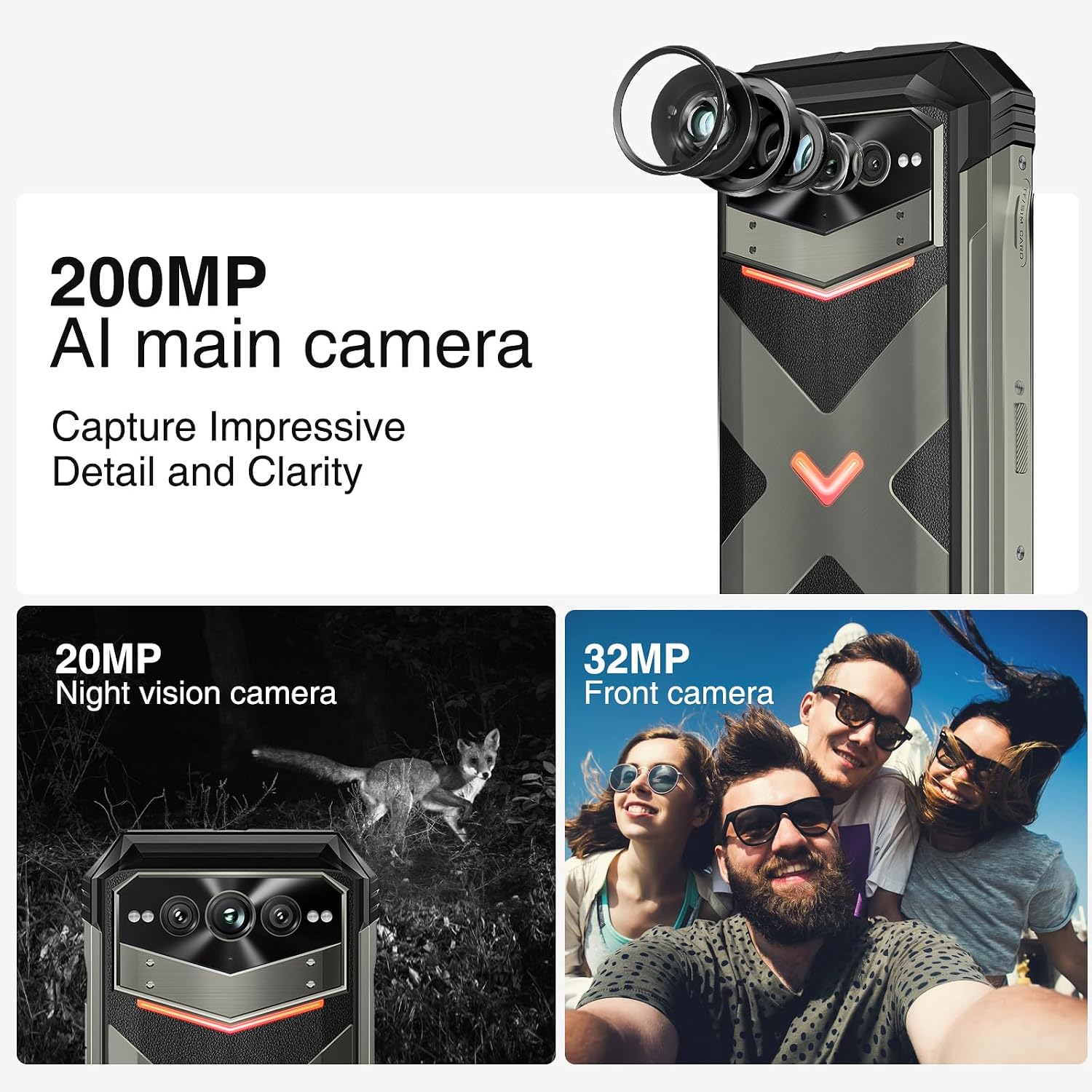
Image: Overview of the DOOGEE V MAX Plus camera system, featuring the 200MP main camera, 32MP front camera, and 20MP night vision camera.
4.4. Intelligent Interaction Lights
The device features intelligent interaction lights with red, green, and blue colors. These lights can be customized for various scenarios, including incoming calls, music playback, SMS notifications, and charging status, adding a unique visual element.

Image: The intelligent interaction lights on the back of the DOOGEE V MAX Plus, demonstrating their customizable color options.
4.5. Performance and Storage
Powered by the MediaTek Dimensity 7050 5G Octa-core processor, the phone offers up to 36GB of RAM (16GB physical + 20GB virtual) for seamless multitasking. It comes with 512GB of built-in storage, expandable up to 2TB with a microSD card, providing ample space for all your data.

Image: An illustration of the MediaTek Dimensity 7050 5G processor, highlighting its octa-core architecture, 6nm advanced tech, and memory configurations (16GB base RAM + 20GB extended RAM, 512GB ROM).
4.6. Connectivity and Durability
The DOOGEE V MAX Plus supports 5G connectivity, Wi-Fi 6, NFC for convenient payments, and accurate navigation systems (GPS, Glonass, Galileo, Beidou). Its rugged design provides 360° protection with IP68/IP69K waterproof and dustproof ratings, and MIL-STD-810H shockproof compliance, making it ideal for harsh environments.
Video: A comprehensive overview of the DOOGEE V MAX Plus, showcasing its ruggedness, display quality, camera features, and overall performance in various outdoor scenarios.

Image: The DOOGEE V MAX Plus demonstrating its certified triple protection (MIL-STD-810H, IP68/IP69K) against water immersion, drops, and concrete submersion.
5. Maintenance
To ensure the longevity and optimal performance of your DOOGEE V MAX Plus, follow these maintenance guidelines:
- Cleaning: Use a soft, lint-free cloth to clean the screen and body. Avoid abrasive materials or harsh chemicals.
- Temperature: Do not expose the device to extreme temperatures (hot or cold) for prolonged periods.
- Software Updates: Regularly check for and install system updates to ensure your device has the latest features, security patches, and performance improvements.
- Storage: While the phone has ample storage, regularly back up important data and manage files to prevent performance degradation.
6. Troubleshooting
Here are solutions to common issues you might encounter:
| Issue | Possible Cause / Solution |
|---|---|
| Device won't power on | Ensure the battery is charged. Connect to the charger and wait a few minutes before attempting to power on again. |
| Poor network signal / Calls not connecting | Check your SIM card installation. Verify that your carrier (e.g., T-Mobile) is supported by the phone's frequency bands. Restart the device. |
| Wi-Fi connectivity issues | Restart your Wi-Fi router and the phone. Forget the network and reconnect. Ensure Wi-Fi 6 compatibility with your router for optimal performance. |
| Battery drains quickly | Close background apps. Reduce screen brightness. Disable unnecessary features like GPS or Bluetooth when not in use. Check for app updates. |
| Device is slow or unresponsive | Clear cache of frequently used apps. Restart the phone. Ensure sufficient free storage space. |
7. Technical Specifications
| Feature | Detail |
|---|---|
| Brand | DOOGEE |
| Model Name | V MAX Plus |
| Operating System | Android 14 |
| CPU Model | MediaTek Dimensity 7050 (Octa-core) |
| RAM Memory Installed Size | 36 GB (16GB physical + 20GB virtual) |
| Memory Storage Capacity | 512 GB (expandable up to 2TB with microSD) |
| Screen Size | 6.58 Inches FHD+ IPS |
| Resolution | 1080x2408 |
| Refresh Rate | 120 Hz |
| Battery Capacity | 22000 Milliamp Hours |
| Charging | 33W Fast Charging, OTG Reverse Charging |
| Main Camera | 200MP AI Ultra-clear |
| Front Camera | 32MP |
| Night Vision Camera | 20MP |
| Wide-angle Camera | 50MP |
| Telephoto Camera | 8MP |
| Wireless Communication | 5G, Wi-Fi 6, Bluetooth, NFC |
| Navigation | GPS, Glonass, Galileo, Beidou |
| Durability | IP68/IP69K Waterproof & Dustproof, MIL-STD-810H Shockproof |
| Item Weight | 9.2 ounces (262 Grams) |
| Dimensions | 7.6 x 4.06 x 2.52 inches |
8. Warranty and Support
Your DOOGEE V MAX Plus (2024) 5G Rugged Smartphone comes with a 2-Year Limited Warranty. For any product-related inquiries, technical assistance, or warranty claims, please contact DOOGEE customer support. They offer 24/7 One-on-One Online Support to assist you.
Please refer to the warranty card included in your product packaging for specific terms and conditions.
Related documentsV MAX Plus


Ask a question about this manual
Ask about setup, troubleshooting, compatibility, parts, safety, or missing instructions. Manuals+ will review the question and use this page’s manual context to help answer it.