Introduction
The UGREEN Jump Starter Power Pack is a versatile and powerful device designed to provide emergency jump-starting for vehicles and serve as a portable power bank. With its robust 1000A peak current and 12000mAh capacity, it can effectively start 12V vehicles, including those with 6.0L gasoline and 3.5L diesel engines. This manual provides essential information for safe operation, maintenance, and troubleshooting.
Safety Information
Your safety is paramount. Please read and understand all safety instructions before using the UGREEN Jump Starter. This device is equipped with advanced safety protections to ensure reliable operation.
- Reverse Connection Protection: Prevents damage if clamps are connected incorrectly to battery terminals.
- Reverse Charging Protection: Stops current flow back from the vehicle battery to the jump starter.
- Short Circuit Protection: Automatically shuts off in case of a short circuit.
- High Temperature Protection: Prevents overheating of the device.
- Overcurrent Protection: Safeguards against excessive current draw.
- Overvoltage Protection: Protects against voltage surges.
- Undervoltage Protection: Prevents deep discharge of the internal battery.
- Low Battery Conditions: Indicates when the jump starter's internal battery is low.

Image: The UGREEN Jump Starter highlighting its comprehensive safety features, including protection against various electrical faults.
Package Contents
Please check the package for the following items:
- UGREEN Jump Starter Power Pack
- Smart Jump Leads (with battery clamps)
- USB-A to USB-C Charging Cable
- Storage Bag
- User Manual (this document)

Image: All items included in the UGREEN Jump Starter package.
Setup
Initial Charging
Before first use, fully charge the UGREEN Jump Starter. Connect the provided USB-A to USB-C cable to the jump starter's USB-C port and a suitable USB power adapter (not included). The digital display will show the charging progress. A full charge ensures optimal performance and extends battery lifespan.
Checking Battery Level
The digital screen on the jump starter displays the current battery level. Ensure the jump starter has at least 60% charge before attempting to jump-start a vehicle.

Image: Digital display showing the battery charge status.
Operating Instructions
Jump Starting a Vehicle
Follow these three simple steps to jump-start your vehicle:
- 1. Connect: Connect the smart ignition wire (jump leads) to the jump starter. Start the power supply and turn on the product.
Note: Before use, make sure the product power is greater than 60%.
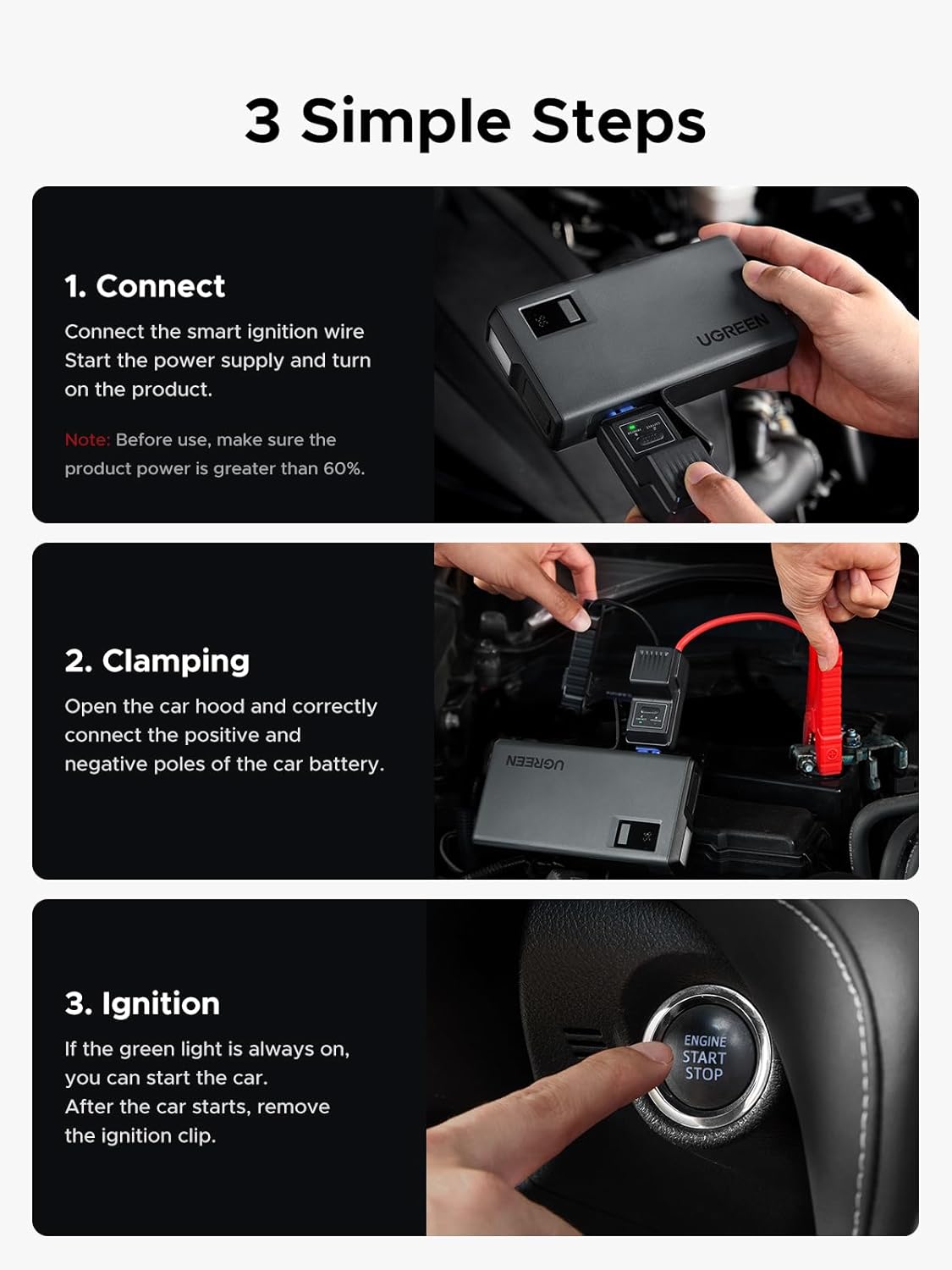
Image: Connecting the jump leads to the jump starter unit.
- 2. Clamping: Open the car hood and correctly connect the positive (red) and negative (black) poles of the car battery to the corresponding clamps on the smart jump leads. Ensure a secure connection.

Image: Correctly clamping the jump leads to the car battery terminals.
- 3. Ignition: If the green light on the smart jump leads is solid, you can start the car. After the car starts, immediately remove the ignition clip (jump leads) from the car battery, then disconnect from the jump starter.
Image: Initiating car ignition after successful connection.
Using as a Power Bank
The UGREEN Jump Starter features USB-A and USB-C ports, allowing it to function as a portable power bank for charging smartphones, tablets, headphones, and other USB-powered devices.
- Connect your device to the USB-A or USB-C output port using a compatible charging cable.
- The jump starter will automatically begin charging your device.

Image: The jump starter functioning as a power bank, charging multiple devices.
Using the LED Flashlight
The built-in LED flashlight provides illumination for various situations, including emergencies.
- Normal Lighting: Press and hold the power button for three seconds to turn on the flashlight.
- Alert Mode (Strobe): After turning on normal lighting, press the power button once to switch to alert mode.
- SOS Mode: Press the power button twice after starting normal lighting to activate SOS mode (flashing Morse code for SOS).
- To turn off the flashlight, press the power button until it cycles off or hold it down.
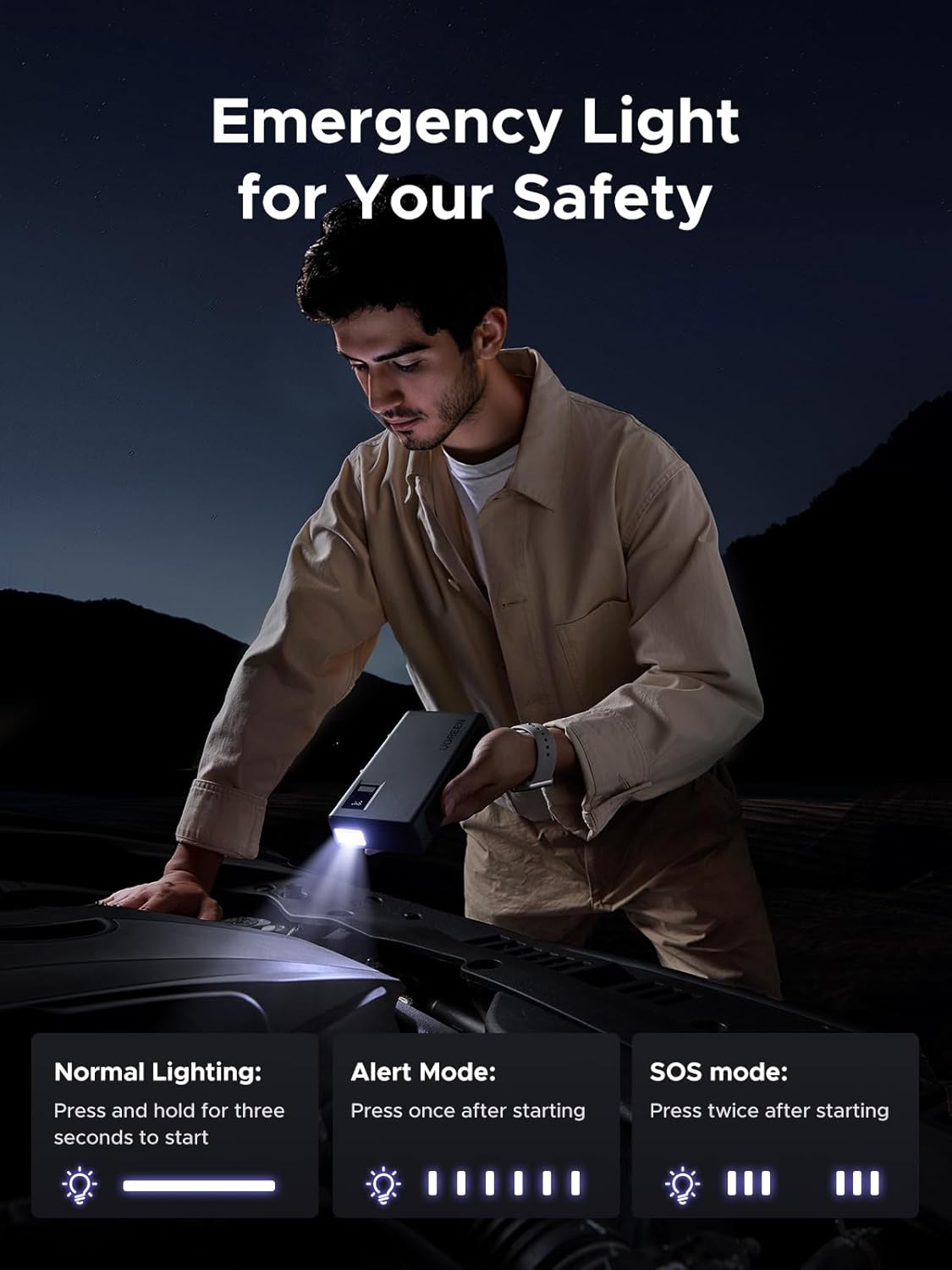
Image: Demonstrating the various modes of the integrated LED flashlight.
Maintenance
- Recharge Regularly: For optimal performance and to extend battery lifespan, recharge the jump starter every three months, even if not in use.
- Storage: Store the device in a cool, dry place, away from direct sunlight and extreme temperatures.
- Cleaning: Use a soft, dry cloth to clean the exterior of the jump starter. Do not use harsh chemicals or abrasive materials.
- Handle with Care: Avoid dropping the device or subjecting it to strong impacts.
Troubleshooting
| Problem | Possible Cause | Solution |
|---|---|---|
| Jump starter does not turn on. | Battery is completely discharged. | Charge the jump starter fully before use. |
| Vehicle does not start after connecting. | Jump starter battery too low (below 60%). Incorrect connection of clamps. Vehicle battery is severely damaged. | Ensure jump starter is charged above 60%. Verify positive (red) to positive, negative (black) to negative. Consult a professional mechanic. |
| Smart jump leads indicator light is not green. | Incorrect connection. Safety protection activated. | Check clamp connections. Refer to safety features section for protection indicators. Disconnect and reconnect. |
| Device not charging external devices. | Jump starter battery too low. Incompatible charging cable/device. | Recharge the jump starter. Try a different USB cable or device. |
Specifications
| Feature | Detail |
|---|---|
| Brand | UGREEN |
| Model Number | ES702 |
| Peak Output Current | 1000 Amps |
| Starting Current | 600 Amps |
| Battery Capacity | 12000mAh |
| Product Dimensions (L x W x H) | 6.35" x 3.42" x 1.3" (161.5 x 85 x 33mm) |
| Item Weight | 470 Grams (1.04 pounds) |
| Engine Compatibility | Up to 6.0L Gasoline Engines, 3.5L Diesel Engines |
| Battery Type | Lithium Polymer |
| Operating Temperature | -4℉ to 140℉ (-20℃ to 60℃) |
| USB Output | USB-A, USB-C (24W Max Total Output) |
| Manufacturer | Ugreen Group Limited |
| Country of Origin | China |
Warranty and Support
UGREEN products are designed and manufactured to the highest quality standards. For information regarding warranty coverage, technical support, or customer service, please refer to the warranty card included with your product or visit the official UGREEN website. You may also contact UGREEN customer support directly through the contact information provided on their website.
For the latest product information and support resources, please visit: www.ugreen.com


