1. Introduction
Thank you for choosing the Vimmk Cordless Water Dental Flosser Model Y208. This device is designed to provide effective oral hygiene by removing food debris and plaque from between teeth and below the gumline. Please read this manual thoroughly before first use to ensure proper operation and maintenance.
2. Safety Information
To reduce the risk of electric shock, burns, fire, or injury, please observe the following safety precautions:
- Avoid electrical hazards. Keep the device away from water sources when charging.
- Keep out of reach of children. This device is not a toy.
- Do not use if you have certain medical conditions without consulting a dental professional.
- Always follow the instructions provided in this user manual.
- Do not immerse the charging cable or adapter in water.
- Do not use if the device or charging cable is damaged.
3. Package Contents
Verify that all items are present in the package:
- 1 x Vimmk Portable Oral Irrigator (Model Y208)
- 9 x 360° Rotating Nozzles (including Standard, Plaque Brush, Tongue Cleaner, Orthodontic, and Periodontal Tips)
- 1 x USB Charging Cable (Type-C)
- 1 x User Manual

Figure 3.1: Contents of the Vimmk Water Flosser package.
4. Product Overview
The Vimmk Cordless Water Dental Flosser features a compact design with multiple functions for comprehensive oral care.

Figure 4.1: Vimmk Cordless Water Dental Flosser and included accessories.
Components:
- Nozzle: Directs the water stream.
- Nozzle Release Button: For detaching and attaching nozzles.
- Water Tank: Holds 300ML of water for flossing.
- Power Button: Turns the device on/off.
- Mode Button: Cycles through different cleaning modes.
- Mode Indicator Lights: Displays the selected cleaning mode.
- Charging Port: USB-C port for recharging the battery.
5. Setup
Follow these steps for initial setup and before each use:
- Charge the Device: Before first use, fully charge the water flosser. Connect the USB-C cable to the charging port and plug it into a 5V1A adapter (not included), power bank, or computer. The indicator lights will show charging status. A full charge takes approximately 4-6 hours and provides up to 21 days of use.
- Fill the Water Tank: Open the water tank cover. Fill the 300ML detachable water tank with lukewarm water. Close the cover securely.
- Attach a Nozzle: Insert your desired nozzle into the hole on the top of the device until it clicks into place. Ensure it is firmly seated.

Figure 5.1: Quick start guide for using the Vimmk Water Flosser.
6. Operating Instructions
Selecting a Mode:
The Vimmk Water Flosser offers 5 cleaning modes to suit various oral care needs. Press the 'M' (Mode) button to cycle through the modes:
- Strong Mode: Provides strong water pressure (1400-1800 pulses/min, 30-110 psi) for deep cleaning and severe impaction.
- Normal Mode: Standard water pressure for efficient daily cleaning of teeth.
- Soft Mode: Gentle water pressure, suitable for sensitive teeth and new users.
- Pulse Mode: Alternating strong and weak water pressure for gum protection and daily cleaning.
- Child Mode: Gentle water pressure customized for children (over 8 years old).

Figure 6.1: Overview of the 5 cleaning modes.
Using the Water Flosser:
- After filling the tank and attaching a nozzle, select your desired mode.
- Lean over a sink and place the nozzle tip into your mouth, aiming it at your gumline at a 90-degree angle.
- Press the Power button to start the water stream. Keep your mouth slightly open to allow water to flow into the sink.
- Guide the water stream along your gumline, pausing briefly between teeth. Clean both the inside and outside surfaces of your teeth.
- The 360° rotating nozzle allows for comprehensive cleaning of hard-to-reach areas.
- Continue until the water tank is empty or you have cleaned all desired areas. The 300ML tank provides approximately 90 seconds of continuous use.
- Press the Power button again to turn off the device.
Nozzle Types:
The device comes with 9 nozzles designed for different oral conditions:
- 5 Standard Jet Tips: For general daily cleaning and tooth stain removal.
- 1 Plaque Brush Tip: For brushing hard-to-reach areas and removing plaque.
- 1 Tongue Cleaner Tip: For effectively cleaning bacteria from the tongue.
- 1 Orthodontic Tip: Specifically designed for cleaning around braces and orthodontic appliances.
- 1 Periodontal Tip: For cleaning the periodontium and caring for gums.
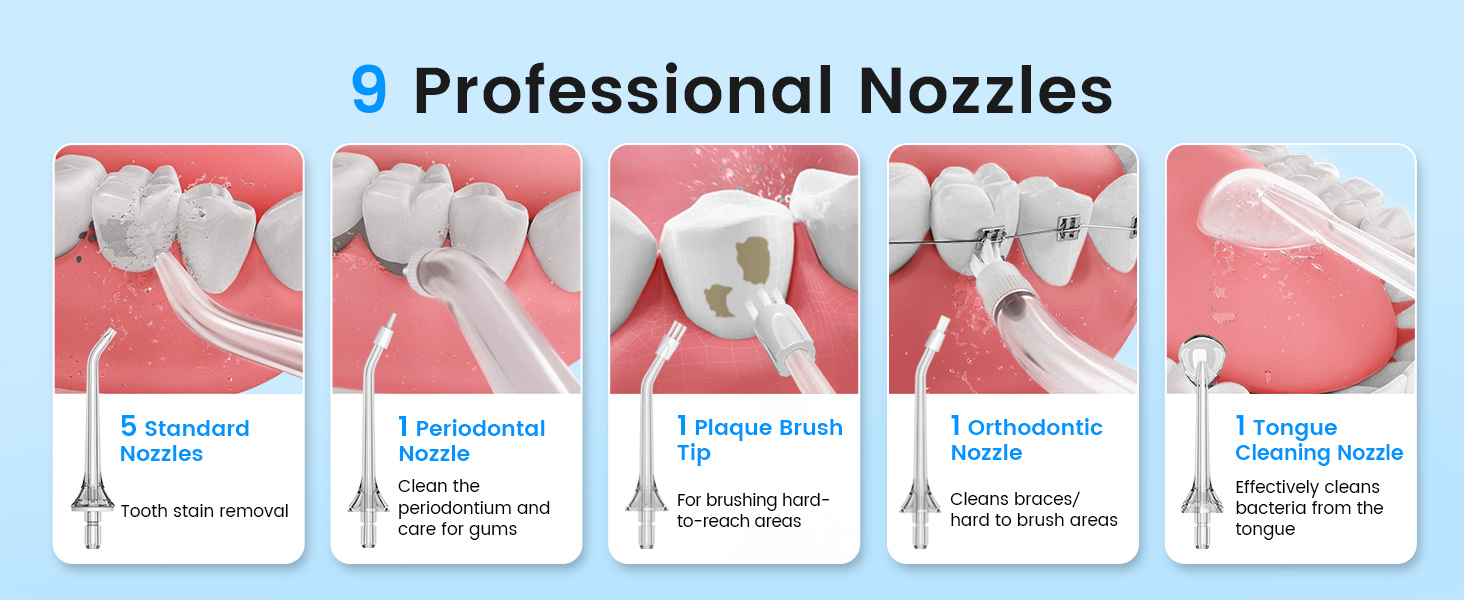
Figure 6.2: Different nozzle types and their applications.
7. Maintenance
Cleaning the Water Tank:
The 300ML water tank is detachable for easy cleaning. Rotate the tank counter-clockwise to remove it from the main unit. Wash the tank with warm, soapy water and rinse thoroughly. Allow it to air dry before reattaching.

Figure 7.1: Detachable water tank for easy cleaning.
Cleaning the Nozzles:
After each use, remove the nozzle by pressing the nozzle release button. Rinse the nozzle under running water. For deeper cleaning, soak nozzles in a solution of 2 parts water to 1 part white vinegar for 5-10 minutes, then rinse thoroughly.
Charging the Battery:
The device features a built-in 1500mAh rechargeable battery. When the battery indicator is low, recharge the device using the provided USB-C cable. A full charge provides approximately 21 days of use based on typical usage.

Figure 7.2: Charging options for the Vimmk Water Flosser.
Waterproof Rating:
The Vimmk Water Flosser has an IPX7 waterproof rating, making it suitable for use in the bath or shower. However, ensure the charging port cover is securely closed when exposed to water.
8. Troubleshooting
| Problem | Possible Cause | Solution |
|---|---|---|
| Device does not turn on. | Battery is low or depleted. | Charge the device for 4-6 hours. |
| Weak water pressure. | Water tank is low or empty; nozzle is clogged. | Refill the water tank; clean the nozzle. |
| Water leakage. | Water tank or nozzle not properly installed. | Ensure the water tank is securely attached and the nozzle clicks into place. Check for cracks or damage. |
| Difficulty removing water tank. | Tank is stiff or wet. | Ensure hands are dry for better grip. Rotate counter-clockwise firmly. If persistent, contact support. |
9. Specifications
- Model Number: Y208
- Water Tank Capacity: 300ML (10 oz)
- Water Pressure: 30-110 psi
- Pulse Rate: 1400-1800 pulses per minute
- Battery: 1500mAh rechargeable (1 A battery included)
- Charging Time: 4-6 hours
- Battery Life: Up to 21 days per charge
- Waterproof Rating: IPX7
- Power Source: Battery Powered
- Wattage: 10 watts
- Package Dimensions: 10.12 x 3.19 x 2.99 inches
- Item Weight: 13.12 ounces
10. Warranty and Support
Every Vimmk product comes with a 30-day return policy and a 1-year warranty for worry-free shopping. For assistance, please contact us:
- Email: sales(at)vimmk.com
- Online Support: Available 24/7
To contact the seller through Amazon:
- Log in to your Amazon account.
- Go to "Your Orders".
- Locate your Order ID for the Vimmk Water Flosser.
- Click "Contact Seller".


