
1. Introduction
The SEQURE TVA3006 is a compact and powerful USB tester designed for real-time monitoring of various electrical parameters of USB-A and Type-C devices. This multifunctional device can detect voltage, current, power, work timekeeping, current direction, capacitance, and quantity of electricity. With its high-precision 4-bit measurement resolution and clear 1.14-inch IPS LCD, it provides accurate and easily readable data for a wide range of applications, from mobile phones and laptops to power banks and other USB-powered equipment.

Figure 1: The SEQURE TVA3006 USB Tester, showcasing its compact design and integrated LCD screen.
2. Product Features
- Multifunctional Detection: Real-time detection of voltage, current, power, work timekeeping, current direction, capacitance, and quantity of electricity.
- High Precision: Features 4-bit measurement resolution for accurate readings with minimal data errors.
- Color LCD Display: Equipped with a 1.14-inch IPS LCD screen for clear and instant display of parameters.
- Dual Interface Support: Integrated USB-A and Type-C interfaces for broad compatibility.
- Data Statistics: Displays maximum, minimum, and average values for voltage, current, and power.
- Adjustable Display Direction: The screen display can be flipped for convenient viewing regardless of insertion orientation.
- Firmware Upgrade Support: Allows for future software enhancements and updates.

Figure 2: Key components and interfaces of the TVA3006 USB Tester.

Figure 3: The adjustable display direction feature, allowing for convenient reading when the tester is inserted in reverse.
3. Setup
Setting up the SEQURE TVA3006 USB Tester is straightforward:
- Identify the appropriate port on your power source (e.g., wall charger, power bank, computer USB port). This can be a USB-A or Type-C port.
- Insert the male end of the TVA3006 tester (USB-A Male or Type-C Male) into the power source's corresponding female port.
- Connect the device you wish to test (e.g., mobile phone, laptop, USB fan) to the female end of the TVA3006 tester (USB-A Female or Type-C Female).
- Once connected, the tester's LCD screen will automatically power on and begin displaying real-time measurement data.
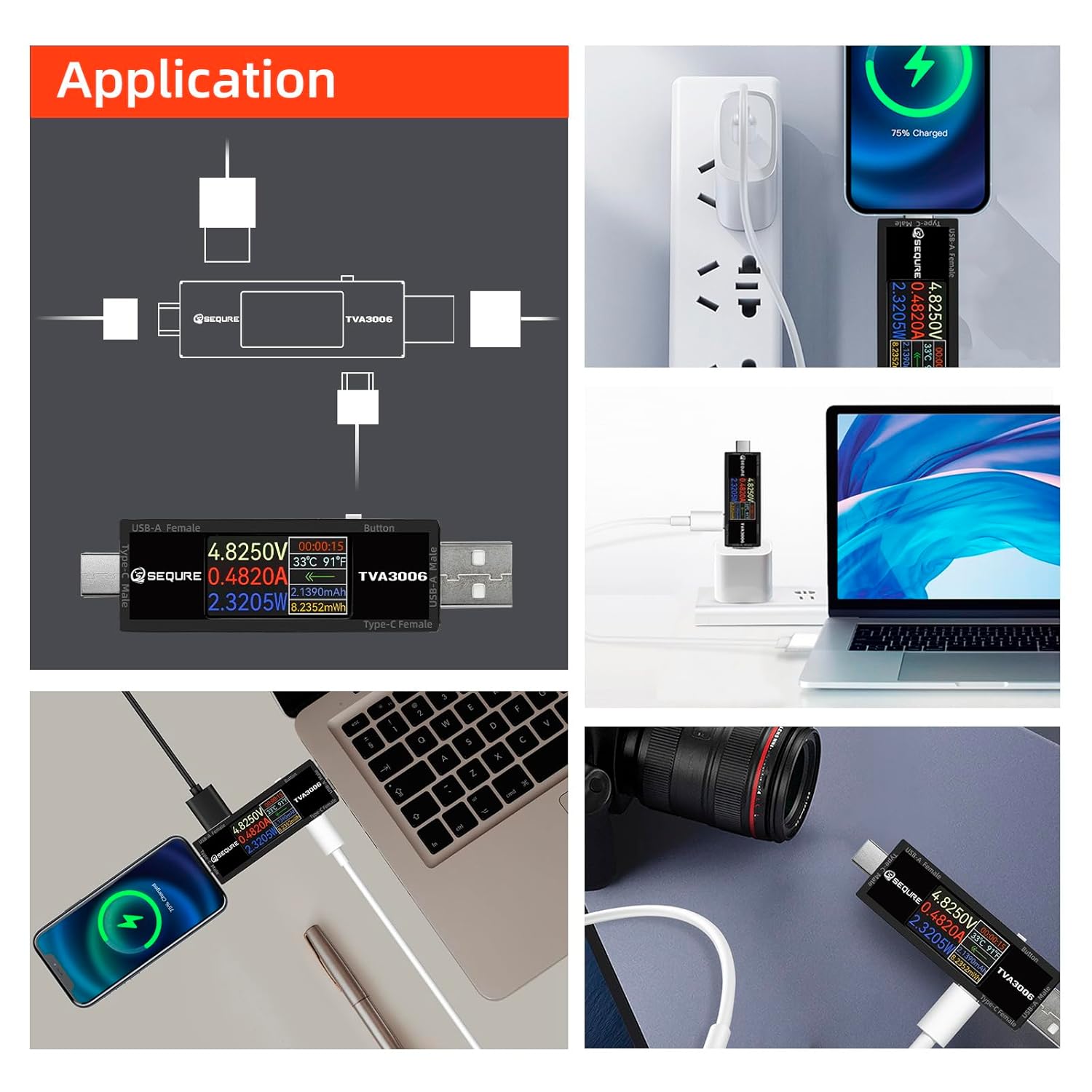
Figure 4: Examples of how to connect and use the TVA3006 in different application scenarios.
4. Operating Instructions
The TVA3006 features a user-friendly interface and a single button for navigation.
4.1 Main Display Interface
Upon connection, the main interface displays the following real-time parameters:
- Voltage (V): Current voltage reading.
- Current (A): Current amperage reading.
- Power (W): Calculated power consumption.
- Work Timekeeping: Duration of the current measurement session.
- Temperature: Internal temperature of the device.
- Direction of Current: Indication of current flow direction.
- Quantity of Electricity (mAh/mWh): Accumulated charge and energy.
- Capacitance: Measured capacitance.

Figure 5: Main display interface and data statistics interface.
4.2 Data Statistics Interface
The tester automatically records and displays statistical data:
- Real-time Data: Current live readings.
- Maximum Value (Max): Highest recorded voltage, current, and power.
- Average Value (Ave): Average voltage, current, and power over the measurement period.
- Minimum Value (Min): Lowest recorded voltage, current, and power.
4.3 Button Operation
The single button on the side of the tester allows for display control:
- Short Press: Cycles through different display screens (e.g., main interface, data statistics).
- Long Press: Flips the display orientation. This is useful when the tester is inserted in a way that makes the screen difficult to read, allowing you to view data in the forward direction.
4.4 Firmware Upgrade
The TVA3006 supports firmware upgrades to enhance functionality and improve performance. Connect the tester to a computer via its Type-C port and follow the instructions provided by SEQURE for the upgrade process.
![SEQURE USB Tester connected to a laptop via a Type-C cable, with the screen displaying 'UPDATE V15.00 [READY]', indicating firmware upgrade support.](https://m.media-amazon.com/images/S/aplus-media-library-service-media/68511f6e-bebc-4637-99ff-d7c8e1db7505.__CR0,0,970,600_PT0_SX970_V1___.jpg)
Figure 6: The TVA3006 supporting data transmission and firmware upgrades.
4.5 Important Note on PD Measurement
For Power Delivery (PD) measurement, a load connection is required for data to be displayed on the screen. For other protocols, a load connection is not necessary for basic data display.

Figure 7: High precision calibration and note on PD measurement requirements.
5. Maintenance
To ensure the longevity and optimal performance of your SEQURE TVA3006 USB Tester:
- Keep the device dry and away from moisture.
- Clean the screen and body with a soft, dry cloth. Avoid using abrasive cleaners or solvents.
- Store the tester in a cool, dry place when not in use.
- Avoid dropping or subjecting the device to strong impacts.
6. Troubleshooting
- No Display: Ensure the tester is properly connected to a power source and a device. Check if the power source is active.
- Inaccurate Readings: Verify that all connections are secure. Ensure the device being tested is functioning correctly. If testing PD, confirm a load is connected.
- Screen Not Flipping: Ensure you are performing a long press on the button. A short press will cycle through display modes.
7. Specifications

Figure 8: Detailed product parameters for the TVA3006.
| Parameter | Value |
|---|---|
| Model Name | TVA3006 |
| Voltage Range | DC 4.5-30V |
| Current Range | 0-15A (Continuous 6A) |
| Interface Specification | USB-A & Type-C |
| Voltage Measurement Accuracy | ±0.01V |
| Current Measurement Accuracy | ±0.01A |
| Screen Specifications | 1.14" IPS LCD |
| Monitoring Methods | Pass-through |
| Monitoring Content | Voltage, Current, Power, Work Timekeeping, Temperature, Current Direction, Capacitance, Quantity of Electricity |
| Adjustable Display Direction | Support |
| Data Statistics | Support |
| Firmware Upgrade | Support |
| Dimension of Host | 80 x 20 x 14 mm (3.14 x 0.78 x 0.55 inches) |
| Weight of Host | 18g (0.62 ounces) |
8. Warranty and Support
The SEQURE TVA3006 USB Tester comes with a 90-day warranty. If you encounter any issues or are unsatisfied with the product for any reason, please contact SEQURE customer support. We are committed to resolving your concerns within 24 hours.