
Introduction
The NOKLEAD Indoor Thermometer and Hygrometer is designed to monitor temperature and humidity levels in various indoor environments. This compact device provides real-time readings and features a comfort level indicator to help maintain an optimal living climate. It is suitable for use in baby rooms, greenhouses, offices, and other spaces where environmental monitoring is beneficial.
What's in the Box
- 2 x NOKLEAD Thermometer and Humidity Meters
- 2 x CR2032 Button Batteries
- 2 x Double-Sided Stickers
Product Features
- Accurate Measurement: Provides precise temperature and humidity readings.
- Comfort Indicator: Displays a face symbol to indicate dry, comfortable, or wet conditions.
- Compact Design: Small and lightweight for easy placement and portability.
- ℃/℉ Switch: Easily switch between Celsius and Fahrenheit temperature units.
- Multiple Mounting Options: Can be placed on a tabletop or mounted using adhesive.
- Secure Battery Compartment: Features a screw-secured battery cover.
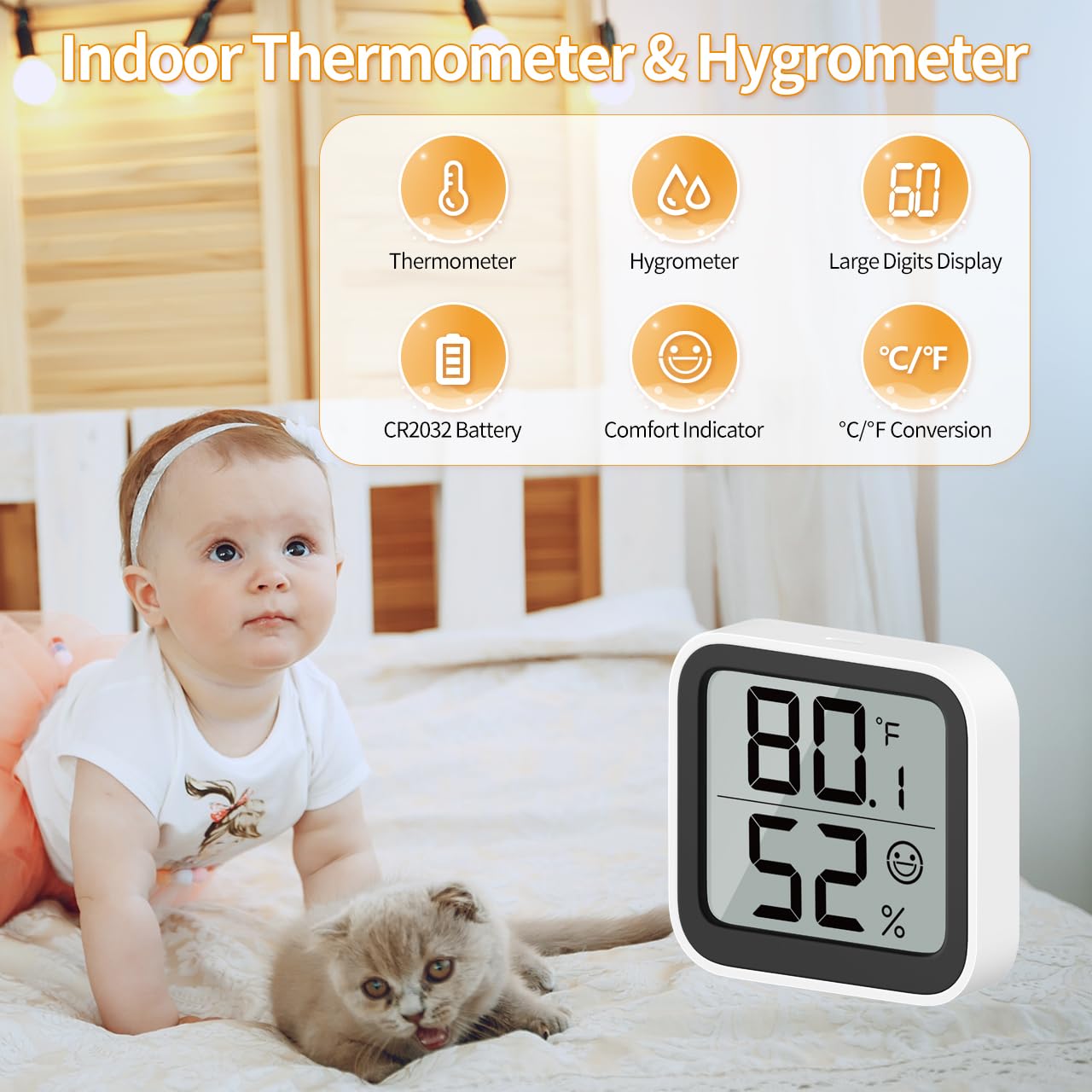
Image 1: Overview of the NOKLEAD Indoor Thermometer and Hygrometer, highlighting its main functions and compact size. The display shows temperature, humidity, and a comfort indicator.
Setup
- Battery Installation:
The device uses one CR2032 button battery. To install or replace the battery:
- Locate the battery compartment on the back of the device.
- Use a small screwdriver to unscrew the safety screw on the battery cover.
- Remove the cover and insert the CR2032 battery with the positive (+) side facing up.
- Replace the battery cover and secure it with the screw.
- Initial Power-On:
Once the battery is installed, the device will automatically power on and begin displaying temperature and humidity readings.

Image 2: Rear view of the device, indicating the battery safety screwgate and the ℃/℉ switch.
Operating Instructions
- Reading the Display:
The large LCD screen displays the current temperature (top number) and humidity (bottom number). Readings are updated approximately every 30 seconds.
- Switching Temperature Units (℃/℉):
On the back of the device, locate the "℃/℉" switch button. Press this button to toggle between Celsius and Fahrenheit temperature displays.
Comfort Level Indicator
The device features a comfort symbol on the display to visually indicate the current environmental conditions. This symbol changes based on both temperature and humidity levels:
- Dry (Sad Face): Humidity below 20% and temperature below 19°C (66.2°F).
- Comfortable (Smiling Face): Humidity between 20% and 60% and temperature between 19°C and 27°C (66.2°F - 80.6°F).
- Wet (Sad Face): Humidity above 60% and temperature above 27°C (80.6°F).
This indicator helps you quickly assess if adjustments to a humidifier or dehumidifier are needed.
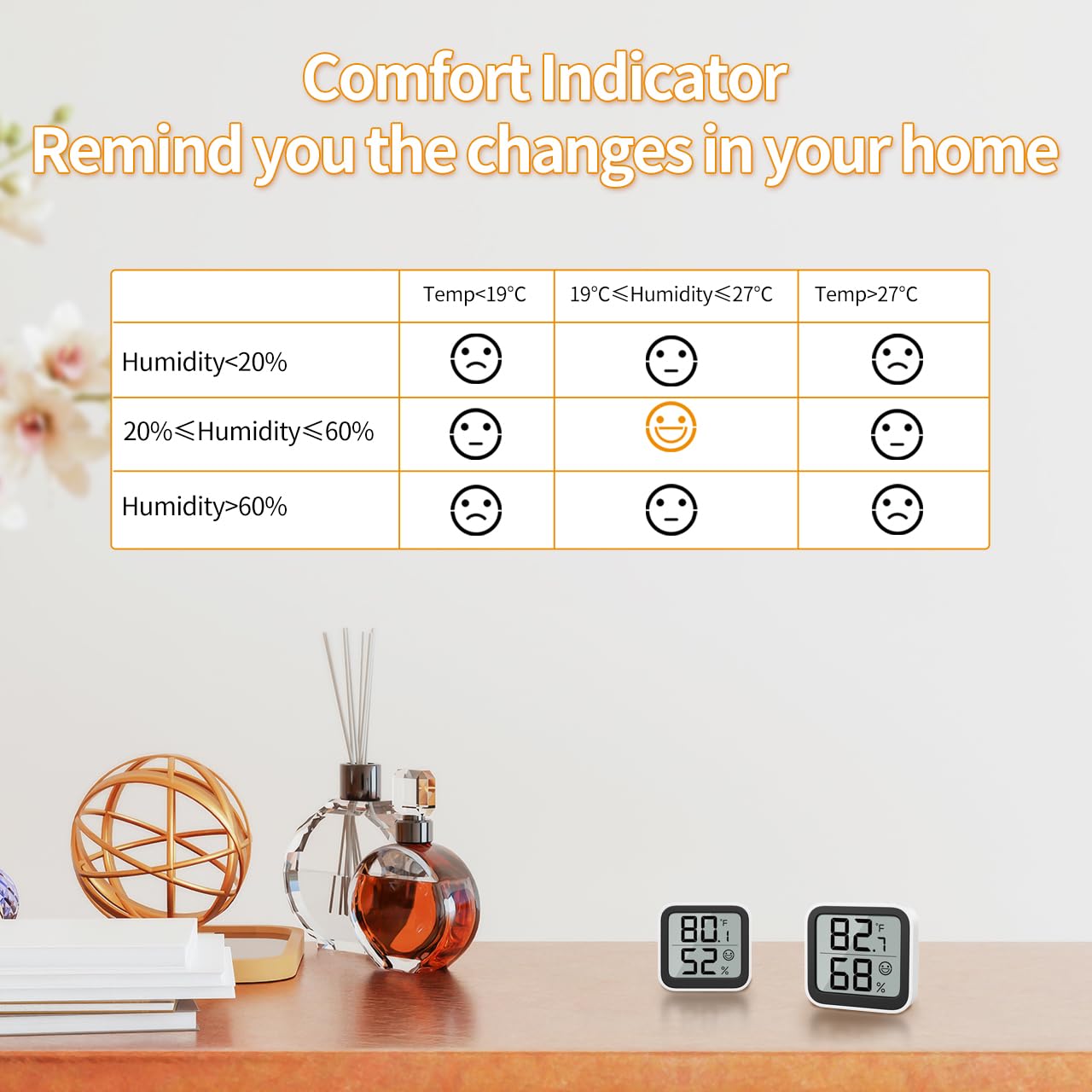
Image 3: Detailed table explaining the comfort indicator symbols based on specific temperature and humidity ranges.
Mounting Options
The NOKLEAD Thermometer and Hygrometer offers versatile placement options:
- Tabletop Placement: The device can stand freely on any flat surface, such as a desk, shelf, or nightstand.
- Adhesive Mounting: Use the provided double-sided stickers to attach the device to a wall or other smooth vertical surface. Ensure the surface is clean and dry before applying the sticker.

Image 4: Examples of mounting options, including adhesive wall mounting and tabletop placement.
Maintenance
- Battery Replacement: Replace the CR2032 battery when the display becomes dim or stops functioning. Follow the battery installation steps in the "Setup" section.
- Cleaning: Wipe the device with a soft, dry cloth. Do not use abrasive cleaners or immerse the device in water.
- Storage: If storing the device for an extended period, remove the battery to prevent leakage.
Troubleshooting
| Problem | Possible Cause | Solution |
|---|---|---|
| No display or dim display | Battery is dead or incorrectly installed. | Replace the CR2032 battery, ensuring correct polarity. |
| Inaccurate readings | Device placed near heat/cold sources or in direct sunlight/drafts. | Relocate the device to a stable environment away from extreme temperature fluctuations. Allow time for readings to stabilize. |
| ℃/℉ switch not working | Button not pressed firmly or device malfunction. | Ensure the button is pressed firmly. If issue persists, contact customer support. |
Specifications

Image 5: Visual representation of the device dimensions and key technical specifications.
| Parameter | Value |
|---|---|
| Model Number | 6223P2 |
| Temperature Measurement Range | -9.9°C to 60°C (14.18°F to 140°F) |
| Temperature Accuracy | ±1.0°C |
| Temperature Resolution | 0.1°C |
| Humidity Measurement Range | 10% RH to 95% RH |
| Humidity Accuracy | ±3-5% RH |
| Humidity Resolution | 1% RH |
| Refresh Rate | 30 seconds |
| Product Dimensions | 46 x 50 x 12 mm |
| Item Weight | 26 g (per unit) |
| Battery Type | CR2032 Button Battery |
| Mounting Type | Tabletop, Surface Mount |
Warranty and Support
For warranty information and customer support, please refer to the documentation provided at the time of purchase or contact your retailer. You may also visit the official NOKLEAD website for further assistance.


