
Amzhero D26
Amzhero Fitness Tracker Band 16MM for D26 User Manual
Soft Silicone Replacement Sport Accessory Strap Wristband
1. Introduction
This user manual provides comprehensive instructions for the Amzhero 16MM Soft Silicone Replacement Sport Accessory Strap Wristband for D26 Fitness Trackers. Please read this manual carefully to ensure proper installation, use, and maintenance of your new wristband.
2. Product Overview
The Amzhero replacement band is designed for the D26 Fitness Tracker, offering a comfortable and durable alternative to your original strap. It is crafted from high-quality, flexible elastomer material, ensuring both comfort and longevity.
- High Quality Material: Made of flexible and durable elastomer material with a surgical-grade stainless steel buckle. Size: 16MM.
- Practical Function: Sweat, rain, splash, and water resistant, suitable for high-intensity workouts and sleep tracking.
- Classic and Simple Design: Conforms to ergonomics for a great wearing experience, transforming your fitness tracker with a classic look.
- Variety of Choices: Available in various colors to personalize your fitness tracker to fit your mood and outfit.

Figure 2.1: Amzhero 16MM Fitness Tracker Band (Blue) designed for D26 Fitness Trackers.

Figure 2.2: Premium Soft Silicone Material features: Adjustable Stainless Steel Metal Buckle, Lightweight & Durable, Soft Comfortable & Skin-Friendly.
3. Setup and Installation
Follow these steps to replace your fitness tracker band:
- Remove Old Band: Locate the quick-release pins or attachment mechanism on your D26 Fitness Tracker. Gently slide the pin to detach the existing band from the tracker module. Repeat for both sides.
- Align New Band: Take one half of the Amzhero replacement band. Identify the correct orientation (usually, one end is for the top of the tracker, the other for the bottom). Align the pin on the new band with the corresponding hole on the tracker module.
- Attach Band: Insert one end of the quick-release pin into the hole on the tracker. While holding that end in place, pull the quick-release lever on the band to retract the pin. Carefully guide the other end of the pin into the second hole on the tracker. Release the lever to secure the pin. Gently tug on the band to ensure it is firmly attached.
- Repeat for Second Half: Follow the same steps to attach the second half of the replacement band to the other side of your D26 Fitness Tracker.
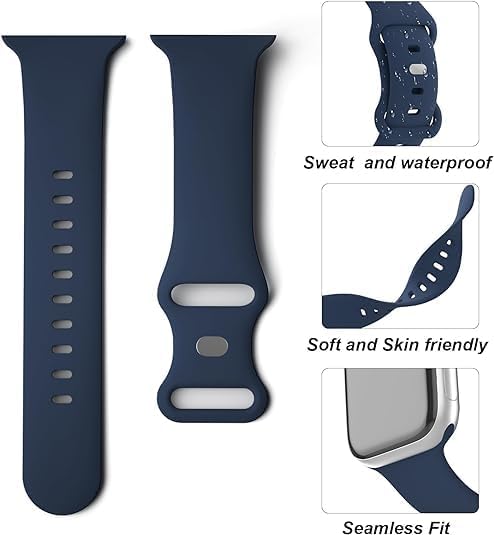
Figure 3.1: Illustration of band attachment points and material properties.
4. Operating and Wearing
Once installed, the Amzhero replacement band is ready for use. Its design ensures comfort and functionality during various activities.
- Wearing: Place the fitness tracker with the new band around your wrist. Adjust the buckle to achieve a comfortable and secure fit. The band should be snug enough to prevent excessive movement but not so tight as to restrict circulation.
- Activity Use: The band's sweat, rain, splash, and water-resistant properties make it ideal for high-intensity workouts, outdoor activities, and daily wear.
- Sleep Tracking: The soft and ergonomic design ensures comfort even during sleep, allowing for accurate sleep tracking by your D26 Fitness Tracker.

Figure 4.1: Proper wearing of the fitness tracker band for comfort and functionality.
5. Maintenance and Care
To ensure the longevity and hygiene of your Amzhero fitness tracker band, follow these maintenance guidelines:
- Cleaning: Regularly clean your band, especially after workouts or exposure to sweat, dirt, or water. Use a soft, damp cloth with mild soap (if necessary) to wipe down the band. Rinse thoroughly with clean water and dry completely before re-wearing.
- Drying: Allow the band to air dry completely. Avoid direct sunlight or high heat, which can damage the silicone material.
- Avoid Harsh Chemicals: Do not use abrasive cleaners, solvents, or harsh chemicals, as these can degrade the silicone and affect its color or texture.
- Storage: When not in use, store the band in a clean, dry place away from extreme temperatures.
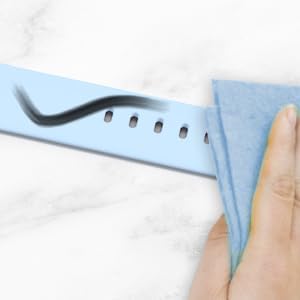
Figure 5.1: Cleaning the silicone band for dirt resistance.

Figure 5.2: The flexible and durable nature of the silicone material.
6. Troubleshooting
If you encounter any issues with your Amzhero replacement band, consider the following common solutions:
| Problem | Possible Cause | Solution |
|---|---|---|
| Band feels uncomfortable or causes irritation. | Too tight, not cleaned regularly, or individual skin sensitivity. | Adjust the tightness. Clean the band and your wrist regularly. If irritation persists, discontinue use and consult a dermatologist. |
| Band detaches from tracker easily. | Improper installation, quick-release pin not fully engaged. | Re-install the band carefully, ensuring the quick-release pin clicks securely into place. Gently tug to confirm attachment. |
| Band appears discolored or damaged. | Exposure to harsh chemicals, prolonged direct sunlight, or excessive wear and tear. | Follow maintenance guidelines. If damage is significant, consider replacing the band. |
7. Specifications
| Feature | Detail |
|---|---|
| Product Name | Fitness Tracker band 16MM for D26 |
| Material | Flexible and durable elastomer (silicone) |
| Buckle Material | Surgical-grade stainless steel |
| Band Width | 16MM |
| Compatibility | D26 Fitness Tracker |
| Water Resistance | Sweat, rain, splash, water resistant |
| Item Package Dimensions | 7.8 x 2.68 x 0.35 inches |
| Package Weight | 0.02 Kilograms |
| Manufacturer | Amzhero |
8. Warranty and Support
Amzhero is committed to providing high-quality products and excellent customer service. If you have any questions or concerns regarding your Fitness Tracker band, please do not hesitate to contact us.
Our customer service team is dedicated to ensuring you have a happy shopping experience and will assist you with any product-related inquiries.
For support, please refer to the contact information provided with your purchase or visit the official Amzhero store on Amazon: Amzhero Store
Related documentsD26

Ask a question about this manual
Ask about setup, troubleshooting, compatibility, parts, safety, or missing instructions. Manuals+ will review the question and use this page’s manual context to help answer it.