
Introduction
Thank you for choosing the Haier 205 L Direct Cool Single Door Refrigerator. This manual provides essential information for the safe and efficient operation, maintenance, and troubleshooting of your appliance. Please read it thoroughly before use and keep it for future reference.
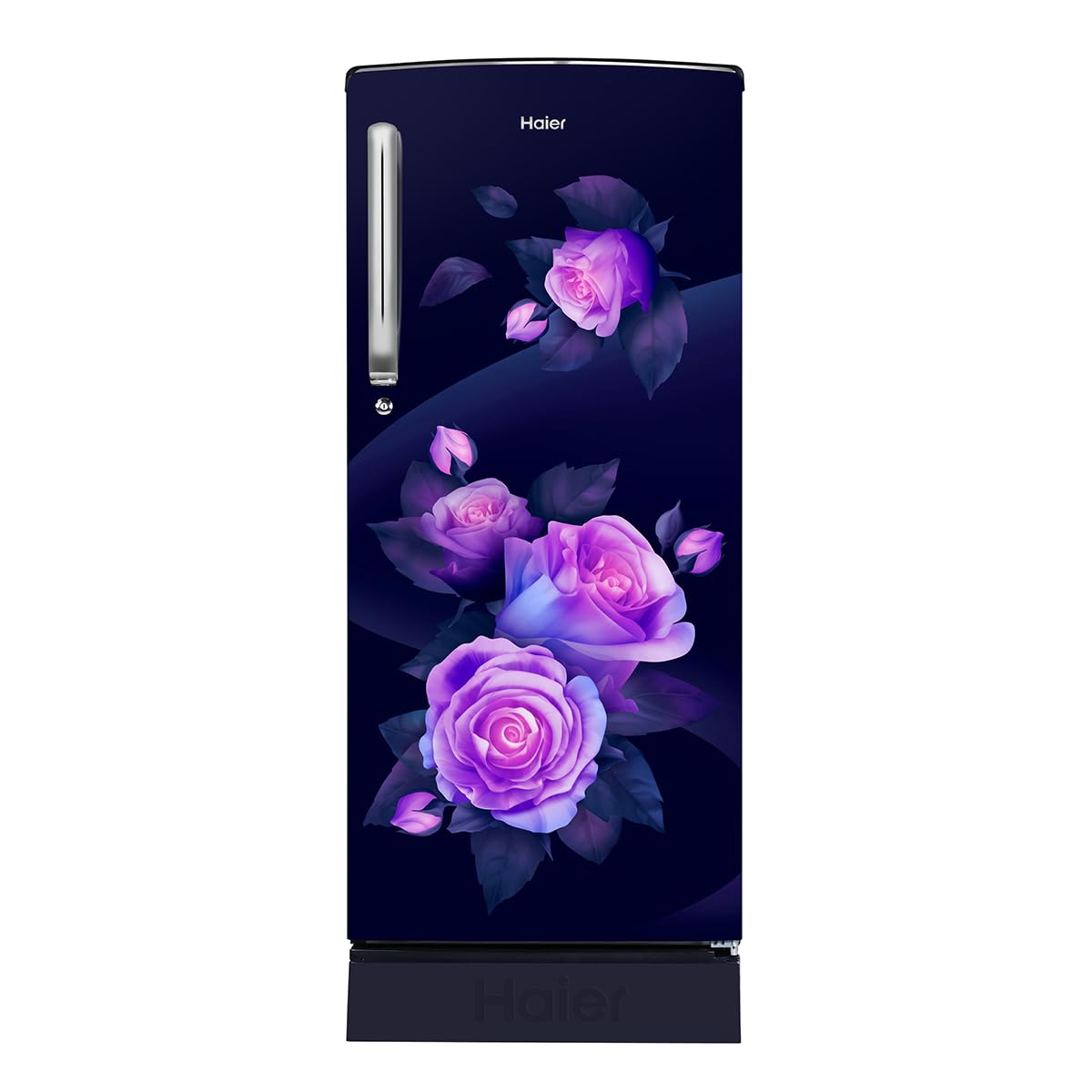
Image: Front view of the Haier 205 L Direct Cool Single Door Refrigerator, featuring a marine rose finish with floral design.
Setup Instructions
1. Unpacking
- Carefully remove all packaging materials, including foam and adhesive tape.
- Inspect the refrigerator for any damage during transit. Report any damage to your dealer immediately.
- Remove any internal accessories and clean them before first use.
2. Placement
- Place the refrigerator on a firm, level surface to ensure stability and prevent vibrations.
- Ensure adequate ventilation. Maintain a minimum clearance of 10 cm (4 inches) from the back and sides of the refrigerator to allow for proper air circulation.
- Avoid placing the refrigerator in direct sunlight or near heat sources such as stoves, heaters, or radiators, as this can increase energy consumption.
- The appliance is designed for indoor use only.
3. Power Connection
- Ensure the power supply voltage matches the rating indicated on the refrigerator's nameplate (230 Volts).
- Plug the refrigerator into an independent, grounded electrical outlet. Do not use extension cords or multiple socket adapters.
- Allow the refrigerator to stand upright for at least 2-4 hours before plugging it in. This allows the refrigerant to settle.
4. Initial Operation
- After plugging in, allow the refrigerator to operate for 2-3 hours empty to reach its stable operating temperature before loading food.
Operating Instructions
1. Temperature Control
- The refrigerator is equipped with a temperature control dial, usually located inside the fresh food compartment.
- Adjust the dial to your desired cooling level. A higher number typically indicates colder temperatures.
- For optimal food preservation, a medium setting is generally recommended. Adjust as needed based on ambient temperature and food load.
2. Food Storage Guidelines
- Fresh Food Compartment: Store fruits, vegetables, dairy products, and cooked foods. Utilize the large vegetable box for fresh produce.
- Freezer Compartment (14 Ltr): Use for freezing fresh food and long-term storage of frozen items.
- Toughened Glass Shelves: These shelves can bear heavy loads up to 120 kg, allowing convenient storage of large curry pots and heavy vessels.
- Ensure food items are properly covered or sealed to prevent odor transfer and maintain freshness.
- Avoid placing hot food directly into the refrigerator; allow it to cool down first.
3. Diamond Edge Freezing Technology (DEFT)
Your refrigerator features Diamond Edge Freezing Technology, which helps ensure firm ice formation and provides better cooling retention within the freezer compartment. This technology contributes to efficient cooling performance.
4. Stabilizer Free Operation
The heavy-duty compressor in this refrigerator is designed for stabilizer-free operation within a voltage range of 135-290 volts, protecting the appliance from voltage fluctuations.
Maintenance
1. Cleaning the Interior
- Always unplug the refrigerator before cleaning.
- Clean the interior regularly with a soft cloth dampened with a solution of mild detergent and warm water.
- Wipe dry thoroughly with a clean, soft cloth.
- The anti-bacterial gasket should also be cleaned regularly to prevent mold and mildew growth.
- Do not use abrasive cleaners, harsh chemicals, or sharp objects, as they can damage surfaces.
2. Cleaning the Exterior
- Wipe the exterior surfaces with a soft, damp cloth. For stubborn stains, use a mild detergent.
- Ensure the rear condenser coils are free of dust and debris for efficient operation. Use a soft brush or vacuum cleaner to gently clean them.
3. Defrosting
While the refrigerator features an automatic defrost system type, regular cleaning and maintenance, including occasional removal of ice buildup if observed, will ensure optimal performance. For detailed defrosting instructions, refer to the comprehensive manual or contact customer support.
Troubleshooting
Before contacting service, please check the following common issues and solutions:
| Problem | Possible Cause | Solution |
|---|---|---|
| Refrigerator does not operate | No power supply; Plug not inserted properly; Fuse blown or circuit breaker tripped. | Check power connection; Ensure plug is firmly inserted; Check household fuse/circuit breaker. |
| Insufficient cooling | Temperature setting too high; Door not closed properly; Excessive food load; Poor ventilation. | Adjust temperature control to a colder setting; Ensure door is fully closed; Reduce food load; Check for adequate clearance around the unit. |
| Unusual noises | Refrigerator not level; Objects touching the back or sides; Compressor noise (normal). | Adjust leveling feet; Move objects away from the unit; Compressor noise is normal during operation. |
| Water on floor/inside | Drain hole blocked; Door left open. | Clear the drain hole; Ensure door is closed properly. |
Specifications
| Feature | Detail |
|---|---|
| Model Number | HRD-2263PMR-N |
| Capacity | 205 Liters |
| Freezer Capacity | 14 Liters |
| Fresh Food Capacity | 171 Liters |
| Product Dimensions (D x W x H) | 61D x 68W x 175H Centimeters |
| Item Weight | 39 Kilograms |
| Voltage | 230 Volts |
| Annual Energy Consumption | 1650 Watts |
| BEE Star Rating | 3 Star |
| Defrost System Type | Automatic |
| Shelf Type | Toughened Glass (up to 120 kg capacity) |
| Special Features | Stabilizer Free Operation, Large Vegetable Box, Energy Efficient, More Chiller Space, Anti-bacterial Gasket, External Handle, Connect Home Inverter, Clean Back, Door Lock |
| Included Components | Pocket Clips |
Warranty Information
This Haier refrigerator comes with a 10-year warranty. Please retain your purchase receipt as proof of purchase for warranty claims. The warranty covers manufacturing defects and specific components as per Haier's warranty policy. For detailed terms and conditions, please refer to the warranty card provided with your appliance or visit the official Haier website.
Customer Support
If you encounter any issues that cannot be resolved using the troubleshooting guide, or if you require technical assistance, please contact Haier customer service.
- Manufacturer: Haier
- Manufacturer Contact Information: Refer to your product documentation or the official Haier website for the most current contact details.
- Online Support: Visit the official Haier website for FAQs, service requests, and additional resources.


