
Welcome
Thank you for choosing the Move2Play Karaoke Machine. This manual provides essential information for setting up, operating, and maintaining your new device. Please read these instructions carefully before use to ensure optimal performance and enjoyment.
Package Contents
Verify that all items listed below are included in your package:
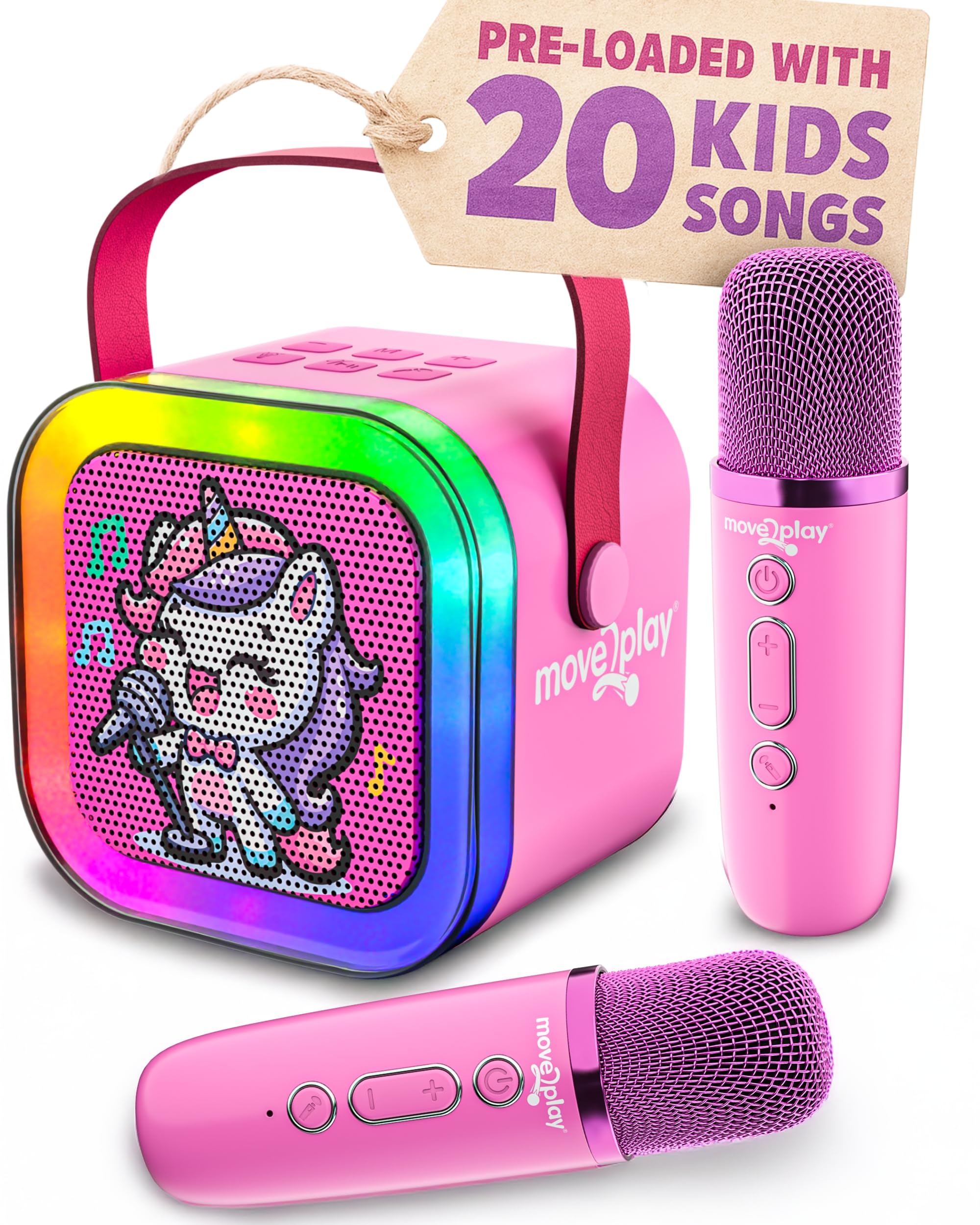
- 1 x Move2Play Karaoke Speaker (Unicorn design)
- 2 x Wireless Microphones
- 1 x USB-C Charging Cable
- 1 x User Manual

Product Features
- 20+ Pre-loaded Kid Songs: Enjoy a selection of popular children's songs directly from the speaker.
- Bluetooth Connectivity: Easily connect to your smartphone or tablet to play any song.
- Dual Wireless Microphones: Two microphones allow for duets and interactive play.
- 4 Voice Effects & Echo Mode: Enhance vocal performances with various fun voice effects and an echo feature.
- Multi-color LED Lights: Dynamic LED lights create an engaging karaoke atmosphere.
- Portable Design: Lightweight and durable for easy transport and use anywhere.
- Rechargeable Battery: Provides up to 6 hours of continuous playtime on a full charge.
Setup Guide
1. Charging the Device
Before first use, fully charge the karaoke speaker and both microphones. Use the provided USB-C charging cable. The indicator light on the microphones will show charging status.

2. Power On/Off
- Speaker: Press and hold the power button on the speaker until the LED lights illuminate.
- Microphones: Press and hold the power button on each microphone until the indicator light blinks.
- To power off, repeat the process by pressing and holding the respective power buttons.
3. Bluetooth Pairing
To connect your karaoke machine to a Bluetooth-enabled device (e.g., smartphone, tablet):
- Ensure the karaoke speaker is powered on and in Bluetooth mode (indicated by a blinking blue light).
- On your device, go to Bluetooth settings and select 'Move2Play Karaoke' from the list of available devices.
- Once connected, the speaker will emit a confirmation tone, and the blue light will become solid.

Operating Your Karaoke Machine
1. Playing Pre-loaded Songs
The speaker comes with over 20 pre-loaded children's songs. To play them, ensure the speaker is not connected via Bluetooth. Use the 'M' button on the speaker to cycle through modes until you hear the pre-loaded songs. Use the '+' and '-' buttons to navigate between songs.

2. Using Voice Effects and Echo Mode
Each microphone features buttons to activate and cycle through 4 different voice effects and an echo mode. Experiment with these to add fun variations to your singing.

3. Volume Control
Adjust the volume of the music and microphone output using the '+' and '-' buttons on both the speaker and the microphones. This allows for independent control of music and vocal levels.
4. LED Lights
The speaker features dynamic multi-color LED lights. Use the light bulb button on the speaker to cycle through different light modes or turn them off.
5. Product Demo Video
Care and Maintenance
- Cleaning: Wipe the device with a soft, dry cloth. Do not use abrasive cleaners or immerse in water.
- Storage: Store the karaoke machine and microphones in a cool, dry place away from direct sunlight when not in use.
- Battery Care: To prolong battery life, avoid fully discharging the device frequently. Charge regularly, even if not in constant use.
Troubleshooting Guide
| Issue | Solution |
|---|---|
| No sound from speaker/microphones | Ensure both the speaker and microphones are powered on and charged. Check volume levels on both devices. Re-pair Bluetooth if necessary. |
| Cannot connect via Bluetooth | Ensure the speaker is in Bluetooth pairing mode. Turn off and on your device's Bluetooth. Move closer to the speaker. |
| LED lights not working | Press the light bulb button on the speaker to cycle through light modes or turn them on. Ensure the speaker is powered on. |
| Microphone voice effects not changing | Press the voice effect button on the microphone to cycle through available effects. |
Product Specifications
- Model Number: K.MACH.104
- Item Weight: 1.32 pounds
- Product Dimensions: 2.2 x 3.93 x 5.6 inches
- Batteries: 1 Lithium Ion battery required (included)
- Connector Type: Bluetooth
- Speaker Count: 1
- Power Source: Battery Powered
- Voltage: 3.7 Volts (DC)
- Special Feature: Karaoke
Warranty and Customer Support
The Move2Play Karaoke Machine comes with a standard manufacturer's warranty. For specific warranty details, product support, or any inquiries not covered in this manual, please refer to the warranty card included in your package or visit the official Move2Play website. You may also contact Move2Play customer service directly for assistance.